1. Introduction
This manual provides comprehensive instructions for the EZVIZ C90 Dual Outdoor Surveillance Camera. It covers installation, operation, advanced features, maintenance, and troubleshooting. Please read this manual thoroughly before using the product to ensure correct operation and to prevent damage.
The EZVIZ C90 Dual is an outdoor PTZ security camera featuring dual lenses for enhanced surveillance. It offers 4MP resolution, color night vision up to 40 meters, AI-powered person/vehicle detection, auto-zoom tracking, and active defense capabilities.

Figure 1.1: EZVIZ C90 Dual Outdoor Surveillance Camera with smartphone app view.
2. Safety Information
- Ensure the power supply voltage is within the specified range (12 Volts).
- Do not expose the camera to extreme temperatures or humidity.
- Install the camera securely to prevent it from falling.
- Keep the camera away from strong electromagnetic interference.
- Only use accessories specified by the manufacturer.
- Refer all servicing to qualified service personnel.
3. Package Contents
Verify that all items are present and in good condition upon opening the package.
- EZVIZ C90 Dual 2K+ Camera
- Power Adapter
- Drilling Template
- Waterproof Kit
- Screw Kit
- Quick Start Guide
- Regulatory Information (2x)
4. Product Overview
The EZVIZ C90 Dual camera features a unique dual-lens design for comprehensive surveillance.
- Dual Lenses: Combines a wide-angle lens (top) with a pan-and-tilt telephoto lens (bottom) for flexible monitoring.
- PTZ Functionality: The bottom lens offers pan and tilt movement for dynamic coverage.
- AI Detection: Intelligent detection of persons and vehicles to reduce false alarms.
- Color Night Vision: Provides clear, full-color video even in low-light conditions up to 40 meters.
- Two-Way Talk: Allows for real-time communication through the camera.
- Active Defense: Features a siren and spotlights to deter intruders.

Figure 4.1: The C90 Dual camera's flexible pan and tilt capabilities for its dual lenses. The top lens offers 10° tilt and 220° pan, while the bottom lens provides 90° tilt and 324° pan.
5. Setup
5.1 Physical Installation
- Choose a Location: Select an outdoor location with a clear view of the area you wish to monitor. Ensure the camera is within Wi-Fi range and has access to a power outlet. The camera is designed for wall-mounted installation.
- Mounting:
- Use the drilling template to mark the screw holes on the wall.
- Drill holes and insert wall anchors if necessary.
- Secure the camera bracket to the wall using the provided screw kit.
- Attach the camera to the bracket.
- Power Connection: Connect the power adapter to the camera and plug it into a power outlet.
- Waterproofing: Use the waterproof kit for all cable connections to protect them from weather elements.
5.2 App Installation & Configuration
- Download the EZVIZ App: Download and install the EZVIZ app from your smartphone's app store (iOS or Android).
- Create an Account: Open the app and register for an EZVIZ account if you don't already have one.
- Add Device:
- Tap the "+" icon in the app to add a new device.
- Scan the QR code located on the camera or its packaging.
- Follow the on-screen prompts to connect the camera to your Wi-Fi network. Ensure your phone is connected to a 2.4GHz Wi-Fi network during setup.
- Initial Setup: Configure basic settings such as device name, time zone, and storage preferences (microSD card or cloud storage).
6. Operating the Camera
6.1 Basic Functions
- Live View: Access real-time video streams from both lenses through the EZVIZ app.
- Recording: Manually record video or configure scheduled recordings and motion-triggered recordings.
- Playback: Review recorded footage stored on the microSD card or cloud service.
6.2 Advanced Features
6.2.1 Dual-Lens Co-Action for Smart Tracking
The C90 Dual camera utilizes both lenses for intelligent tracking. When the wide-angle top lens detects a moving person, the pan-and-tilt bottom lens automatically rotates to track the person and record their activities.

Figure 6.1: Illustration of the dual-lens co-action tracking. The top lens detects movement, and the bottom lens tracks the subject.
6.2.2 AI-Powered Person/Vehicle Detection
Both lenses can differentiate between people and vehicles, reducing false alarms from environmental factors like falling leaves. The PT lens can automatically track detected movement.

Figure 6.2: The camera's AI detection highlighting a person and a vehicle within its surveillance area.
6.2.3 F/6mm Digital Zoom & Two-Way Conversation
- Digital Zoom: Use the EZVIZ app to digitally zoom into specific areas of the wide-angle view for a closer look.
- Two-Way Talk: Engage in real-time conversations with visitors or deter intruders using the built-in microphone and speaker.
- Customizable Voice Alerts: Configure the camera to automatically play a recorded voice message upon motion detection.
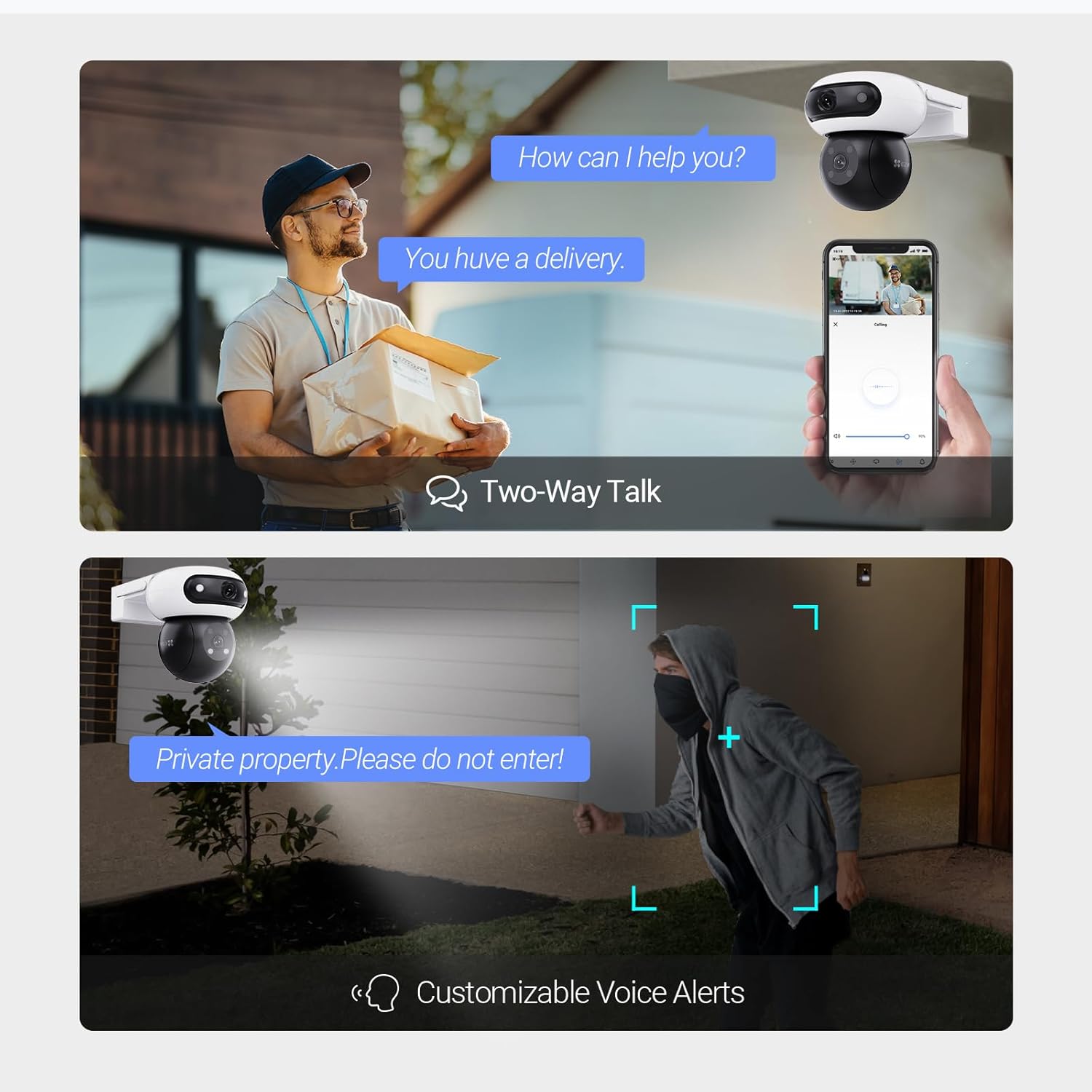
Figure 6.3: Demonstrates the two-way talk feature with a person at the door and the customizable voice alerts deterring an intruder.
6.2.4 Color Night Vision & Active Defense
The camera provides clear color night vision up to 40 meters, supported by four built-in headlights and a large F1.0 aperture. It offers three night vision modes for optimal clarity. Upon detecting intruders, the active defense system activates a siren and dazzling spotlights.

Figure 6.4: The camera illuminating an outdoor area with its color night vision capabilities, showing a range of up to 40 meters.

Figure 6.5: The camera's active defense system activating a siren and flashing lights to deter an approaching person.
6.2.5 Patrol Modes & Preset Points
Configure the camera to automatically patrol predefined viewpoints. You can set up to four preset points for the camera to cycle through, ensuring comprehensive coverage of your property. The camera can also return to a preset location with a single tap in the EZVIZ app.

Figure 6.6: Demonstrates the camera's patrol mode and the ability to follow four pre-set points for automated surveillance.
7. Maintenance
- Cleaning: Regularly clean the camera lenses with a soft, dry cloth to ensure clear image quality. Do not use harsh chemicals.
- Firmware Updates: Check the EZVIZ app periodically for firmware updates to ensure optimal performance and security.
- Cable Inspection: Periodically inspect power and network cables for any signs of wear or damage.
- Storage Management: If using a microSD card, regularly back up important footage and consider formatting the card periodically to maintain performance.
8. Troubleshooting
| Problem | Possible Cause | Solution |
|---|---|---|
| Camera offline | No power; Wi-Fi signal lost; Router issue. | Check power connection; Verify Wi-Fi signal strength; Restart router; Reconfigure Wi-Fi in app. |
| Poor image quality | Dirty lens; Insufficient lighting; Network bandwidth. | Clean the lens; Ensure adequate lighting for night vision; Check network speed. |
| Motion detection not working | Detection sensitivity too low; Detection area not set; Firmware outdated. | Adjust sensitivity in app; Define detection zones; Update camera firmware. |
| Cannot connect to app | Incorrect Wi-Fi password; Camera not in pairing mode; App version outdated. | Double-check Wi-Fi password; Reset camera and re-add; Update EZVIZ app. |
9. Specifications
| Feature | Detail |
|---|---|
| Model Name | C90 Dual |
| Video Capture Resolution | 4MP + 4MP (Dual Lenses) |
| Night Vision Range | Up to 40 meters (Color Night Vision) |
| Viewing Angle | Top Lens: 110 Degrees (Wide-angle); Bottom Lens: PTZ (Pan 324°, Tilt 90°) |
| Wireless Communication | Wi-Fi (2.4GHz), Bluetooth |
| Storage | Supports MicroSD card up to 512 GB |
| Power Source | Wired (12 Volts, 18 Watts) |
| Water Resistance Level | IP65 |
| Dimensions (LxWxH) | 14.5 x 11.6 x 14.2 Centimeters |
| Item Weight | 735 Grams |
| Video Encoding | H.265 |
| Control Method | App (EZVIZ App), Amazon Alexa |
10. Warranty and Support
The EZVIZ C90 Dual camera typically comes with a manufacturer's warranty. Please refer to the warranty card included in your package or visit the official EZVIZ website for detailed warranty terms and conditions.
For technical support, product inquiries, or service requests, please contact EZVIZ customer support through their official website or the EZVIZ app.
- EU Spare Part Availability Duration: 2 Years


