
1. Product Overview
The BIGBIG WON Aether Gamepad is a high-performance controller designed for an enhanced gaming experience across multiple platforms including PC, Nintendo Switch, Android, and iOS. It features an intuitive LCD display for on-the-fly customization, Hall Effect joysticks and triggers for precise control, and versatile connectivity options.

This controller is engineered to deliver overwhelming performance, especially in competitive FPS games, with a high polling rate of up to 1000Hz for instantaneous response in both wired and wireless modes. It incorporates a 12-bit sampling chip for superior accuracy and responsiveness.

2. Setup and Connection
The Aether Gamepad offers three primary connection methods: wired, Bluetooth, and 2.4GHz wireless via a dedicated USB receiver. Choose the method best suited for your gaming environment.
2.1. Wired Connection
Connect the gamepad directly to your PC, Switch, Android, or iOS device using a compatible USB-C cable. This method provides the most stable data transfer and ensures minimal latency.
2.2. 2.4GHz Wireless Connection
- Insert the included 2.4GHz USB receiver into an available USB port on your PC or compatible device.
- Turn on the gamepad. The controller will automatically attempt to connect to the receiver.
- Once connected, the indicator light on the gamepad will stabilize.
2.3. Bluetooth Connection
- Turn on the gamepad.
- Activate Bluetooth pairing mode on the gamepad (refer to the LCD display for specific instructions).
- On your device (PC, Switch, Android, iOS), search for Bluetooth devices and select "BIGBIG WON Aether" from the list.
- Confirm the pairing. The indicator light on the gamepad will stabilize upon successful connection.
The controller is designed with ceramic antennas for enhanced signal strength and connection stability, minimizing delay and supporting smooth gameplay.

3. Operating Instructions
The Aether Gamepad provides extensive customization options through its integrated LCD display and advanced hardware features.
3.1. LCD Display Customization
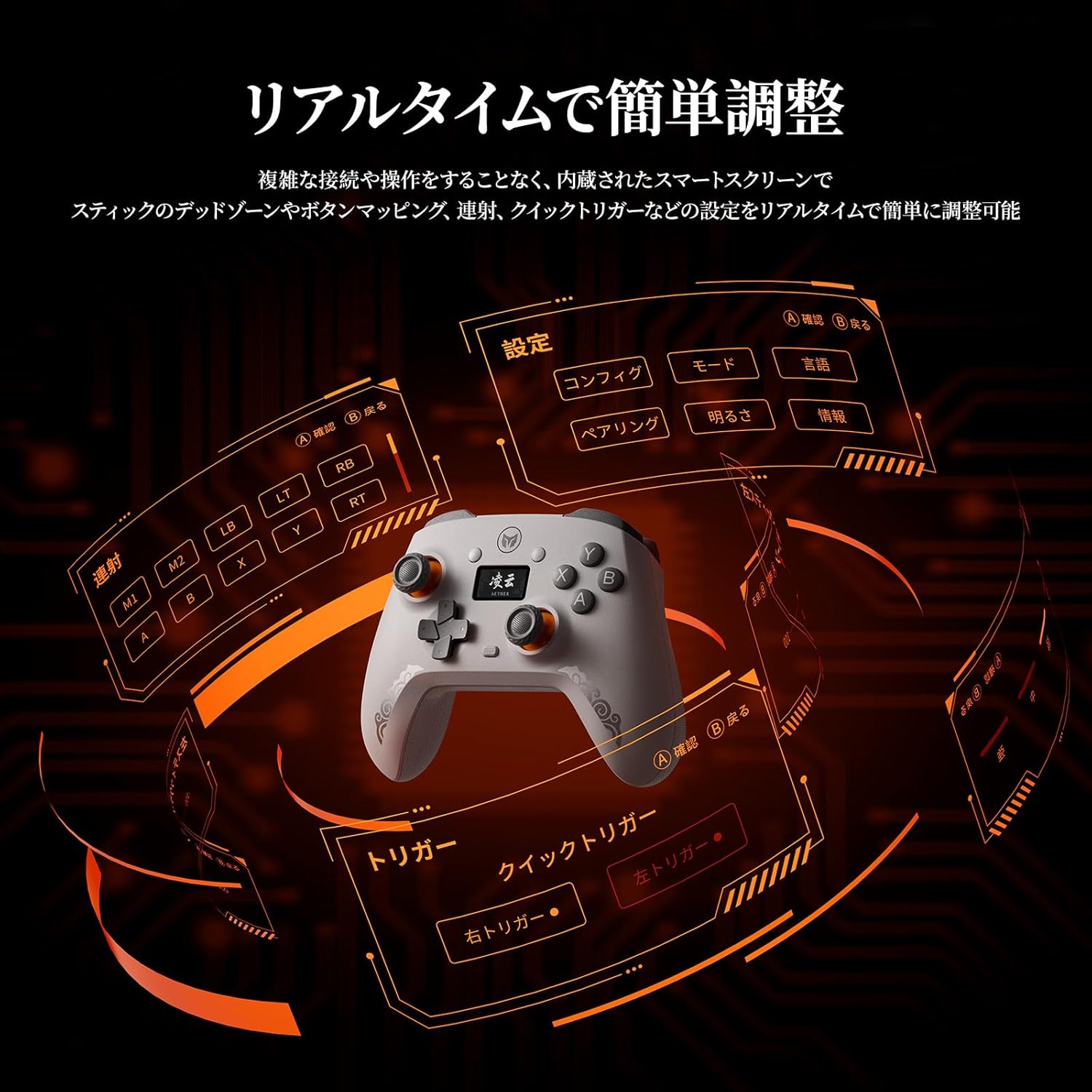
The built-in LCD display allows for real-time adjustments without the need for external software. You can intuitively configure various settings directly on the controller.
- Back Button Assignment: Assign single key inputs to the two large back buttons (M1, M2) on the rear of the controller. These buttons support mapping only, not macro functions.
- Joystick Sensitivity & Dead Zones: Adjust joystick sensitivity curves and dead zones, including 0 dead zone and negative dead zone options, to optimize for your playstyle.
- Vibration Levels: Fine-tune the vibration intensity for a more immersive gaming experience.
- Trigger Mode Switching: Easily switch between Linear Trigger Mode (ideal for racing games) and Quick Trigger Mode (for rapid response in shooting games).
- Turbo Function: Set up continuous firing for specific buttons.

3.2. Hall Effect Joysticks and Triggers
The Aether controller utilizes Hall Effect sensors for its joysticks and triggers, providing superior responsiveness, precision, and durability compared to traditional mechanical sensors. This non-contact technology ensures long-term accuracy and prevents wear.


3.3. Back Buttons and Vibration
The two large back buttons (M1, M2) can be customized for single key inputs, allowing for quick additional actions during gameplay. The controller also features a vibration function with adjustable intensity, providing realistic feedback for an immersive experience.

4. Maintenance
Proper maintenance ensures the longevity and optimal performance of your Aether Gamepad.
4.1. Cleaning
Wipe the controller with a soft, dry cloth. Avoid using abrasive cleaners or solvents that may damage the surface or internal components.
4.2. Battery Information
The Aether Gamepad is equipped with a 600mAh large-capacity battery, providing approximately 16 hours of continuous use on a single full charge. To maximize battery life:
- Charge the controller fully before first use.
- Avoid completely draining the battery frequently.
- Store the controller in a cool, dry place when not in use for extended periods.
5. Troubleshooting
If you encounter issues with your Aether Gamepad, refer to the following common solutions.
5.1. Connection Issues
- Controller not connecting: Ensure the controller is charged. For wireless connections, verify the USB receiver is properly inserted or Bluetooth is enabled and discoverable on your device. Try re-pairing the controller.
- Intermittent connection: Ensure there are no obstructions between the controller and the receiver/device. Reduce interference from other wireless devices.
5.2. Input Issues (e.g., Trigger Malfunctions, Accidental Inputs)
Some users have reported occasional accidental inputs, particularly with triggers, especially in wireless modes or when the language setting is Japanese. If you experience this:
- Switch Language Setting: Navigate to the LCD display settings and change the controller's language to English. This has been reported by some users to mitigate accidental input issues.
- Firmware Update: Check the official BIGBIG WON website for the latest firmware updates. Updating the firmware can resolve known bugs and improve performance.
- Wired Connection: If wireless issues persist, consider using a wired connection, as this has been reported to eliminate accidental inputs for some users.
5.3. Power Issues
- Controller not turning on: Ensure the battery is charged. Connect the controller to a power source using the USB-C cable.
- Power ON/OFF: To power on/off the controller, press and hold the Xbox button (or equivalent central button) for a few seconds.
6. Specifications
| Model Number | AETHER |
| Dimensions | 15.4 x 12.8 x 7.4 cm |
| Weight | 320 g |
| Connectivity | Wired (USB-C), Bluetooth, 2.4GHz Wireless |
| Polling Rate | Up to 1000Hz |
| Battery Capacity | 600mAh |
| Compatibility | PC, Nintendo Switch, Android, iOS |
| Country of Origin | China |
| Release Date | 2025/1/22 |
This product has obtained technical standard compliance certification in Japan.

7. Package Contents
The following items are included in the product package:
- BIGBIG WON Aether Gamepad
- 2.4G Wireless Receiver
- User Manual / After-sales Support Card

8. Warranty and Support
For warranty information and customer support, please refer to the after-sales support card included in your package or visit the official BIGBIG WON website. If you experience issues, providing a video demonstrating the problem can assist the support team in providing a quicker resolution.