
1. Introduction
Thank you for choosing the RALGEND Farmhouse 69" Executive L-Shaped Desk. This manual provides essential information for the safe assembly, operation, maintenance, and troubleshooting of your new desk. Please read these instructions carefully before beginning assembly and retain them for future reference.
This desk is designed to provide a spacious and organized workspace with integrated features for modern office needs.
2. Safety Information
WARNING: This product involves electricity. Please observe the following safety precautions:
- Keep children away from the charging station to prevent accidental touch.
- Keep the charging station and power cords away from water or any liquids.
- Avoid placing the desk or charging station near high-temperature sources.
- Ensure all electrical connections are secure and properly grounded.
- Do not overload the electrical outlets on the charging station.
3. Package Contents
Before assembly, verify that all parts are present and undamaged. The desk is shipped in two separate packages, which may arrive at different times. Refer to the included parts list in your assembly guide to identify each component.

The desk components are shipped in two packages, which might arrive separately.
Typical contents include:
- Desk panels (desktop, side panels, drawer fronts, cabinet doors)
- Hardware kit (screws, dowels, cam locks, drawer slides, handles)
- Power strip with AC outlets and USB ports
- Monitor stand components
- Keyboard tray components
- Assembly instructions manual
4. Assembly Instructions
Assembly of this L-shaped desk requires careful attention to detail. All parts are coded for easy identification. It is highly recommended to have at least two people for handling and setup due to the size and weight of the components.
- Preparation: Clear a large, open area for assembly. Lay out all parts and hardware, matching them against the included parts list.
- Follow the Illustrated Guide: Refer to the detailed, step-by-step illustrated instructions provided in your package. Each step will show which parts and hardware to use.
- Secure Connections: Ensure all screws, cam locks, and dowels are tightened securely but do not overtighten to avoid damaging the wood.
- Drawer and Cabinet Assembly: Pay close attention to the orientation of drawer slides and cabinet hinges for smooth operation.
- Power Strip Installation: Install the power strip into the designated cutout on the desktop. Ensure the power cord is routed safely and not pinched.
- Final Placement: Once assembled, carefully move the desk to its desired location. If placing against a wall, ensure any rear brackets are installed as per the instructions for added stability.
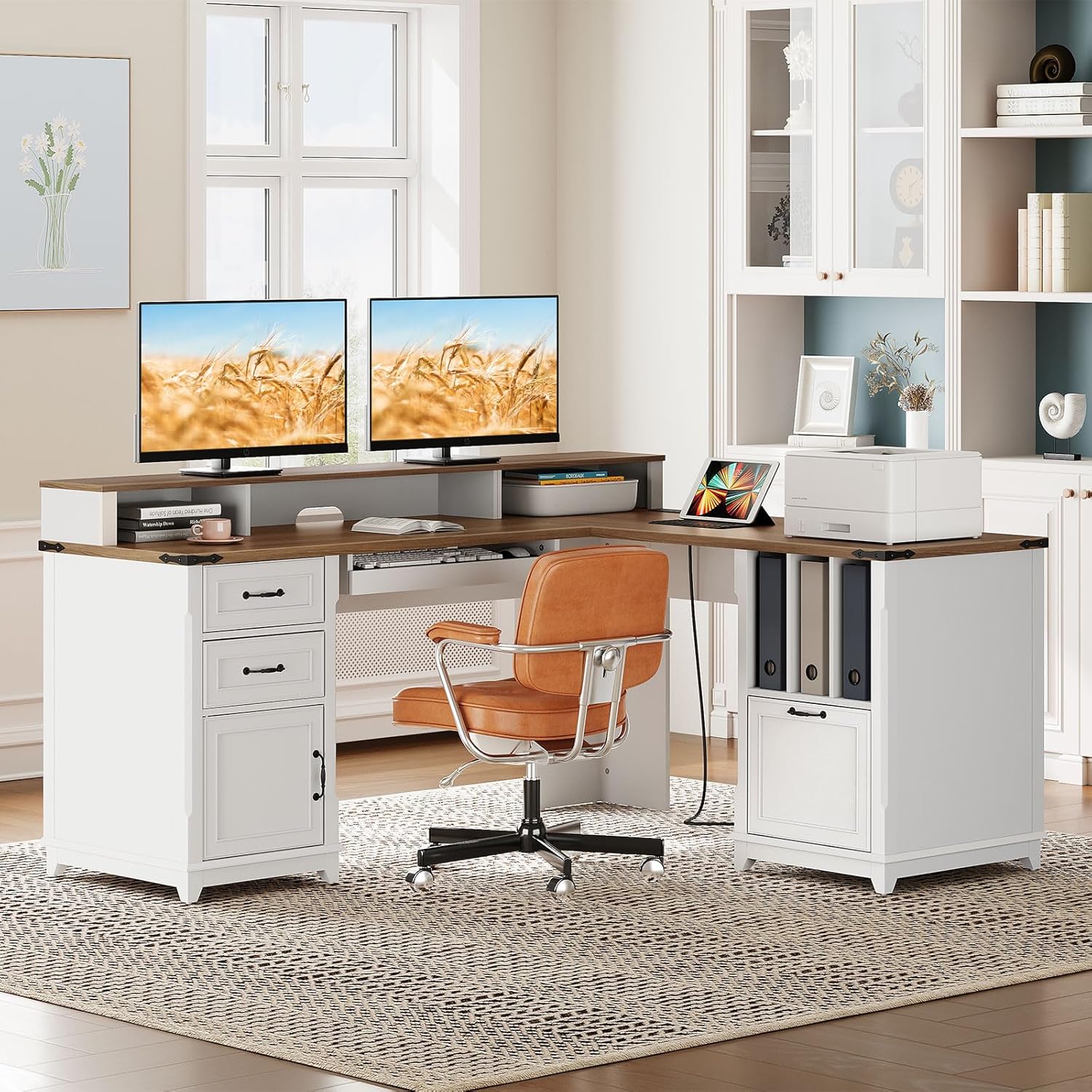
The RALGEND Farmhouse L-Shaped Executive Desk, fully assembled.

Detailed dimensions of the desk and its components for planning your space.

Detail of the desk's sturdy base design.

Detail of the decorative corner accents, enhancing the farmhouse aesthetic.
5. Features and Components
5.1. Ergonomic Design
The desk features a full-sized monitor stand to elevate your screens to an ergonomic height, promoting proper posture and reducing neck strain. A keyboard tray is also included for comfortable typing.
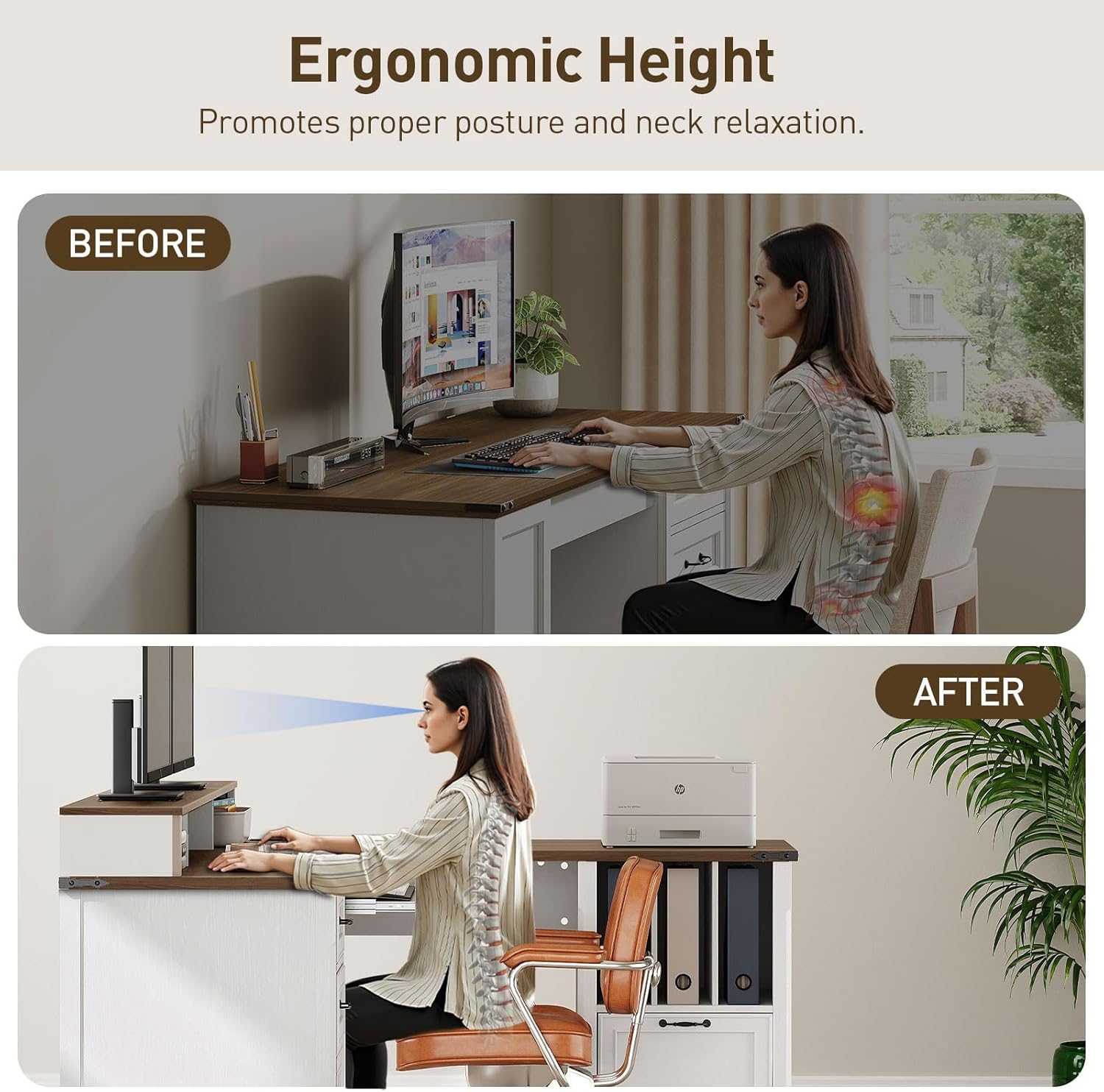
Visual representation of ergonomic benefits provided by the monitor stand.
5.2. Built-in Charging Station
A convenient power strip is integrated into the desktop, offering 3 AC outlets (125V/12A) and 2 USB ports (5V/2A) for charging multiple devices simultaneously.

The integrated charging station provides convenient power access for your devices.
5.3. Ample Storage
The L-shaped desk provides diverse storage options to keep your workspace organized:
- Left Side: Features 3 open cubbies, 2 drawers, and 1 cabinet for various small items and supplies.
- Right Side: Includes a file drawer suitable for letter and A4 files, and an additional file cabinet for folders.

Overview of the various storage compartments available on the desk.

Detail of the drawer slides, designed for smooth operation.
6. Operating Instructions
6.1. Using the Charging Station
Plug the desk's main power cord into a wall outlet. You can then plug up to three AC-powered devices into the 3-prong outlets and up to two USB-powered devices into the USB ports. Ensure devices are compatible with the provided voltage and amperage.
6.2. Keyboard Tray
The keyboard tray slides in and out smoothly for convenient access and storage of your keyboard and mouse. Avoid placing excessive weight or pressure on the tray to prevent damage.
6.3. Drawers and Cabinets
The drawers and cabinets operate on smooth slides and hinges. To open, gently pull the handles. To close, push firmly until fully shut. The file drawer is designed to accommodate standard letter and A4 sized hanging files.
7. Maintenance and Care
- Cleaning: Wipe surfaces with a soft, damp cloth. Avoid harsh chemicals or abrasive cleaners that may damage the finish.
- Spills: Immediately wipe up any spills to prevent water damage or staining.
- Weight Capacity: The desktop can hold up to 220 lbs (approximately 100 kg). Do not exceed this weight limit.
- Environmental Conditions: Avoid exposing the desk to extreme temperatures or humidity, which can cause warping or cracking.
- Hardware Check: Periodically check and tighten all screws and fasteners to ensure the desk remains stable.
8. Troubleshooting
8.1. Desk is Wobbly
- Ensure all assembly hardware is securely tightened.
- Verify the desk is on a level surface. Adjust if necessary.
8.2. Drawers Do Not Slide Smoothly
- Check that the drawer slides are correctly installed and aligned.
- Ensure no obstructions are blocking the drawer path.
- Lightly lubricate the drawer slides with a silicone-based lubricant if needed.
8.3. Charging Station Not Working
- Verify the desk's main power cord is securely plugged into a functional wall outlet.
- Check if the wall outlet itself is receiving power (test with another device).
- Ensure devices plugged into the charging station are properly connected and functional.
9. Specifications
| Feature | Detail |
|---|---|
| Product Dimensions | 59 x 69 x 35.2 inches (L x W x H) |
| Item Weight | 169.7 pounds |
| Model Number | 1701DNUWH |
| Material | Engineered Wood |
| Desktop Weight Capacity | Up to 220 lbs |
| Charging Station | 3 AC Outlets (125V/12A), 2 USB Ports (5V/2A) |
| Power Cord Length | 4.9 feet |
10. Product Overview Video
Watch this video for a visual overview of the RALGEND Farmhouse 69" Executive L-Shaped Desk's features and design.
This video provides a comprehensive look at the RALGEND Farmhouse 69" Executive L-Shaped Desk, highlighting its key features and functionality.
11. Warranty and Support
RALGEND stands behind the quality of its products. For warranty information, missing parts, or technical support, please contact the seller or manufacturer directly through your purchase platform. Please have your model number (1701DNUWH) and purchase date available when contacting support.