
1. Introduction
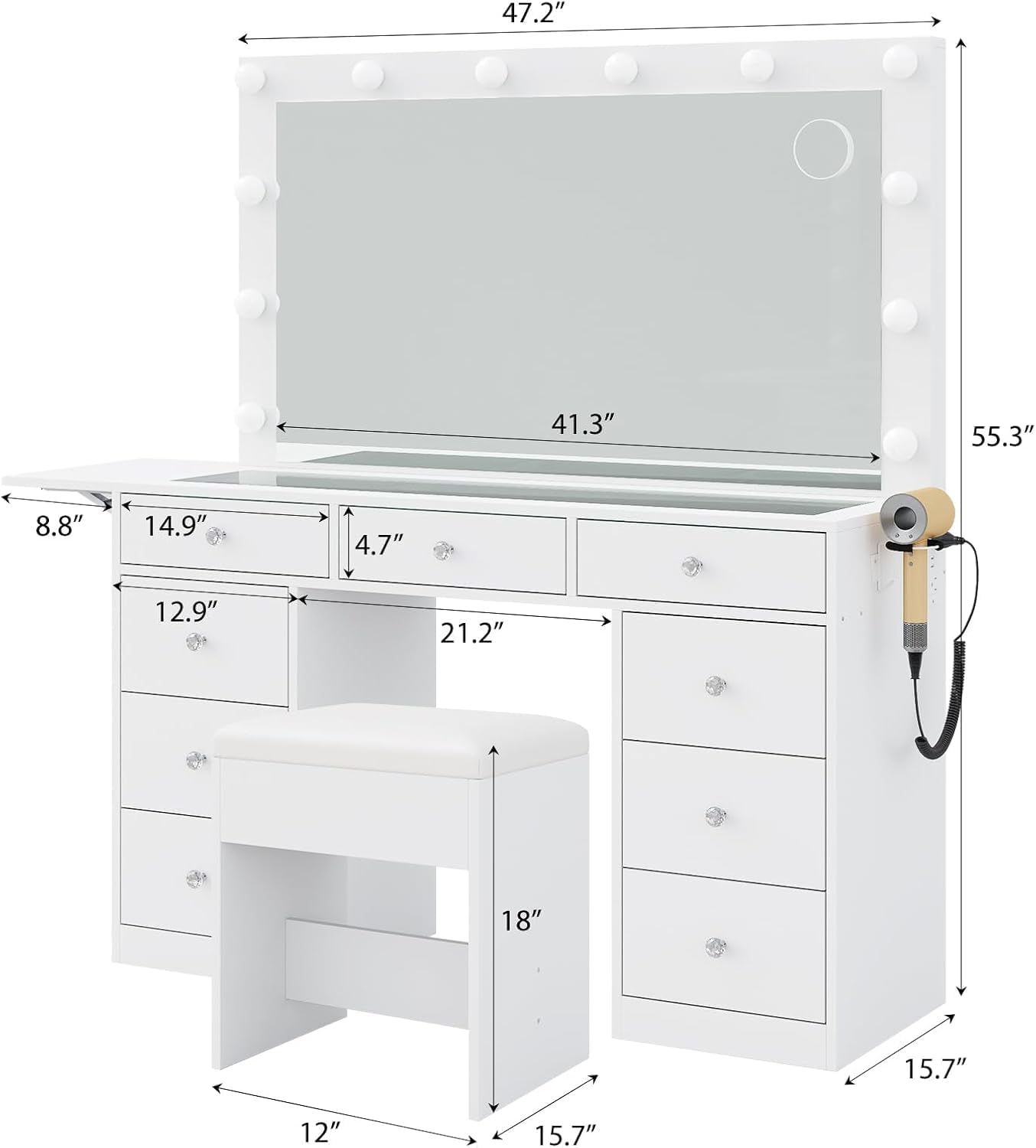
Thank you for choosing the FUSOU Vanity Desk with Power Outlet. This comprehensive makeup vanity features 9 drawers, a mirror with 12 LED lights offering 3 lighting modes, a glass top, and a convenient fold-up panel. This manual provides essential information for safe assembly, operation, maintenance, and troubleshooting to ensure optimal performance and longevity of your vanity desk.
2. Safety Information
WARNING: Please read all safety instructions carefully before assembly and use.
- Always follow the installation instructions provided in the package.
- Be cautious of sharp edges and pinch points during assembly.
- Keep electrical components dry and away from water to prevent electric shock.
- Do not exceed the weight limit of the glass desktop to avoid damage or injury.
- Keep the vanity away from heat sources and never leave it unattended while in use.
- Always turn off the lights and unplug the vanity when not in use.
3. Product Features
- 3 Lighting Options: Features 12 Hollywood bulbs and a wider mirror for clear makeup application. Includes 3 adjustable lighting modes: cold light, natural light, and warm light. Long-pressing the switch changes the lighting color.
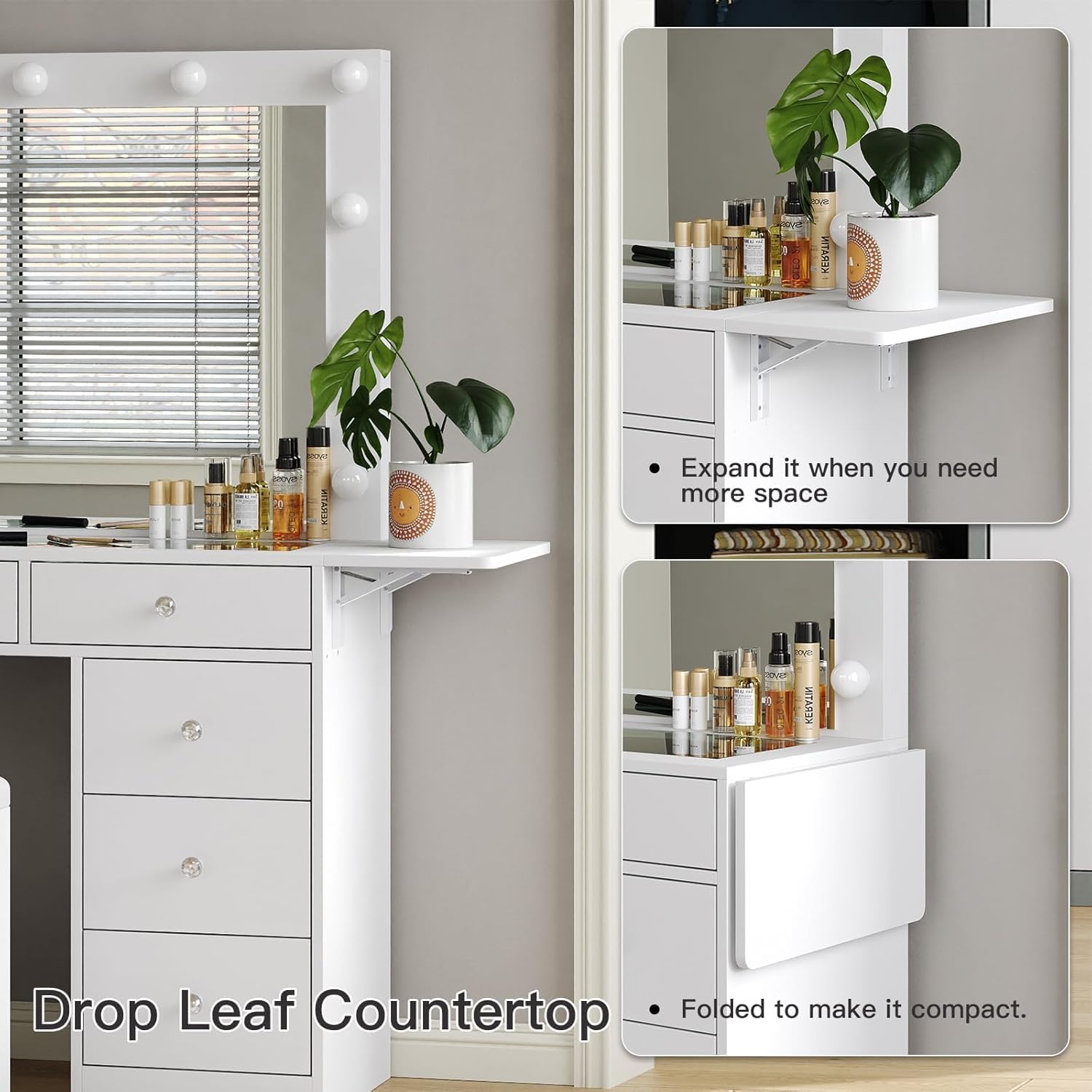
- 9 Drawers Makeup Vanity: Extended tabletop and a fold-up panel provide ample space. The fold-up panel can be folded to save space when not in use. A glass tabletop allows for easy viewing of cosmetics and accessories. Includes 3 center drawers and 6 side drawers for extensive storage.
- Integrated Power Outlet: Equipped with a hair dryer stand and a power outlet. The charging station includes 2 standard plug sockets and 2 USB ports for connecting various devices like hair dryers, curling irons, phones, and tablets.
- Comfortable Makeup Stool: The included stool features a cushion made of double layers of soft sponge and PU for a comfortable sitting experience. It can be conveniently stored under the vanity when not in use.



4. Components List
Before beginning assembly, ensure all parts are present and undamaged. Refer to the included assembly manual for detailed part identification.
| Component | Description | Quantity |
|---|---|---|
| Main Desk Frame | Engineered wood structure for the vanity desk. | 1 |
| Mirror with LED Lights | Large mirror with 12 integrated LED bulbs. | 1 |
| Drawers | Nine individual drawers for storage. | 9 |
| Glass Top Panels | Transparent panels for the desktop. | Multiple |
| Fold-up Side Panel | Extendable side panel for additional space. | 1 |
| Power Outlet Unit | Integrated unit with AC outlets and USB ports. | 1 |
| Hair Dryer Holder | Mountable holder for a hair dryer. | 1 |
| Makeup Stool | Cushioned stool for comfortable use. | 1 |
| Hardware Kit | Screws, fasteners, and tools for assembly. | 1 set |
5. Setup and Assembly
The FUSOU Vanity Desk requires assembly. While instructions are provided, assembly can be time-consuming. It is recommended to have at least two people for assembly, and an electric drill can significantly reduce the time required.
Assembly Steps:
- Unpack and Verify: Carefully unpack all components and compare them against the provided components list in your separate assembly manual.
- Prepare Workspace: Clear a spacious area for assembly. Lay down a soft cloth or cardboard to protect the vanity parts from scratches.
- Assemble Base Structure: Follow the step-by-step diagrams in the assembly manual to construct the main desk frame.
- Install Drawers: Assemble and install the 9 drawers into their respective compartments. Ensure smooth operation.
- Attach Mirror: Securely attach the mirror with LED lights to the main desk frame.
- Integrate Electrical Components: Install the power outlet unit and hair dryer holder as per instructions. Ensure all connections are secure.
- Place Glass Top: Carefully place the glass top panels into their designated slots.
- Assemble Stool: Put together the makeup stool.
- Final Checks: Ensure all screws are tightened (use a manual screwdriver for final tightening to avoid stripping), and the vanity is stable.
6. Operating Instructions
6.1. LED Mirror Lighting
- Power On/Off: Locate the touch sensor on the mirror surface. Tap once to turn the lights on or off.
- Change Lighting Mode: With the lights on, short press the touch sensor to cycle through the three lighting modes: cold light, natural light, and warm light.
- Adjust Brightness: To adjust the brightness within each mode, long press the touch sensor. The brightness will gradually increase or decrease. Release when the desired brightness is reached.
6.2. Power Outlet Usage
- The integrated power outlet unit includes 2 standard AC sockets (125V/12A) and 2 USB ports (5V/2A).
- Plug your hair dryer, curling iron, phone, tablet, or other electronic devices directly into the appropriate port.
- Ensure devices are compatible with the provided voltage and current.
6.3. Fold-up Panel
- To expand the panel, gently lift it and extend the support mechanism until it locks into place.
- To fold the panel, disengage the support mechanism and carefully lower the panel until it is flush with the side of the vanity.
7. Maintenance
- Cleaning the Surface: Wipe the engineered wood surfaces with a soft, damp cloth. Avoid harsh chemicals or abrasive cleaners.
- Glass Top Care: Clean the glass tabletop with a glass cleaner and a lint-free cloth. Be careful not to scratch the surface.
- Stool Maintenance: The PU leather cushion can be cleaned with a wet cloth. For spills, wipe immediately.
- Drawer Slides: Periodically check drawer slides for smooth operation. If they become stiff, a small amount of silicone lubricant can be applied.
- Electrical Components: Ensure the power outlet and wiring are free from dust and debris. Do not attempt to repair electrical components yourself.

8. Troubleshooting
This section addresses common issues you might encounter with your vanity desk.
| Problem | Possible Cause | Solution |
|---|---|---|
| LED lights not turning on. | Not plugged in; loose connection; power outage; faulty bulb. | Ensure power cord is securely plugged into a working outlet. Check all connections. If a bulb is faulty, contact customer support for replacement. |
| Lights not changing modes/brightness. | Touch sensor malfunction; user error. | Ensure you are using the correct touch gestures (short press for mode, long press for brightness). Clean the touch sensor area. |
| Drawers are stiff or not closing properly. | Overloaded drawer; misaligned slides; debris in slides. | Reduce contents in the drawer. Check if the drawer slides are properly aligned and free of obstructions. Apply silicone lubricant if needed. |
| Power outlets not working. | Not plugged in; circuit breaker tripped; faulty unit. | Verify the main power cord is plugged in. Check your household circuit breaker. If the issue persists, contact customer support. |
| Vanity feels unstable. | Loose fasteners; uneven floor. | Check and tighten all assembly screws. Ensure the vanity is placed on a flat, level surface. |
9. Specifications
| Attribute | Detail |
|---|---|
| Brand | FUSOU |
| Model Number | VD007-WH-1 |
| Product Dimensions | 15.7 x 47 x 55 inches (Depth x Width x Height) |
| Item Weight | 39.9 pounds |
| Frame Material | Engineered Wood |
| Furniture Finish | White |
| Color | White |
| Lighting | 12 LED Bulbs, 3 Lighting Modes (Cold, Natural, Warm) |
| Power Outlet | 2 AC Sockets (125V/12A), 2 USB Ports (5V/2A) |
10. Warranty and Support
For specific warranty information and customer support, please refer to the documentation included with your product or contact FUSOU customer service directly. Keep your purchase receipt for warranty claims.
Note: No official product videos from the seller were available for embedding in this manual.