
Introduction
This manual provides detailed instructions for the assembly, operation, and maintenance of your ODK 51-inch L-Shaped Desk. Please read all instructions carefully before beginning assembly and retain this manual for future reference. This desk is designed to maximize your workspace, fitting efficiently into corners and providing ample surface area for various activities.
Safety Information
- Always assemble the desk on a flat, stable surface.
- Ensure all parts are securely fastened before use.
- This desk is heavy and large; it may tip over if not properly assembled or if leaned on.
- Keep away from children and pets during assembly.
- Do not place objects exceeding the maximum weight limit of 150 pounds on the desk.
Package Contents
Before assembly, verify that all components are present and undamaged. If any parts are missing or damaged, please contact ODK customer service.
- Desktop Panels (L-shaped sections)
- Metal Frame Legs and Support Beams
- Adjustable Foot Pads
- Assembly Hardware (screws, bolts, Allen wrench)
- Headphone Hook
- Instruction Manual
Setup and Assembly Instructions
Assembly typically takes approximately 25-30 minutes with one person. All necessary tools, including a screwdriver, are provided.
- Step 1: Prepare the Desktop Panels. Lay the desktop panels upside down on a soft, clean surface to prevent scratches.
- Step 2: Attach the Connecting Plates. Secure the metal connecting plates to the underside of the desktop panels where they will join to form the L-shape. Ensure screws are tightened firmly.
- Step 3: Assemble the Leg Frames. Attach the horizontal support beams to the vertical leg frames using the provided hardware. Ensure all connections are stable.
- Step 4: Attach Leg Frames to Desktop. Carefully align and attach the assembled leg frames to the pre-drilled holes on the underside of the desktop panels. Tighten all screws securely.
- Step 5: Install Diagonal Braces. Attach the diagonal braces to the leg frames for enhanced stability. These braces are crucial for the desk's structural integrity.
- Step 6: Install Adjustable Foot Pads. Screw the adjustable foot pads into the bottom of each leg. These pads help stabilize the desk on uneven floors.
- Step 7: Attach Headphone Hook. Secure the headphone hook to your desired location on the desk frame.
- Step 8: Final Check. Carefully flip the desk upright. Ensure all screws are tight and the desk is stable. Adjust the foot pads as needed to eliminate any wobbling.
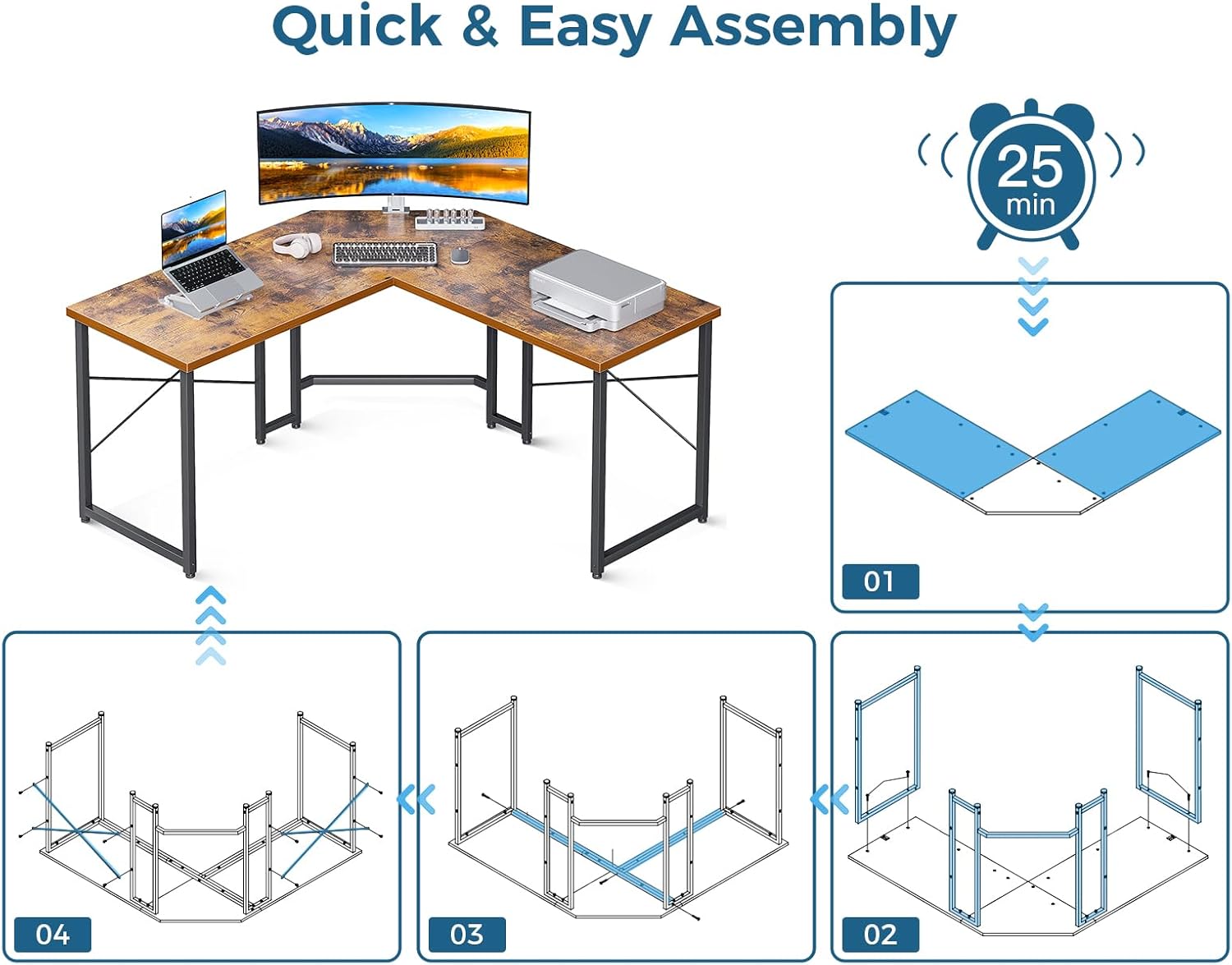
Image: Quick and Easy Assembly Steps

Image: Product Dimensions for ODK L-Shaped Desk
Operating Instructions
The ODK L-Shaped Desk is designed for versatile use in home offices, gaming setups, or study rooms. Its L-shape maximizes corner space, providing ample room for multiple monitors, computers, and accessories.
- Placement: Position the desk in a corner to optimize room layout and create a dedicated workspace.
- Workspace: Utilize the expansive desktop for computers, monitors, keyboards, and other work or gaming essentials. The design allows for comfortable multi-monitor setups.
- Legroom: The open design beneath the desk provides generous legroom, allowing for comfortable seating and movement of office chairs.
- Headphone Hook: Use the integrated headphone hook to keep your headphones organized and easily accessible.

Image: Ample Legroom Under the Desk

Image: ODK L-Shaped Desk in a Home Office Setup
Maintenance
Proper care will ensure the longevity and appearance of your ODK L-Shaped Desk.
- Cleaning the Desktop: The engineered wood desktop is designed to be water-resistant. For daily cleaning, wipe the surface with a soft, damp cloth. For tougher stains, use a mild household cleaner and dry immediately. Avoid abrasive cleaners or harsh chemicals that may damage the finish.
- Cleaning the Frame: Wipe the metal frame with a damp cloth. Dry thoroughly to prevent rust.
- Regular Checks: Periodically check all screws and bolts to ensure they remain tight. Re-tighten if necessary to maintain stability.
- Avoid Excessive Weight: Do not exceed the maximum weight recommendation of 150 pounds to prevent structural damage.

Image: Premium Desktop and Sturdy Construction Details
Troubleshooting
| Problem | Possible Cause | Solution |
|---|---|---|
| Desk is wobbly or unstable. | Uneven floor; loose screws; foot pads not adjusted. | Ensure all assembly screws are tightened. Adjust the adjustable foot pads on each leg until the desk is stable on the floor. |
| Parts do not align during assembly. | Incorrect orientation of parts; screws not fully loosened. | Review the assembly diagram carefully. Loosen all screws slightly, adjust the parts into alignment, then re-tighten all screws. |
| Missing or damaged parts. | Shipping damage; packaging error. | Do not proceed with assembly. Contact ODK customer service immediately for assistance. |
Specifications
| Feature | Detail |
|---|---|
| Brand | ODK |
| Model Number | SPCB02030901012USDF-2 |
| Product Dimensions (D x W x H) | 50.5" x 50.5" x 29.9" |
| Shape | L-Shaped (Rectangular sections) |
| Color | Vintage (Top), Black (Base) |
| Top Material Type | Engineered Wood |
| Base Material | Metal |
| Finish Type | Powder Coated |
| Item Weight | 36.4 Pounds |
| Maximum Weight Recommendation | 150 Pounds |
| Assembly Required | Yes |
| Recommended Number of People for Assembly | 1 |
| Included Components | Headphone Hook |
Warranty and Support
ODK provides a limited warranty for this product. For specific warranty details, please refer to the documentation included with your purchase or contact ODK customer service.
ODK offers a 30-day free return or exchange service. For any questions, concerns, or assistance with your product, please contact our 24-hour online professional customer service team. They are available to help solve any problems you may encounter.
For further support, please visit the official ODK store on Amazon: ODK Store


