
1. Safety Information
Please read and understand all instructions before beginning assembly and use. Failure to follow these instructions may result in injury or damage to the product.
- Heavy Item: This desk is heavy (approximately 113.8 lbs). It is highly recommended that two or more people handle and assemble the desk to prevent injury.
- Anti-Tip Device: Always use the included anti-tip device to secure the desk to a wall. This prevents accidental tipping, especially in households with children or pets.
- Proper Tools: Use only the tools specified in the assembly instructions. Do not overtighten screws.
- Stable Surface: Assemble the desk on a clean, flat, and stable surface to avoid scratching or damaging the components.
- Electrical Safety: Ensure the power hub is connected to a properly grounded outlet. Do not overload the outlets. Keep liquids away from electrical components.
- Weight Capacity: Do not exceed the maximum weight recommendation of 150 pounds for the desktop.
2. Package Contents
Verify that all components listed below are present before beginning assembly. If any parts are missing or damaged, please contact customer support.
- 1 x RALGEND 55-inch Farmhouse Executive Desk
- 1 x Hardware Kit (screws, dowels, cam locks, etc.)
- 1 x Charging Station (pre-installed or to be installed)
- 1 x Anti-Tip Kit
- 1 x Instruction Manual (this document)
3. Assembly Instructions
Follow the step-by-step instructions provided in the included printed manual. The following video provides a visual guide for the assembly process. It is recommended to have at least two people for assembly.
Video 3.1: Detailed installation guide for a farmhouse desk. This video demonstrates the step-by-step process of assembling a similar farmhouse-style desk, including attaching panels, securing hardware, and installing drawers and doors. It provides visual cues for proper alignment and fastening of components.
3.1. Handle Installation
The desk handles can be installed in two different appearances. Refer to the video below for a visual demonstration of both methods.
Video 3.2: Demonstration of two handle installation methods for desk drawers. This short video illustrates how to attach the drawer handles, showing two distinct aesthetic options for the final appearance.
4. Operating Instructions
4.1. Monitor Stand
The integrated monitor stand is designed to elevate your monitor to an ergonomic height, promoting better posture and reducing neck strain. Place your monitor directly on the stand. The open compartments can be used for small office supplies.

Image 4.1: An image illustrating the ergonomic benefits of the elevated monitor stand, showing a 'before' and 'after' comparison of user posture. The stand helps position the monitor at eye level to reduce neck and back strain.
4.2. Built-in Power Hub
The desk features a built-in power hub with 3 standard AC outlets and 2 USB ports. Use these to conveniently power and charge your electronic devices directly from your desktop. Cable management holes are provided to maintain a tidy workspace.

Image 4.2: A close-up view of the integrated power hub, showing the three AC outlets and two USB ports. A smartphone is shown charging, demonstrating the convenience of the built-in feature.
4.3. Storage Drawers and File Cabinet
The desk includes three drawers of varying sizes. The bottom drawer is a file cabinet designed to accommodate Letter and A4 size hanging files. The left side of the desk features adjustable and removable shelves for flexible storage of books and other items.

Image 4.3: An image displaying the three drawers of the desk, with the bottom drawer configured as a file cabinet for Letter and A4 size documents. The upper drawers are shown with various office supplies, highlighting the versatile storage solutions.
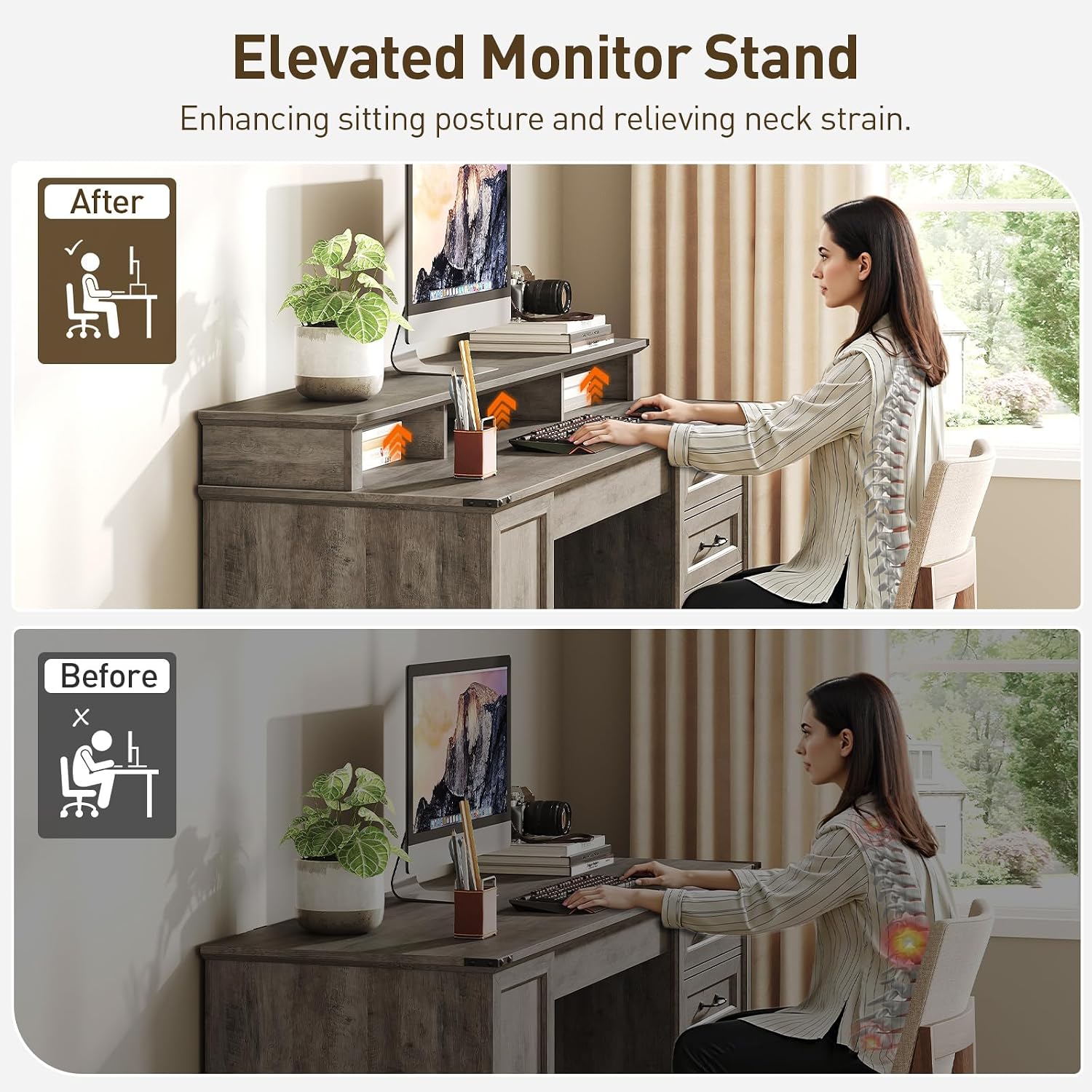
Image 4.4: A close-up of the side bookshelf, demonstrating the adjustable and removable shelves. Books and decorative items are arranged on the shelves, showcasing the practical and space-saving design.
5. Maintenance
Regular maintenance will help preserve the appearance and functionality of your RALGEND Executive Desk.
- Cleaning: Wipe surfaces with a soft, damp cloth. Avoid harsh chemicals or abrasive cleaners that may damage the finish.
- Spills: Immediately wipe up any spills to prevent staining or water damage.
- Hardware: Periodically check all screws and fasteners to ensure they are tight. Retighten as necessary.
- Sunlight Exposure: Avoid prolonged exposure to direct sunlight to prevent fading or discoloration of the wood finish.
- Heat and Moisture: Protect the desktop from extreme heat and moisture. Use coasters for drinks and heat pads for hot items.
6. Troubleshooting
If you encounter any issues with your desk, refer to the following common solutions:
| Problem | Possible Cause | Solution |
|---|---|---|
| Desk is wobbly | Loose fasteners | Check and tighten all screws and cam locks. Ensure the desk is on a level surface. |
| Drawers do not slide smoothly | Misaligned slides or debris | Ensure drawer slides are correctly installed and aligned. Clear any debris from the tracks. |
| Power hub not working | Not plugged in, overloaded, or faulty outlet | Verify the power cord is securely plugged into a working wall outlet. Check if the circuit breaker has tripped. Do not exceed the power hub's capacity. |
| Missing parts | Packaging error | Contact RALGEND customer support with your purchase details and the specific missing part number. |
7. Specifications
- Brand: RALGEND
- Model Number: 1401DNUBG
- Color: Greige
- Style: Farmhouse
- Material: Engineered Wood
- Product Dimensions: 55.1"W x 21.7"D x 35.4"H
- Item Weight: 113.8 Pounds
- Maximum Weight Recommendation: 150 Pounds
- Special Features: Built-In USB Outlet, Monitor Stand, 3 Drawers (1 File Drawer), Adjustable Shelves, Cable Management Holes
- Assembly Required: Yes
8. Warranty Information
This RALGEND Executive Desk comes with a Limited Warranty. For specific details regarding warranty coverage, terms, and conditions, please refer to the warranty card included in your package or contact RALGEND customer support.
9. Customer Support
For any questions, assistance with assembly, missing parts, or warranty claims, please contact RALGEND customer support through the retailer where the product was purchased or visit the official RALGEND website for contact information.
Thank you for choosing RALGEND. We hope you enjoy your new executive desk!