
NexFoto NF-W215BN-T-BT-U-US
NexFoto 21.5 Inch Touchscreen Digital Picture Frame User Manual
Model: NF-W215BN-T-BT-U-US
1. Introduction
Welcome to the NexFoto 21.5 Inch Touchscreen Digital Picture Frame. This manual provides detailed instructions for setting up, operating, and maintaining your new digital photo frame. Designed for ease of use, this frame allows you to effortlessly share and display your cherished memories in vibrant Full HD.

Figure 1: NexFoto 21.5 Inch Digital Picture Frame
2. Product Features
- 21.5-inch FHD Glossy Touch Screen: Features 1920 x 1080 resolution with a 16:9 aspect ratio and IPS display technology for wide viewing angles and sharp details.
- 64GB Internal Memory: Stores up to 160,000 pictures, with support for Micro SD card extended storage (up to 64GB, not included).
- Wi-Fi Connectivity: Compatible with 2.4GHz and 5Ghz networks for easy photo and video sharing.
- Versatile Placement: Can be freestanding or wall-mounted in both landscape and portrait orientations with auto-rotation.
- Multifunctional Custom Settings: Includes options for captions, weather display, calendar, clock, alarm, and sleep mode.
- Cloud-Based Storage: Offers convenient, private, and secure cloud storage.
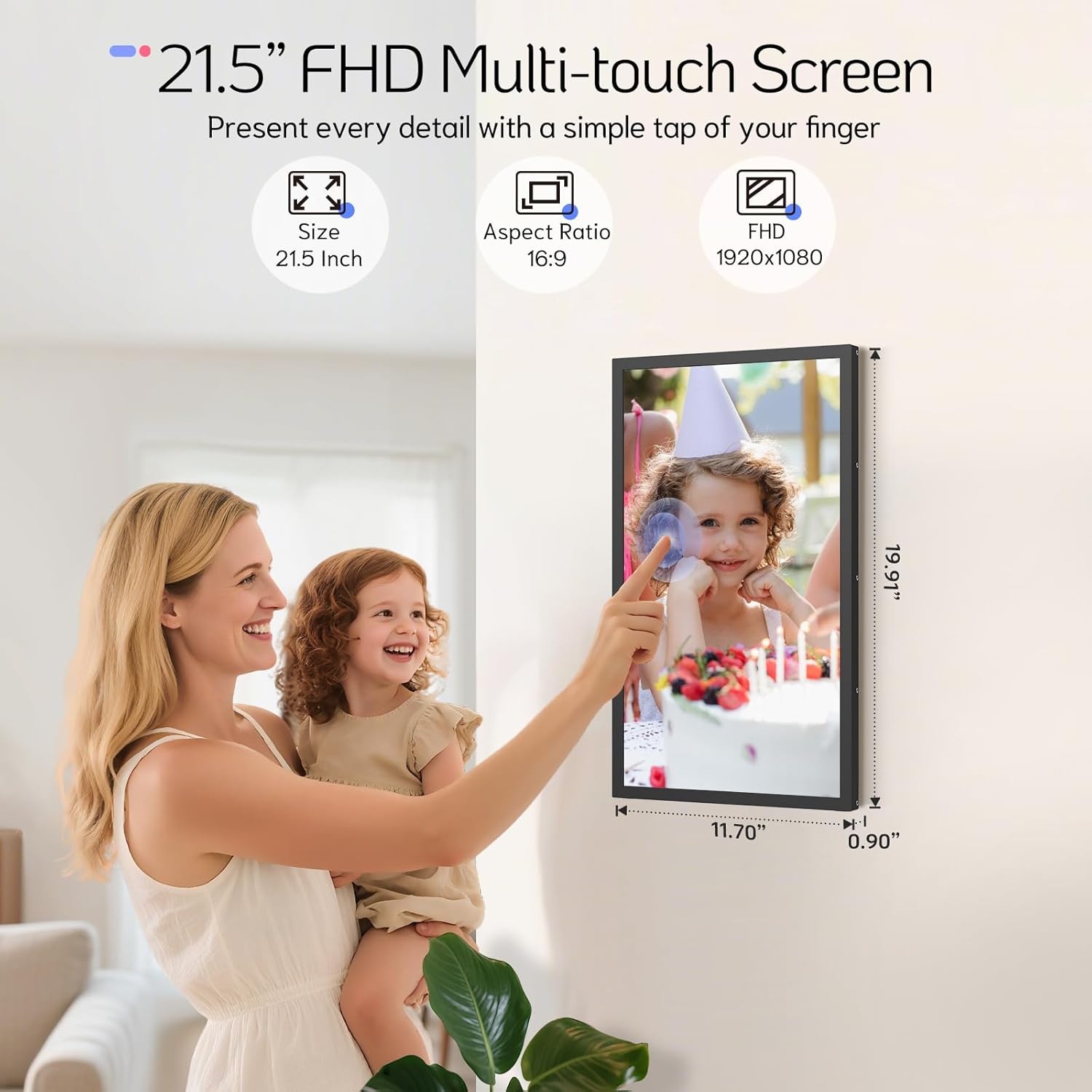
Figure 2: 21.5 Inch FHD Multi-touch Screen Details

Figure 3: Effortless Photo and Video Sharing

Figure 4: Built-In Bluetooth Speakers & Art Gallery
3. Package Contents
Please check the box for the following items:
- NexFoto 21.5 Inch Digital Picture Frame
- Wall Adaptor with US plug
- 64GB USB drive
- User Manual & Quick Start Guide
- Screwdriver
- Rotatable Wall Mount (100x100 VESA Compatible)
- Wall Anchors & Screws
- Stand

Figure 5: Included Package Contents
4. Setup Guide
4.1 Initial Setup
- Power On: Connect the power adapter to the frame and plug it into a power outlet. The frame will automatically power on.
- Language Selection: Follow the on-screen prompts to select your preferred language.
- Wi-Fi Connection: Connect the frame to your Wi-Fi network (supports 2.4GHz and 5GHz). Ensure a stable connection for optimal performance.
- Download NexFoto App: Scan the QR code displayed on the screen or search for "NexFoto" in your mobile app store (iOS/Android) to download the companion app.
- Pair Your Frame: Open the NexFoto app, create an account, and follow the in-app instructions to pair your mobile device with the digital frame via Bluetooth and Wi-Fi.

Figure 6: Quick Setup Steps
Video 1: This video provides a brief overview of the NexFoto Digital Picture Frames, showcasing their features and ease of use for sharing memories.
5. Operating Instructions
5.1 Sharing Photos and Videos
Once your frame is paired with the NexFoto app, you can easily upload photos and videos from your smartphone. The app allows you to select media from your gallery, add captions, and choose which album to send them to. You can also invite family and friends to join your private social circle to share their own memories directly to your frame.
The frame also supports direct upload via USB drive or Micro SD card (not included) for added convenience.

Figure 7: Interact and Connect with Shared Memories
5.2 Custom Settings
The NexFoto frame offers various customizable settings accessible through the touchscreen interface or the app:
- Captions: Add personalized captions to your photos.
- Display Information: Enable or disable the display of weather, calendar, and clock.
- Alarm & Sleep Mode: Set alarms or schedule sleep mode to conserve energy and manage display times.
5.3 Display Orientation
The frame can be used in both landscape and portrait orientations. Its auto-rotation feature adjusts the display content automatically. For wall mounting, use the included rotatable wall mount for easy adjustment.

Figure 8: Rotatable Wall Mount for Flexible Display
6. Maintenance and Care
- Cleaning the Screen: Use a soft, lint-free cloth to gently wipe the screen. For stubborn smudges, slightly dampen the cloth with water or a screen-cleaning solution. Avoid harsh chemicals.
- Cleaning the Frame: Wipe the frame with a dry, soft cloth.
- Placement: Avoid placing the frame in direct sunlight or in areas with extreme temperatures or high humidity.
- Handling: Handle the frame with care to prevent damage to the screen or internal components.
7. Troubleshooting
| Problem | Solution |
|---|---|
| Frame does not power on. | Ensure the power adapter is securely connected to both the frame and a working power outlet. Try a different outlet. |
| Cannot connect to Wi-Fi. | Check if your Wi-Fi network is 2.4GHz or 5GHz compatible. Ensure the Wi-Fi password is correct. Restart your router and the frame. |
| Photos are not appearing on the frame. | Verify that photos have been successfully uploaded via the NexFoto app or inserted USB/Micro SD card. Ensure the frame is connected to Wi-Fi if using the app. |
| Screen is unresponsive. | Restart the frame by unplugging and re-plugging the power adapter. Ensure the screen is clean and free of debris. |
| Frame is displaying incorrect time/weather. | Ensure the frame is connected to Wi-Fi and location services are enabled (if applicable) for accurate data synchronization. |
8. Technical Specifications
| Feature | Detail |
|---|---|
| Screen Size | 21.5 Inches |
| Resolution | 1920*1080 FHD |
| Aspect Ratio | 16:9 |
| Internal Memory | 64GB |
| Compatible Devices | iOS, Android |
| Wi-Fi Compatibility | 2.4GHz, 5GHz |
| Product Dimensions | 19.91 x 11.7 x 0.99 inches |
| Item Weight | 8.67 pounds |
| Color | Black |
| Model Number | NF-W215BN-T-BT-U-US |
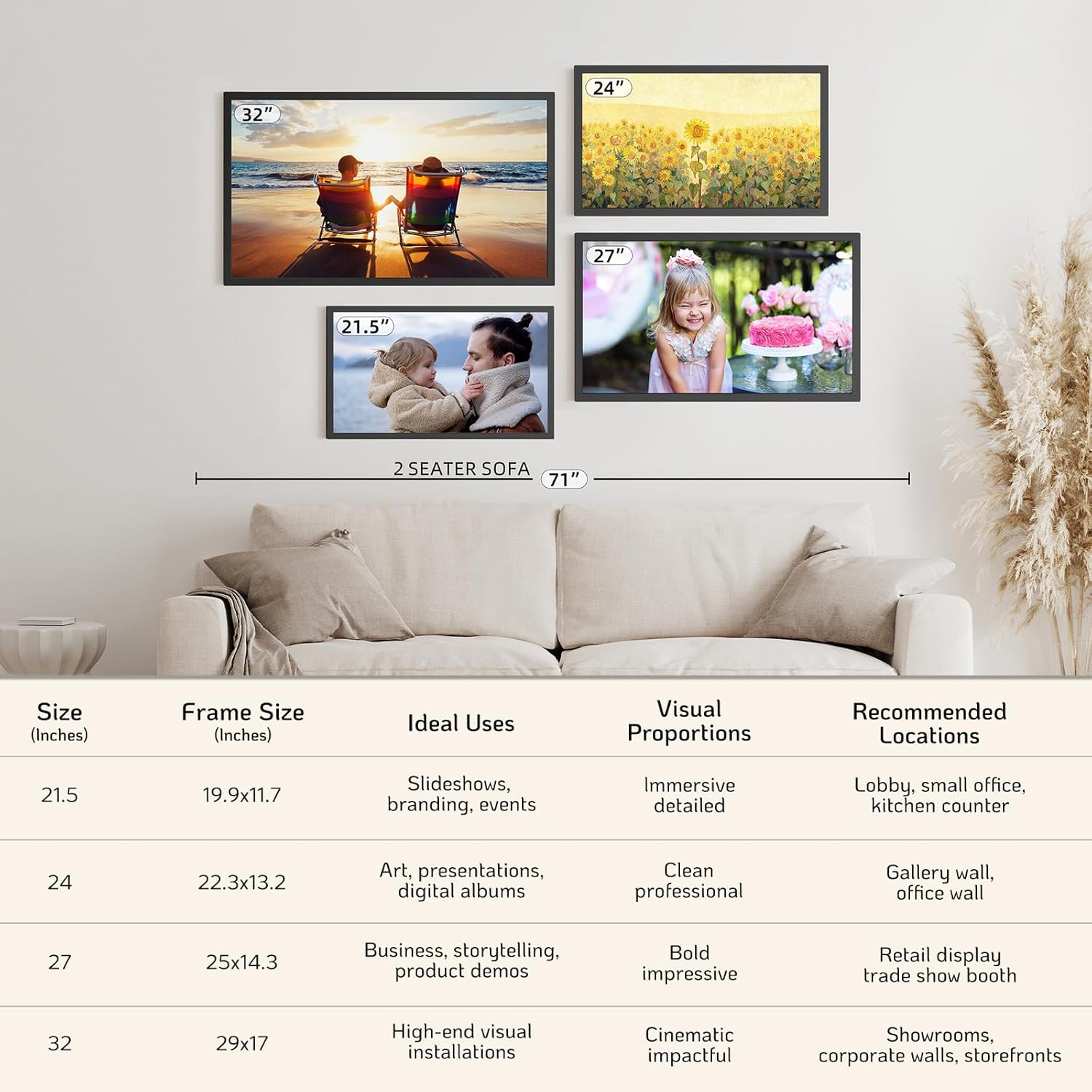
Figure 9: NexFoto Frame Sizes and Placement Examples
9. Warranty and Support
9.1 One-Year Warranty
NexFoto is committed to delivering top-quality digital photo frames. This product comes with a one-year warranty from the date of purchase, covering manufacturing defects and malfunctions under normal use. Please retain your proof of purchase for warranty claims.
9.2 Customer Support
If you have any questions, require technical assistance, or need to make a warranty claim, please contact NexFoto customer support. Our team is available to provide satisfactory responses within 12 hours.
For the most up-to-date contact information, please refer to the official NexFoto website or the contact details provided in your Quick Start Guide.
Ask a question about this manual
Ask about setup, troubleshooting, compatibility, parts, safety, or missing instructions. Manuals+ will review the question and use this page’s manual context to help answer it.