
Introduction
Thank you for purchasing the FUHONGYUAN Digital Alarm Clock Radio. This device is designed to provide reliable timekeeping, alarm functions, and AM/FM radio entertainment. With its large LED display, dual alarms, and convenient features like sleep timer and snooze, it is an ideal companion for your bedroom or any room. Please read this manual carefully before use to ensure proper operation and to maximize your experience with the product.
Safety Information
To ensure safe operation and prevent damage, please observe the following precautions:
- Do not expose the unit to rain, moisture, or extreme temperatures.
- Avoid placing the unit near heat sources such as radiators, heat registers, stoves, or other apparatus (including amplifiers) that produce heat.
- Do not block any ventilation openings. Ensure proper airflow around the unit.
- Use only attachments/accessories specified by the manufacturer.
- Unplug this apparatus during lightning storms or when unused for long periods of time.
- Refer all servicing to qualified service personnel. Servicing is required when the apparatus has been damaged in any way, such as power-supply cord or plug is damaged, liquid has been spilled or objects have fallen into the apparatus, the apparatus has been exposed to rain or moisture, does not operate normally, or has been dropped.
- Do not mix old and new batteries, or different types of batteries.
- Dispose of batteries properly according to local regulations.
Package Contents
Please check that all items are present and in good condition:
- FUHONGYUAN Digital Alarm Clock Radio (Model: CR-01 BLA)
- Power Adapter
- User Manual (this document)
Note: 3 AA batteries for backup power are not included and must be purchased separately.
Product Overview
Familiarize yourself with the main components and controls of your alarm clock radio.
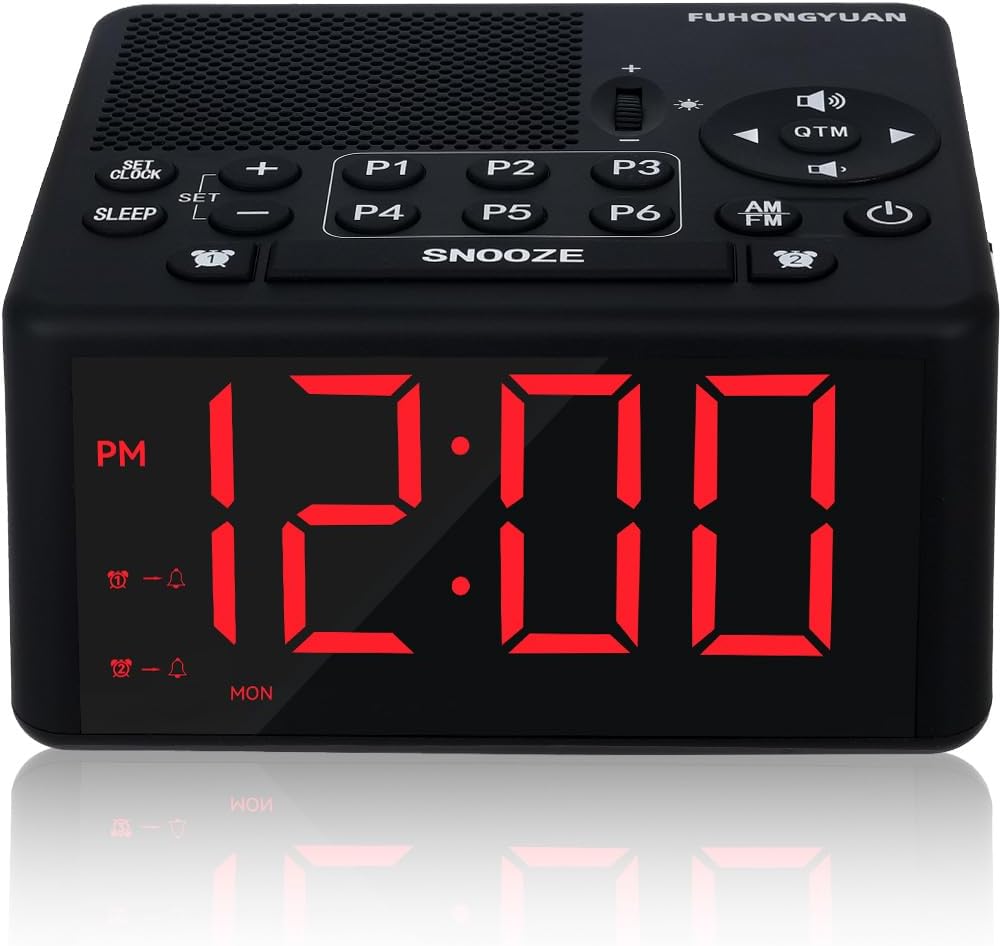
Figure 1: Front view of the FUHONGYUAN Digital Alarm Clock Radio, showing the large red LED display and control buttons on top.
Top Panel Controls:
- SET CLOCK: Press to enter time setting mode.
- SET: Press to confirm settings.
- SLEEP: Activates/adjusts sleep timer.
- +/-: Adjusts time, volume, or frequency.
- P1-P6: Preset radio station buttons.
- SNOOZE: Temporarily silences alarm for 9 minutes.
- QTM (Quick Tune Memory): Quickly cycles through preset stations.
- Volume Dial: Adjusts speaker volume.
- Brightness Slider: Adjusts LED display brightness.
- AM/FM: Toggles between AM and FM radio bands.
- Power Button: Turns the unit on/off.
- Alarm 1/Alarm 2 Buttons: Activates/sets Alarm 1 or Alarm 2.

Figure 2: Product dimensions, showing the compact size of the alarm clock radio.
Setup
1. Power Connection
Connect the provided power adapter to the DC IN port on the back of the unit and plug it into a standard AC 110-120V 50Hz wall outlet. The display will light up.
2. Battery Backup Installation
For battery backup, open the battery compartment on the bottom of the unit. Insert 3 AA batteries (not included) according to the polarity markings (+/-). The battery backup ensures that time and alarm settings are retained during a power outage. The display will dim after 20 seconds if no operation occurs during battery backup mode.
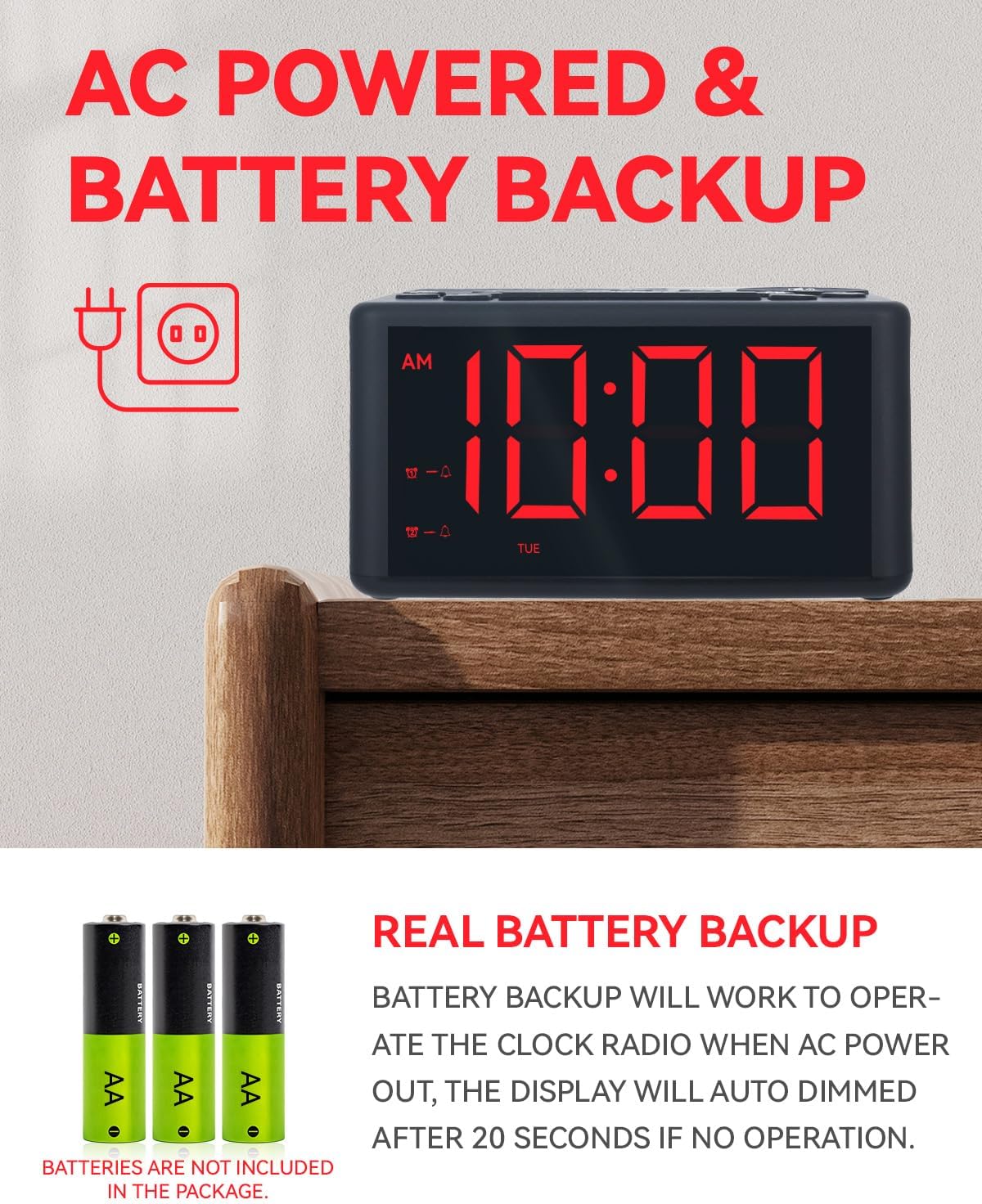
Figure 3: Illustration of AC power connection and battery backup feature, showing where to insert AA batteries.
Operating Instructions
1. Setting the Time and Day
- Press and hold the SET CLOCK button until the hour digits flash.
- Use the +/- buttons to adjust the hour. Press SET to confirm.
- The minute digits will flash. Use the +/- buttons to adjust the minutes. Press SET to confirm.
- The day of the week will flash. Use the +/- buttons to select the current day (MON, TUE, WED, THU, FRI, SAT, SUN). Press SET to confirm and exit time setting mode.
2. Setting the Alarm (Dual Alarm System)
This clock radio features two independent alarms (Alarm 1 and Alarm 2).
- Press and hold either the Alarm 1 or Alarm 2 button until the alarm hour digits flash.
- Use the +/- buttons to adjust the alarm hour. Press SET to confirm.
- The alarm minute digits will flash. Use the +/- buttons to adjust the alarm minutes. Press SET to confirm.
- Select the alarm sound: Use the +/- buttons to choose between 3 alarm sounds (Beep, Bird, Wave) or Radio. Press SET to confirm.
- Select the alarm mode: Use the +/- buttons to choose between Weekday (MON-FRI), Weekend (SAT-SUN), or Everyday (MON-SUN). Press SET to confirm.
- The alarm is now set. The corresponding alarm icon will appear on the display.

Figure 4: The dual alarm feature allows setting two separate alarms with different sounds and schedules.
3. Snooze Function
When the alarm sounds, press the large SNOOZE button to temporarily silence the alarm for 9 minutes. The alarm will sound again after 9 minutes. To cancel the snooze and turn off the alarm for the day, press the corresponding Alarm 1 or Alarm 2 button, or the Power button.

Figure 5: The prominent SNOOZE button for an extra 9 minutes of sleep.
4. Radio Operation (AM/FM)
Your clock radio features both AM and FM bands.
- Press the AM/FM button to turn on the radio and switch between AM and FM bands.
- Use the +/- buttons to manually tune the frequency. Press and hold +/- to auto-scan for the next available station.
- Adjust the volume using the Volume Dial.
Presetting Stations (P1-P6)
You can store up to 6 AM and 6 FM stations for quick access.
- Tune to your desired station using the +/- buttons.
- Press and hold one of the P1-P6 buttons (e.g., P1) for about 1 second until the display flashes, indicating the station is saved.
- To recall a preset station, simply press the corresponding P1-P6 button.

Figure 6: The P1-P6 buttons allow for easy one-click access to your favorite radio stations.
5. Sleep Timer
The sleep timer allows the radio to play for a set duration before automatically turning off.
- While the radio is playing, press the SLEEP button repeatedly to cycle through the sleep timer options (e.g., 10, 20, 30, 40, 50, 60, 70, 80, 90 minutes, or OFF).
- The radio will automatically turn off after the selected time.
6. Display Dimmer
Adjust the brightness of the large LED display using the dedicated slider on the top panel. This allows you to find your comfortable screen brightness for day or night use.

Figure 7: The 4.17-inch LED screen with a dimmer function, showing various brightness levels.
Maintenance
- Cleaning: Wipe the unit with a soft, dry cloth. Do not use abrasive cleaners or solvents.
- Storage: If storing the unit for an extended period, remove the backup batteries to prevent leakage.
Troubleshooting
| Problem | Possible Cause | Solution |
|---|---|---|
| No power/Display off | Power adapter not connected or power outage. | Ensure power adapter is securely plugged in. Check power outlet. If using battery backup, display will dim after 20 seconds of inactivity. |
| Radio static/Poor reception | Weak signal, antenna not extended, or interference. | Extend the FM antenna fully. Reposition the unit for better reception. Avoid placing near other electronic devices that may cause interference. |
| Alarm does not sound | Alarm not set, alarm volume too low, or alarm turned off. | Ensure alarm is activated (icon visible). Check alarm volume. Verify alarm time and mode (Weekday/Weekend/Everyday). |
| Time is incorrect | Time not set correctly or power interruption without battery backup. | Reset the time following the "Setting the Time and Day" instructions. Ensure backup batteries are installed and fresh. |
Specifications
| Feature | Detail |
|---|---|
| Brand | FUHONGYUAN |
| Model | CR-01 BLA |
| Display Type | LED |
| Display Color | Red |
| Product Dimensions | 4.33"W x 2.36"H (approx. 11cm W x 6cm H) |
| Power Source | Corded Electric (AC110-120V 50Hz) |
| Battery Backup | 3 x AA batteries (not included) |
| Radio Bands | AM/FM |
| Alarm Features | Dual Alarm, Weekday/Weekend/Everyday Alarm, 3 Alarm Sounds (Beep, Bird, Wave), Snooze |
| Special Features | Large Display, Adjustable Brightness (Dimmer), Adjustable Volume, Preset Radio Stations (6 AM, 6 FM), Sleep Timer |
| Material | Acrylonitrile Butadiene Styrene (ABS) |
| Item Weight | 1.07 pounds (approx. 0.48 kg) |
Warranty and Support
For warranty information or technical support, please refer to the product packaging or contact FUHONGYUAN customer service directly. You may also visit the official FUHONGYUAN store on Amazon for more information: FUHONGYUAN Store.