
1. Important Safety Information
Please read all instructions carefully before operating the appliance. Retain this manual for future reference.
- Ensure the ice maker is placed on a stable, level surface.
- Do not block ventilation openings.
- Connect to a grounded power outlet only.
- Keep the machine upright for at least 24 hours before initial use to allow refrigerant to settle.
- Use only potable water.
2. Product Overview
The Coolski Commercial Under Counter Ice Maker Machine (Model IM-55BS) is designed for high-volume ice production, suitable for both commercial and home use. It features a durable stainless steel construction, an intuitive LCD control panel, and an automatic self-cleaning function.

The ice maker produces up to 130 pounds of ice per day with a 30-pound storage capacity.
3. Setup and Installation
Proper installation is crucial for optimal performance and longevity of your ice maker. This unit can be installed as a built-in, freestanding, or under-counter appliance.
3.1 Unpacking and Placement
- Carefully remove all packaging materials.
- Ensure the machine is placed on a flat, stable surface.
- Allow at least 1 inch of clearance around the unit for proper ventilation.
- Keep the unit upright for a minimum of 24 hours before plugging it in.

The ice maker supports built-in, freestanding, and under-counter installations.
3.2 Water and Drain Connections
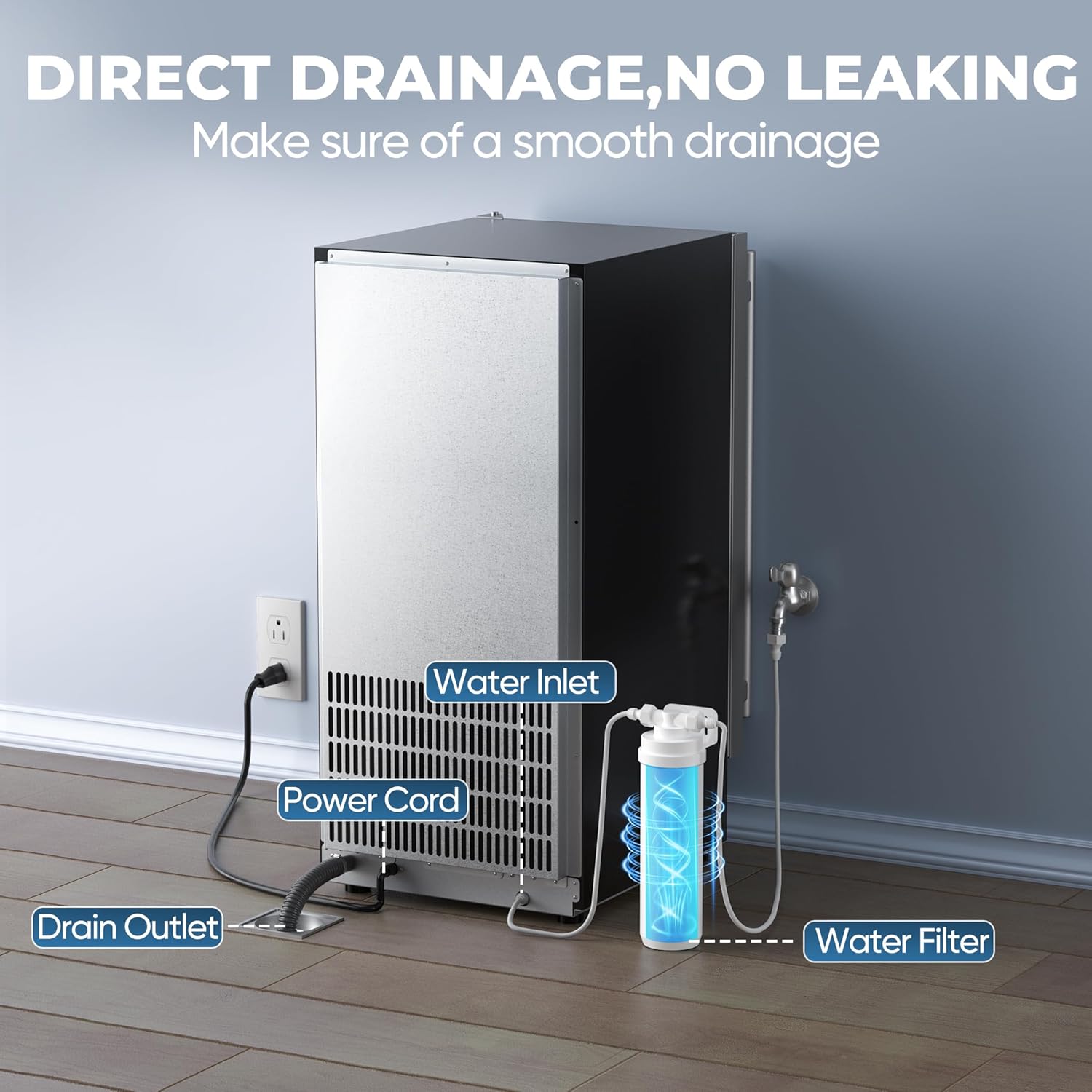
The ice maker requires a continuous water supply and a gravity drain connection.
- Connect the provided water inlet hose to a potable water supply.
- Connect the drain hose to a floor drain or suitable drainage system. Ensure a downward slope for gravity drainage.
- The unit includes an inline water filter to improve water quality.

Illustration of the water inlet, power cord, and drain outlet connections at the rear of the unit.
3.3 Electrical Connection
Plug the power cord into a grounded electrical outlet. Refer to the specifications for voltage requirements.
4. Operating Instructions
Your Coolski ice maker is designed for user-friendly operation via its LCD digital control panel.
4.1 Control Panel Functions

The LCD control panel displays status and allows for mode selection and ice thickness adjustment.
- Mode Button: Cycles through different operating modes.
- Clean Button: Initiates the self-cleaning cycle (press and hold for 3 seconds).
- Up/Down Buttons: Adjust ice cube thickness.
- Indicators: Displays for 'Making Ice', 'Fall Ice', 'Ice Full', 'Temp. Mode', 'Hight Temp.', and 'Water Short'.
4.2 Initial Operation
- After connecting water and power, press the 'Mode' button to start ice production.
- The machine will automatically fill with water and begin the ice-making cycle.
- Ice cubes are produced in cycles of 11 to 20 minutes, yielding 32 clear ice cubes per cycle.
4.3 Adjusting Ice Thickness
You can customize the thickness of the ice cubes to suit your needs:

Adjust ice thickness for various uses: Thin (8 mins for smoothies), Medium (12 mins for drinks), Large (16 mins for seafood).
- Use the 'Up' and 'Down' buttons on the control panel to select your desired ice thickness.
- Thinner ice cubes are produced faster (approx. 8 minutes), while thicker cubes take longer (approx. 16 minutes).
5. Maintenance and Cleaning
Regular maintenance ensures the longevity and hygienic operation of your ice maker.
5.1 Self-Cleaning Function
The unit features an automatic self-cleaning function:
Activate the Ultra Clean Mode for automatic internal cleaning.
- To activate, press and hold the 'Clean' button for 3 seconds.
- The machine will perform a cleaning cycle, circulating water and draining impurities.
- It is recommended to run the self-cleaning cycle regularly, especially if the machine has been idle for an extended period or if ice quality declines.
5.2 External Cleaning
- Wipe the exterior with a soft cloth and mild detergent.
- Do not use abrasive cleaners or solvents.
5.3 Water Filter Replacement
The inline water filter helps remove sediment and improve ice taste. Replace the filter periodically as recommended by the manufacturer or if you notice a decrease in water flow or ice quality.
6. Troubleshooting Guide
If you encounter issues with your ice maker, refer to the following common problems and solutions:
| Problem | Possible Cause | Solution |
|---|---|---|
| Machine does not turn on | No power supply; Power button not pressed (if applicable) | Check power cord connection and outlet. Ensure the unit is plugged in. |
| No ice production | No water supply; Water filter clogged; Low ambient temperature; Refrigerant issue | Check water connection and supply valve. Replace water filter. Ensure room temperature is within operating range. Contact customer support if issue persists. |
| Ice cubes are too thin/thick | Incorrect ice thickness setting | Adjust ice thickness using the 'Up' and 'Down' buttons on the control panel. |
| Ice production is slow | High ambient temperature; Poor ventilation; Dirty condenser | Ensure adequate ventilation around the unit. Clean the condenser coils regularly. |
| Machine is noisy | Unit not level; Loose components; Normal operating sounds | Ensure the unit is level. Check for any loose parts. Some operational sounds (e.g., water circulation, compressor) are normal. |
| Error codes on display | Specific internal issue | Refer to the specific error code in a more detailed manual (if available) or contact customer support with the error code. |
If the problem persists after attempting these solutions, please contact Coolski Customer Support.
7. Specifications
| Feature | Detail |
|---|---|
| Model Number | IM-55BS |
| Product Dimensions (D x W x H) | 14.9" x 20.7" x 33" |
| Weight | 65 Pounds |
| Daily Ice Production | Up to 130 LBS/24H |
| Ice Storage Capacity | 30 LBS |
| Ice Making Cycle Time | 11 to 20 minutes |
| Energy Consumption | 280 kWh (per year, estimated) |
| Included Accessories | Water Filter, Water Hose, Drain Hose, Ice Scoop |

Detailed product dimensions and included hoses.
8. Warranty Information
Coolski stands behind the quality of its products.

Warranty details: 5 Years on Compressor, 3 Years on Parts & Labor.
- Compressor: 5 Years Limited Warranty
- Parts & Labor: 3 Years Limited Warranty
Please retain your proof of purchase for warranty claims. For detailed terms and conditions, refer to the warranty card included with your product or contact Coolski Customer Support.
9. Customer Support
For any questions, technical assistance, or warranty claims, please contact Coolski Customer Support.
Visit the official Coolski store for more information and contact options: Coolski Store on Amazon


