
1. Introduction
The Opus BT-C3100 is an advanced 4-bay intelligent battery charger, discharger, and analyzer designed for various rechargeable battery types, including NiCd, NiMH, and Li-ion. It features independent channels, allowing each bay to operate in a different mode simultaneously. This manual provides detailed instructions for safe and efficient use of your device.
2. Setup
Follow these steps to set up your Opus BT-C3100 charger:
- Unpack: Carefully remove the charger and its power adapter from the packaging.
- Connect Power: Plug the AC power adapter into a standard wall outlet (AC 100V-240V, 50/60Hz). Connect the DC output plug of the adapter to the DC 12V 2A input port on the back of the charger.
- Initial Display: Upon connecting power, the charger's backlit digital display will illuminate, indicating it is ready for operation.
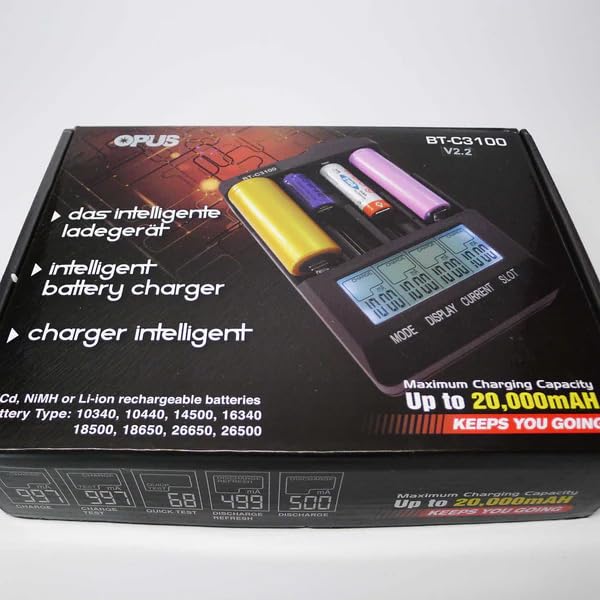
This image displays the Opus BT-C3100 battery charger, a black unit with four independent charging slots and a digital display. It is shown alongside its power adapter and the product's retail packaging, which highlights features like 'intelligent battery charger' and compatibility with NiCd, NiMH, and Li-ion batteries.
3. Operating Modes
The BT-C3100 offers five distinct operating modes:
- Charge Mode: Charges batteries at a selected current (200mA, 300mA, 500mA, 700mA, 1000mA for 4 channels; up to 2000mA for 2 channels). The charger uses minus delta voltage termination for NiCd/NiMH and 4.2V CC/CV for Li-ion batteries.
- Discharge Mode: Discharges batteries to a set voltage to determine their actual capacity. Discharge testing is available up to 1A.
- Test Mode: Fully charges the battery, then discharges it to measure its capacity, and finally recharges it. This provides an accurate capacity reading.
- Quick Test Mode: Quickly tests the internal resistance of the battery. A lower resistance indicates a healthier battery.
- Refresh Mode: Cycles the battery through charge and discharge cycles multiple times to restore its full capacity, particularly useful for older NiCd/NiMH batteries.
To select a mode, insert a battery into a slot, then press the 'MODE' button repeatedly until the desired mode is displayed. Use the 'CURRENT' button to adjust the charging/discharging current if applicable. The 'DISPLAY' button cycles through information such as voltage, current, time, and capacity.
Battery Compatibility: The charger supports 3.6V/3.7V Lithium Ion Batteries (e.g., 10340, 10350, 10440, 10500, 12340, 12500, 12650, 13450, 13500, 13650, 14350, 14430, 14500, 14650, 16500, 16340, 16650, 17350, 17500, 17650, 17670, 18350, 18490, 18500, 18650, 18700, 20700, 21700, 22500, 22650, 25500, 26500, 26650) as well as NiCd and NiMH AA/AAA batteries. A switch on the PCB allows selection between 3.7V LiFePO4 charging or 4.35V high voltage Li-ion charging; default is 4.2V CC/CV.
4. Maintenance
Proper maintenance ensures the longevity and optimal performance of your charger:
- Cleaning: Disconnect the charger from power before cleaning. Use a soft, dry cloth to wipe the exterior. Do not use abrasive cleaners or solvents.
- Storage: Store the charger in a cool, dry place away from direct sunlight and extreme temperatures when not in use.
- Safety: Avoid exposing the charger to water or high humidity. Do not attempt to disassemble or modify the unit, as this will void the warranty and may pose a safety risk.
5. Troubleshooting
If you encounter issues with your Opus BT-C3100, consider the following:
- Charger Not Powering On: Ensure the power adapter is securely connected to both the wall outlet and the charger. Verify the outlet is functional.
- Battery Not Charging/Recognized: Check that the battery is inserted correctly with the correct polarity. Ensure the battery type is compatible with the charger. Clean battery contacts if necessary.
- Display Errors: Refer to the specific error codes in the full manual (if available) or try removing and reinserting the battery.
- Overheating: While some warmth is normal during operation, excessive heat may indicate an issue. Ensure adequate ventilation around the charger. Discontinue use if overheating persists.
6. Specifications
| Input Voltage | AC 100V-240V 50/60Hz or DC 12V 2A |
| Output Current | 200mA, 300mA, 500mA, 700mA, 1000mA (4 channels) or 2000mA (2 channels) |
| Output Voltage | 4.2 Volts (Li-ion default) |
| Compatible Battery Types | NiCd, NiMH, 3.6V/3.7V Li-ion (e.g., AA, AAA, 18650, 26650) |
| Number of Bays | 4 independent channels |
| Product Dimensions | 6.5"D x 3.5"W x 2"H |
| Color | Black |
7. Warranty and Support
This Opus BT-C3100 charger comes with a 90-day warranty from the date of purchase. This warranty covers manufacturing defects under normal use. It does not cover damage caused by misuse, accidents, unauthorized modifications, or improper handling.
For technical support, warranty claims, or further assistance, please contact the seller or retailer from whom you purchased the product. Please have your purchase receipt and product model number ready when contacting support.


