
Introduction
The daylight Halo Go 2 is a portable and rechargeable magnifying lamp designed to provide precise illumination and magnification for detailed tasks. This manual provides essential information for the safe and effective use, setup, operation, and maintenance of your Halo Go 2 lamp.
Safety Information
- Do not disassemble or modify the lamp. This may cause damage or injury and will void the warranty.
- Keep the lamp away from water or other liquids.
- Use only the provided USB cable for charging.
- Avoid direct eye exposure to the LED light for prolonged periods.
- Keep out of reach of children.
- Ensure the lamp is placed on a stable, flat surface during use.
Package Contents
Please check the package for the following items:
- daylight Halo Go 2 Magnifying Lamp
- USB Charging Cable
- Velvet Carry Case
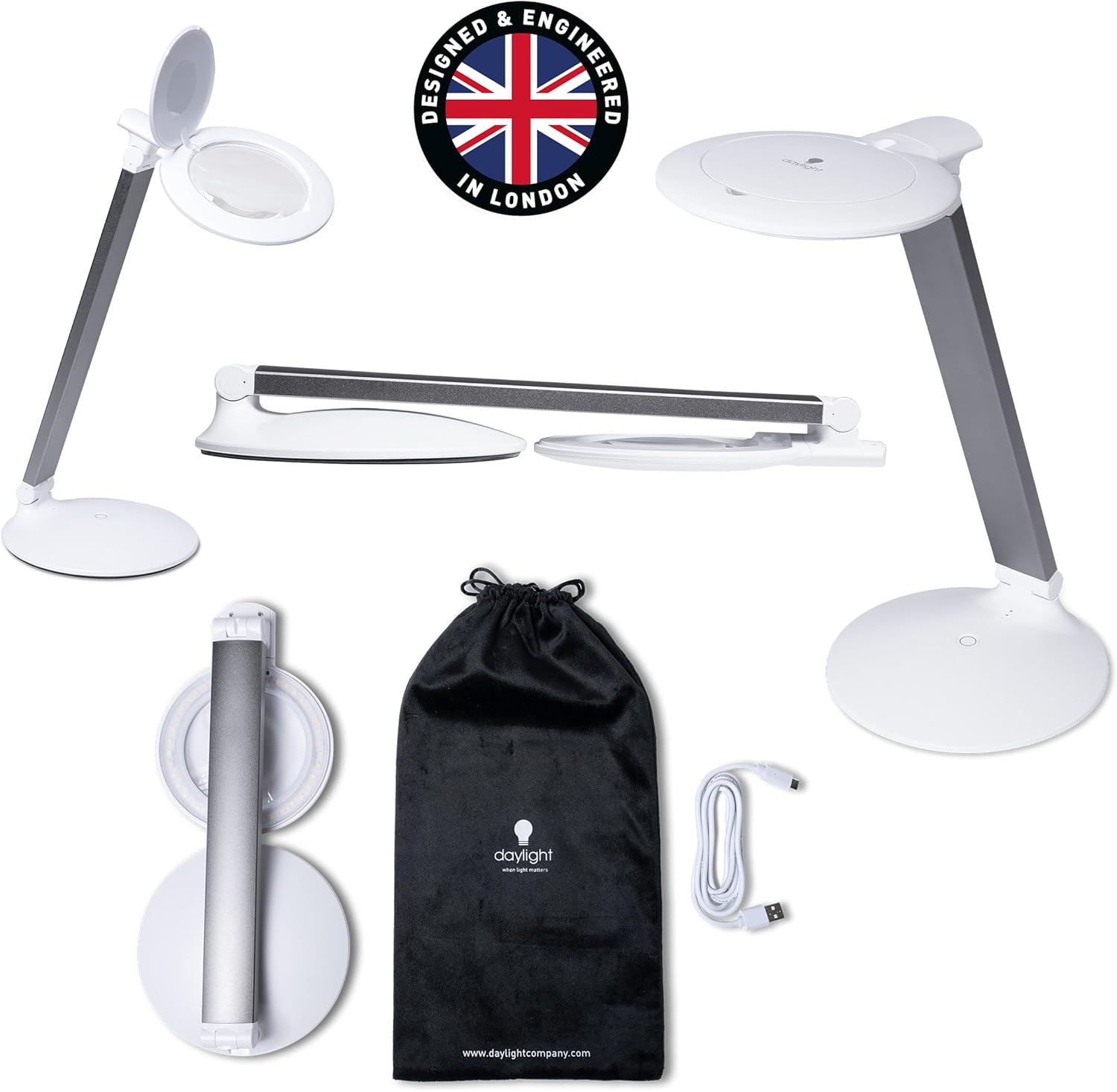
Image: The Halo Go 2 lamp, its USB charging cable, and the included velvet carry case.
Product Overview
The Halo Go 2 lamp features a compact, foldable design for portability and ease of storage. Key components include the lamp head with an integrated magnifying lens, an adjustable arm, a stable base, and a power/brightness control button.

Image: The Halo Go 2 lamp fully extended, showing the lamp head, arm, and base.

Image: A visual representation of the lamp's foldable design, transitioning from an upright position to a compact, flat form.
Setup
- Unpack: Carefully remove all components from the packaging.
- Unfold: Gently unfold the lamp from its compact position. The arm can be adjusted to your desired angle.
- Initial Charge: Before first use, it is recommended to fully charge the lamp. Refer to the 'Charging' section for instructions.
Operating Instructions
- Power On/Off: Press the power button located on the base of the lamp to turn it on. Press again to cycle through brightness settings and turn off.
- Adjust Brightness: The lamp features two brightness settings. Press the power button once for the high mode (powerful light for detailed work) and a second time for the low mode (softer glow for general tasks or reading). A third press will turn the lamp off.
- Using the Magnifier: Open the lens safety cover to access the 5-diopter (2.25X) magnifying lens. For higher magnification, use the integrated 12-diopter (4.0X) inset lens.
- Adjusting the Arm: The lamp's arm is flexible, allowing you to position the light and magnifier precisely where needed.
- Standalone Lamp Use: The lamp can be used as a regular task lamp by keeping the lens safety cover closed.

Image: Examples of the Halo Go 2 lamp in use for reading (low brightness) and detailed nail work (high brightness).

Image: Various applications of the Halo Go 2 lamp, demonstrating its use for detailed tasks like nail care and embroidery with magnification.
Charging
The Halo Go 2 lamp is equipped with a rechargeable battery, offering up to 8 hours of consistent lighting on a full charge.
- Connect the provided USB charging cable to the charging port on the lamp's base.
- Plug the other end of the USB cable into a compatible USB power source (e.g., laptop, phone charger, USB power bank).
- The charging indicator lights (usually small LEDs on the base) will illuminate to show charging status. Refer to the product's specific indicator behavior for full charge notification.
- Once fully charged, disconnect the lamp from the power source.
Maintenance
- Cleaning the Lens: Use a soft, lint-free cloth specifically designed for optical lenses to clean the magnifying lens. Do not use abrasive cleaners or harsh chemicals.
- Cleaning the Lamp Body: Wipe the lamp's surface with a soft, damp cloth. Avoid getting moisture into any openings.
- Storage: When not in use, fold the lamp into its compact form and store it in the included velvet carry case to protect it from dust and scratches.
Troubleshooting
| Problem | Possible Cause | Solution |
|---|---|---|
| Lamp does not turn on. | Battery is depleted. | Charge the lamp fully using the provided USB cable. |
| Lamp does not charge. | Faulty USB cable or power adapter. | Try a different USB cable or power adapter. Ensure connections are secure. |
| Light flickers or is dim. | Low battery. | Recharge the lamp. |
| Magnification is unclear. | Lens is dirty or smudged. | Clean the lens with a soft, lint-free cloth. |
Specifications
- Model: Halo Go 2 (U25400)
- Magnification: 5 Diopter (2.25X), 12 Diopter (4.0X) inset
- Light Source: LED
- Color Temperature: 6,000K
- Brightness: 4,200 Lux at 15cm, 330 Lumens
- Color Rendering Index (CRI): 95+
- Power Consumption: 5W
- Voltage: 5V (DC)
- Battery Life: Up to 8 hours (on full charge)
- LED Lifespan: 25,000 hours
- Dimensions: 1.97"D x 6.1"W x 13.58"H (unfolded)
- Item Weight: 2.1 Pounds
- Material: Lightweight Metal, Plastic
- Special Features: 3-Way, Adjustable Arm, Cordless, Portable, Rechargeable
- Included Components: Carrying Case, Power Cable
- UPC: 809802254006
Warranty and Support
The daylight Halo Go 2 Magnifying Lamp comes with a 2-year manufacturer's warranty. For warranty claims, technical support, or any inquiries regarding your product, please contact daylight customer service. Keep your proof of purchase for warranty validation.
For further assistance, please visit the official daylight website or contact their customer support channels.


