
1. Introduction
The Eversolo DMP-A6 Master Gen 2-Silver is a high-fidelity music streamer designed to deliver exceptional audio performance. This device integrates advanced digital-to-analog conversion (DAC) capabilities with comprehensive music streaming features, supporting a wide array of audio formats and online services. It features a 6-inch LCD color touchscreen for intuitive control and can also be managed via a dedicated mobile application. This manual provides detailed instructions for setting up, operating, maintaining, and troubleshooting your DMP-A6 Master Gen 2-Silver.

Image: The Eversolo DMP-A6 Master Gen 2-Silver, a sleek, silver-colored high-fidelity music streamer with a large front display and a prominent volume knob.
2. What's in the Box
Upon unboxing your Eversolo DMP-A6 Master Gen 2-Silver, please ensure all the following items are present:
- Power Cable
- USB Cable
- Screwdriver
- User Manual (this document)
- Trigger Cable
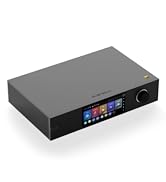
Image: A black box labeled 'eversolo' next to a list of included accessories: Power cable, USB cable, Screwdriver, User Manual, and Trigger cable.
3. Product Overview
Front Panel and Display
The front panel features a prominent 6-inch LCD color touchscreen, which serves as the primary interface for navigating menus, selecting music, and adjusting settings. To the right of the screen is a multi-function rotary knob, typically used for volume control and menu navigation. The display provides real-time information about the currently playing track, audio format, and system status.

Image: A close-up view of the Eversolo DMP-A6 Master Gen 2-Silver's 6-inch LCD touchscreen, displaying music playback information including artist, song title, and audio format details.
Rear Panel Connections
The rear panel houses all the necessary input and output ports for connecting the DMP-A6 Master Gen 2-Silver to your audio system and network. These include various digital and analog audio connections, as well as network and USB ports.

Image: The rear panel of the Eversolo DMP-A6 Master Gen 2-Silver, showing a comprehensive array of input and output ports including Gigabit LAN, HDMI Out, USB 3.0, USB-B, Optical, Coaxial, XLR, and RCA outputs, along with power input and trigger ports.
4. Setup
Follow these steps to set up your Eversolo DMP-A6 Master Gen 2-Silver:
- Power Connection: Connect the provided power cable to the AC inlet on the rear panel and plug it into a suitable power outlet.
- Network Connection: For optimal streaming performance, connect an Ethernet cable from your router to the Gigabit LAN port on the rear panel. Alternatively, the device supports Wi-Fi connectivity, which can be configured via the on-screen menu during initial setup.
- Audio Output Connection:
- Analog Output: Connect the XLR (balanced) or RCA (unbalanced) outputs to your active speakers or power amplifier's corresponding inputs.
- Digital Output: Use the HDMI, USB, Optical, or Coaxial digital outputs to connect to an external DAC or AV receiver. Note that digital inputs do not provide digital outputs; only analog outputs are available from digital sources.
- Audio Input Connection: If using the DMP-A6 as a decoder, connect your source devices to the Coaxial, Optical, or Type-C USB inputs. HD Bluetooth input is also available.
- HDMI ARC Connection: If you wish to transmit TV audio directly to the DMP-A6, connect your TV's HDMI ARC port to the HDMI ARC input on the DMP-A6. This reduces cable connections and simplifies audio routing.
- Trigger Connection: Utilize the Trigger cable to link the DMP-A6 with other compatible devices, enabling automatic power on/off synchronization.
- Initial Power On: Press the power button on the front panel or use the remote control to turn on the device. Follow the on-screen prompts for initial setup, including language selection and network configuration.

Image: A close-up of the rear panel of the Eversolo DMP-A6 Master Gen 2-Silver, with an HDMI cable being connected to the HDMI Out port, illustrating the connectivity options.
5. Operating Instructions
User Interface and Navigation
The DMP-A6 Master Gen 2-Silver operates on a deeply tailored Android 11 system, providing a user-friendly interface accessible via the 6-inch touchscreen. Navigate through menus, select music, and adjust settings directly on the device.
Mobile Application Control
For enhanced convenience, the Eversolo DMP-A6 can be controlled using an exclusive mobile application available for Android and iOS devices. This app allows you to browse your music library, control playback, and manage settings remotely.

Image: A hand holding a smartphone displaying the Eversolo mobile application interface, showing music browsing and playback controls.

Image: A person using a tablet to control the Eversolo DMP-A6 Master Gen 2-Silver, demonstrating the convenience of remote operation.
Music Services and Streaming
The DMP-A6 Master Gen 2-Silver supports a variety of popular music services and streaming protocols, allowing you to access a vast library of high-quality audio content:
- Amazon Music
- TIDAL (including TIDAL Connect)
- Qobuz
- HIRESAUDIO
- Roon Ready
- DLNA
- Other services like Deezer, KKBOX, Calm Radio, Radio Paradise, Apple Music, Spotify, Soundcloud, etc.

Image: A collage of logos representing various supported music streaming services and platforms, including Qobuz, Deezer, Amazon Music, TIDAL, and Roon Ready.
Personalized Music Library
The device allows for cross-platform addition of music files from local drives (e.g., connected USB storage) or network storage (e.g., NAS). You can easily customize and manage your own hybrid playlists and queues, integrating content from various sources and streaming services.
Master Recording Playback and Decoding
The DMP-A6 Master Gen 2-Silver supports a comprehensive range of ultra-high sampling master recording formats, ensuring high-fidelity audio reproduction:
- CD-quality formats (FLAC, WAV, APE)
- DSD512 (dsf/.dff/.iso/.dst) stereo/multichannel
- MQA (Master Quality Authenticated)

Image: Logos representing various high-resolution audio formats supported by the Eversolo DMP-A6 Master Gen 2-Silver, including FLAC, DSD, MQA, WAV, and APE.
6. Maintenance
To ensure the longevity and optimal performance of your Eversolo DMP-A6 Master Gen 2-Silver, follow these maintenance guidelines:
- Cleaning: Use a soft, dry cloth to wipe the exterior of the device. Avoid using abrasive cleaners, solvents, or chemical sprays, as they may damage the finish.
- Ventilation: Ensure the device is placed in a well-ventilated area to prevent overheating. Do not block the ventilation openings.
- Environment: Keep the device away from direct sunlight, heat sources, excessive dust, moisture, and strong electromagnetic fields.
- Firmware Updates: Regularly check for and install firmware updates. Eversolo provides monthly firmware updates to improve performance and add new features. These can typically be performed directly through the device's system settings or via the mobile app.
7. Troubleshooting
If you encounter issues with your DMP-A6 Master Gen 2-Silver, refer to the following common troubleshooting steps:
| Problem | Possible Cause | Solution |
|---|---|---|
| No power | Power cable not connected; Power outlet faulty; Device switch off | Ensure power cable is securely connected; Try a different power outlet; Check the power switch on the rear panel. |
| No sound output | Incorrect audio output selected; Cables not connected properly; Amplifier/speakers off or muted | Verify the correct output (XLR, RCA, HDMI, etc.) is selected in settings; Check all audio cable connections; Ensure your amplifier/speakers are powered on and not muted. |
| Cannot connect to network (Wi-Fi/Ethernet) | Incorrect network settings; Router issue; Weak Wi-Fi signal | Check Wi-Fi password or Ethernet cable connection; Restart your router; Move the device closer to the router or use an Ethernet connection. |
| Mobile app not connecting | Device and phone on different networks; App version outdated | Ensure both the DMP-A6 and your mobile device are connected to the same Wi-Fi network; Update the Eversolo app to the latest version. |
| Music playback issues (skipping, stuttering) | Network congestion; High-resolution file playback; External storage issue | Ensure stable internet connection for streaming; Try playing a local file to rule out network issues; Check external storage device for errors. |
If the problem persists after attempting these solutions, please contact Eversolo customer support through their official service channels.
8. Specifications
| Feature | Detail |
|---|---|
| Model Name | DMP-A6 Master Gen 2-Silver |
| Product Dimensions | 7.36 x 10.63 x 3.54 inches |
| Item Weight | 9.29 pounds |
| Connectivity Technology | Bluetooth, Ethernet, HDMI, Wi-Fi |
| Connector Type | HDMI, USB, Optical, Coaxial, XLR, RCA |
| Special Features | Professional EQ, Roon Ready, Squeezelite, TIDAL Connect, Touch Screen, HDMI ARC, TRIGGER functions, Op-amp Chip OPA1612, Upgraded linear power supply (<40uV noise) |
| Supported Internet Services | Amazon Music, TIDAL, Qobuz, HIRESAUDIO, Roon Ready, Deezer, Apple Music, Spotify, Soundcloud, etc. |
| Supported Audio Formats | FLAC, WAV, APE, DSD512 (dsf/.dff/.iso/.dst), MQA, PCM768kHz/32Bit |
| Controller Type | App Control, Remote Control, Touchscreen |
| Operating System | Android 11 (tailored system) |
9. Warranty and Support
Eversolo offers a 12-month after-sales warranty for the DMP-A6 Master Gen 2-Silver. For any comments, questions, or support inquiries, please utilize Eversolo's official service channels:
- Official Website Forum
- Email support
Expect a prompt response from their dedicated support team. Regular firmware updates are provided monthly to enhance performance and user experience.


