1. Introduction
Thank you for choosing the HOU iPad Keyboard Case. This manual provides detailed instructions for setting up, operating, and maintaining your new keyboard case. Designed for enhanced productivity and protection, this accessory transforms your iPad into a versatile workstation.
2. Compatibility
This keyboard case is designed to be compatible with specific iPad models. Please verify your iPad's model number to ensure proper fit and functionality.
How to Check Your iPad Model:
- Go to Settings on your iPad.
- Tap on General, then About.
- Locate the Model Number. It typically starts with 'A' followed by four digits (e.g., A2602).
- Alternatively, the model number is printed in tiny text on the back case of your iPad.
Compatible iPad Models:
- iPad 9th Generation 10.2 inch 2021 (Model Numbers: A2602/A2603/A2604/A2605)
- iPad 8th Generation 10.2 inch 2020 (Model Numbers: A2270/A2428/A2429/A2430)
- iPad 7th Generation 10.2 inch 2019 (Model Numbers: A2200/A2197/A2198)
- iPad Air 3 (10.5 inch)
- iPad Pro 10.5 inch 2017

3. Key Features
The HOU iPad Keyboard Case offers a range of features designed to enhance your iPad experience:
- Silent & Responsive Typing: Equipped with premium silicone-coated scissor switches for quiet, comfortable, and efficient typing.
- Magnetic Detachable Design: The keyboard can be easily detached from the case, allowing for flexible use in tablet mode or laptop mode.
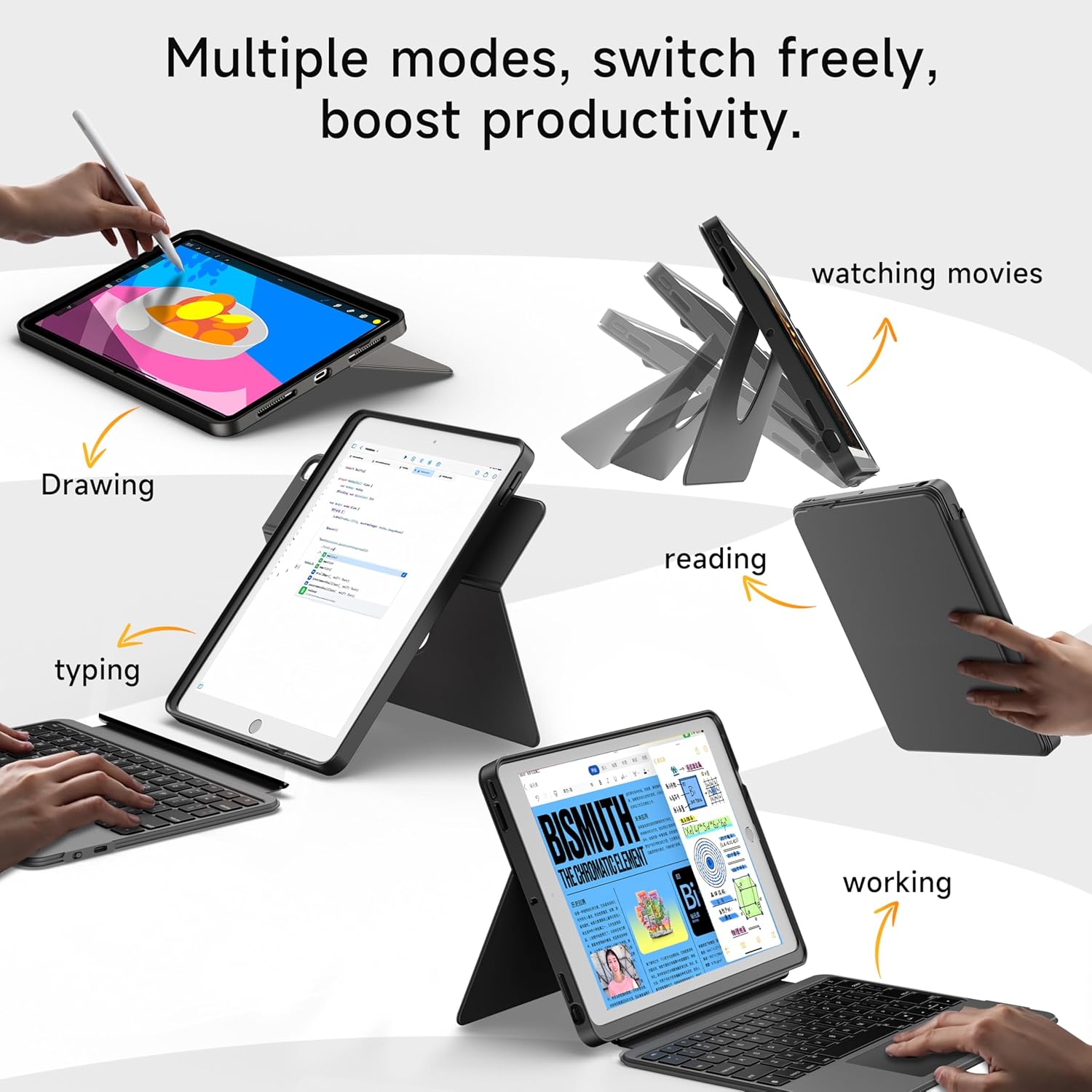
- 360° Rotating Stand with Adjustable Angles: Provides versatile viewing angles, supporting both portrait and landscape orientations for various activities like reading, watching, or presenting.
- 7-Color Backlit Keyboard: Features adjustable 7-color backlighting for typing in low-light conditions, with customizable brightness levels.
- Military-Grade Protection: The shockproof silicone case offers 360° protection against drops and spills.
- Secure Apple Pencil Storage: Includes an elastic strap to securely hold your Apple Pencil.
- Integrated Touchpad: A large multi-touch touchpad supports iOS gestures for precise navigation.
- Long Battery Life: The keyboard features a 500mAh battery, providing up to 50 hours of use with backlighting off, or 4-6 hours with backlighting on.

4. Setup Instructions
4.1. Charging the Keyboard
Before first use, ensure the keyboard is fully charged.
- Locate the USB-C charging port on the side of the keyboard.
- Connect the provided USB-C cable to the keyboard and a compatible power adapter (not included).
- The LED indicator will turn red during charging and turn off when fully charged. A 2-hour charge provides weeks of use.

4.2. Bluetooth Pairing
Follow these steps to connect your keyboard to your iPad via Bluetooth:
- Ensure the keyboard is charged and turn it on using the power switch.
- On your iPad, go to Settings > Bluetooth.
- Press and hold the FN + CONTROL + R keys on the keyboard for 3 seconds to enter pairing mode. The Bluetooth indicator light on the keyboard will flash.
- On your iPad, select "HOU Keyboard" from the list of available devices.
- Once paired, the Bluetooth indicator light on the keyboard will turn off.
5. Operating Instructions
5.1. Using the Keyboard
The keyboard provides a full QWERTY layout with dedicated iOS command keys for efficient workflow.
- Shortcut Keys: Access one-tap shortcuts for screen brightness, media playback, volume control, Lock, Home, and Emoji functions.
- Typing: Enjoy a comfortable and quiet typing experience for documents, emails, and more.

5.2. Adjusting Backlight
The keyboard features 7-color backlighting with adjustable brightness.
- Change Color: Press FN + Light Bulb icon to cycle through the 7 available colors.
- Adjust Brightness: Press FN + Up Arrow or FN + Down Arrow to increase or decrease backlight brightness.
5.3. Using the Touchpad
The large multi-touch touchpad supports various iOS gestures for intuitive navigation:
- Single Finger Tap: Click/Select.
- Two Fingers Swipe: Scroll up/down/left/right.
- Three Fingers Swipe Up: Go to Home screen.
- Three Fingers Swipe Down: View Control Center.
- Pinch In/Out: Zoom in/out.
5.4. Utilizing the 360° Rotating Stand
The integrated stand allows for flexible viewing options:
- Landscape Mode: Ideal for watching videos, presentations, or typing.
- Portrait Mode: Perfect for reading documents, browsing social media, or video calls.
- Adjustable Tilt: Tilt the screen from 90° (typing) to 170° (movie nights) for optimal comfort.


6. Maintenance
To ensure the longevity and optimal performance of your HOU iPad Keyboard Case, follow these maintenance guidelines:
- Cleaning: Use a soft, damp cloth to wipe down the exterior of the case and keyboard. Avoid harsh chemicals or abrasive materials.
- Storage: When not in use, keep the keyboard case closed to protect the screen and keyboard. Store in a cool, dry place away from extreme temperatures.
- Avoid Liquids: While the case offers some protection, avoid direct exposure to liquids to prevent damage to the electronic components.
7. Troubleshooting
If you encounter any issues with your HOU iPad Keyboard Case, refer to the following common solutions:
- Keyboard Not Connecting via Bluetooth:
- Ensure the keyboard is fully charged and powered on.
- Turn off and on your iPad's Bluetooth, then try pairing again.
- Make sure your iPad's operating system is iOS 15.3 or later.
- Keyboard Not Responding:
- Check the keyboard's battery level. Recharge if necessary.
- Reconnect the Bluetooth connection.
- Backlight Not Working:
- Ensure the keyboard is powered on.
- Press FN + Light Bulb icon to activate or change backlight settings.
- Touchpad Lag or Unresponsiveness:
- Ensure the keyboard battery is not critically low.
- Restart the Bluetooth connection on your iPad.
8. Product Specifications
| Feature | Detail |
|---|---|
| Brand | HOU |
| Model Number | B0DTKBTV4H |
| Compatible Devices | iPad 9th/8th/7th Gen 10.2", iPad Air 3, iPad Pro 10.5" 2017 |
| Connectivity Technology | Bluetooth |
| Keyboard Description | Ergonomic, Ultra-Silent Keys, X-shaped high-rebound keys |
| Special Features | Backlit (7-Color), Detachable Case, Hotkeys and Media Keys, Portable, Trackpad, 360° Rotating Stand, Apple Pencil Holder |
| Battery Capacity | 500mAh (Lithium) |
| Battery Life | Up to 50 hours (backlight off), 4-6 hours (backlight on) |
| Charging Port | USB-C |
| Material | Silicone (Shockproof, Military-Grade Protection) |
| Item Weight | 1.34 pounds (approx. 608g) |
| Included Components | Keyboard, Case, USB-C Charging Cable |
9. Warranty and Customer Support
Your HOU iPad Keyboard Case is backed by a comprehensive warranty and dedicated customer support.
- 1-Year Replacement Guarantee: Enjoy peace of mind with a 1-year replacement warranty covering manufacturing defects.
- 30-Day Refund Policy: If you are not completely satisfied with your purchase, you may return it within 30 days for a full refund.
- 24/7 Customer Support: For any questions, concerns, or assistance, please contact our customer support team available 24 hours a day, 7 days a week.


