
XINFUTE RCS-4MVPS4EX
User Manual for XINFUTE Air Conditioner Remote Control
Model: RCS-4MVPS4EX
Introduction
This manual provides detailed instructions for the operation and maintenance of your new XINFUTE RCS-4MVPS4EX Air Conditioner Remote Control. This remote is designed as a replacement unit for Sanyo Air Conditioners, offering essential functions for comfortable climate control. Please read this manual thoroughly before use to ensure proper functionality and longevity of the product.
The remote control is made of durable ABS material and comes in the color as shown. It is a direct replacement unit and is intended to function as well as the original remote.
Product Overview

Figure 1: Front view of the remote control, showing the display with temperature set to 78°F, time, and basic function buttons like HIGH POWER, ON-I/OFF-O, 1HR., and TEMP. adjustment.
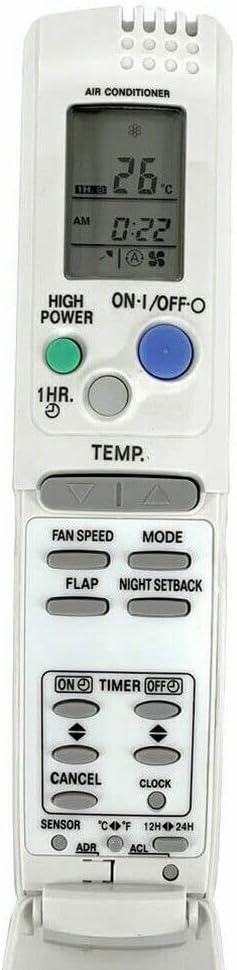
Figure 2: Front view of the remote control with the lower protective flap opened, exposing advanced control buttons such as FAN SPEED, MODE, FLAP, NIGHT SETBACK, TIMER ON/OFF, CANCEL, CLOCK, SENSOR, ADR, and ACL.

Figure 3: Side profile of the remote control, illustrating the design and the opened lower flap that conceals additional control buttons.
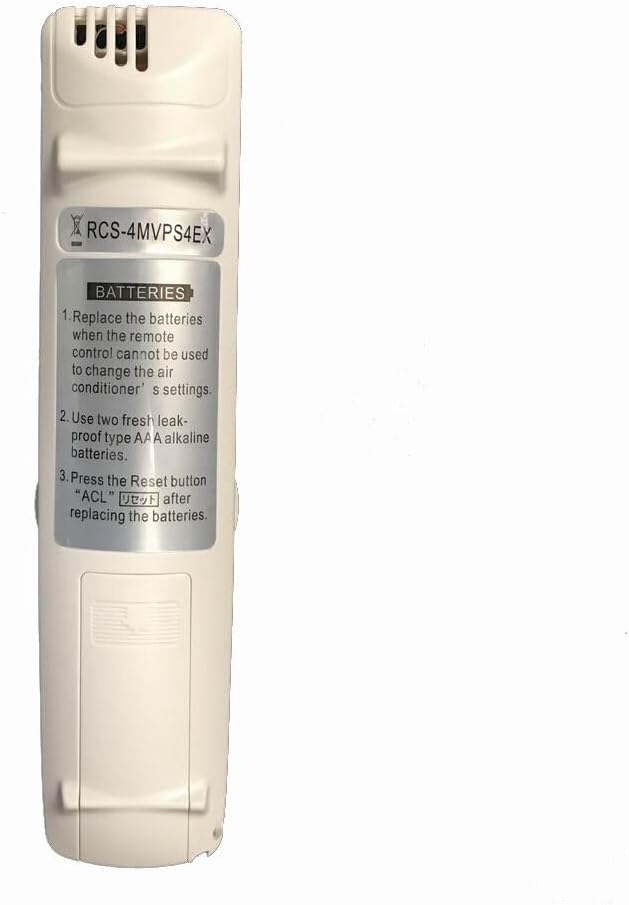
Figure 4: Rear view of the remote control, highlighting the battery compartment cover and printed instructions for battery replacement and reset procedures.
Setup
Battery Installation
The remote control requires two (2) AAA batteries for operation. Batteries are not included with the purchase.
- Locate the battery compartment on the back of the remote control.
- Slide the battery compartment cover downwards to open it.
- Insert two fresh, leak-proof AAA alkaline batteries, ensuring the correct polarity (+ and -) as indicated inside the compartment.
- Slide the battery compartment cover back into place until it clicks securely.
Note: The remote control does not require any pairing or complex setup. Once batteries are installed, it is ready for use with compatible Sanyo Air Conditioners.
Figure 5: Detailed view of the battery compartment on the back of the remote, illustrating where to insert the AAA batteries and the printed instructions for battery replacement and reset.
Operating Instructions
This section details the functions of the buttons on your remote control.
Basic Functions (Upper Panel)
- ON-I/OFF-O Button (Blue): Press to turn the air conditioner ON or OFF.
- HIGH POWER Button (Green): Activates or deactivates the high power mode for rapid cooling or heating.
- 1HR. Button (Grey): Likely for a 1-hour timer function. Refer to your air conditioner's manual for specific functionality.
- TEMP. Buttons (Grey Arrows): Use the up and down arrows to adjust the desired temperature setting. The display shows the current temperature.
Figure 6: Focus on the upper section of the remote, highlighting the primary control buttons and the digital display showing temperature and operational status.
Advanced Functions (Under Flap)
Open the lower protective flap to access additional control options.
- FAN SPEED: Adjusts the fan speed of the air conditioner.
- MODE: Cycles through different operating modes (e.g., Cool, Heat, Fan, Dry, Auto).
- FLAP: Controls the louver/flap direction or swing function.
- NIGHT SETBACK: Activates or deactivates a sleep mode or night setback function for energy saving and comfort during sleep.
- TIMER ON/OFF: Sets the timer for the air conditioner to turn on or off automatically.
- CANCEL: Cancels active timer settings or other programmed functions.
- CLOCK: Sets the current time on the remote's display.
- SENSOR: May relate to an internal temperature sensor or a specific sensor mode.
- °C/°F: Toggles the temperature display between Celsius and Fahrenheit.
- 12H/24H: Toggles the time display between 12-hour and 24-hour format.
- ADR: Specific function, likely related to address setting or advanced mode. Refer to your air conditioner's manual.
- ACL (Reset Button): Press this button with a pointed object (like a pen tip) to reset the remote control to its factory default settings. This is often required after battery replacement.
Figure 7: Detailed view of the remote control with the lower flap open, providing a clear look at all the advanced function buttons available for comprehensive control of the air conditioner.
Maintenance
Cleaning
To maintain the appearance and functionality of your remote control:
- Wipe the surface with a soft, dry cloth.
- For stubborn dirt, lightly dampen the cloth with water and a mild detergent, then wipe dry immediately.
- Do not use abrasive cleaners, alcohol, or solvents, as these can damage the plastic and printed labels.
Battery Replacement
Replace batteries when the remote control's display becomes dim or if the remote becomes unresponsive. Always replace both batteries at the same time with new, fresh AAA alkaline batteries.
After replacing batteries, it is recommended to press the "ACL" (Reset) button to ensure proper operation. Use a small, pointed object like a paperclip or pen tip to press the recessed ACL button.
Troubleshooting
| Problem | Possible Cause | Solution |
|---|---|---|
| Remote control not responding. | Dead or low batteries. Incorrect battery polarity. Remote not pointed at AC unit. Obstruction between remote and AC unit. | Replace batteries with new AAA alkaline batteries. Ensure batteries are inserted with correct polarity. Point remote directly at the air conditioner's receiver. Remove any obstructions. |
| Display is dim or blank. | Low batteries. | Replace batteries. |
| Functions not working correctly after battery replacement. | Remote needs to be reset. | Press the "ACL" (Reset) button using a pointed object. |
| Remote works but specific AC functions don't respond. | Compatibility issue with specific AC model. AC unit malfunction. | Verify the remote's compatibility with your specific Sanyo Air Conditioner model. Consult your air conditioner's manual or a qualified technician if the AC unit itself is not responding to other controls. |
Specifications
- Model: RCS-4MVPS4EX
- Brand: XINFUTE
- Material: ABS Material
- Color: As Shown
- Power Source: 2 x AAA Batteries (not included)
- Product Dimensions: 4 x 3 x 1 inches (approximately)
- Item Weight: 2.4 ounces (approximately)
- Max Number of Supported Devices: 1 (designed for a single air conditioner unit)
- Country of Origin: China
Warranty and Support
Warranty Information
This product comes with a one-year warranty from the date of purchase. This warranty covers manufacturing defects and ensures the product functions as described. Please retain your proof of purchase for warranty claims.
Customer Support
All goods are inspected before shipment. If you are not satisfied with your purchase, or if you encounter any issues, please contact the seller within 24 hours of receipt of your purchase for assistance. For general inquiries or support, please refer to the contact information provided by your retailer or the XINFUTE brand's official support channels.
Ask a question about this manual
Ask about setup, troubleshooting, compatibility, parts, safety, or missing instructions. Manuals+ will review the question and use this page’s manual context to help answer it.