
Introduction
Thank you for choosing the MFSTUDIO 4-Piece Outdoor Patio Furniture Set. This manual provides essential information for the safe assembly, operation, and maintenance of your new outdoor conversation set. Please read these instructions carefully before assembly and retain them for future reference.
Safety Information
- Ensure all components are present and undamaged before assembly. Do not use if any parts are missing or broken.
- Assemble the furniture on a soft, clean surface to prevent scratches.
- Tighten all bolts and screws firmly, but do not overtighten. Re-tighten periodically.
- Keep children away from the assembly area. Small parts can be a choking hazard.
- Do not stand or jump on the furniture.
- Place the furniture on a level surface to prevent tipping.
- Avoid exposing cushions to prolonged heavy rain or extreme weather conditions. Store cushions indoors during inclement weather.
Package Contents
Your MFSTUDIO 4-Piece Outdoor Patio Furniture Set includes the following components:
- 1 x Three-Seat Sofa
- 2 x Rocking Single Sofas
- 1 x Coffee Table
- Seat and Back Cushions (Navy Blue)
- Assembly Hardware (bolts, washers, nuts, Allen wrench)
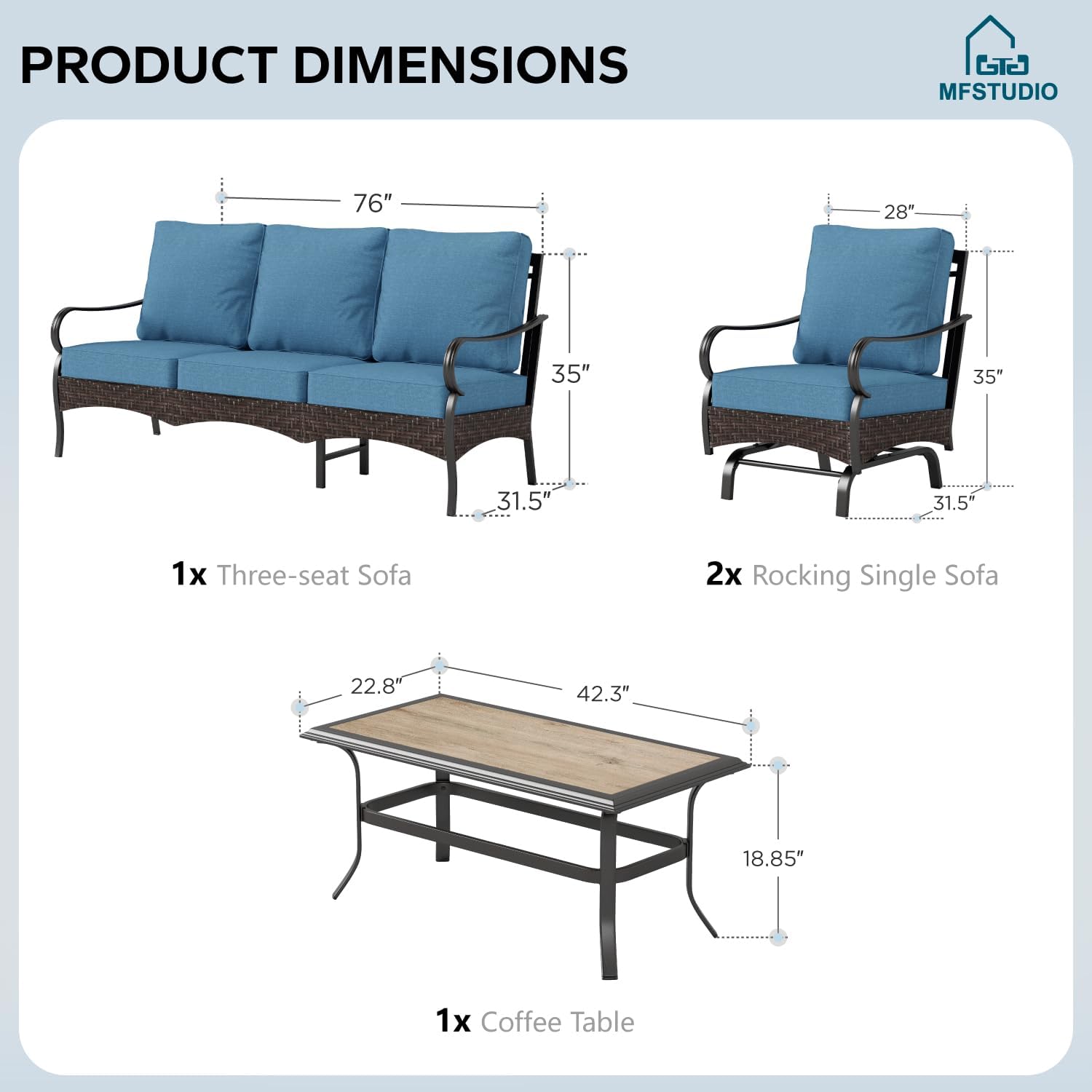
Figure 1: Product Dimensions and Components
Setup and Assembly
Assembly is required for this furniture set. Please follow the steps below. It is recommended to have two people for assembly.
- Unpack Components: Carefully remove all parts from the packaging. Lay them out on a soft, non-abrasive surface to avoid damage. Verify all parts are present against the package contents list.
- Assemble Sofa Frames: For the three-seat sofa and rocking single sofas, attach the backrests to the seat frames using the provided bolts and Allen wrench. Ensure the metal frames are aligned correctly.
- Attach Armrests: Secure the armrests to the assembled seat and backrest sections. Do not fully tighten bolts until all connections are made.
- Assemble Coffee Table: Attach the legs to the coffee table frame and then secure the tabletop.
- Final Tightening: Once all components are loosely assembled, go back and fully tighten all bolts and screws. Do not overtighten.
- Place Cushions: Position the seat and back cushions onto the respective furniture pieces. The cushions feature Velcro and zippers for secure placement and easy removal.
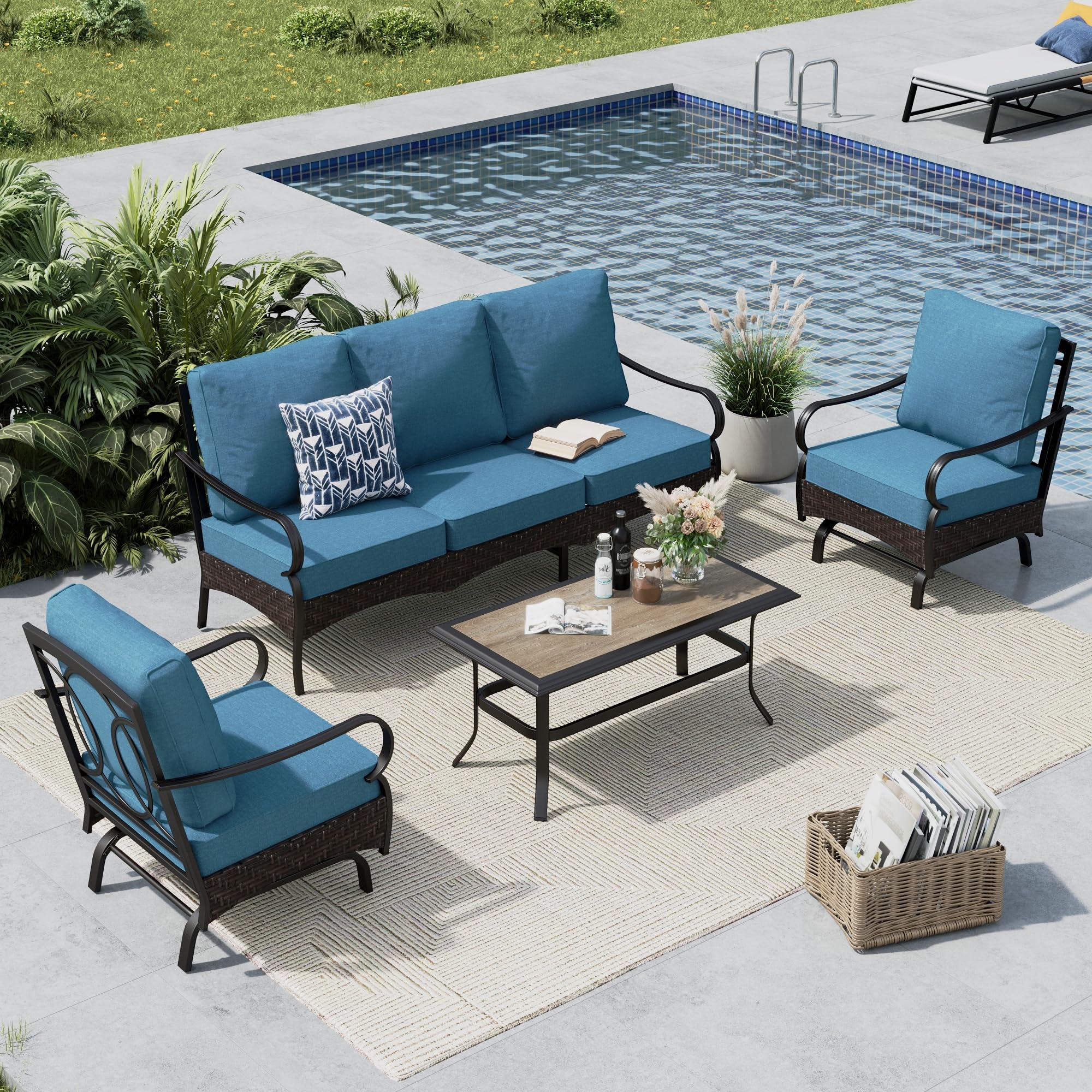
Figure 2: Fully Assembled Furniture Set
Operating Instructions
This outdoor furniture set is designed for comfortable relaxation and conversation.
- Rocking Single Sofas: The two single sofas are designed with a gentle rocking motion for added comfort. Sit centrally and use your feet to initiate a smooth rocking movement.
- Cushion Comfort: The 5.5-inch high-density sponge cushions provide optimal comfort and support. Cushions are secured with Velcro to prevent slipping.
- Coffee Table Use: The coffee table provides a convenient surface for drinks, snacks, and decorative items. Avoid placing excessively hot items directly on the surface without protection.

Figure 3: Rocking Single Sofa

Figure 4: Premium Density Rebound Cushion
Maintenance
Proper care will extend the life and appearance of your MFSTUDIO patio furniture set.
- Frame Care: The steel frame features an E-coating for rust resistance. Clean the frame with a soft cloth and mild soap and water. Rinse thoroughly and dry completely to prevent water spots.
- Cushion Care: The cushions are made with 'Cushion Pro' technology, making them water-proof, stain-resistant, and oil-resistant. Covers are removable via zippers for easy washing. Hand wash or machine wash on a gentle cycle with cold water and mild detergent. Air dry only; do not tumble dry.
- Rattan Care: The rattan wicker is designed for outdoor durability. Clean with a soft brush or cloth and mild soap and water. Rinse and dry.
- Weather Protection: While designed for outdoor use, covering the furniture during prolonged periods of harsh weather (heavy rain, snow, intense sun) or when not in use will help preserve its condition. Store cushions indoors during off-seasons.

Figure 5: Cushion Pro Technology - Water Resistance
Troubleshooting
If you encounter any issues with your furniture set, please refer to the following common solutions:
- Wobbly Furniture: Check all bolts and screws to ensure they are securely tightened. Ensure the furniture is placed on a flat, even surface.
- Difficulty Assembling: Review the assembly steps carefully. Ensure all parts are oriented correctly. Do not fully tighten bolts until all connections are made.
- Cushions Slipping: Ensure the Velcro strips on the cushions and furniture frame are properly aligned and attached.
For further assistance, please contact MFSTUDIO customer support.
Specifications
| Brand | MFSTUDIO |
| Model Number (ASIN) | B0DTK68LPL |
| Color | Navy Blue Motion Set |
| Set Size | 4 Pieces (5 Seats total) |
| Style | Modern |
| Frame Material | Steel with E-coating |
| Wicker Material | Rattan |
| Cushion Thickness | 5.5 inches |
| Single Sofa Weight Capacity | Up to 350 lbs |
| Assembly Required | Yes |
Official Product Videos
MFSTUDIO Outdoor Patio Sofa Conversation Furniture Set
This video showcases the MFSTUDIO outdoor patio sofa conversation furniture set, highlighting its features and overall aesthetic in an outdoor setting.
Stylish Outdoor Sectional Patio Furniture Set
A video demonstrating the stylish design and various configurations of the outdoor sectional patio furniture set.
MFSTUDIO Metal & Rattan Patio Furniture Set
This video provides a closer look at the metal and rattan construction of the MFSTUDIO patio furniture set, emphasizing its durability and aesthetic.
Warranty and Support
For warranty information and customer support, please refer to the documentation included with your purchase or visit the official MFSTUDIO website. You may also contact the seller directly through the platform where the product was purchased.