
1. Product Overview
The TCL 55P655 is a 55-inch (139 cm) 4K Ultra HD Smart LED Google TV designed to deliver a high-quality viewing experience. It features a metallic bezel-less design for an expansive display and integrates advanced technologies for picture and sound optimization.

Front view of the TCL 55P655 55-inch 4K UHD Google TV, highlighting its metallic bezel-less design and key features like 4K HDR and Dolby Audio.
Key Features:
- Display: 4K Ultra HD (3840 x 2160) LED Panel, HDR 10, T-Screen, Dynamic Color Enhancement, Metallic Bezel-Less Design, 178 Degree Wide Viewing Angle, Micro Dimming.
- Processor: AiPQ Processor, 64-bit Quad Core Processor.
- Operating System: Google TV.
- Memory: 2GB RAM, 16GB ROM.
- Audio: 24 Watts output, Dolby Audio MS12Y.
- Connectivity: Wi-Fi (2.4GHz/5GHz dual-band), Bluetooth, 3 HDMI Ports (including eARC/ARC), 1 USB port, Ethernet, Headphone output.
- Special Features: Google Assistant, Multiple Eye Care, Screen Mirroring, Web Browser.

The TCL 55P655 TV displaying its 4-star energy rating and icons representing features such as Dynamic Color Enhancement, AiPQ Processor, T-Screen, Multiple Eye Care, Dolby Audio, HDMI, Google TV, 16GB ROM, and Metallic Bezel-less design.
2. Setup Guide
2.1 Unboxing and Package Contents
Carefully remove all components from the packaging. Ensure all items listed below are present.

An illustration detailing the contents included in the TCL 55P655 TV package: the LED TV unit, Table Top TV Stand, TV Remote, 2 Batteries, and an Audio Cable.
- 1N LED TV
- 1N Audio Cable
- 1N Stand (Table Top)
- 1N Power cord
- 1N Remote Control
- 2N AAA Batteries
2.2 Stand Installation
- Place the TV screen-down on a soft, flat surface to prevent damage.
- Align the stand bases with the corresponding slots on the bottom of the TV.
- Secure the stands using the provided screws. Ensure they are firmly attached.
2.3 Wall Mounting (Optional)
This TV supports VESA-compliant wall mounts. Consult a professional for wall mounting installation to ensure safety and proper setup. Wall mount hardware is typically sold separately.
2.4 Connecting Peripherals
Connect your devices (set-top box, gaming console, Blu-ray player, sound system) to the TV using the appropriate ports.

A detailed side view of the TCL 55P655 TV, illustrating the various connectivity ports including USB 2.0, LAN, HDMI (1, 2 SERVICE, 3 eARC/ARC), Antenna/Cable In, AV In adapter, Headphone, and Digital Audio Out (Optical).
- HDMI Ports: Connect set-top boxes, gaming consoles, or Blu-ray players. HDMI 3 supports eARC/ARC for audio return channel functionality with compatible sound systems.
- USB Port: Connect USB storage devices for media playback.
- LAN (Ethernet): For wired internet connection.
- Antenna/Cable In: Connect an antenna or cable TV feed.
- AV In Adapter: For older devices using composite video and stereo audio.
- Headphone: For connecting headphones.
- Digital Audio Out (Optical): For connecting to external audio receivers or soundbars.
2.5 Initial Power On and Network Connection
- Connect the power cord to the TV and then to a power outlet.
- Press the power button on the TV or remote control to turn it on.
- Follow the on-screen instructions for initial setup, including language selection, time zone, and network connection.
- For Wi-Fi, select your network and enter the password. For wired connection, ensure the Ethernet cable is connected.
3. Operating Instructions
3.1 Remote Control Functions
The remote control provides access to all TV functions, including navigation, volume, channel selection, and smart features.
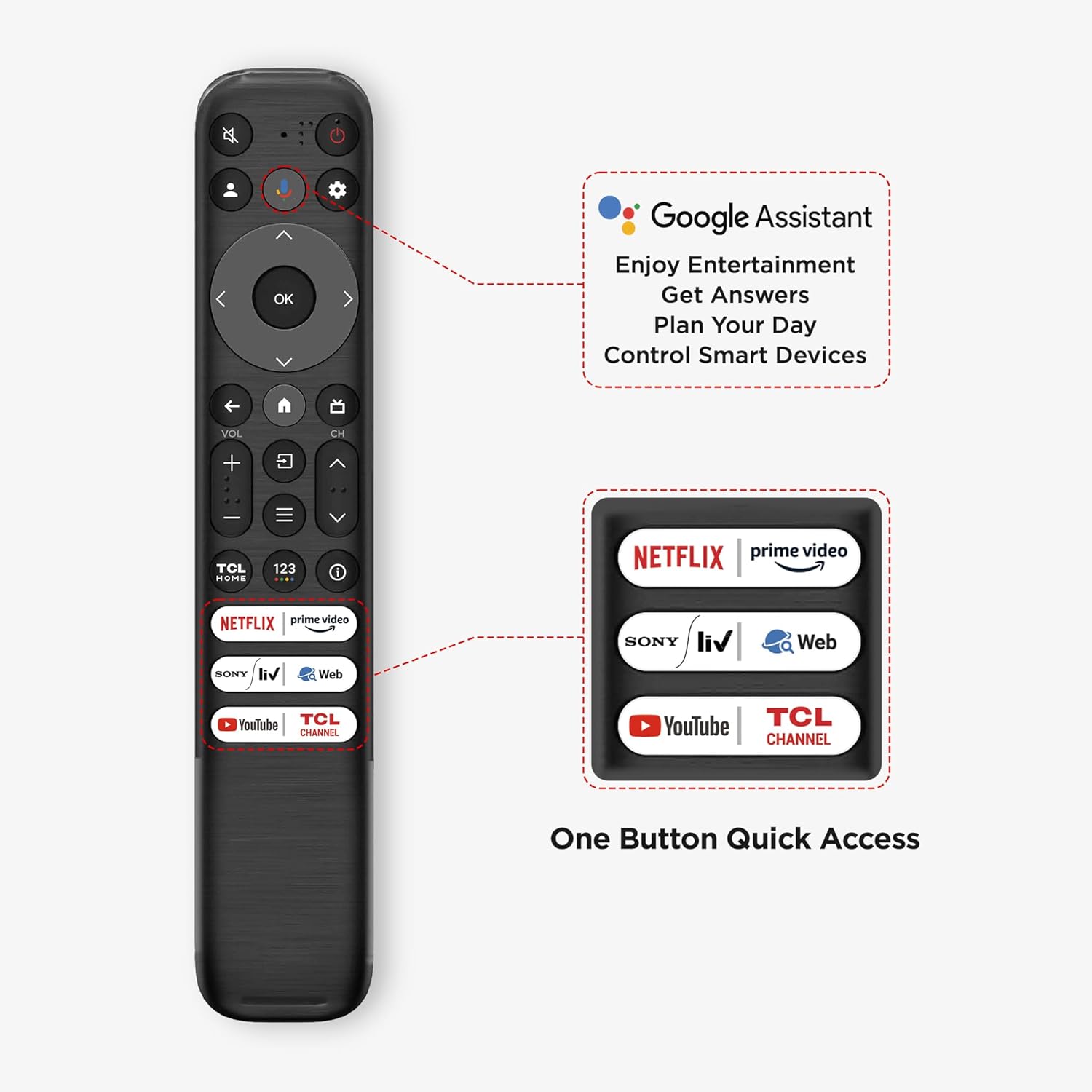
The remote control for the TCL 55P655 TV, highlighting dedicated buttons for Google Assistant and quick access to popular streaming services like Netflix, Prime Video, YouTube, and the TCL Channel.
- Power Button: Turns the TV on or off.
- Navigation Pad (Up/Down/Left/Right/OK): Navigates menus and selects options.
- Back Button: Returns to the previous screen.
- Home Button: Accesses the Google TV home screen.
- Volume Up/Down: Adjusts the volume level.
- Channel Up/Down: Changes TV channels.
- Google Assistant Button: Activates voice control for commands and searches.
- Quick Access Buttons: Dedicated buttons for popular streaming services (e.g., Netflix, Prime Video, YouTube).

A user interacting with the TCL 55P655 TV remote, demonstrating the use of Google Assistant for voice commands.
3.2 Google TV Interface
The Google TV interface organizes content from various streaming services and apps into a personalized home screen.

The Google TV interface on the TCL 55P655, showcasing popular streaming applications like Prime Video, Netflix, YouTube, Disney+ Hotstar, and more, accessible for entertainment.
- Home Screen: Displays personalized recommendations, installed apps, and content categories.
- Apps: Access the Google Play Store to download and install additional applications.
- Search: Use the search function or Google Assistant for voice search to find content.
3.3 Picture and Sound Settings
Adjust picture and sound settings to optimize your viewing and listening experience.
- Picture Modes: Select from various preset picture modes (e.g., Standard, Vivid, Movie, Sport) or customize settings like brightness, contrast, color, and sharpness.
- Dynamic Color Enhancement: This feature enhances color vibrancy and saturation.
- HDR 10: Provides superior contrast and color accuracy for compatible content.
- Sound Modes: Choose from preset sound modes (e.g., Standard, Music, Movie, Voice) or adjust equalizer settings.
- Dolby Audio: Enhances audio clarity and provides an immersive sound experience.

Dynamic Color Enhancement

4K HDR Display

Dolby Audio 24 Watts

Metallic Bezel-less Design

T-Screen Technology

AiPQ Processor
3.4 Smart TV Features
- Google Assistant: Use voice commands to search for content, control smart home devices, get information, and more.
- Screen Mirroring: Cast content from your compatible smartphone or tablet to the TV screen.
- Web Browser: Browse the internet directly on your TV.
- Multiple Eye Care: Features designed to reduce eye strain during prolonged viewing.
4. Maintenance
4.1 Cleaning the TV
- Screen: Gently wipe the screen with a soft, lint-free cloth. For stubborn marks, use a screen-cleaning solution specifically designed for electronics, applied to the cloth, not directly to the screen.
- TV Body: Use a soft, dry cloth to wipe dust and dirt from the TV's frame and back panel. Avoid using abrasive cleaners or solvents.
4.2 Software Updates
Ensure your TV's software is up to date to benefit from the latest features, performance improvements, and security patches. The TV will typically notify you of available updates, or you can check manually in the settings menu.
5. Troubleshooting
If you encounter issues with your TCL 55P655 TV, refer to the following common troubleshooting steps.
- No Power:
- Check if the power cord is securely connected to both the TV and the power outlet.
- Ensure the power outlet is functioning by testing it with another device.
- Press the power button on the TV itself, not just the remote, to rule out remote issues.
- No Picture/Sound:
- Verify that the correct input source (HDMI 1, HDMI 2, etc.) is selected.
- Check all cable connections (HDMI, audio) between the TV and external devices.
- Ensure the volume is not muted or set too low.
- Remote Control Not Working:
- Replace the batteries in the remote control.
- Ensure there are no obstructions between the remote and the TV's IR sensor.
- If using Bluetooth, ensure the remote is paired correctly.
- Network Connectivity Issues (Wi-Fi/Ethernet):
- Restart your router and modem.
- Check Wi-Fi settings on the TV to ensure the correct network is selected and the password is entered accurately.
- If using Ethernet, ensure the cable is securely connected to both the TV and the router.
- 4K Video Playback Issues:
- Ensure the content you are trying to play is genuinely 4K resolution.
- Use high-speed HDMI cables (HDMI 2.0 or higher) for 4K sources.
- Check the TV's display settings to confirm 4K output is enabled for the connected HDMI port.
- TV Performance (Lagging/Freezing):
- Restart the TV by unplugging it from the power outlet for a few minutes, then plugging it back in.
- Close unused applications running in the background.
- Ensure the TV's software is updated to the latest version.
6. Specifications

A diagram providing the precise dimensions of the TCL 55P655 TV, including width, height (with and without stand), depth, and screen diagonal, along with weight information.
| Feature | Detail |
|---|---|
| Brand | TCL |
| Model | 55P655 |
| Screen Size | 55 Inches (139 cm) |
| Resolution | 4K Ultra HD (3840 x 2160) |
| Refresh Rate | 60 Hertz |
| Display Technology | LED, HDR 10, T-Screen |
| Viewing Angle | 178 Degrees |
| Operating System | Google TV |
| RAM Memory | 2 GB |
| Storage Capacity | 16 GB |
| Processor | 64-bit Quad Core Processor, AiPQ Processor |
| Graphics Coprocessor | G31x2 800MHz |
| Sound Output | 24 Watts |
| Audio Technology | Dolby Audio MS12Y |
| Connectivity | 3 HDMI Ports, 1 USB Port, Ethernet, Wi-Fi (2.4GHz/5GHz dual-band), Bluetooth, Headphone output |
| Power Consumption (On-mode) | 125 Watts |
| Product Dimensions (with stand) | 123W x 75H x 25.5D cm |
| Item Weight | 9.2 kg |
| Batteries Required | 2 AAA batteries (included) |
7. Warranty and Support
7.1 Warranty Information
The TCL 55P655 TV comes with a 2-year warranty provided by the manufacturer from the date of purchase. The remote control has a separate 6-month warranty. Warranty claims can typically be processed using your purchase invoice.
7.2 Customer Support
For technical assistance, service requests, or further inquiries, please refer to the official TCL India website or contact their customer support channels. Contact details are usually available on the manufacturer's website or in the documentation provided with your product.


