
ASKGO K8
ASKGO K8 Electric Scooter User Manual
Model: K8
Brand: ASKGO
1. Introduction
Thank you for choosing the ASKGO K8 Electric Scooter. This manual provides essential information for the safe operation, maintenance, and troubleshooting of your new electric scooter. Please read this manual thoroughly before your first ride to ensure proper use and to maximize the lifespan of your product. Keep this manual for future reference.

Figure 1: ASKGO K8 Electric Scooter
2. Safety Information
Your safety is paramount. Always adhere to the following safety guidelines:
- Always wear a helmet and appropriate safety gear (knee pads, elbow pads) when riding.
- Check the brakes, tire pressure, and overall condition of the scooter before each ride.
- Obey all local traffic laws and regulations.
- Do not exceed the maximum weight limit of 265 pounds (120 kg).
- The scooter is suitable for adults and teenagers within the height range of 4'9" to 5'9".
- Avoid riding in heavy rain, snow, or on slippery surfaces.
- Be aware of your surroundings and avoid distractions while riding.
- Ensure the high-brightness front light and rear brake lights are functional, especially when riding at night.

Figure 2: Front and Rear Light Combination for enhanced visibility.
3. Setup
The ASKGO K8 Electric Scooter is designed for quick setup, arriving 100% pre-assembled. Minimal steps are required before your first ride.
3.1 Unboxing and Initial Inspection
- Carefully remove the scooter and all components from the packaging.
- Check for any visible damage during transit. If any damage is found, contact customer support immediately.
- Verify all included components are present: Electric Scooter, User Manual, Tool Set, Charger.
3.2 Initial Charging
Before your first ride, fully charge the scooter's battery. The charging time is approximately 6 hours.
- Locate the charging port on the scooter.
- Connect the charger to the scooter's charging port, then plug the charger into a standard wall outlet.
- The charger indicator light will typically show red during charging and turn green when fully charged.
- Do not overcharge the battery. Disconnect the charger once charging is complete.
4. Operating the Scooter
Familiarize yourself with the controls and features for a smooth riding experience.
4.1 Power On/Off
Press and hold the power button on the handlebar display to turn the scooter on or off.
4.2 Smart LCD Display
The integrated LCD display provides real-time riding information:
- Battery Bar: Shows current battery level.
- Current Speed: Displays your instantaneous speed.
- PAS Level / Speed Mode: Indicates the current power assist level or speed mode (M1, M2, M3).
- Gear Display: Shows the selected gear.
- Single and Total Mileage: Tracks your trip distance and total distance.

Figure 3: Intelligent LCD Display for clear riding information.
4.3 Speed Modes
The scooter offers multiple speed modes to suit different riding conditions:
- M1: Up to 15 mph (24 km/h)
- M2: Up to 20 mph (32 km/h)
- M3: Up to 22 mph (35 km/h)
Switch between modes using the designated button on the display.
4.4 Braking System
The scooter is equipped with effective dual disc brakes (front and rear) for reliable stopping power. Apply both brakes simultaneously for optimal control and stability.

Figure 4: E-ABS Front and Rear Disc Brake for shorter braking distances.
4.5 Folding Mechanism
The scooter features a convenient portable design, allowing it to be easily folded for storage or transport. The unique stem lock prevents accidental detachment.
4.6 Riding Experience
The scooter's 14-inch pneumatic tires and dual shock absorption system (front and rear) provide a comfortable ride, absorbing most impacts from uneven surfaces. The 9.5-inch wide deck offers ample foot room.

Figure 5: Enjoying a ride on the ASKGO K8 Electric Scooter.
Video 1: Demonstrating the K10 Electric Scooter with Seat in various urban and park settings, highlighting its portability and ease of use for daily commuting and leisure.
5. Maintenance
Regular maintenance ensures the longevity and optimal performance of your scooter.
5.1 Battery Care
- Charge the battery regularly, even if not in use, to maintain its health.
- Avoid completely draining the battery before recharging.
- Store the scooter in a cool, dry place away from direct sunlight and extreme temperatures.
5.2 Tire Maintenance
- Regularly check the tire pressure of the 14-inch pneumatic tires and inflate to the recommended PSI.
- Inspect tires for wear, punctures, or damage.
5.3 Brake System
- Periodically check the responsiveness of the dual disc brakes.
- Ensure brake pads are not excessively worn. Adjust or replace as needed.
5.4 General Cleaning
- Wipe down the scooter with a damp cloth after use.
- Do not use high-pressure water jets or corrosive cleaners.
- Keep the motor and electrical components dry.
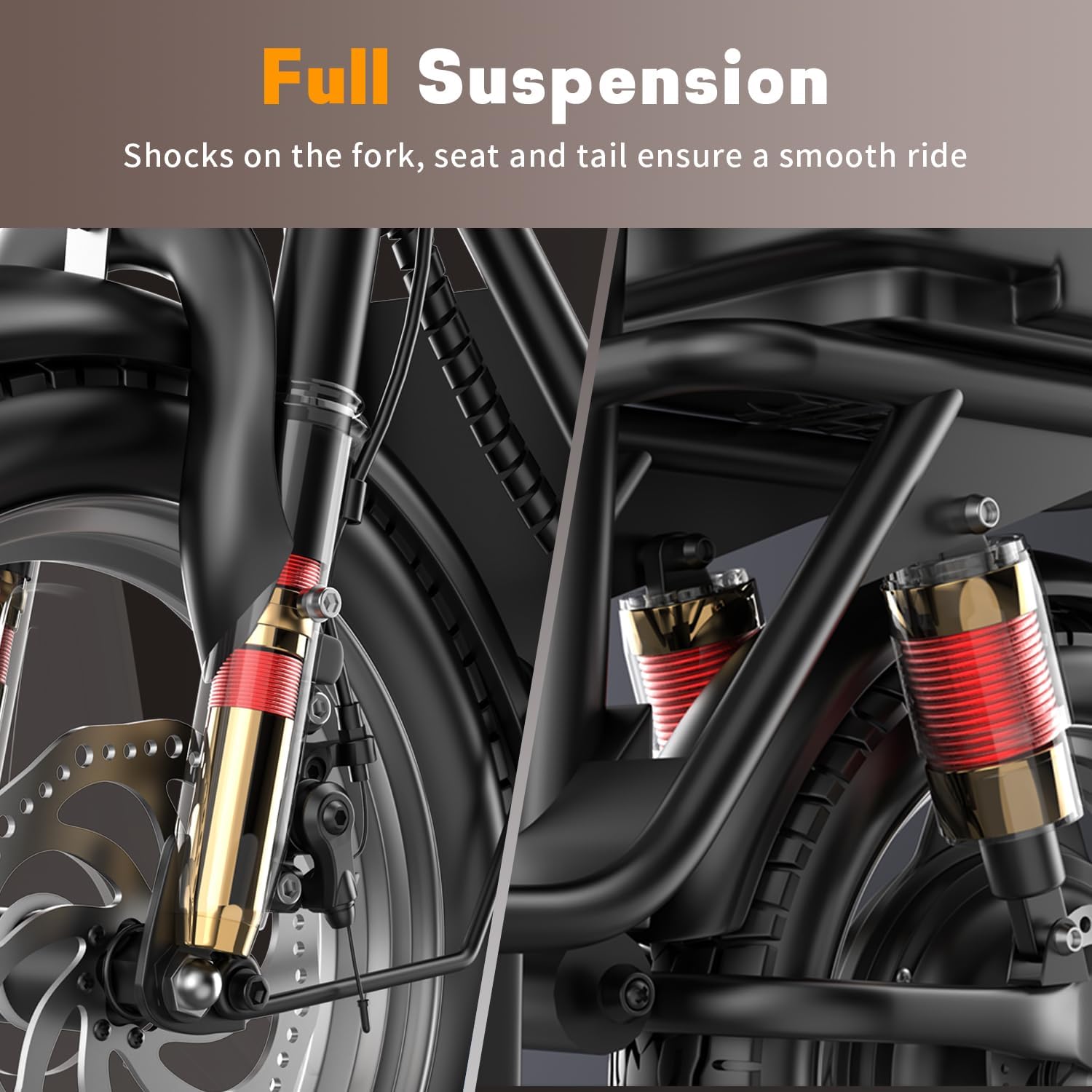
Figure 6: Full Suspension system on the fork, seat, and tail for a smooth ride.
6. Troubleshooting
This section addresses common issues you might encounter. For problems not listed here, please contact customer support.
| Problem | Possible Cause | Solution |
|---|---|---|
| Scooter does not power on | Low battery; Loose connections; Power button issue | Charge the battery fully; Check all cable connections; Contact support if issue persists. |
| Reduced range or speed | Under-inflated tires; Overload; Battery degradation | Check and inflate tires; Ensure load is within limits; Battery replacement may be needed over time. |
| Brakes feel weak | Brake pads worn; Cable tension too loose | Inspect and replace brake pads; Adjust brake cable tension. |
| Unusual noises during operation | Loose components; Motor issue; Bearing wear | Inspect for loose screws or parts; Contact support for motor or bearing issues. |
| Display not working correctly | Loose connection; Water damage; Internal fault | Check display cable connection; Avoid water exposure; Contact support for repair. |
7. Specifications
Detailed technical specifications for the ASKGO K8 Electric Scooter:
| Feature | Specification |
|---|---|
| Model Name | K8 |
| Motor Power | 500W |
| Battery | 48V 10.4AH |
| Top Speed | 22 mph |
| Maximum Distance Range | 30 Miles |
| Charging Time | 6 Hours |
| Weight Limit | 265 Pounds |
| Product Dimensions (LxWxH) | 48.43" x 21.65" x 39.37" |
| Wheel Size | 14 Inches |
| Wheel Type | Pneumatic |
| Frame Material | Carbon Steel |
| Brake Style | Front Braking, Rear Braking (Dual Disc) |
| Special Features | Anti-Puncture Tire, Digital Display, Dual Braking System, Adjustable Handlebar Height, Basket |
8. Warranty and Support
ASKGO provides a 1-Year Warranty for the K8 Electric Scooter, covering manufacturing defects. Additionally, a Lifetime Warranty is mentioned for certain components, please refer to the specific warranty card included with your product for full details.
For technical support, warranty claims, or any questions regarding your scooter, please contact the manufacturer, Shenzhen Beirui industrial Co., Ltd., or your point of purchase. Ensure you have your purchase receipt and product model information ready.
Ask a question about this manual
Ask about setup, troubleshooting, compatibility, parts, safety, or missing instructions. Manuals+ will review the question and use this page’s manual context to help answer it.