
Introduction
Thank you for choosing the SEDETA 47.2-inch White L-Shaped Desk. This desk is designed to provide a versatile and organized workspace for various activities, including office work, studying, and gaming. It features ample storage, integrated LED lighting, and convenient power outlets to enhance your productivity and experience. Please read this manual carefully before assembly and use to ensure proper setup and safe operation.
Safety Information
- Always assemble the desk according to the provided instructions. Ensure all screws are tightened securely, especially at the tabletop joints.
- Distribute heavy items evenly on the desk to maintain stability. Do not place heavy objects on the edges or corners to prevent tipping.
- Keep liquids away from electrical components, including LED lights and power outlets, to prevent electrical hazards.
- Do not overload the power outlets. Ensure the total power consumption of connected devices does not exceed the rated capacity.
- Keep small parts and packaging materials away from children to prevent choking hazards.
Setup and Assembly
Assembly is required for this desk. All necessary assembly tools and detailed instructions are included in the package. Please follow the numbered steps carefully. The desk features a reversible design, allowing you to configure the L-shape to either the left or right side to best suit your space.
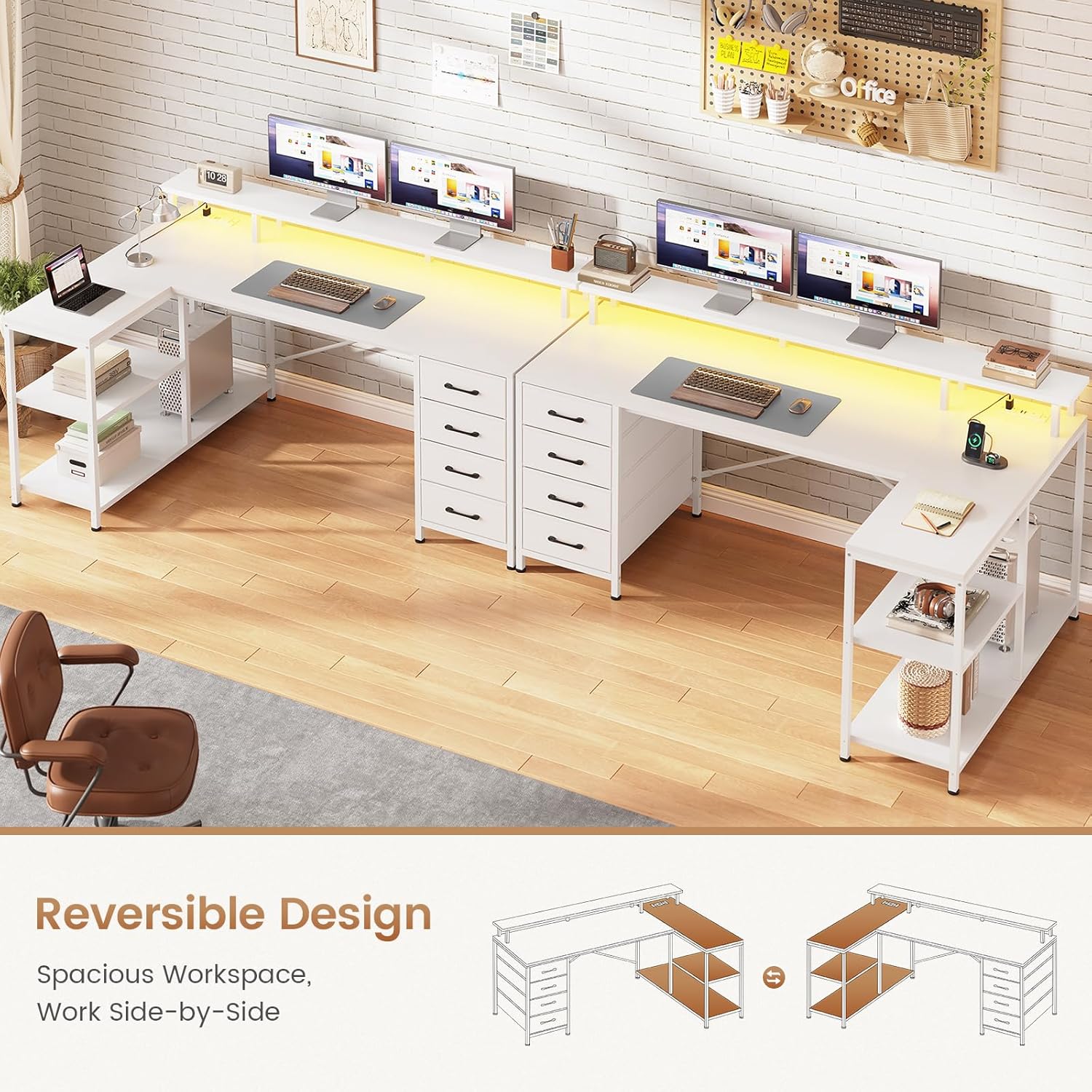
Image: Reversible Design - The desk can be assembled with the storage unit on either the left or right side.
Video: SEDETA Computer Desk Assembly Overview. This video provides a general overview of the desk's features and assembly process.
Features and Components
Spacious Work Surface
The desktop offers a generous working area of 47.2"L x 19"W on the main section and 31.5"L x 9.8"W on the L-extension. It can comfortably accommodate multiple monitors, a keyboard, mouse, and other office essentials. The integrated monitor stand helps raise your screen to an ergonomic height, reducing neck and back strain.

Image: Full Size Monitor Stand - Designed to promote correct posture and reduce neck strain.
Integrated Storage
The desk includes a comprehensive storage system to keep your workspace tidy:
- 4 Fabric Drawers: Lightweight and easy to install, these drawers provide enclosed storage for documents, supplies, and personal items.
- 2-Tier Storage Shelves: Open shelves offer convenient access to books, binders, and decorative items.
- Computer Tower Stand: A dedicated space for your PC tower, keeping it off the floor and easily accessible.

Image: Plenty of Storage Space - Illustrates the 4 fabric drawers, 2 storage shelves, and CPU stand.
LED Lights & Power Outlets
Enhance your environment with the built-in features:
- RGB LED Light Strip: Features over 60,000 colors and 29 flashing modes. Control via APP or remote. Includes music sync function with a built-in adjustable microphone, allowing lights to change with sound and music. A timer function is also available.
- Charging Station: Equipped with 2 AC outlets (120V/12A) and 2 USB ports (5V/2A) to power up to 4 devices simultaneously. The power cord is 4.92 feet long.

Image: L Shaped Desk with RGB LED Lights - Highlighting key control, APP control, and various lighting features.

Image: Charging Port - Details the 2 AC outlets and 2 USB ports for convenient device charging.
Construction
- Frame: Reinforced metal frame for stability and durability.
- Top Material: Engineered wood with a white finish.
- Adjustable Feet: Protect your floors and ensure desk stability on uneven surfaces.

Image: Adjustable Feet - Illustrates the adjustable feet designed for stability and floor protection.
Operating Instructions
Using the LED Lights
- Power On/Off: Use the included remote control or the dedicated mobile application to turn the LED lights on or off.
- Color Selection: Select from over 60,000 colors using the remote or app.
- Mode Selection: Choose from 29 flashing modes to suit your preference.
- Music Sync: Activate the music sync function via the app. The built-in microphone will detect sound and music, causing the lights to change rhythmically.
- Timer Function: Set a timer for the lights to automatically turn off.
Using the Power Outlets
- Plug the desk's main power cord into a standard wall outlet.
- Connect your devices to the 2 AC outlets or 2 USB ports located on the desk.
- Ensure devices are compatible with the provided voltage (120V for AC, 5V for USB) and do not exceed the total amperage capacity.
Maintenance
- Cleaning: Wipe the desk surfaces with a soft, damp cloth. Avoid harsh chemicals or abrasive cleaners that may damage the finish.
- Dusting: Regularly dust the desk, especially around the LED lights and power outlets, to prevent dust buildup.
- Hardware Check: Periodically check all screws and fasteners to ensure they remain tight. Retighten if necessary.
- Drawer Care: The fabric drawers can be spot cleaned with a mild detergent and water. Allow them to air dry completely.
Troubleshooting
- LED Lights Not Working: Check if the power cord is securely plugged in. Ensure the remote control batteries are not depleted. Try controlling via the mobile app.
- Power Outlets Not Supplying Power: Verify the desk's main power cord is properly connected to a live wall outlet. Check if the wall outlet itself is functioning by testing with another device.
- Desk Wobbles: Adjust the leveling feet at the bottom of the desk legs to stabilize it on uneven floors. Ensure all assembly screws are tightened.
- Drawers Not Sliding Smoothly: Ensure the fabric drawers are correctly inserted into their slots and not overloaded. Check for any obstructions.
Specifications
| Feature | Detail |
|---|---|
| Brand | SEDETA |
| Model | B0DTHPQQWL |
| Shape | L-Shape |
| Product Dimensions | 19"D x 47.2"W x 36.4"H |
| Color | White |
| Style | Modern |
| Base Material | Metal |
| Top Material Type | Engineered Wood |
| Finish Type | Powder Coated |
| Special Features | 4 Drawers, LED Lights & Power Outlets |
| Number of Drawers | 4 |
| Number of Shelves | 2 |
| Tabletop Thickness | 0.4 Inches |
| Maximum Load Capacity | 300 lbs |
| Required Assembly | Yes (Tools and instructions included) |
Warranty and Support
This SEDETA L-Shaped Desk comes with a Limited Warranty. If your item arrives damaged, scratched, or with missing parts, please contact us directly. We are committed to providing free replacements or a partial refund to ensure your satisfaction. For any questions or support needs, please refer to the contact information provided with your purchase documentation.
