
1. Introduction
Thank you for choosing the CLY 30W LED Motion Sensor Security Floodlight. This manual provides essential information for the safe installation, operation, and maintenance of your new security light. Please read these instructions thoroughly before installation and retain them for future reference.

Image 1.1: The CLY 30W LED Motion Sensor Security Floodlight, showing the main light unit, motion sensor, power cord with plug, and mounting screws.
2. Safety Instructions
- Always disconnect power before installing or servicing the light fixture.
- Ensure the power source voltage matches the light's requirements (120 Volts).
- Installation should be performed by a qualified electrician if you are unsure about electrical wiring.
- Do not look directly into the LED light source when it is illuminated, as this may cause eye damage.
- Keep children away from the installation area.
- Ensure the mounting surface is strong enough to support the fixture.
- Do not modify the product in any way, as this will void the warranty and may pose safety risks.
3. Package Contents
Verify that all components are present before beginning installation:
- CLY 30W LED Motion Sensor Security Floodlight (1 unit)
- User Manual (1 unit)
- Mounting Screws and Wall Plugs (quantity may vary)
4. Product Features
- High Brightness: 30W LED producing 2820 lumens with 6500K cool white light.
- Motion Sensor: Integrated PIR sensor with a 0-12 meter detection distance and 180° sensing range.
- Fixed Operation: Operates exclusively at night with a fixed 30-second lighting duration per detection. No adjustable settings for light time or day/night mode.
- Durable Construction: Made from plastic-clad aluminum for good heat dissipation and corrosion resistance.
- Weatherproof: IP66 rated for the light fixture and IP65 for the motion sensor, ensuring reliable outdoor performance in various weather conditions.
- Easy Installation: Features a 1.5-meter cord with a standard plug for direct connection to an outlet.
- Adjustable Bracket: 180° adjustable mounting bracket for flexible positioning.

Image 4.1: Illustration of the floodlight's quality features, including high-density tempered glass, excellent heat dissipation fins, and the 1.5-meter cable with plug.

Image 4.2: Close-up view of the super bright LED beads within the floodlight, highlighting the light source.
5. Setup and Installation
5.1 Choosing an Installation Location
Select a location that provides the desired lighting coverage and allows the motion sensor to detect movement effectively. The recommended installation height is between 3 to 5 meters (approximately 10 to 16 feet) for optimal performance.
5.2 Mounting the Light
- Mark the desired mounting points on the wall, ceiling, or ground using the bracket as a template.
- Drill pilot holes at the marked locations. Insert wall plugs if mounting into masonry or drywall.
- Secure the mounting bracket to the surface using the provided screws.
- Attach the floodlight to the secured bracket.
- Adjust the angle of the floodlight and the motion sensor as needed. The bracket allows for 180° adjustment, and the sensor head can rotate 360° horizontally and 180° vertically.

Image 5.1: Diagram showing the dimensions of the floodlight, the 180° adjustable bracket, and various installation methods including ceiling, wall, and ground mounting.

Image 5.2: Illustration demonstrating the adjustability of the motion sensor, showing 360° horizontal rotation and 180° vertical tilt.
5.3 Electrical Connection
The floodlight comes with a 1.5-meter power cord and a standard plug. Simply plug the cord into a compatible 120V outdoor power outlet. Ensure the outlet is weatherproof or protected from moisture.

Image 5.3: Close-up of the 1.5-meter power cable with a standard plug, indicating ease of connection.
6. Operating Instructions
The CLY Motion Sensor Security Floodlight is designed for straightforward operation with fixed settings:
- Automatic Night Mode: The light is equipped with a photocell sensor that detects ambient light levels. It will only activate when it is dark enough (at night). During the day, the motion sensor is inactive to conserve energy.
- Motion Detection: When motion is detected within the sensor's range (0-12 meters, 180° angle) during nighttime, the floodlight will illuminate.
- Fixed Lighting Duration: Once activated by motion, the light will stay on for a fixed duration of 30 seconds. This duration is not adjustable. After 30 seconds, if no further motion is detected, the light will turn off. If motion continues, the light cycle will restart.
- No Adjustments: Please note that there are no buttons or settings to adjust the lighting time, sensitivity, or day/night mode. The unit operates with these fixed parameters.

Image 6.1: Visual explanation of the fixed lighting mode, showing the light activating for 30 seconds upon motion detection at night and remaining off during the day.
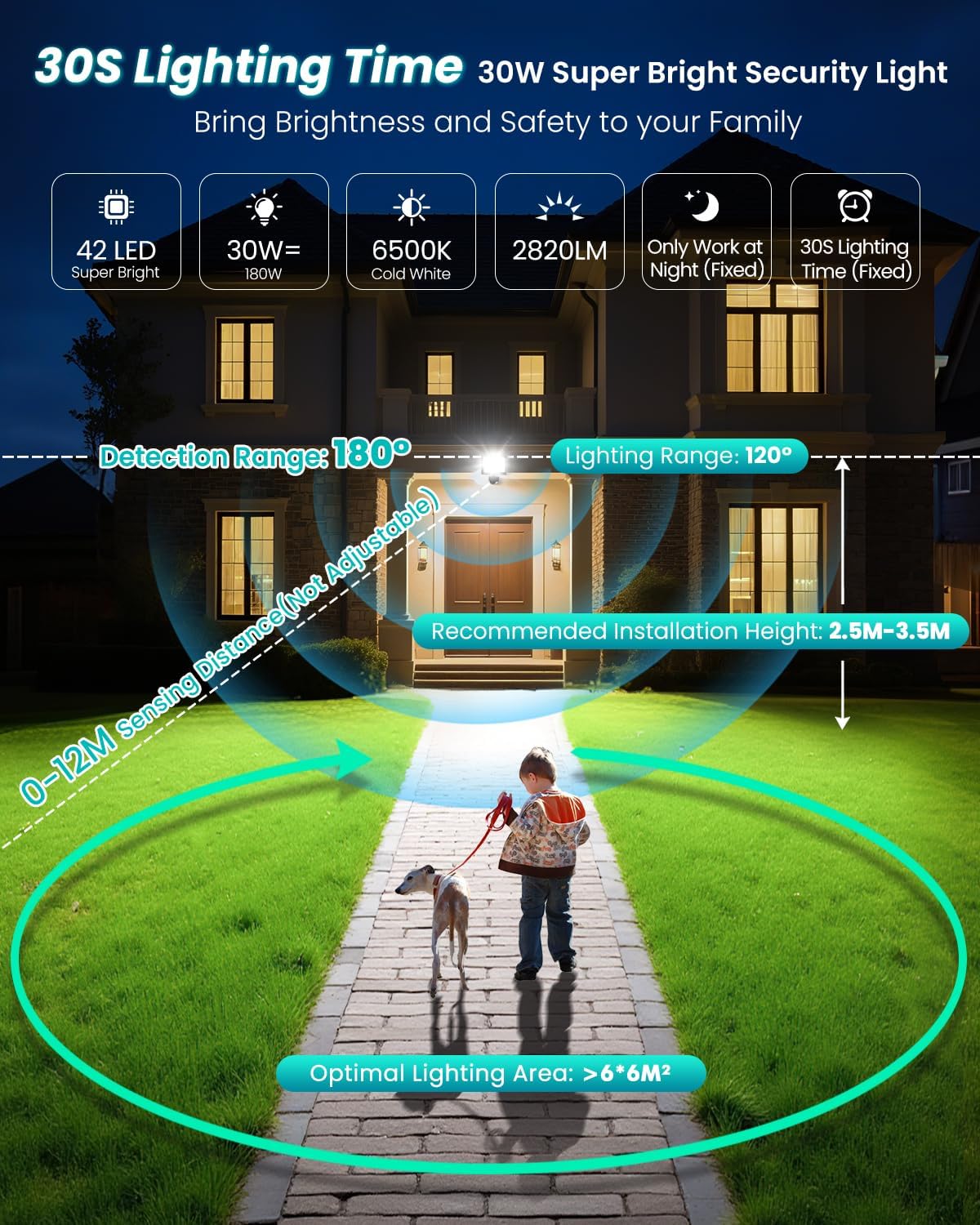
Image 6.2: Diagram illustrating the 180° detection range and 0-12 meter sensing distance of the motion sensor, along with the 120° lighting range and recommended installation height.
7. Maintenance
The CLY Security Floodlight is designed for minimal maintenance. Follow these guidelines to ensure longevity:
- Cleaning: Periodically clean the light fixture and motion sensor lens with a soft, damp cloth to remove dirt, dust, or debris that may obstruct the sensor or reduce light output. Do not use abrasive cleaners or solvents.
- Inspection: Regularly inspect the power cord for any signs of damage. Ensure the mounting screws remain tight.
- Weather Resistance: The IP66 (light) and IP65 (sensor) ratings ensure protection against dust and water jets. However, avoid submerging the unit in water.

Image 7.1: Visual representation of the floodlight's IP66 waterproof rating and resistance to various weather conditions, including rain, heat, and cold.
8. Troubleshooting
If you encounter issues with your CLY Security Floodlight, refer to the following common problems and solutions:
| Problem | Possible Cause | Solution |
|---|---|---|
| Light does not turn on at night. | No power; Sensor obstructed; Ambient light too high. | Check power connection. Ensure sensor lens is clean and unobstructed. Relocate if ambient light (e.g., street light) is interfering. |
| Light stays on continuously. | Constant motion detected; Sensor malfunction. | Ensure no continuous motion in the detection zone (e.g., swaying branches, pets). If problem persists, contact support. |
| Light turns on during the day. | Photocell sensor obstructed or faulty. | Clean the sensor lens. Ensure no objects are blocking light from reaching the photocell. |
| Motion detection range is poor. | Sensor angle incorrect; Obstructions; Temperature extremes. | Adjust sensor angle. Remove obstructions. Performance may vary slightly in extreme hot or cold conditions. |
9. Specifications
| Feature | Specification |
|---|---|
| Model Number | FLB030 |
| Power Consumption | 30W |
| Luminous Flux | 2820 LM |
| Color Temperature | 6500K (Cool White) |
| Voltage | 120 Volts |
| Motion Sensor Detection Distance | 0-12 meters |
| Motion Sensor Detection Angle | 180° |
| Lighting Duration (Fixed) | 30 seconds |
| Operating Mode | Night Mode Only (No Day/Night adjustment) |
| Waterproof Rating (Light) | IP66 |
| Waterproof Rating (Sensor) | IP65 |
| Cable Length | 1.5 meters (with plug) |
| Material | Plastic-clad Aluminum |
| Product Dimensions | 14.48 x 5.84 x 17.02 cm |
| Weight | 500 g |
10. Warranty Information
Specific warranty details for this product may vary. Please refer to the warranty information provided at the point of purchase or contact the seller/manufacturer directly for current warranty terms and conditions.
11. Customer Support
For technical assistance, troubleshooting beyond this manual, or inquiries regarding your product, please contact your retailer or the CLY manufacturer's customer support channels. Refer to your purchase documentation for contact information.

