
Introduction
Thank you for choosing the SEDETA L Shaped Desk. This manual provides detailed instructions for the assembly, operation, maintenance, and troubleshooting of your new desk. Please read this manual thoroughly before assembly and use to ensure proper function and safety. This desk is designed to provide a spacious and organized workspace with integrated features for modern needs.
Important Safety Information
- Always assemble the desk according to the provided instructions.
- Ensure all screws are tightened securely, especially at the table top joints, to maintain stability.
- Distribute heavy items evenly on the desk to maintain stability.
- Do not place heavy objects on the edges or corners to prevent tipping.
- Keep electrical components (power outlets, LED lights) away from liquids.
- Do not overload the power outlets.
Package Contents
Please verify that all components are present before beginning assembly. If any parts are missing or damaged, please contact customer support.
- Desktop Panels (L-shaped sections)
- Metal Frame Components
- 4 Fabric Storage Drawers
- Monitor Stand
- 2-Tier Storage Shelves
- CPU Tower Stand
- LED Light Strip with Controller
- Power Outlet Unit (2 AC, 2 USB)
- Assembly Hardware (screws, bolts, Allen wrench)
- Instruction Manual
Assembly Instructions
Follow these steps carefully for proper assembly. It is recommended to have two people for certain assembly stages.
Step 1: Unpacking and Preparation
Unpack all components and lay them out on a clean, soft surface to prevent scratches. Identify all parts using the included parts list.
Step 2: Assembling the Main Desk Frame
Connect the metal frame components according to the diagrams in your separate assembly guide. Ensure all connections are secure but do not fully tighten screws until the entire frame is assembled.
Step 3: Installing the Storage Shelves
Attach the two-tier storage shelves to the designated section of the desk frame. These shelves are designed to hold items such as books, office supplies, or a CPU tower.
Step 4: Attaching the Fabric Drawers
Insert the four fabric drawers into their respective slots on the desk frame. Ensure the drawers slide smoothly. When assembling the fabric drawers, ensure they are correctly aligned with the frame to prevent tearing, as noted by some users.

The desk includes four fabric drawers, providing convenient and accessible storage for office supplies and personal items. One drawer is shown partially open, revealing its capacity.

The side of the desk features two open storage shelves, ideal for books, decorative items, or a CPU tower, as depicted on the bottom shelf.
Step 5: Positioning the Monitor Stand
Place the monitor stand on the main desktop area. This stand is designed to elevate your monitors for ergonomic viewing.

The full-size monitor stand elevates screens to an ergonomic height, promoting better posture and reducing neck strain during work or gaming sessions.
Step 6: Connecting Power Outlets and LED Lights
Integrate the power outlet unit and LED light strip into the designated areas. Connect the power cord to a wall outlet. The LED lights can be controlled via an app or a physical button.

The integrated power strip provides two standard AC outlets and two USB ports for convenient charging of devices directly on the desk.
Step 7: Reversible Design Configuration
The L-shaped desk features a reversible design, allowing you to configure the longer side of the desk to either the left or right, depending on your room layout and preference. This flexibility is determined during the initial frame assembly. Refer to the specific diagrams in your assembly guide for left-hand or right-hand orientation.

This image demonstrates the desk's reversible design, allowing users to configure the L-shape to either the left or right side to suit their space.

An overhead view of the SEDETA L-shaped desk in a gaming setup, showcasing the integrated LED lighting, monitor stand, and various storage options.
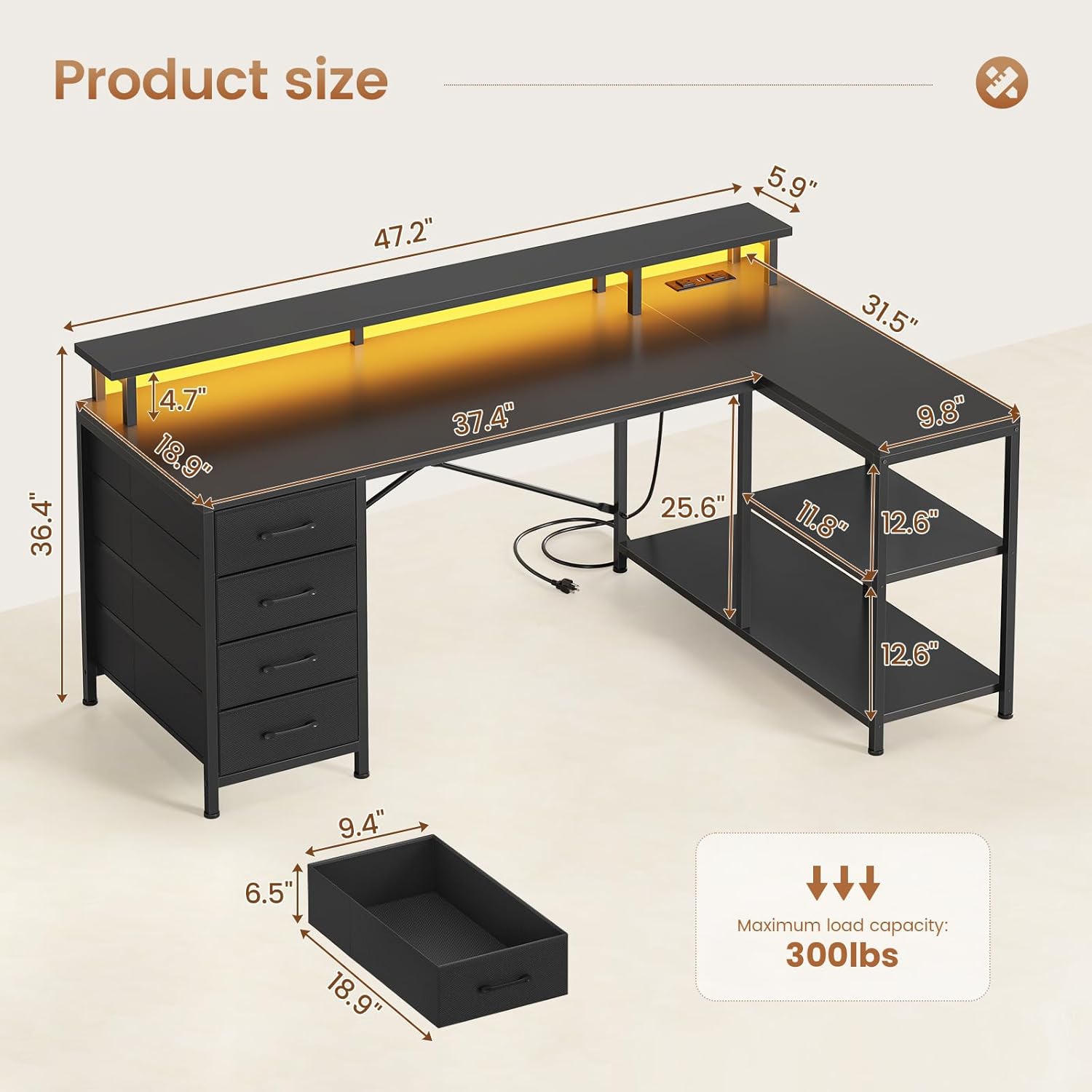
A detailed diagram illustrating the overall dimensions of the L-shaped desk, including the main desktop area, the side storage shelves, and the monitor stand.
Operating Instructions
LED Lighting System
The desk features an integrated RGB LED light strip to enhance your workspace or gaming environment.
- Control: The LED lights can be controlled via a dedicated mobile application or a physical key control button.
- Color Options: Choose from over 60,000 colors and 29 flashing modes to customize your lighting.
- Music Sync: A built-in sensitivity-adjustable microphone allows the LED light color to change with the rhythm of sound and music.
- Timer Function: Utilize the timer function for automated lighting control.

The desk features vibrant RGB LED lighting, controllable via a mobile app or a physical button, offering a wide range of colors and dynamic modes.

This graphic illustrates the advanced features of the RGB LED lighting system, including control via a mobile app, music synchronization, and a programmable timer function.
Power Outlets
The desk includes a built-in charging station for your electronic devices.
- AC Outlets: Two 120V/12A AC outlets are available for standard electronics.
- USB Ports: Two 5V/2A USB ports are provided for charging mobile devices such as cell phones, tablets, and Bluetooth speakers.
- Power Cord: The unit comes with a 4.92-foot power cord.

The integrated power strip provides two standard AC outlets and two USB ports for convenient charging of devices directly on the desk.
Video Demonstration
This video provides a visual overview of the SEDETA L-shaped computer desk, showcasing its design, storage capabilities, and integrated features.
Maintenance
- Cleaning: Wipe the desk surfaces with a soft, damp cloth. Avoid harsh chemicals or abrasive cleaners that may damage the finish.
- Dusting: Regularly dust the desk and its components to prevent buildup.
- Hardware: Periodically check and tighten all screws and fasteners to ensure the desk remains stable.
- Electrical Components: Ensure the power outlets and LED lights are kept dry and free from dust. Disconnect from power before cleaning.
Troubleshooting
- Desk Wobbles: Ensure all screws are fully tightened. Check if the adjustable feet are properly leveled on uneven floors.
- Fabric Drawers Not Fitting/Tearing: Verify that the drawer frame is correctly assembled and that the fabric drawers are inserted straight and not forced. Ensure the drawer slides are clear of obstructions.
- LED Lights Not Working: Check if the power cord is securely plugged into both the desk unit and the wall outlet. Ensure the LED strip controller is properly connected. Try cycling through the power and color modes.
- Power Outlets Not Functioning: Confirm the desk's power cord is plugged into a live wall outlet. Test the wall outlet with another device. Ensure no circuit breakers have tripped.
- Missing Parts: If any parts are missing upon arrival, please contact customer service for assistance.
Specifications
| Feature | Detail |
|---|---|
| Brand | SEDETA |
| Model | B0DTHMQ32K |
| Shape | L-Shape |
| Desk Design | Computer Desk |
| Product Dimensions (D x W x H) | 19"D x 47.2"W x 36.4"H |
| Color | Black |
| Style | Modern |
| Base Material | Metal |
| Top Material Type | Engineered Wood |
| Finish Type | Powder Coated |
| Special Features | 4 Drawers, LED Lights & Power Outlets |
| Number of Drawers | 4 |
| Number of Shelves | 2 |
| Tabletop Thickness | 0.4 Inches |
| Maximum Height | 36.4 Inches |
| Required Assembly | Yes |
Warranty and Support
This SEDETA L Shaped Desk comes with a Limited Warranty. For specific details regarding the warranty period and coverage, please refer to the warranty card included in your package or contact SEDETA customer support.
If you encounter any issues, require replacement parts, or have questions not covered in this manual, please contact SEDETA customer service for assistance. Contact information can typically be found on the product packaging or the official SEDETA website.
