1. Introduction
This manual provides comprehensive instructions for the proper use and maintenance of your kwmobile Cover compatible with Kobo Clara HD. This cover is designed to protect your e-reader while offering enhanced functionality through its integrated hand strap and stand feature. Please read this manual carefully to ensure optimal performance and longevity of your product.
2. Product Overview
The kwmobile Kobo Clara HD Cover is crafted from durable faux leather, providing an elegant appearance and robust protection. Key features include:
- Full Protection: Safeguards your e-reader against shocks, falls, bumps, and scratches on all four corners and both sides.
- Integrated Hand Strap: Two elastic rubber band straps provide a secure grip for comfortable one-handed reading.
- Kickstand Function: Allows for hands-free reading by propping your e-reader on a desk or table.
- Secure Closure: An elastic strap ensures the cover remains closed when not in use.

This image displays the kwmobile Kobo Clara HD cover in dark blue. The e-reader is shown inserted into the case, which is propped up using its integrated stand feature. A hand is visible on the left, demonstrating the use of the elastic hand strap located on the back of the cover.

This image focuses on the back of the kwmobile Kobo Clara HD cover, emphasizing the elastic hand strap designed for comfortable and secure holding during use.
3. Setup: Installing Your Kobo Clara HD
Follow these steps to correctly install your Kobo Clara HD into the kwmobile cover:
- Identify Orientation: The Kobo Clara HD has slightly different corner curvatures. The case is designed to fit the device in a specific orientation. Ensure the e-reader's bottom (where the charging port is located) aligns with the slightly larger rounded corners of the case's frame.
- Insert Device: Gently align your Kobo Clara HD with the frame of the case. Apply even pressure to snap the device into place. Do not force the device if it does not fit easily; re-check the orientation.
- Verify Fit: Once inserted, ensure all edges of your Kobo Clara HD are securely seated within the case's frame.
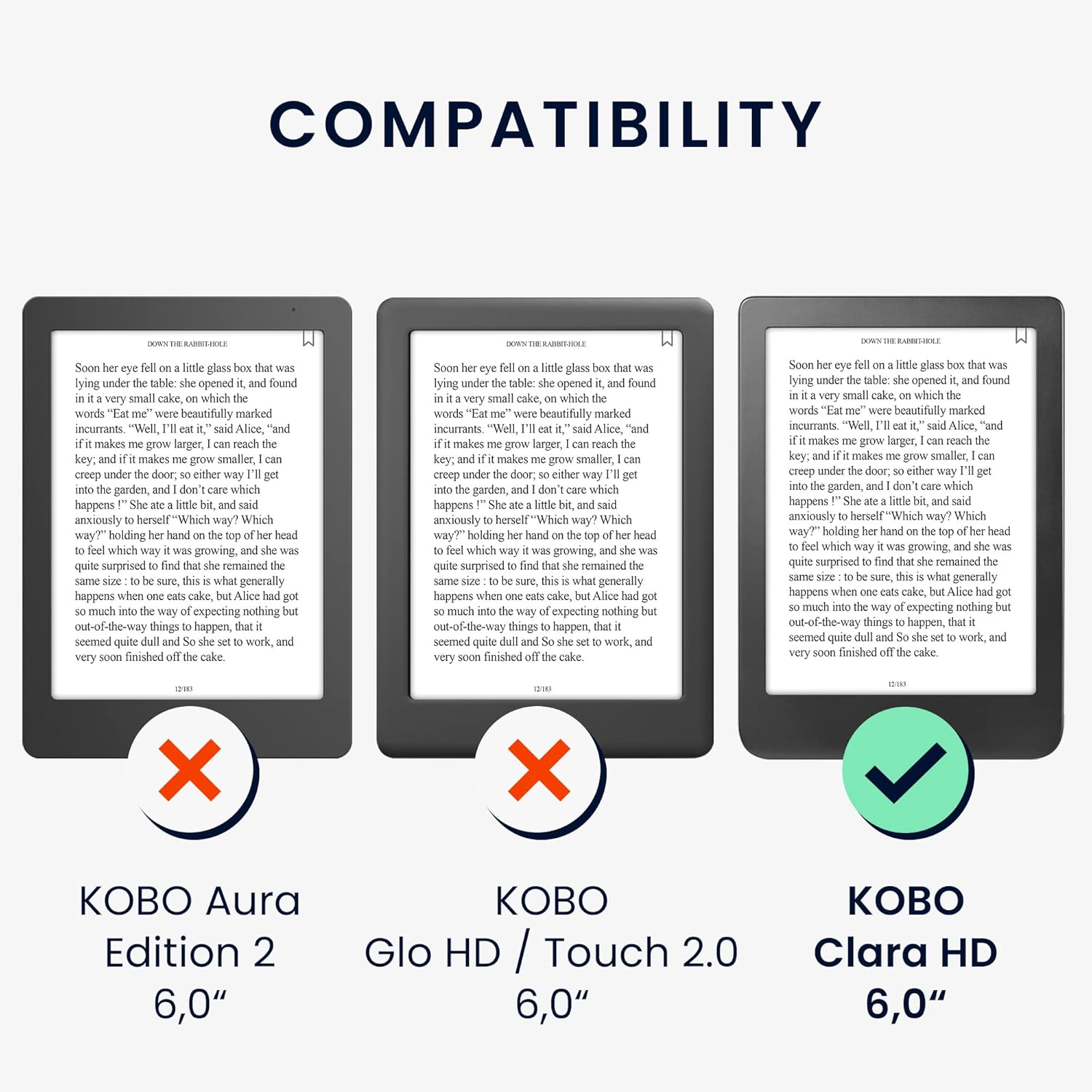
A visual guide illustrating the compatibility of the kwmobile cover. It clearly indicates that the cover is specifically designed for the Kobo Clara HD (6.0 inches), and is not compatible with the Kobo Aura Edition 2 (6.0 inches) or Kobo Glo HD / Touch 2.0 (6.0 inches).
4. Operating Instructions
4.1 Using the Hand Strap
The cover features an elastic hand strap on the back for comfortable and secure holding. Simply slide your hand through the strap to maintain a firm grip on your e-reader, especially useful for reading in various positions.

A close-up view of a person holding the Kobo Clara HD e-reader, which is secured within the kwmobile cover. The elastic hand strap on the back of the cover is in use, providing a comfortable and secure grip for reading.
4.2 Using the Kickstand
To use the kickstand feature, fold the front cover backward and secure it into the designated slot on the back of the case. This will prop your e-reader at an angle, allowing for hands-free viewing on flat surfaces.
This image combines two key features: the Kobo Clara HD e-reader is displayed in the kwmobile cover, utilizing the kickstand for hands-free viewing. In the upper left corner, a hand demonstrates the use of the elastic strap on the back of the cover.
4.3 Closing the Cover
To close the cover, simply fold the front flap over your e-reader's screen. An additional elastic strap can be wrapped around the entire case to ensure it remains securely closed during transport.
5. Maintenance
To maintain the appearance and integrity of your kwmobile cover, follow these guidelines:
- Cleaning: Wipe the faux leather surface with a soft, damp cloth. Avoid using harsh chemicals or abrasive cleaners, as these can damage the material.
- Storage: Store the cover in a cool, dry place away from direct sunlight and extreme temperatures to prevent material degradation.
- Avoid Sharp Objects: Keep the cover away from sharp objects to prevent scratches or punctures.
6. Troubleshooting
6.1 Device Does Not Fit
If your Kobo Clara HD does not seem to fit into the case, ensure you are inserting it with the correct orientation. The bottom of the e-reader (with the charging port) should align with the slightly wider curved corners of the case's internal frame. Gently try rotating the device 180 degrees and re-inserting it.
6.2 Auto-Sleep Functionality
While the cover is designed to protect, some users may experience inconsistent auto-sleep functionality. If your e-reader does not automatically go to sleep when the cover is closed, it is recommended to manually put your Kobo Clara HD to sleep to conserve battery life.
6.3 Elastic Strap Tightness
The elastic strap for closure and the hand strap are designed to be snug to provide a secure hold and closure. Over time, the elasticity may adjust slightly with use.
7. Specifications
| Feature | Detail |
|---|---|
| Brand | kwmobile |
| Compatible Model | Kobo Clara HD |
| Material | Faux Leather |
| Color | Dark Blue |
| Item Dimensions (L x W x H) | 6.69 x 4.72 x 0.63 inches |
| Item Weight | 3.88 ounces (110 Grams) |
8. Warranty and Support
For warranty information or product support, please contact the seller directly through your purchase platform. kwmobile is committed to providing quality products and customer satisfaction.
You can visit the official kwmobile store for more information and contact options: kwmobile Store on Amazon


