
1. Introduction
Thank you for choosing the FOMITO Godox iA32 iFlash Camera Flash. This compact and versatile flash unit is designed to provide enhanced lighting for your photography, offering both automatic and manual control options. Please read this manual thoroughly before use to ensure proper operation and to maximize the performance of your flash.
2. Safety Information
- Do not disassemble or modify the flash unit. Repairs should only be performed by authorized service personnel.
- Keep the unit dry. Do not handle with wet hands or immerse in water.
- Avoid direct eye exposure to the flash light, especially at close range, as it may cause visual impairment.
- Keep out of reach of children.
- Use only specified AA batteries. Do not mix old and new batteries or different types of batteries.
- Remove batteries if the flash will not be used for an extended period.
- Operate the flash within the specified temperature range to prevent damage.
3. Package Contents
Verify that all items are included in your package:
- 1 x Godox iA32 Mini Flash Body
- 1 x Carrying bag

Image: The Godox iA32 Mini Flash unit shown alongside its included carrying bag.
4. Product Overview
The Godox iA32 is designed for portability and ease of use, featuring a slim profile and intuitive controls.
Key Features:
- Slim & Portable Design: Ultra-slim, flat design for easy transport and attachment to cameras.
- Flexible Angle Adjustments: Flash head tilts from -7° to 90° for versatile lighting, including bounce flash.
- Auto & Manual Modes: Offers both automatic power adjustment and full manual control with 8 power levels.
- High-Performance: Up to 490 full-power flashes and a fast 2.5-second recycling time (with AA batteries).
- Optical S1/S2 Modes: Supports multi-light setups for creative lighting configurations.
- Easy-to-Use LCD Panel: Clear display for quick adjustments to settings.
- Single Contact Hot Shoe: Simple and reliable connection, compatible with most camera models.

Image: The Godox iA32 flash unit shown mounted on a camera, highlighting its compact size and design. Another flash unit is visible next to the camera.
5. Setup
5.1 Battery Installation
- Open the battery compartment cover on the side of the flash unit.
- Insert two AA batteries (sold separately) according to the polarity indicators (+/-) inside the compartment.
- Close the battery compartment cover securely.

Image: Hands holding a camera and the Godox iA32 flash unit, demonstrating its compact size and how it might be handled before mounting.

Image: A detailed view of the Godox iA32's single-contact hot shoe, along with a diagram illustrating compatibility with various camera hot shoe types (S, C, N, F, L, O).
5.2 Mounting the Flash on Camera
- Ensure your camera is turned off.
- Slide the flash unit's hot shoe into your camera's hot shoe mount until it clicks into place.
- Tighten the locking ring (if present) on the flash unit to secure it to the camera.
- Turn on your camera, then turn on the flash unit.
6. Operating Instructions
6.1 Power On/Off
Press and hold the power button to turn the flash unit on or off.
6.2 Mode Selection (Auto/Manual)
The iA32 offers two primary operating modes:
- Auto Mode: The flash automatically adjusts its power output based on your camera's ISO and aperture settings. The recommended shooting distance will be displayed on the LCD panel.
- Manual Mode: Provides full control over flash power. You can adjust the output across 8 power levels, from 1/128 to full power (1/1), in 1/3-step increments.
Use the "MOD" button to switch between Auto and Manual modes. Use the '+' and '-' buttons to adjust settings within each mode.
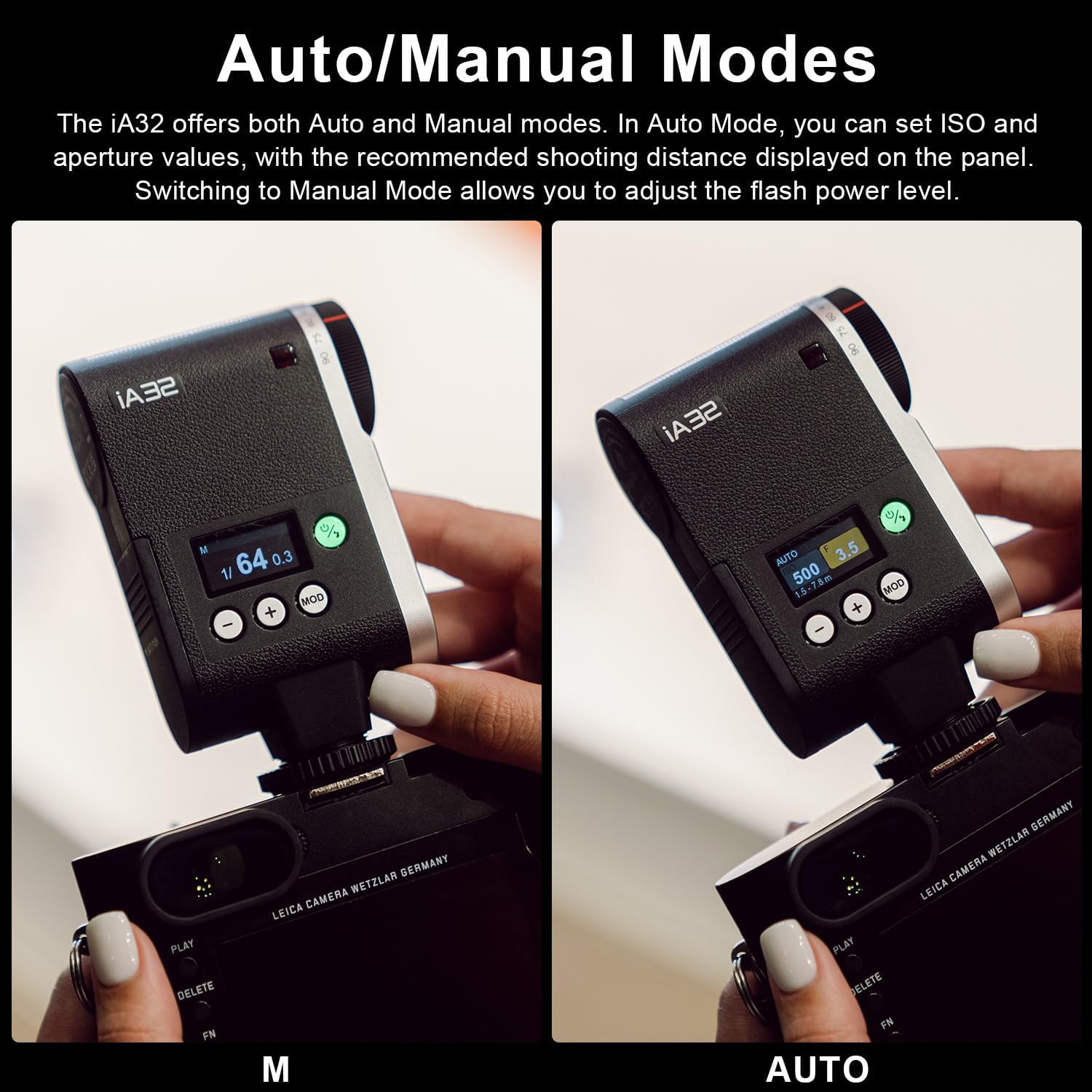
Image: The LCD panel of the Godox iA32 flash, illustrating the display in both Manual (M) mode with power level setting and Auto mode with recommended shooting distance.
6.3 Flash Head Angle Adjustment
The flash head can be tilted from -7° to 90° using the side dial. This allows for direct flash or bounce flash techniques, where the light is directed off a ceiling or wall for softer illumination.

Image: A sequence of images demonstrating how to adjust the tilt angle of the Godox iA32 flash head using the side dial, showing various positions from -7° to 90°.
6.4 Optical S1/S2 Modes
These modes enable the iA32 to function as an optical slave unit, triggered by another flash:
- S1 Mode: The iA32 fires simultaneously with the main flash. This mode is suitable for manual flash units.
- S2 Mode: The iA32 ignores the pre-flash from a TTL-compatible main flash and fires on the second flash pulse. This allows it to be used with cameras that employ a pre-flash for exposure metering.
Refer to the LCD panel and mode button to select S1 or S2 mode when setting up multi-light configurations.
7. Maintenance
- Cleaning: Use a soft, dry cloth to clean the flash unit. For stubborn dirt, a slightly damp cloth can be used, followed by a dry cloth. Do not use solvents or abrasive cleaners.
- Storage: Store the flash in a cool, dry place away from direct sunlight and extreme temperatures. Remove batteries if storing for extended periods.
- Battery Care: Replace batteries when the low battery indicator appears. Dispose of used batteries responsibly.
8. Troubleshooting
| Problem | Possible Cause | Solution |
|---|---|---|
| Flash does not fire. |
|
|
| Flash recycling time is slow. |
|
|
| Inconsistent flash output. |
|
|
9. Specifications
| Feature | Detail |
|---|---|
| Model | iA32 |
| Guide Number (GN) | 15 (at ISO 100) |
| Power Levels | 8 levels (1/128 to 1/1) in 1/3-step increments |
| Recycle Time | Approx. 2.5 seconds (full power) |
| Flash Duration | Not specified (typical for shoe mount flashes) |
| Flash Modes | Auto, Manual, Optical S1, Optical S2 |
| Flash Head Tilt Angle | -7° to 90° |
| Power Source | 2 x AA batteries (not included) |
| Flashes per Charge | Approx. 490 (full power, with AA batteries) |
| Dimensions | 0.94 x 0.81 x 0.7 inches (2.39 x 2.06 x 1.78 cm) |
| Weight | 2.75 ounces (78 grams) |
| Compatible Mountings | Canon, Sony, Nikon, Pentax, Panasonic, Olympus (single contact hot shoe) |
10. Warranty and Support
This product is covered by a manufacturer's warranty. For specific warranty terms and conditions, please refer to the warranty card included with your purchase or contact FOMITO customer support. For technical assistance or service inquiries, please visit the official FOMITO website or contact their customer service department.
Manufacturer: GODOX
Brand: FOMITO
Date First Available: January 20, 2025