
Introduction
Thank you for purchasing the Giecy Wireless Microphone System WM002. This manual provides detailed instructions for the safe and efficient use of your new wireless microphone. Please read this manual thoroughly before use and retain it for future reference.
Product Overview
The Giecy WM002 is a high-sensitivity UHF wireless headset microphone system designed for clear voice amplification. It offers stable signal transmission up to 50 meters and is suitable for various applications such as meetings, lectures, fitness instruction, and promotions.
Key Features:
- UHF Wireless Technology: Ensures stable signal transmission and clear audio without interference.
- 50-Meter Transmission Range: Provides ample freedom of movement.
- High-Sensitivity Condenser Microphone: Delivers clear and crisp sound.
- Adjustable Volume: Volume can be adjusted directly on the transmitter.
- Durable Design: Made from high-strength ABS material, allowing for flexible adjustment and enhanced wear resistance.
- Long Battery Life: Built-in 200 mAh rechargeable lithium-ion batteries provide approximately 4 hours of operation.
Package Contents:
- Wireless Headset Microphone (Transmitter) x 1
- Receiver x 1
- 6.35mm Adapter x 1
- USB Charging Cable x 1
- Instruction Manual x 1

Figure 1: Package Contents
Component Identification

Figure 2: Transmitter and Receiver Components
- Transmitter (Headset Microphone): Features a power ON/OFF button, volume adjustment keys (+/-), and a charging port.
- Receiver: Features a power ON/OFF switch and a charging port.
- 6.35mm Adapter: Used to connect the receiver to devices with a 6.35mm microphone input.
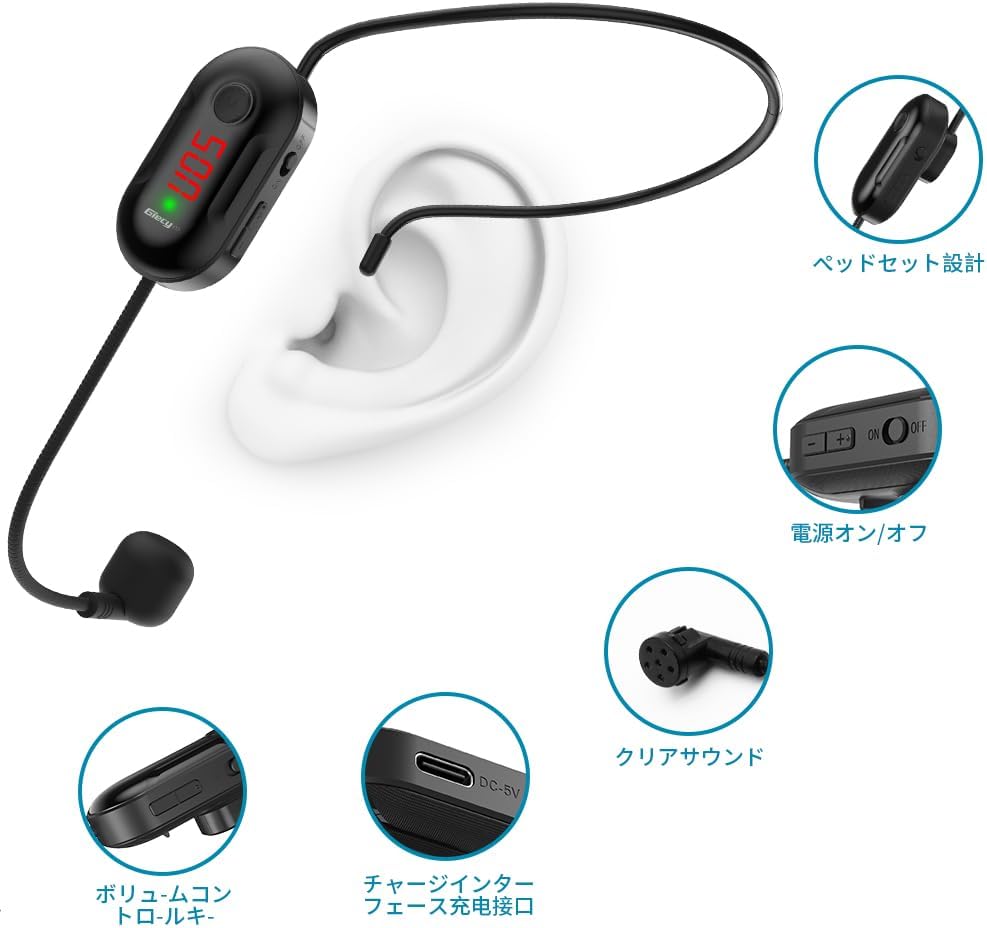
Figure 3: Headset Microphone Details
Setup Instructions
- Charge the Devices: Before first use, fully charge both the transmitter (headset microphone) and the receiver using the provided USB charging cable. The charging time is approximately 3 hours.
- Connect the Receiver:
- Insert the receiver directly into the microphone input jack (3.5mm or 6.35mm with adapter) of your amplifier, speaker, or multimedia device.
- If your device has a 6.35mm input, attach the 6.35mm adapter to the receiver first, then insert it firmly. You should hear a "click" sound, indicating a successful connection.
- Important Note: This system is designed for microphone input jacks only. Auxiliary (AUX) jacks are not supported. It is not compatible with Android phones, iPhones, MacBooks, laptops, or Bluetooth speakers.
- Power On the Receiver: Flip the power switch on the receiver to the "ON" position.
- Power On the Transmitter: Press and hold the power button on the headset microphone (transmitter) for 3 seconds until it turns on.
- Automatic Pairing: The transmitter and receiver will automatically pair. Once successfully paired, no further operation is required. The signal is stable and ready for use.

Figure 4: System Setup and Transmission Range

Figure 5: Device Compatibility
Operating Instructions
- Wearing the Headset: Position the headset microphone comfortably on your head, ensuring the microphone is close to your mouth for optimal sound pickup. The flexible design allows for adjustment.
- Adjusting Volume: Use the volume adjustment keys (+/-) on the side of the headset microphone (transmitter) to increase or decrease the microphone's output volume. The preset volume level is 7.
- Speaking Clearly: Speak clearly and directly into the microphone for the best audio quality.
- Power Off: When finished, press and hold the power button on the headset microphone for 3 seconds to turn it off. Then, turn off the receiver's power switch.

Figure 6: Typical Usage Scenarios
Maintenance
- Cleaning: Wipe the microphone and receiver with a soft, dry cloth. Do not use abrasive cleaners or solvents.
- Charging: Recharge the devices when the battery indicator shows low power. Avoid overcharging or completely draining the battery for optimal battery life.
- Storage: Store the system in a cool, dry place away from direct sunlight and extreme temperatures.
- Handling: While the microphone is made of durable ABS material, avoid excessive bending or harsh impacts to prevent damage.
Troubleshooting
| Problem | Possible Cause | Solution |
|---|---|---|
| No sound or low volume. |
|
|
| Static or interference. |
|
|
| Device not pairing. |
|
|
| Receiver adapter does not fit or connect firmly. |
|
|
Specifications
| Model Number | WM002 |
| Brand | Giecy |
| Color | Wireless |
| Transmission Technology | UHF Wireless |
| Transmission Range | Up to 50 meters |
| Battery Capacity (Transmitter & Receiver) | 200 mAh Lithium-ion (rechargeable) |
| Operating Time | Approximately 4 hours |
| Charging Time | Approximately 3 hours |
| Connection Type | Microphone Jack (3.5mm / 6.35mm with adapter) |
| Material | High-strength ABS |
| Package Dimensions | 23.1 x 16.3 x 4.2 cm |
| Package Weight | 100 g |
Warranty and Support
For any questions regarding the product, either before or after purchase, please contact Giecy customer service. Our team is available to assist you with any inquiries or issues you may encounter.
Please refer to your purchase documentation or the seller's contact information for specific warranty details and support channels.