
Introduction
This manual provides detailed instructions for the safe installation, operation, and maintenance of your WINGBO 72-inch Ceiling Fan with Light and Remote Control (Model SYCF7214). Please read this manual thoroughly before installation and retain it for future reference.
Safety Information
Always follow basic safety precautions when installing and operating this appliance to reduce the risk of fire, electric shock, and personal injury.
- Ensure the power is turned off at the circuit breaker before installation or servicing.
- All wiring must be in accordance with national and local electrical codes.
- The mounting structure must be capable of supporting the fan's weight (refer to specifications).
- Do not operate the fan with damaged wiring or components.
- Keep hands and objects clear of the fan blades during operation.
Setup and Installation
This section guides you through the installation process of your ceiling fan. Professional installation is recommended if you are unfamiliar with electrical wiring.
Unpacking and Inspection
Carefully remove all components from the packaging. Inspect for any damage during transit. Ensure all parts listed in the packing list are present.
Mounting Options
The fan supports both flat and sloped ceiling installations. Select the appropriate downrod length for your ceiling height.

Image: Mounting options for flat and sloped ceilings, and available downrod lengths (4.5", 12", 24").

Image: Examples of the ceiling fan installed on both slanted and flat ceilings.
Blade Installation
The fan features double-sided blades with black and walnut finishes. Choose your preferred side during installation. Attach the blades securely to the motor housing.

Image: Double-sided fan blades showing walnut color (Side A) and black color (Side B).
Wiring and Remote Receiver Installation
Connect the fan's wiring to your household electrical system. Ensure the remote control receiver is properly installed within the canopy. Refer to the video for detailed steps.
Video: This video demonstrates the installation process for the 72-inch ceiling fan, including wiring and remote receiver setup.
Operation
Your WINGBO ceiling fan is operated via the included remote control, offering various settings for comfort and convenience.
Remote Control Functions
- Power On/Off: Press the power button to turn the fan and light on or off.
- Fan Speed: Select from 6 fan speeds to adjust airflow.
- Light Control:
- Dimmable LED: Adjust light brightness from 10% to 100%.
- Color Temperature: Cycle through 3 color temperatures: Warm White (3000K), Neutral White (4000K), and Cool White (6000K).
- Reversible Motor: Change the fan's rotation direction for summer (downward airflow) or winter (upward airflow) modes.
- Timer Settings: Set the fan to turn off automatically after 1, 4, or 8 hours.
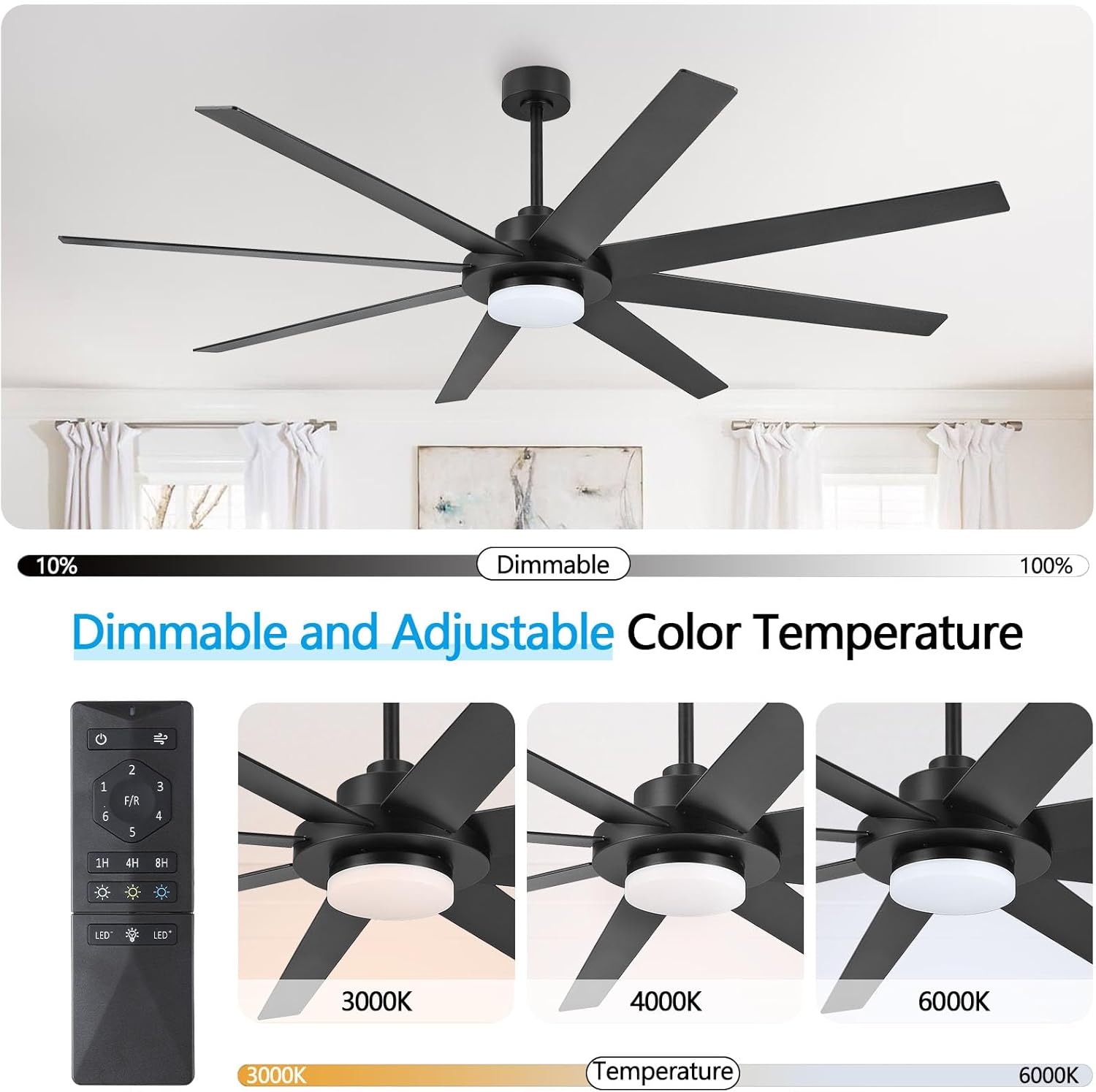
Image: Remote control functions for dimmable LED light and adjustable color temperatures (3000K, 4000K, 6000K).

Image: Reversible motor function for summer (downward airflow) and winter (upward airflow) modes.

Image: Visual representation of Summer Mode (downward airflow) and Winter Mode (upward airflow).

Image: Quiet operation and timer settings (1h, 4h, 8h) of the ceiling fan.
Video: This video showcases the WINGBO 72" Ceiling Fan with Light in operation, demonstrating its features and quiet performance.
Maintenance
Regular maintenance ensures the longevity and optimal performance of your ceiling fan.
- Cleaning: Dust the fan blades and motor housing periodically with a soft, damp cloth. Do not use abrasive cleaners or solvents.
- Tightening Fasteners: Check all screws and fasteners on the fan and mounting hardware at least twice a year. Tighten any loose connections.
- Blade Balance: If the fan wobbles, ensure all blades are securely attached and balanced. A balancing kit (not included) may be used if necessary.
- Light Kit: The LED light kit is integrated. If the light malfunctions, contact customer support.
Troubleshooting
Before contacting customer support, refer to the following common issues and solutions:
| Problem | Possible Cause | Solution |
|---|---|---|
| Fan does not start | No power to the fan; loose wire connections; remote control battery low. | Check circuit breaker; ensure all wire connections are secure; replace remote control batteries. |
| Fan wobbles | Loose blades or mounting hardware; unbalanced blades. | Tighten all blade screws and mounting hardware; use a balancing kit to correct blade imbalance. |
| Light does not work | Loose wire connection to light kit; remote control issue. | Check light kit wiring; ensure remote control batteries are fresh and paired correctly. |
| Remote control not working | Low battery; not paired with receiver. | Replace batteries; refer to pairing instructions (if applicable, usually in the main manual). |
Specifications
Key technical specifications for the WINGBO 72-inch Ceiling Fan (Model SYCF7214).
| Feature | Detail |
|---|---|
| Brand | WINGBO |
| Model Number | SYCF7214 |
| Size | 72 inches |
| Color | Black and Walnut (reversible blades) |
| Power Source | DC Motor |
| Wattage | 75 watts |
| Noise Level | 45 Decibels (typically less than 35 dB during quiet operation) |
| Light Type | Integrated Dimmable LED Light Kit |
| Color Temperatures | 3000K (Warm White), 4000K (Neutral White), 6000K (Cool White) |
| Control Method | Remote Control |
| Mounting Type | Ceiling Mount (Flat or Sloped) |
| Included Components | Light Kit, Remote Control, Downrods (4.5", 12", 24") |
| Material | Metal, Plastic |
| Indoor/Outdoor Usage | Indoor |
Warranty and Support
WINGBO is committed to providing quality products and customer satisfaction.
Warranty Information
This product includes a free motor replacement for 10 years and a 3-year warranty on all other parts. Please retain your proof of purchase for warranty claims.

Image: WINGBO's Worry-Free Promise detailing 10-year motor replacement and 3-year parts warranty.
Customer Support
For any questions regarding the use, installation, or after-sales support, please contact WINGBO directly through Amazon. We aim to respond to all inquiries within 24 hours.
You can visit the official WINGBO store on Amazon for more information and products: WINGBO Amazon Store


