
sako SUNPOLO 8KW/11KW
Sako SUNPOLO 8KW/11KW Hybrid Solar Inverter User Manual
Model: SUNPOLO 8KW/11KW | Brand: Sako
Introduction
The Sako SUNPOLO Hybrid Solar Inverter is an advanced power solution designed for residential and commercial applications, offering seamless integration of solar power, grid electricity, and battery storage. This inverter supports both on-grid and off-grid operations, providing a reliable and efficient energy supply. With dual MPPT trackers, a robust Battery Management System (BMS), and expandability for up to 6 units in parallel, the SUNPOLO inverter ensures optimal performance and flexibility for various energy demands.

Figure 1: Front view of the Sako SUNPOLO Hybrid Solar Inverter, showcasing its sleek design and integrated display.
Key Features
- BMS Battery System: Features optional communication via USB, RS232, RS485, or Dry-Contact. Capable of operating with or without a battery system.
- Dual MPPT & AC Output: Equipped with two independent 27A MPPT trackers. Provides dual AC outputs (L1/L2) and supports ON-Grid, OFF-Grid, and Hybrid operational modes. Up to 6 inverters can be combined for capacity expansion.
- High Performance: Delivers up to 11000W output power with a maximum PV input DC voltage of 450VDC and a conversion efficiency of up to 96%.
- Smart Monitoring: Built-in WiFi allows for remote monitoring of the inverter's status via a mobile application. User-configurable settings for DC/AC input priority, battery type, and charging current are accessible via the LCD screen.
- Safety and Compatibility: Includes comprehensive protection features such as overload protection, short circuit protection, overvoltage protection, undervoltage protection, and overtemperature protection. Compatible with both AC and DC power inputs, including diesel generators.
Setup and Installation
Proper installation is crucial for the safe and efficient operation of your Sako SUNPOLO inverter. It is recommended that installation be performed by a qualified electrician or solar professional.
System Overview and Connections
The inverter integrates solar panels, batteries, the utility grid, and household appliances to create a comprehensive energy system. Ensure all connections are secure and follow local electrical codes.

Figure 2: Comprehensive system diagram illustrating the connections between the solar panels, inverter, battery, utility grid, generator, and various household appliances.
Parallel Operation for Capacity Expansion
For increased power output, up to six Sako SUNPOLO inverters can be connected in parallel. This configuration allows for scalable energy solutions to meet higher demand requirements.
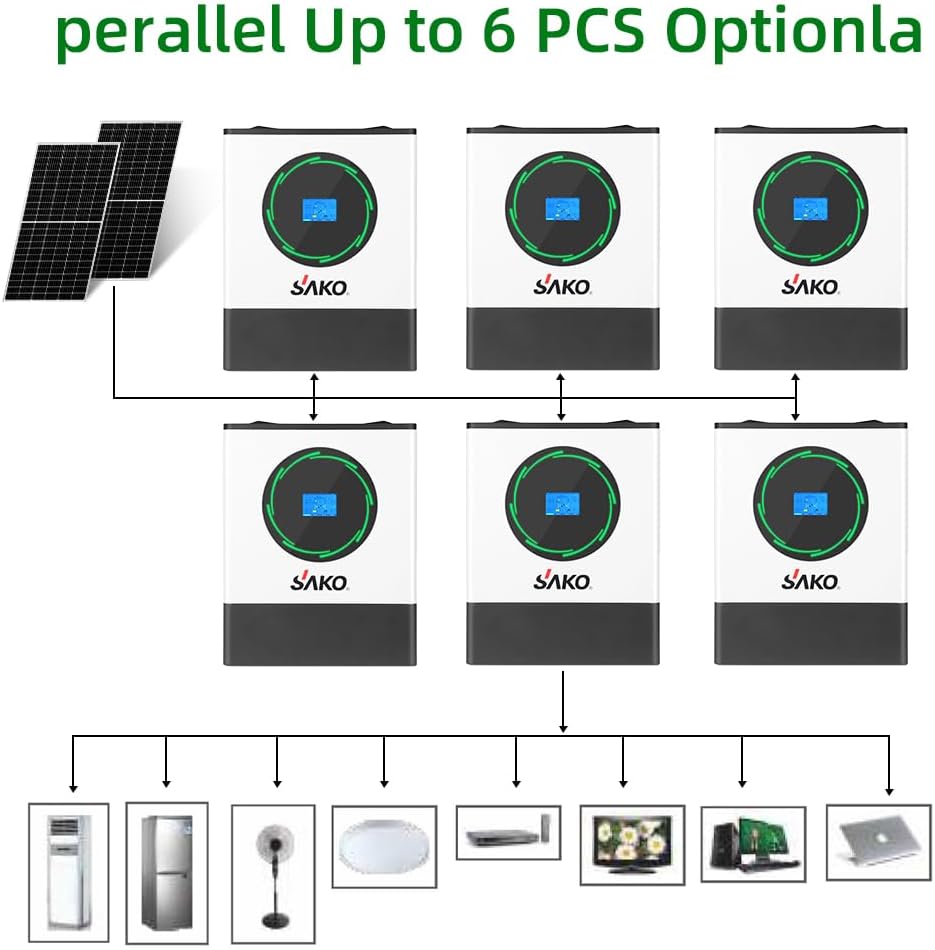
Figure 3: Diagram demonstrating the parallel connection of up to six Sako SUNPOLO inverters to support a larger load capacity.
Main Features and Solar System Connection Overview

Figure 4: Overview of the inverter's main features and a simplified diagram of the solar system connection, highlighting key components and power flow.
Operating Modes
The Sako SUNPOLO inverter offers flexible operating modes to optimize energy usage based on your preferences and available power sources.
Charging Modes
The inverter supports four distinct charging modes, allowing users to prioritize solar, utility, or a combination for battery charging.
- Solar Charging: Prioritizes solar power for battery charging.
- Electricity Utility Priority: Utilizes grid electricity as the primary source for charging.
- Solar Priority: Prioritizes solar power, using utility only when solar is insufficient.
- Hybrid Charging: Combines solar and utility power for efficient charging.

Figure 5: Visual representation of the four user-configurable charging modes for the inverter's battery system.
Daytime Charging and Nighttime Discharge
The system is designed to efficiently charge batteries during the day using solar power and discharge them at night to power household loads, maximizing self-consumption of renewable energy.

Figure 6: Illustration of the inverter's operational cycle, demonstrating daytime battery charging from solar energy and nighttime power discharge to the home.
Battery Management System (BMS)
The integrated BMS ensures the longevity and safety of your battery system by providing comprehensive protection and management features.
- Temperature Protection: High-temperature, low-temperature, and intelligent temperature control protection.
- Voltage Protection: Under-voltage and over-voltage protection.
- Current Protection: Overload and short-circuit protection.
- Charge/Discharge Protection: Over-recharge and over-discharge protection.
- Other Protections: Pressure differential protection, multi-level failure protection, condensation protection, disconnection protection, and electrostatic protection.
- Communication Ports: USB, RS232, RS485, and Dry Contact for versatile communication with external systems.

Figure 7: Detailed overview of the Battery Management System (BMS) protections and communication options for the SUNPOLO 11KW model.
Maintenance
Regular maintenance ensures the optimal performance and longevity of your Sako SUNPOLO inverter. It is recommended to:
- Keep the inverter clean and free from dust and debris.
- Ensure proper ventilation around the unit to prevent overheating.
- Periodically check all electrical connections for tightness and signs of corrosion.
- Monitor the LCD display and mobile app for any error codes or warnings.
- Consult a qualified technician for any complex issues or internal inspections.
Troubleshooting
This section provides general guidance for common issues. For detailed troubleshooting, refer to the full technical manual or contact customer support.
- No Power Output: Check input power sources (solar, grid, battery), circuit breakers, and all connections. Ensure the inverter is switched on.
- Low Power Output: Verify solar panel cleanliness and shading. Check battery charge level and health.
- Error Codes on Display: Note the specific error code and consult the technical specifications or contact support for interpretation and resolution.
- Inverter Overheating: Ensure adequate ventilation space around the inverter. Clear any obstructions from cooling vents. Reduce load if consistently overheating.
Technical Specifications
The following tables provide detailed technical specifications for the Sako SUNPOLO 8KW and 11KW models.

Figure 8: Technical Specifications - Part 1: Basic information, Grid-Tie Operation, PV Input, and Grid Output parameters.

Figure 9: Technical Specifications - Part 2: Off-Grid Operation, AC Input, Battery Mode Output, and Battery & Charger specifications.

Figure 10: Technical Specifications - Part 3: Physical dimensions, weight, parallel functions, communication interface, and environmental operating conditions.
Warranty and Support
For warranty information and technical support, please refer to the documentation provided with your purchase or contact Sako customer service. Extended warranty options may be available through authorized retailers.
Related documentsSUNPOLO 8KW/11KW


Ask a question about this manual
Ask about setup, troubleshooting, compatibility, parts, safety, or missing instructions. Manuals+ will review the question and use this page’s manual context to help answer it.