
1. Introduction
The Streamlight Stinger 2020 S is a high-performance, rechargeable LED flashlight designed for professional use. It features multiple lighting modes, a durable aluminum alloy body, and advanced battery technology for extended runtime. This manual provides essential information for the proper setup, operation, and maintenance of your Stinger 2020 S flashlight.
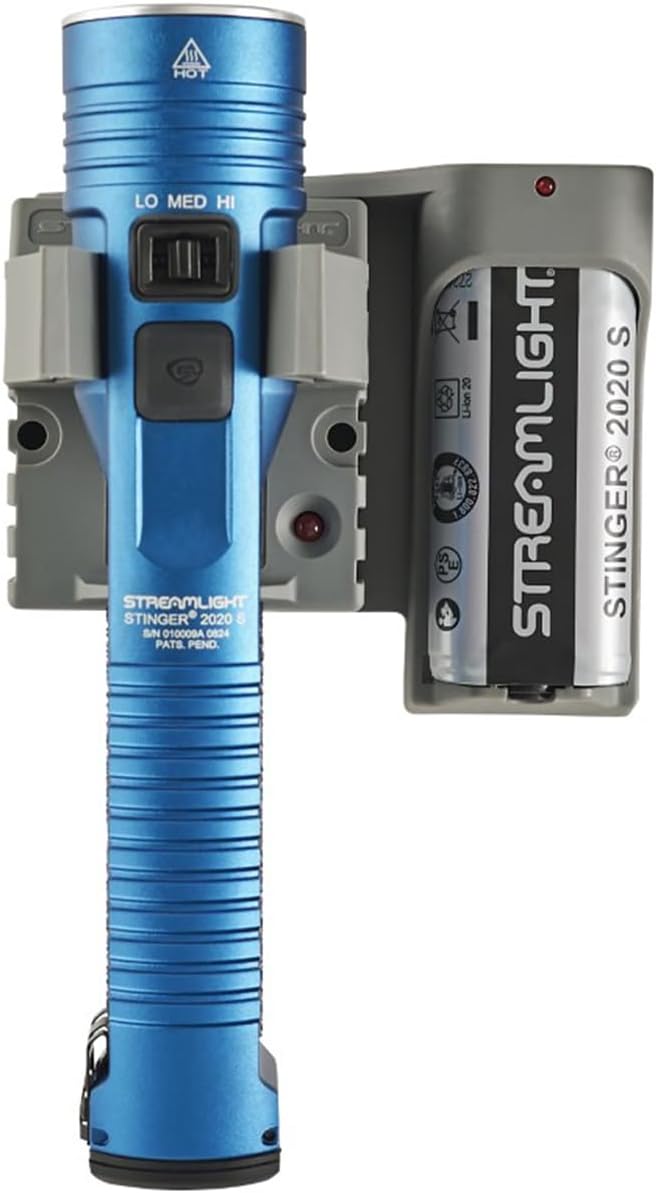
Figure 1: Streamlight Stinger 2020 S Flashlight with Piggyback Charger. The image displays the blue flashlight alongside its grey piggyback charging cradle, which also holds a spare battery.
2. Key Features
- High, Medium, Low, and Strobe Modes: Versatile lighting options for various situations.
- Intuitive Mode Switch: Easy selection of high, medium, or low settings.
- Push-button Head Switch: Includes a battery status indicator.
- Durable Construction: Premium quality aluminum alloy body with ergonomic, anti-roll design and textured grip.
- Impact and Water Resistance: High temperature, shock-mounted, corrosion-resistant, and impact-resistant BOROFLOAT® glass lens. IPX7 waterproof to 1 meter for 30 minutes.
- Rechargeable Battery: Utilizes a 5,200 mAh Li-Ion rechargeable battery pack.
- Piggyback Charging Options: Allows for charging the flashlight and a spare battery simultaneously, doubling runtime.

Figure 2: Diagram illustrating key features of the Stinger 2020 S, including the mode switch, ergonomic design, and piggyback charging options.
3. Setup and Charging
Before first use, fully charge the flashlight battery. The Stinger 2020 S comes with a Lithium Ion battery pack (included).
3.1 Initial Charging
- Connect the charging cord to the charger base and plug it into a suitable power outlet (AC or DC, depending on your charger model).
- Insert the Stinger 2020 S flashlight into the charging cradle. Ensure it is securely seated. The charging indicator light on the charger will illuminate to confirm charging is in progress.
- For models with a Piggyback charger, you can also insert a spare battery into the secondary slot for simultaneous charging.
- Allow the flashlight to charge until the indicator light changes, typically indicating a full charge. Refer to your specific charger's instructions for exact indicator behavior.
3.2 Battery Installation/Removal (if applicable)
While the battery is typically pre-installed, if replacement is needed:
- Unscrew the tail cap of the flashlight.
- Carefully remove the old battery.
- Insert the new Streamlight Li-Ion battery with the positive (+) terminal facing towards the head of the flashlight.
- Screw the tail cap back on securely.
4. Operating Instructions
The Stinger 2020 S features an intuitive mode switch for easy operation.
4.1 Mode Selection
The flashlight has a sliding switch located on the body to select between High, Medium, and Low output modes. A separate push-button switch on the head controls power and strobe.
- High Mode: Slide the switch to the "HI" position. Provides maximum illumination.
- Medium Mode: Slide the switch to the "MED" position. Offers a balanced output for general use.
- Low Mode: Slide the switch to the "LO" position. Ideal for extended runtime or close-up tasks.
4.2 Power On/Off and Strobe
- To Turn On/Off: Press the push-button switch on the head of the flashlight.
- To Activate Strobe: Rapidly double-press the push-button switch. Press again to turn off strobe.
4.3 Output and Runtime Specifications
| Mode | Lumens | Beam Distance | Runtime |
|---|---|---|---|
| High | 2,000 | 315m | 2 hours |
| Medium | 850 | 200m | 4 hours |
| Low | 100 | 70m | 24 hours |
| Strobe | N/A | N/A | 3.25 hours |
5. Maintenance
Proper maintenance ensures the longevity and optimal performance of your Streamlight Stinger 2020 S.
- Cleaning: Wipe the flashlight body with a damp cloth. Do not use abrasive cleaners or solvents.
- O-Rings: Periodically inspect and lubricate the O-rings with silicone grease to maintain water resistance. Replace if damaged.
- Battery Care: For best battery life, avoid fully discharging the battery frequently. Recharge as needed. If storing for extended periods, charge the battery every few months.
- Lens: Clean the glass lens with a soft, lint-free cloth.
The Stinger 2020 S is designed to be waterproof to IPX7 standards (submersible to 1 meter for 30 minutes). Ensure all seals are intact and caps are tightened before exposing to water.
6. Troubleshooting
If your Streamlight Stinger 2020 S is not functioning as expected, refer to the following common issues and solutions:
- Flashlight does not turn on:
- Ensure the battery is fully charged.
- Check that the battery is inserted correctly with the positive (+) terminal facing the head.
- Verify that the tail cap is screwed on tightly.
- Clean battery contacts with a clean cloth.
- Light is dim or flickers:
- Recharge the battery.
- Check for loose connections or dirty contacts.
- Charging indicator not working:
- Ensure the charger is properly plugged into a power source.
- Verify the flashlight is correctly seated in the charging cradle.
If issues persist after attempting these solutions, contact Streamlight customer support for further assistance.
7. Specifications
| Feature | Detail |
|---|---|
| Brand | Streamlight |
| Model Number | 78231 |
| Power Source | Battery Powered |
| Light Source Type | LED |
| White Brightness | 2000 Lumens (High) |
| Battery Cell Composition | Lithium Ion |
| Number of Batteries | 1 (included) |
| Water Resistance Level | Waterproof (IPX7) |
| Item Weight | 2.15 Pounds (approx. 0.975 kg) |
| Product Dimensions | 10.13 x 6.25 x 4.25 inches |
| Runtime (Max) | 24 hours (Low) |
| UPC | 080926782310 |
8. Accessories
A range of official Streamlight accessories are available to enhance the functionality and versatility of your Stinger 2020 S flashlight. These include various charging cords, holsters, and safety wands.

Figure 3: A selection of available accessories for the Streamlight Stinger 2020 S, including various charging cables, holsters, and colored safety wands.
For a complete list of compatible accessories and their part numbers, please refer to the official Streamlight website or your product packaging.
9. Warranty and Support
Streamlight products, including the Stinger 2020 S, are backed by a limited lifetime warranty. This warranty covers defects in material and workmanship for the lifetime of the product, excluding batteries, bulbs, abuse, and normal wear and tear.
For detailed warranty information, to register your product, or for technical support, please visit the official Streamlight website:
You may also contact Streamlight customer service directly for assistance with product inquiries, parts, or service.