
SBS TECARFM2USB
SBS 15W Car Charger with FM Transmitter User Manual
Model: TECARFM2USB
1. Product Overview
The SBS 15W Car Charger with FM Transmitter is a versatile device designed to enhance your in-car experience. It allows you to charge your mobile devices, stream audio wirelessly to your car's FM radio, and manage hands-free calls, all through your vehicle's 12V cigarette lighter socket.

Image: Front view of the SBS 15W Car Charger with FM Transmitter, showing the display and control buttons.
Key Features:
- Dual USB-A Charging Ports: Charge up to two devices simultaneously.
- 15W Fast Charging: Delivers 15 watts of power for rapid charging, especially via the green USB-A port.
- Adaptive Fast Charge (AFC): Automatically adjusts power output for safe and efficient charging.
- FM Transmitter: Connects your smartphone to your car radio wirelessly via FM frequency.
- Hands-Free Calling: Integrated microphone and controls for answering calls directly through your car's speakers.
- Media Playback: Supports music playback from Bluetooth-connected devices, Micro SD cards (up to 32GB), and USB flash drives.
- Integrated Controls: Easy-to-use buttons for managing music playback (play/pause, skip tracks) and call functions.
- LCD Display: Shows the current FM frequency.
2. Setup
2.1 Initial Connection
- Insert the SBS Car Charger into your vehicle's 12V cigarette lighter socket. The device will power on, and the LCD display will light up.
- The device is designed to be compatible with all cars equipped with a 12V cigarette lighter socket.

Image: The car charger plugged into a 12V socket, illustrating its universal compatibility with various devices.
2.2 Bluetooth Pairing
- On your smartphone, enable Bluetooth and search for available devices.
- Select the device named "TECARFM2USB" (or similar) from the list to pair. Once paired, you will hear an audio confirmation.
2.3 FM Frequency Setup
- Tune your car's FM radio to an empty frequency (one without any strong radio station signals).
- On the SBS Car Charger, use the integrated dial or buttons to adjust the FM frequency to match the one on your car radio. The frequency will be displayed on the LCD screen.
- Once the frequencies match, audio from your paired smartphone will be transmitted through your car's speakers.

Image: An exploded view of the car charger, highlighting its internal components and the concept of wireless FM transmission to make your car smart.
3. Operating Instructions
3.1 Charging Devices
The car charger features two USB-A ports. You can charge two devices simultaneously. The green USB-A port supports Adaptive Fast Charge (AFC) for quicker charging of compatible devices, delivering up to 15W when connected individually.

Image: The car charger with two phones connected via USB cables, demonstrating its ability to charge two devices simultaneously with AFC 15W.
3.2 Music Playback
You can play music through the car charger from various sources:
- Bluetooth: Stream music wirelessly from your paired smartphone.
- Micro SD Card: Insert a Micro SD card (up to 32GB) into the designated slot to play audio files directly.
- USB Flash Drive: Insert a USB flash drive into the 1.0A USB port to play audio files.
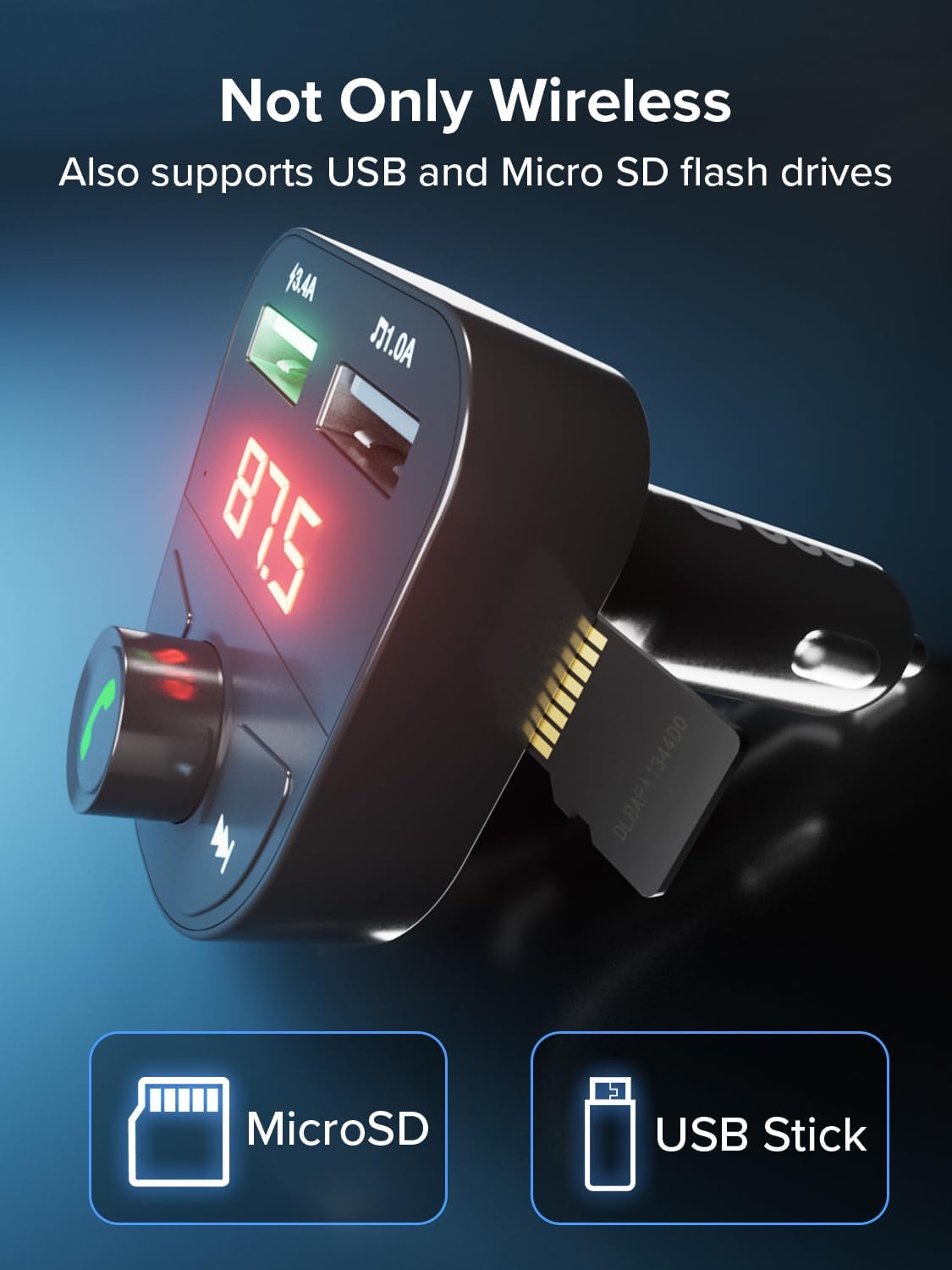
Image: The car charger with a MicroSD card inserted and a USB stick icon, indicating support for external media playback.
3.3 Hands-Free Calling
When a call comes in, simply press the central button on the dial to answer. You can hear the caller through your car's speakers, and the integrated microphone allows for clear communication. Press the central button again to end the call.
3.4 Integrated Controls
The device features intuitive controls for managing your audio and calls:
- Central Dial/Button: Press to answer/end calls, play/pause music. Rotate to adjust volume.
- Side Buttons: Use the left and right buttons to skip to the previous or next track.

Image: Close-up of the car charger's controls, showing the central dial with a phone icon and side buttons for managing music and calls.
4. Maintenance
To ensure the longevity and optimal performance of your SBS Car Charger, follow these simple maintenance guidelines:
- Keep the device clean by wiping it with a soft, dry cloth. Avoid using abrasive cleaners or solvents.
- Do not expose the device to extreme temperatures, direct sunlight, or excessive moisture.
- Store the device in a cool, dry place when not in use.
- Avoid dropping or subjecting the device to strong impacts.
5. Troubleshooting
5.1 No Power/Device Not Turning On
- Ensure the car charger is fully inserted into the 12V cigarette lighter socket.
- Check if the car's cigarette lighter socket is receiving power (e.g., by testing with another device).
- Verify your car's fuse box for any blown fuses related to the 12V socket.
5.2 Poor FM Signal/Static Noise
- Try changing the FM frequency on both the car charger and your car radio to find a clearer, unused frequency.
- Ensure there are no strong radio stations broadcasting on or near your selected frequency.
- Adjust the position of the car charger slightly within the socket, if possible, to improve signal.
5.3 Bluetooth Connection Issues
- Make sure Bluetooth is enabled on your smartphone and the device is within range.
- Forget the device from your phone's Bluetooth settings and try pairing again.
- Restart both your smartphone and the car charger (by unplugging and re-plugging it).
5.4 Charging Not Working or Slow
- Ensure your charging cable is not damaged and is properly connected to both the charger and your device.
- Verify that your device supports the fast charging capabilities of the green USB-A port.
- If charging two devices, the power output per port will be shared, which may result in slower charging for each device compared to charging a single device.
6. Specifications
| Feature | Specification |
|---|---|
| Brand | SBS |
| Model Number | TECARFM2USB |
| Input Voltage | 12 Volts |
| Total USB Ports | 2 (USB Type A) |
| Power Output | 15 Watts (max) |
| Output Current | 3 Amperes (max) |
| Compatible Devices | Smartphone, tablet, MP3 player, laptop |
| Connectivity Technology | Bluetooth, FM, USB, Micro SD |
| Included Components | 1 adapter, 1 USB cable |
7. Warranty and Support
This SBS Car Charger comes with a 2-year manufacturer's warranty. Please retain your proof of purchase for warranty claims.
For technical support, warranty inquiries, or further assistance, please refer to the contact information provided with your product packaging or visit the official SBS website.
Related documentsTECARFM2USB


Ask a question about this manual
Ask about setup, troubleshooting, compatibility, parts, safety, or missing instructions. Manuals+ will review the question and use this page’s manual context to help answer it.