
Introduction
This manual provides detailed instructions for the proper use and care of your Casio AE-1600H Series Digital Watch. Please read this manual thoroughly to ensure optimal performance and longevity of your timepiece. The Casio AE-1600H is designed for durability and functionality, featuring a large digital display, 100-meter water resistance, and a 10-year battery life.
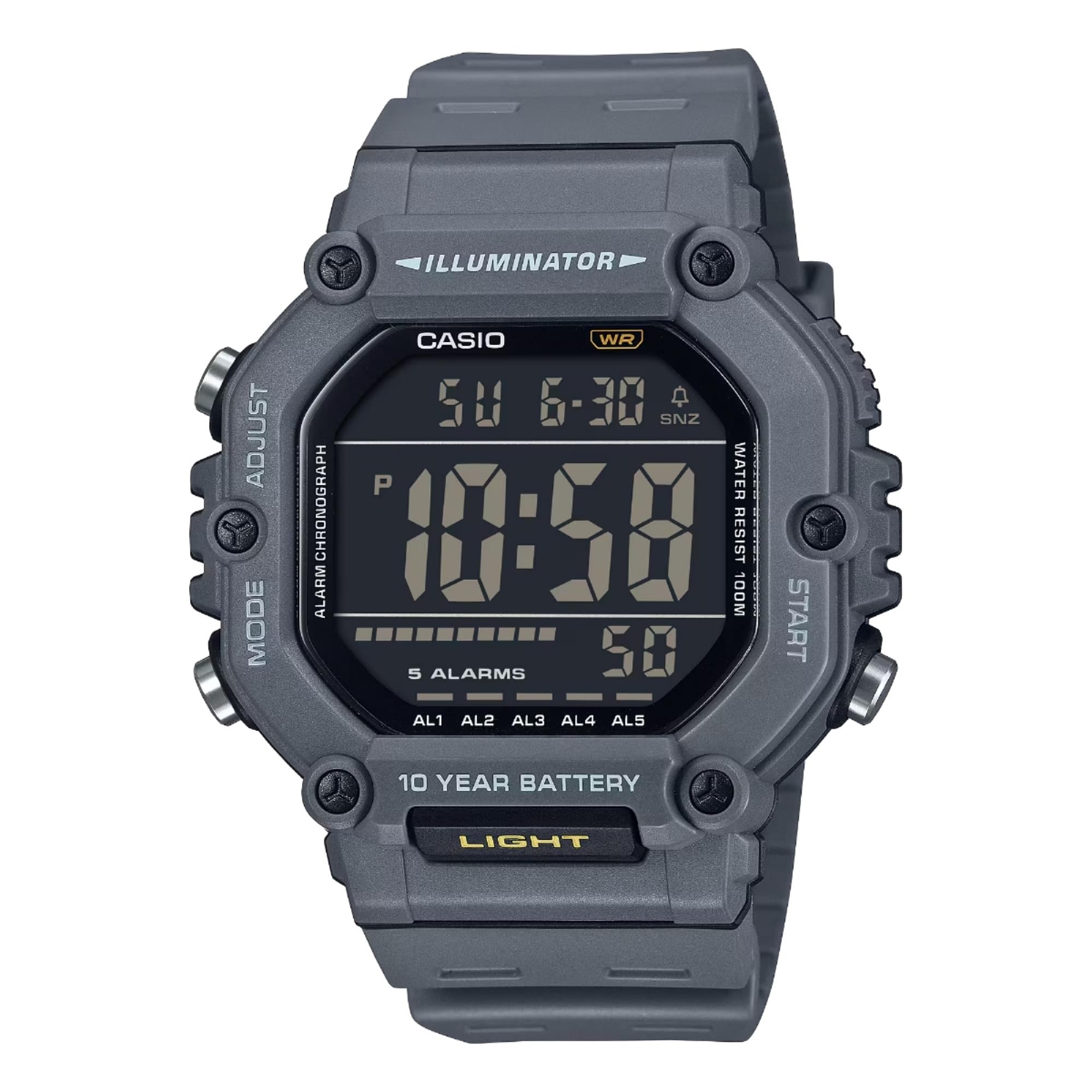
Image of the Casio AE-1600H Series Digital Watch, showing its large digital display and robust design.
Setup
Initial Time and Date Setting
- In the Timekeeping Mode, press and hold the ADJUST button until the seconds digits begin to flash, indicating the setting screen.
- Press the MODE button to cycle through the settings: Seconds → Hour → Minute → Year → Month → Day.
- Use the START button to increase the flashing digit or setting. Use the LIGHT button to decrease the flashing digit or setting (if applicable).
- Once all settings are correct, press the ADJUST button to exit the setting screen.
12/24-Hour Format Selection
In the Timekeeping Mode, press the START button to toggle between 12-hour and 24-hour time formats.
Operating Instructions
Mode Navigation
Press the MODE button to cycle through the watch's functions in the following order:
- Timekeeping Mode
- Dual Time Mode
- Alarm Mode (5 alarms + snooze)
- Stopwatch Mode
- Countdown Timer Mode
Timekeeping Mode
This mode displays the current time (hour, minute, second), day of the week, and date. The large digits ensure clear visibility.
Dual Time Mode
The Dual Time mode allows you to keep track of a second time zone. To set the dual time:
- Navigate to the Dual Time Mode.
- Press and hold the ADJUST button until the hour digits flash.
- Use the START button to adjust the hour and the LIGHT button to adjust the minutes.
- Press ADJUST to confirm and exit.
Alarm Mode
The watch features 5 multi-function alarms (AL1-AL5) and one snooze alarm (SNZ). You can set alarms for specific times and dates.
- Navigate to the Alarm Mode. Use the START button to cycle through AL1, AL2, AL3, AL4, AL5, and SNZ.
- To set an alarm, press and hold the ADJUST button until the hour digits flash.
- Use the MODE button to select hour, minute, month, or day.
- Use the START button to change the selected value.
- Press ADJUST to confirm and exit.
- To turn an alarm on/off, select the alarm and press the START button.
Stopwatch Mode
The 1/100-second stopwatch can measure up to 24 hours and includes split time functionality.
- Navigate to the Stopwatch Mode.
- Press START to begin timing.
- Press ADJUST to record a split time without stopping the timer. Press ADJUST again to return to elapsed time display.
- Press START to stop the timer.
- Press ADJUST to reset the stopwatch to zero.
Countdown Timer Mode
The countdown timer can be set for up to 24 hours and features an auto-repeat function.
- Navigate to the Countdown Timer Mode.
- Press and hold the ADJUST button until the hour digits flash.
- Use the MODE button to select hour, minute, or second.
- Use the START button to change the selected value.
- Press ADJUST to confirm and exit.
- Press START to begin the countdown. Press START again to pause, and ADJUST to reset.
LED Backlight
Press the LIGHT button (located at the bottom front of the watch) to illuminate the display with an amber LED backlight for improved visibility in low-light conditions. The backlight features an afterglow function.
Video demonstrating the features and functionality of the Casio AE-1600H digital watch, including button operation and display visibility.
Maintenance
Water Resistance
Your Casio AE-1600H watch is water resistant up to 100 meters (10 BAR). This means it is suitable for recreational swimming, showering, and general water exposure. Do not operate buttons while the watch is submerged in water.
Battery Replacement
The watch is powered by a CR2032 battery with an approximate 10-year lifespan. When the display becomes dim or functions become erratic, it may be time to replace the battery. Battery replacement should ideally be performed by a qualified watch technician to ensure proper sealing and water resistance.
Cleaning
Wipe the watch with a soft, dry cloth. For stubborn dirt, use a soft cloth dampened with water and a mild neutral detergent, then wipe dry. Avoid using volatile agents like thinner or benzine, as they may damage the resin components.
Troubleshooting
Incorrect Time Display
- Ensure the time and date settings are correctly adjusted as per the "Initial Time and Date Setting" section.
- Check if the 12/24-hour format is set to your preference.
Display is Dim or Blank
- The battery may be low. Consider replacing the CR2032 battery.
- Ensure the watch is not exposed to extreme temperatures, which can temporarily affect LCD visibility.
Buttons Not Responding
- Ensure the watch is not in a setting mode that locks other button functions.
- If the watch is wet, dry it thoroughly before operating buttons.
Specifications
| Model Name | AE-1600H |
| Display Type | Digital |
| Movement Type | Quartz |
| Case Material | Resin |
| Band Material | Resin |
| Water Resistance Depth | 100 Meters (10 BAR) |
| Battery Life | Approx. 10 years (CR2032) |
| Case Dimensions (H x W x D) | 54.1 x 49.7 x 15.9 mm |
| Weight | 3.99 ounces (approx. 113g) |
| Features | LED Backlight (Amber with Afterglow), Dual Time, 1/100-second Stopwatch, Countdown Timer (Auto-repeat), 5 Multi-function Alarms, Hourly Time Signal, 12/24-hour format |
Warranty and Support
Limited Warranty
Your Casio AE-1600H Series Digital Watch comes with a limited warranty against manufacturing defects. Please refer to the warranty card included with your purchase for specific terms and conditions, including coverage duration and claim procedures.
Customer Support
For further assistance, technical support, or service inquiries, please visit the official Casio website or contact their customer service department. Contact information can typically be found on the Casio website or in the packaging materials.


