
TooPower TM-216
TooPower Digital Hearing Aids User Manual
Model: TM-216
Introduction
Thank you for choosing TooPower Digital Hearing Aids. These devices are designed to enhance your hearing experience with advanced technology. Built-in with a powerful DSP (digital signal processor) chip, they effectively reduce background noise from all directions, delivering clearer and higher-quality sound. These hearing aids are ideal for seniors and adults experiencing mild to moderate hearing loss, helping them to re-engage in conversations and enjoy a better quality of life.
What's in the Box
- OTC Hearing Aids (2 units)
- Charging Bin (1 unit)
- Charging Cable (1 unit)
- Dust Filters (6 units)
- Cleaning Brush (1 unit)
- Ear Caps (8 units)
- Instructions for Precautions (1 document)
- Operating Guide (1 document)
Product Overview
The TooPower Digital Hearing Aids are designed for comfort and effectiveness. Each aid is compact and features a cochlear fit design for a secure and comfortable placement in the ear. The included charging case provides convenient storage and extended battery life.

Image: The TooPower digital hearing aids, showing two beige-colored aids in their black charging case, along with a separate view of a single hearing aid from the front and back. A profile image of an elderly man is also included, suggesting the target user.

Image: An illustration detailing the Cochlear Fit Design, highlighting dual microphones, touch-sensitive control key, and 16-channel dual microphone system. It also provides the device dimensions (0.3" x 0.5" x 0.6") and charging case dimensions (2.2" x 1.4" x 0.9"), along with a crucial reminder to remove the protective film before charging.
Initial Setup and Charging
- First Use Preparation: Before initial use, ensure you remove the protective film from the hearing aids. This film is typically located on the charging contacts.
- Charging the Devices: Place both hearing aids into the charging bin. Connect the charging cable to the bin and a suitable power source. The devices will charge wirelessly when placed in the magnetic charging dock. A full charge takes approximately 2 hours.
- Battery Life: Once fully charged, the hearing aids can be used for over 25 hours. The charging case provides an additional 100 hours of backup power, allowing for approximately 1-2 weeks of use without needing to recharge the case itself.
- Selecting Ear Caps: Choose the ear caps that provide the most comfortable and secure fit for your ears. A proper fit is essential for optimal sound quality and to prevent whistling.
Operating Your Hearing Aids
Power On/Off
The hearing aids feature an automatic power on/off function. When you take the hearing aids out of the charging case, they will power on automatically. When you place them back into the charging case, they will power off and begin charging.
Volume Adjustment
To adjust the sound volume, quickly press the multifunctional button on the hearing aid. There are 5 adjustable volume levels. Continue pressing to cycle through the levels until you find your preferred setting.
Mode Switching
The hearing aids offer three distinct modes to adapt to various listening environments. To switch between modes, long press the multifunctional button for 5 seconds. You will hear a specific number of beeps indicating the current mode:
- 1 Beep: Quiet Mode (Ideal for calm indoor environments and daily communication.)
- 2 Beeps: Noise Cancelling Mode (Suitable for parties and noisy environments, featuring intelligent noise reduction.)
- 3 Beeps: Tinnitus Mode (A tinnitus shielding mode that generates continuous, low-volume white noise.)
The device has a memory function that automatically saves the last used mode and volume setting after 20 minutes of use, retaining these settings for your next use.
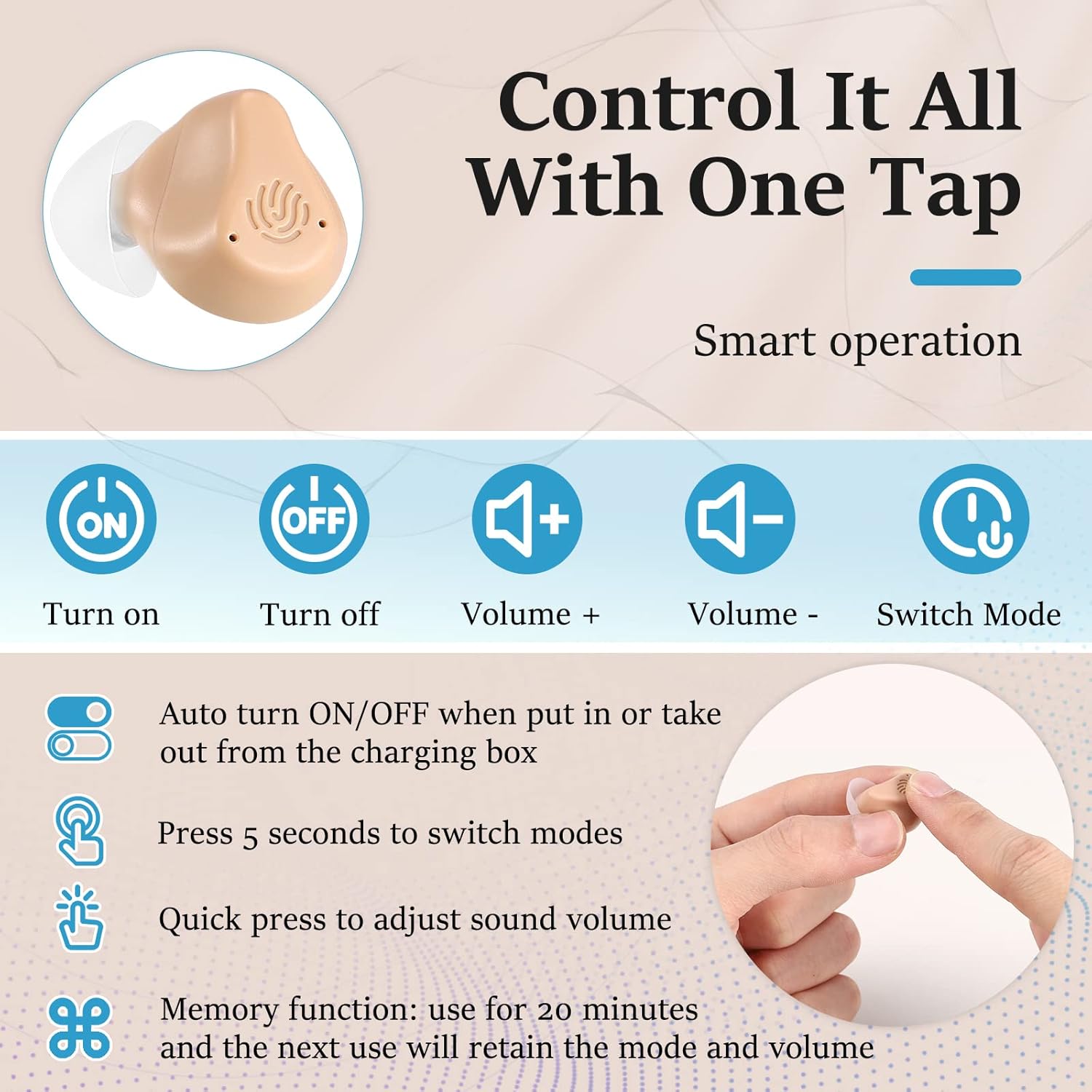
Image: An infographic illustrating the simple one-tap controls of the hearing aids. It displays icons for Turn On, Turn Off, Volume Up, Volume Down, and Switch Mode. Accompanying text explains automatic power on/off when removed from or placed in the charging box, pressing for 5 seconds to switch modes, quick press to adjust sound volume, and the memory function that retains settings after 20 minutes of use.

Image: A visual guide explaining the three distinct sound modes of the hearing aids. Mode 1, "Di", is for quiet environments and daily communication, emphasizing sound amplification and hearing protection. Mode 2, "Di di", is for parties and noisy environments, featuring intelligent noise reduction. Mode 3, "Di di di", is a tinnitus shielding mode that generates continuous, low-volume white noise. Each mode is accompanied by an illustrative scenario.
Care and Maintenance
Proper care and maintenance will extend the lifespan of your TooPower Digital Hearing Aids and ensure optimal performance.
- Cleaning: Use the provided cleaning brush to gently remove any earwax or debris from the hearing aids, especially around the sound outlet and microphone ports. Regularly clean the ear caps.
- Dust Filters: Replace the dust filters as needed to maintain clear sound transmission. Refer to the "What's in the Box" section for the quantity of included filters.
- Storage: When not in use, always store the hearing aids in their charging bin to protect them from dust and damage, and to keep them charged.
- Avoid Moisture: Keep the hearing aids dry. Avoid exposure to water, excessive humidity, or extreme temperatures.
Troubleshooting
| Problem | Possible Cause | Solution |
|---|---|---|
| No sound or weak sound | Low battery; Earwax blockage; Incorrect volume setting; Protective film not removed. | Charge the hearing aids; Clean the ear caps and sound outlet; Adjust volume; Ensure protective film is removed from charging contacts. |
| Whistling or feedback sound | Improper fit; Earwax buildup; Hand/object too close to the ear; Volume too high. | Ensure the hearing aid is properly seated in the ear; Clean ear canal and hearing aid; Avoid covering the hearing aid; Reduce volume. |
| Hearing aids not charging | Protective film still on; Poor contact with charging pins; Charging cable/adapter issue. | Remove any protective film; Ensure hearing aids are correctly seated in the charging bin; Try a different charging cable or power adapter. |
| Difficulty switching modes | Button not pressed long enough. | Ensure you long press the multifunctional button for 5 seconds to switch modes. |
Technical Specifications
| Brand | TooPower |
| Model Name | TM-216 |
| Item Model Number | TM-216 |
| Color | Beige & Black |
| Material | Acrylonitrile Butadiene Styrene (ABS) |
| Style | Intelligent Noise Reduction |
| Channels | 16-Channel Digital |
| Microphones | Dual Microphone System |
| Charging Time | Approx. 2 hours for full charge |
| Usage Time (per charge) | More than 25 hours |
| Charging Case Backup Power | Approx. 100 hours (1-2 weeks) |
| Device Dimensions | 0.3" x 0.5" x 0.6" |
| Charging Case Dimensions | 2.2" x 1.4" x 0.9" |
| ASIN | B0DT9SDS81 |
| Date First Available | January 17, 2025 |
| Country of Origin | China |
Warranty and Support
For any questions, technical support, or warranty inquiries regarding your TooPower Digital Hearing Aids, please refer to the contact information provided in the "Instructions for Precautions" or "Operating Guide" included in your product packaging. You may also visit the official TooPower brand store on Amazon for further assistance and resources.
Note: Specific warranty terms and conditions may vary. Please consult your product documentation for detailed information.
Ask a question about this manual
Ask about setup, troubleshooting, compatibility, parts, safety, or missing instructions. Manuals+ will review the question and use this page’s manual context to help answer it.