Introduction
This manual provides essential instructions for the safe and efficient operation, installation, and maintenance of your Generic Egg Turning Motors, designed specifically for 120-egg incubators. Please read this manual thoroughly before use to ensure proper function and longevity of the product.
Safety Information
- Always disconnect power to the incubator before installing, cleaning, or performing maintenance on the egg turning motors.
- Ensure all electrical connections are secure and dry to prevent electrical hazards.
- Do not operate the motors if they appear damaged or if any wires are frayed.
- Keep out of reach of children and pets.
- Use only with compatible 120-egg incubators as specified.
Package Contents
Verify that all items are present in the package:
- 2 x Egg Turning Motors
Note: Incubator and other accessories are sold separately.
Specifications
| Feature | Detail |
|---|---|
| Model Number | Mo120-2 |
| Package Dimensions | 3.94 x 3.15 x 2.36 inches |
| Item Weight | 3.53 ounces (100 Grams) |
| Manufacturer | CHANCHAN MARKET |
| Compatibility | Designed for 120-egg incubators |
Setup and Installation
Follow these steps to properly install the egg turning motors into your 120-egg incubator:
- Prepare the Incubator: Ensure your incubator is unplugged and empty. Refer to your incubator's manual for specific instructions on accessing the egg turning mechanism area.
- Identify Mounting Points: Locate the designated mounting points for the egg turning motors within your incubator. These are typically small brackets or holes designed to secure the motor.
- Mount the Motors: Carefully position each egg turning motor onto its respective mounting point. Secure them using screws or clips as provided by your incubator manufacturer (not included with these motors). Ensure the motors are firmly attached and do not wobble.
- Connect Wiring: Connect the wires from the egg turning motors to the appropriate ports on your incubator's control unit. The connectors are designed to fit only one way. Ensure a snug and secure connection.
- Test Connection: Once installed, perform a preliminary check. Gently tug on the wires to ensure they are securely connected.
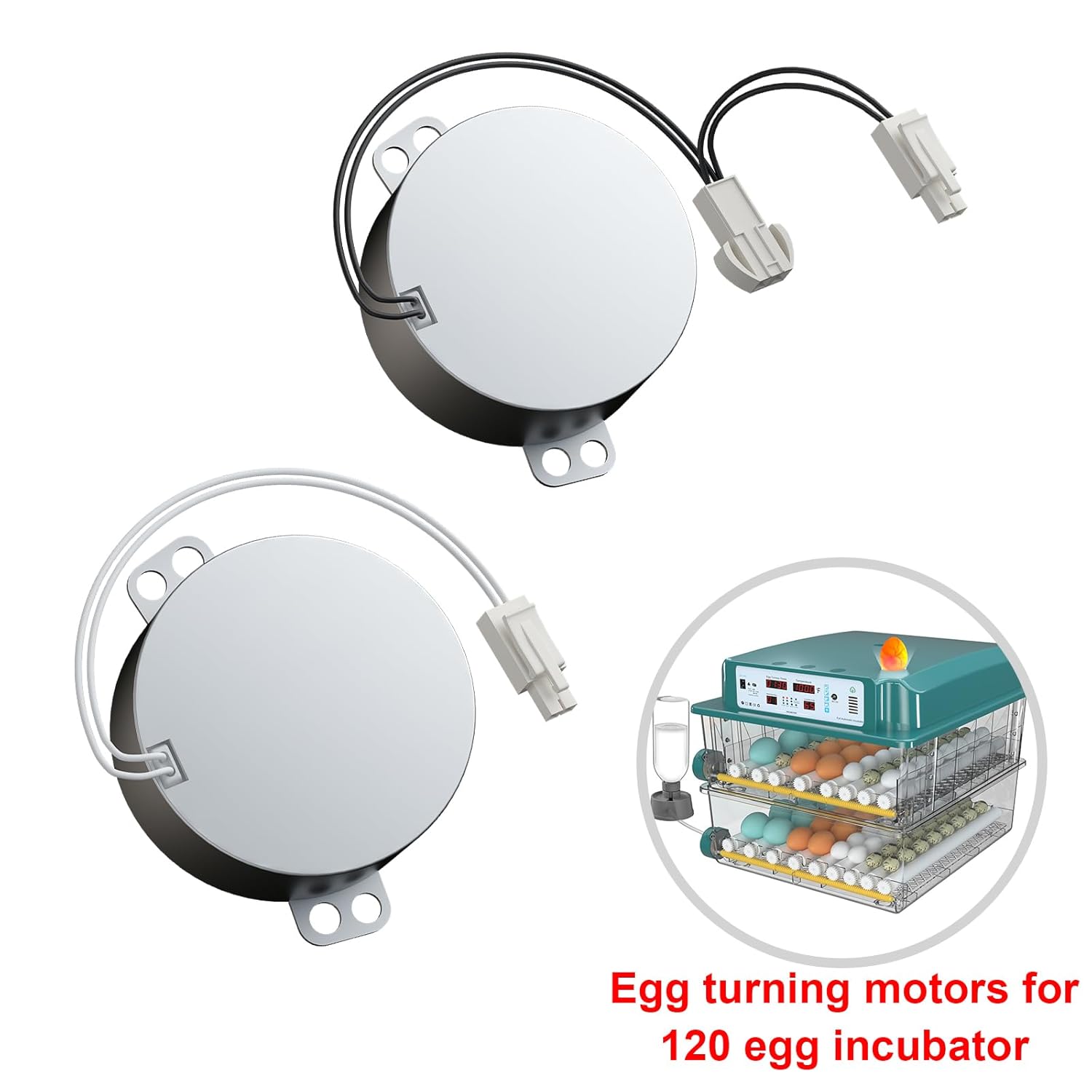
Image: Two egg turning motors with their wiring and connectors. An inset image shows a two-tier incubator with eggs, illustrating where such motors would be installed to facilitate egg turning.
Operating Instructions
These motors are designed to automate the egg turning process within your incubator. Once installed, their operation is typically controlled by the incubator's main unit.
- Power On Incubator: Plug in your incubator and power it on according to its specific instructions.
- Set Turning Interval: Most incubators allow you to set the frequency and duration of egg turning. Refer to your incubator's control panel and manual to configure these settings. The motors will activate based on these programmed intervals.
- Monitor Operation: Periodically observe the egg turning mechanism to ensure the motors are functioning correctly and eggs are being turned as expected.
Note: The egg turning motors themselves do not have independent controls; they are slaves to the incubator's main controller.
Maintenance
Proper maintenance ensures the longevity and reliable performance of your egg turning motors.
- Regular Cleaning: Disconnect power before cleaning. Gently wipe the exterior of the motors with a dry or slightly damp cloth to remove dust and debris. Avoid using harsh chemicals or excessive moisture.
- Inspect Wiring: Periodically check the wiring for any signs of wear, fraying, or damage. Replace damaged wires immediately.
- Ensure Ventilation: Make sure the motors are not obstructed, allowing for proper airflow to prevent overheating.
- Storage: If storing the incubator for an extended period, ensure the motors are clean and dry. Store in a cool, dry place.
Troubleshooting
| Problem | Possible Cause | Solution |
|---|---|---|
| Motors not turning eggs |
|
|
| Unusual noise from motors |
|
|
| Motors overheating |
|
|
Warranty and Support
These egg turning motors are manufactured by CHANCHAN MARKET. For any questions, technical assistance, or warranty claims, please refer to the contact information provided by your retailer or the manufacturer's official channels. Keep your purchase receipt as proof of purchase.


