
Electactic Z5830N
Electactic Nugget Ice Maker Machine Z5830N User Manual
Model: Z5830N
1. Introduction
Thank you for choosing the Electactic Nugget Ice Maker Machine, Model Z5830N. This appliance is designed to produce soft, chewable nugget ice efficiently, suitable for various settings including home kitchens, offices, bars, and parties. With a daily production capacity of up to 66 pounds and an 18-pound storage capacity, this machine ensures a consistent supply of ice. Its stainless steel construction offers durability and a modern aesthetic, while features like the LCD control panel, self-cleaning function, and 24-hour timer enhance user convenience and operational efficiency.
This manual provides essential information for the safe and effective operation, installation, maintenance, and troubleshooting of your ice maker. Please read it thoroughly before using the appliance and retain it for future reference.
2. Safety Instructions
To reduce the risk of fire, electric shock, or injury when using your appliance, follow these basic precautions:
- Read all instructions before using the appliance.
- Ensure the power supply matches the voltage requirements specified on the appliance label.
- Do not operate any appliance with a damaged cord or plug, or after the appliance malfunctions or has been damaged in any manner.
- Do not immerse the power cord, plug, or any part of the appliance in water or other liquids.
- Unplug the appliance from the outlet when not in use, before cleaning, or before performing any maintenance.
- Keep the appliance away from heat sources and direct sunlight.
- Do not allow children to operate the ice maker without supervision.
- Use only potable water for ice production.
- Ensure proper ventilation around the appliance. Do not block any ventilation openings.
- This appliance is intended for household and similar applications only.
3. Product Overview
3.1 Key Features
- Nugget Ice Production: Produces soft, chewable nugget ice.
- High Capacity: Up to 66 pounds of ice per day.
- Ice Storage: 18 pounds maximum ice storage capacity.
- Efficient Ice Making: First batch of ice in under 10 minutes.
- Temperature Retention: Designed to retain 80% of ice for up to 24 hours after the basket is full.
- Flexible Installation: Can be used as a freestanding or built-in unit.
- Durable Construction: Stainless steel door and exterior for longevity and easy cleaning.
- Automatic Water Supply: Features an auto water supply system, eliminating manual refilling.
- Self-Cleaning Function: Easy activation via the LCD panel for hygienic maintenance.
- 24-Hour Timer: Allows for scheduled start and shut-down times to conserve energy.
- User-Friendly LCD Control Panel: Displays ambient temperature, water shortage, and ice full reminders.
3.2 Components
Familiarize yourself with the main components of your ice maker:
- Stainless Steel Exterior: Main housing of the unit.
- LCD Control Panel: Located on the front, used for operation and monitoring.
- Ice Storage Bins: Dual internal bins for collecting and storing nugget ice.
- Water Inlet: Connection point for the automatic water supply.
- Water Outlet: Drain for water discharge.
- Adjustable Feet: For leveling the unit.
- Reversible Door: Allows for flexible door swing direction.
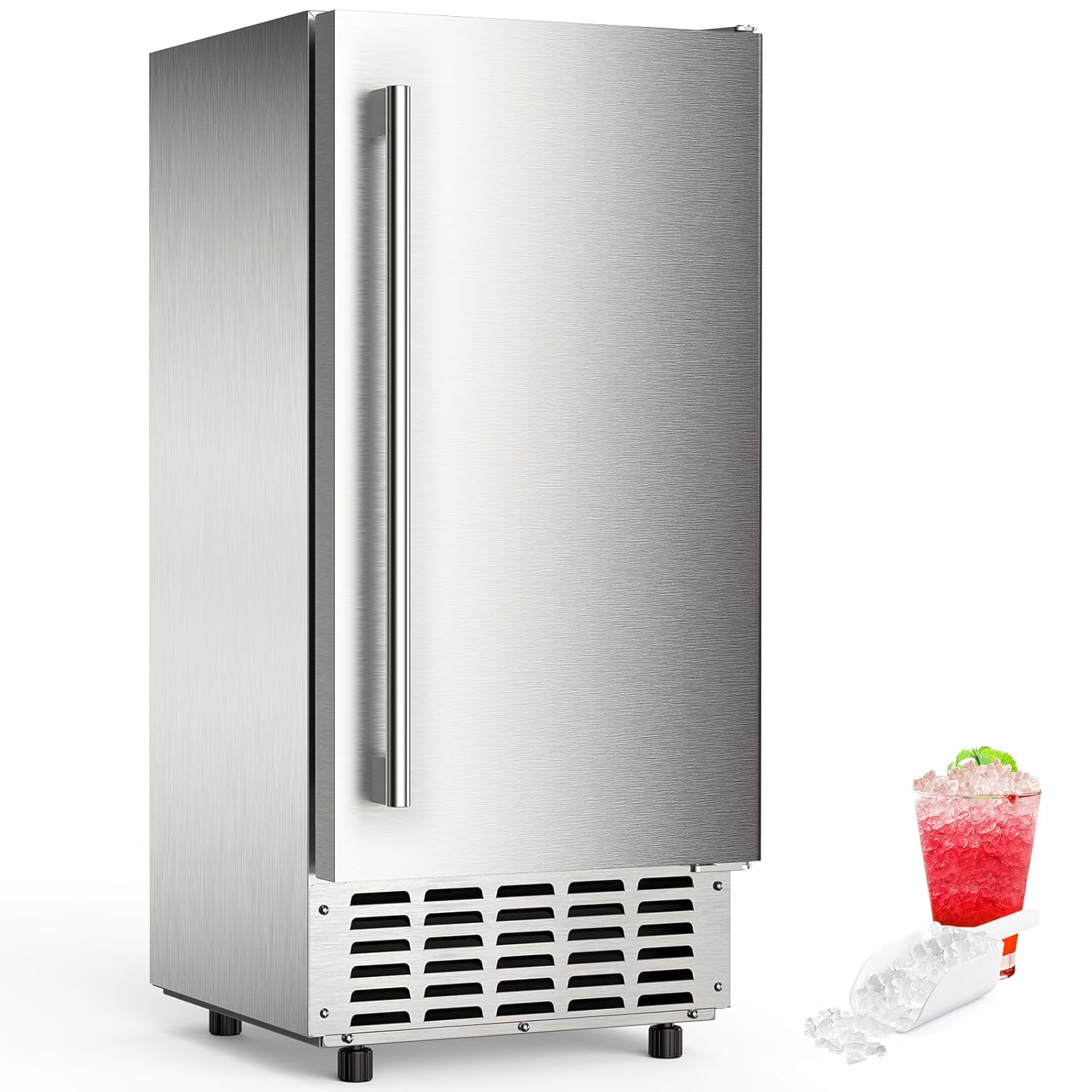
Figure 1: Front view of the Electactic Nugget Ice Maker Machine.
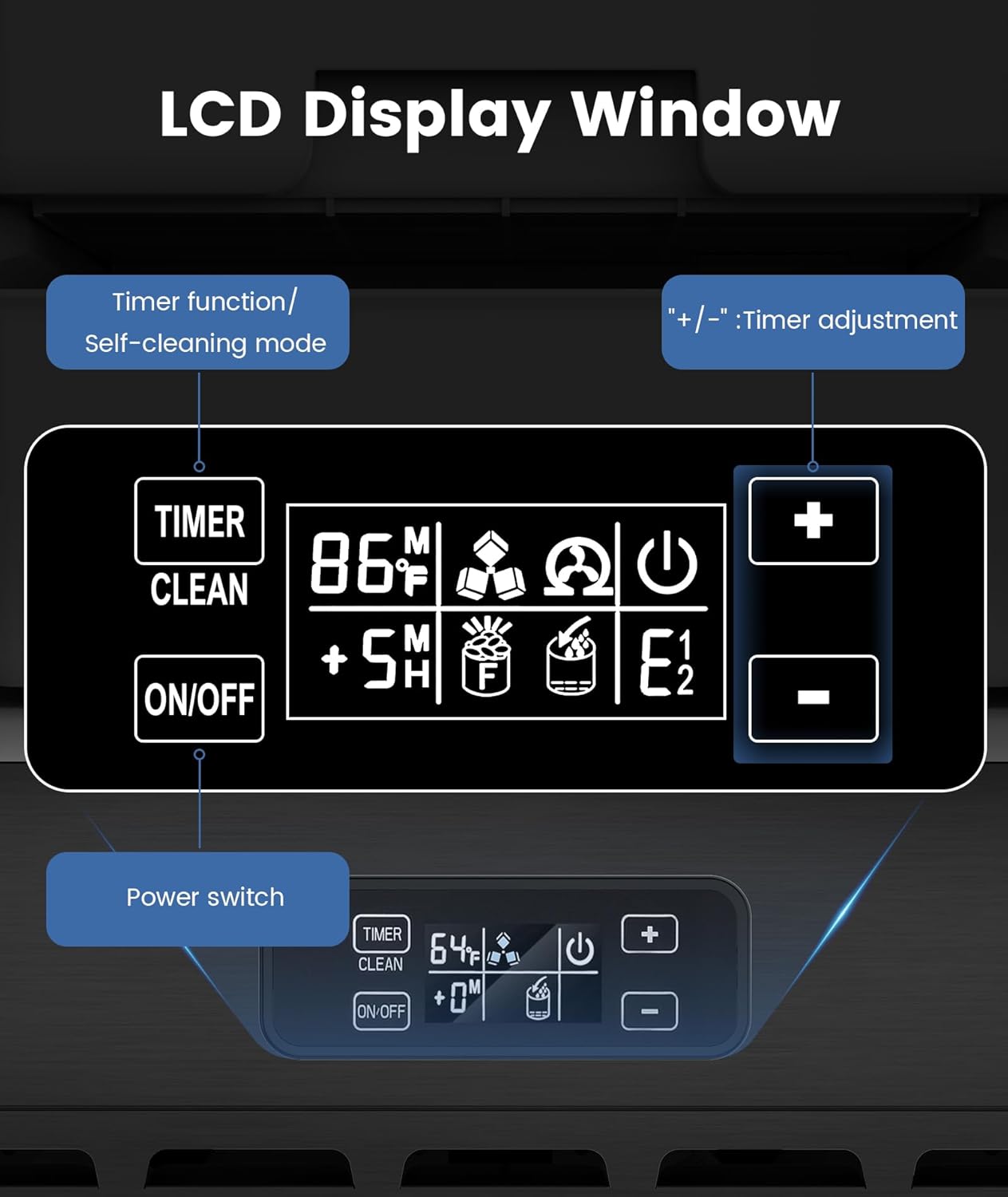
Figure 2: Interior view displaying the dual ice storage bins filled with nugget ice.

Figure 3: Detailed view of the LCD control panel.
4. Setup
4.1 Unpacking and Placement
- Carefully remove the ice maker from its packaging. Retain packaging materials for future transport if needed.
- Inspect the unit for any shipping damage. Contact customer support immediately if damage is found.
- Place the ice maker on a flat, stable surface. The unit can be installed freestanding or built-in under a counter. Ensure there is adequate clearance for ventilation (at least 2 inches on sides and back).
- Adjust the leveling feet at the bottom of the unit to ensure it is perfectly level. This is crucial for proper drainage and ice production.

Figure 4: Installation options: Freestanding and Under Counter.
4.2 Water Connection
This ice maker features an automatic water supply system. Connect it to a potable water source:
- Locate the water inlet connection at the back of the unit.
- Connect the provided water supply hose to the water inlet. Ensure a secure, leak-free connection.
- Connect the other end of the water supply hose to a cold water line with a shut-off valve.
- Locate the water outlet (drain) at the back of the unit.
- Connect the drain hose to the water outlet and route it to a suitable drain. Ensure the drain hose has a continuous downward slope to prevent water stagnation.
- Turn on the water supply and check for any leaks at the connections.

Figure 5: Water Inlet and Water Outlet connections.
4.3 Initial Cleaning
Before first use, it is recommended to clean the interior of the ice maker:
- Prepare a solution of mild detergent and warm water.
- Wipe down the interior surfaces, including the ice storage bins, with a soft cloth dampened with the solution.
- Rinse thoroughly with clean water.
- Run the self-cleaning cycle (refer to Section 6.1) before making ice for consumption.
5. Operating Instructions
5.1 Powering On and Off
- To Power On: Press the "ON/OFF" button on the LCD control panel. The unit will begin its ice-making cycle.
- To Power Off: Press the "ON/OFF" button again. The unit will stop ice production.
5.2 Ice Production
Once powered on and connected to a water supply, the machine will automatically start producing nugget ice. The first batch typically takes less than 10 minutes. The unit will continue to produce ice until the storage bins are full or the water supply is low.
5.3 Using the LCD Control Panel
The LCD panel provides real-time information and control options:
- Ambient Temperature Display: Shows the current room temperature.
- Water Shortage Indicator: An icon will illuminate when the water supply is low, prompting you to check the water connection.
- Ice Full Indicator: An icon will illuminate when the ice storage bins are full, and the machine will pause ice production.
- Timer Function: Press the "TIMER" button to set a scheduled start or shut-down time. Use the "+" and "-" buttons to adjust the time.
- Self-Cleaning Mode: Refer to Section 6.1 for instructions.

Figure 6: Ice production efficiency and capacity.
6. Maintenance and Cleaning
6.1 Self-Cleaning Function
The self-cleaning function helps maintain hygiene and efficiency:
- Ensure the unit is connected to a water supply and the drain hose is properly routed.
- Press and hold the "TIMER" button on the LCD display for approximately 5 seconds.
- The unit will initiate a self-cleaning cycle, circulating water through its internal components.
- Once the cycle is complete, the unit will automatically return to standby or ice-making mode.
6.2 Regular Cleaning
Perform regular cleaning to ensure optimal performance and ice quality:
- Exterior: Wipe the stainless steel exterior with a soft cloth and mild detergent. Avoid abrasive cleaners that could scratch the surface.
- Interior and Ice Bins: Periodically remove the ice storage bins and wash them with warm, soapy water. Rinse thoroughly and dry before returning them to the unit.
- Condenser Coils: The condenser coils, located at the back or bottom of the unit, should be cleaned every few months to prevent dust and lint buildup, which can affect efficiency. Use a soft brush or vacuum cleaner to gently remove debris.
- Water Lines: If you notice a decrease in ice quality or production, consider flushing the water lines or consulting a professional for descaling.
7. Troubleshooting
Before contacting customer support, please refer to the following troubleshooting guide:
| Problem | Possible Cause | Solution |
|---|---|---|
| No ice production | Unit not powered on No water supply Water shortage indicator active Ice full sensor activated | Press ON/OFF button Check water connection and supply valve Ensure water supply is connected and turned on Empty ice bins |
| Ice production is slow | High ambient temperature Poor ventilation Dirty condenser coils Water flow restriction | Ensure unit is in a cool, well-ventilated area Clear obstructions around the unit Clean condenser coils (refer to Section 6.2) Check water filter (if installed) or water lines |
| Ice is wet or clumps together | Ice melting in storage bin High humidity | This is normal for nugget ice makers as the storage bin is not a freezer. Transfer ice to a freezer for long-term storage. Ensure unit is in a suitable environment. |
| Unit is noisy | Normal operational sounds Unit not level Loose components | Some operational noise from the compressor and water pump is normal. Adjust leveling feet to ensure stability. Contact customer support if noise is excessive or unusual. |
| Water leakage | Loose water connections Blocked drain hose | Check and tighten all water inlet and drain hose connections. Ensure the drain hose is not kinked or blocked and has a continuous downward slope. |
8. Specifications
| Feature | Specification |
|---|---|
| Brand | Electactic |
| Model Name | Z5830N |
| Product Dimensions (D x W x H) | 18" x 15" x 32" |
| Daily Ice Production Capacity | Up to 66 lbs |
| Max Ice Storage Capacity | 18 lbs |
| Wattage | 920 watts |
| ASIN | B0DT9QGTFT |
9. Warranty and Support
For warranty information or technical support, please contact Electactic customer service. Details regarding your product's specific warranty period and terms can typically be found on the product packaging or the official Electactic website. Please have your model number (Z5830N) and purchase information ready when contacting support.
For further assistance, you may visit the Electactic Store online: Electactic Store
Related documentsZ5830N


Ask a question about this manual
Ask about setup, troubleshooting, compatibility, parts, safety, or missing instructions. Manuals+ will review the question and use this page’s manual context to help answer it.