
Jasion YC1 ST
Jasion YC1 ST Electric Bike User Manual
Model: YC1 ST
Introduction
This manual provides essential instructions for the safe assembly, operation, maintenance, and troubleshooting of your Jasion YC1 ST 26-inch electric bike. Please read this manual thoroughly before your first ride and keep it for future reference.
Safety Information
Always wear a helmet when riding. Ensure all components are correctly assembled and tightened before each use. Regularly check brakes, tires, and battery connections. Do not ride under the influence of alcohol or drugs. Obey all local traffic laws and regulations.
Package Contents
Upon opening the package, verify that all components are present and undamaged. The package should include:
- Jasion YC1 ST Electric Bike Frame with rear wheel and motor pre-assembled
- Front Wheel
- Handlebar Assembly
- Seat Post with Saddle
- Pedals (Left and Right)
- Front Fender
- Front Headlight
- Kickstand
- Battery Charger
- Tool Kit
- User Manual (this document)

Image: All components of the Jasion YC1 ST electric bike laid out for assembly, including the frame, wheels, seat, pedals, and accessories.
Assembly Instructions
Follow these steps to assemble your Jasion YC1 ST electric bike. Refer to the assembly video for visual guidance.
1. Unboxing and Initial Inspection
- Carefully open the packaging and remove all components.
- Remove all protective wrapping and ties.
- Verify that all parts listed in the "Package Contents" section are present.
2. Handlebar Installation
- Remove the protective cap from the fork stem.
- Insert the handlebar stem into the fork tube.
- Align the handlebar with the front wheel and tighten the stem bolts securely using the provided tools.
3. Kickstand Attachment
- Locate the mounting plate on the bike frame near the rear wheel.
- Attach the kickstand using the provided bolts and tighten them firmly.
4. Front Wheel Installation
- Remove the protective covers from the front fork dropouts.
- Carefully align the front wheel into the fork dropouts, ensuring the brake rotor slides correctly into the caliper.
- Secure the front wheel using the quick-release skewer or axle nuts, ensuring it is centered and tight.
5. Front Fender and Headlight Installation
- Attach the front fender to the fork using the provided bolts.
- Mount the front headlight to the designated bracket on the fork or handlebar, ensuring it is securely fastened and pointed correctly.
6. Pedal Attachment
- Identify the left (L) and right (R) pedals. The left pedal tightens counter-clockwise, and the right pedal tightens clockwise.
- Thread each pedal into its corresponding crank arm and tighten firmly with a wrench.
7. Seat Post and Saddle Adjustment
- Insert the seat post with the saddle into the seat tube of the frame.
- Adjust the seat height to a comfortable riding position, ensuring your feet can touch the ground when stopped.
- Secure the seat post with the quick-release lever or bolt.
8. Battery Installation and Check
- Unlock the battery compartment using the provided key.
- Slide the battery into the frame until it clicks into place.
- Turn the key to the locked position to secure the battery.
- Press the power button on the battery or display to ensure it powers on.
Video: Official Jasion YC1 ST Electric Bike Unboxing and Assembly Guide. This video demonstrates the step-by-step process of unpacking and assembling your new electric bike, including handlebar, kickstand, front wheel, fender, headlight, pedals, seat, and battery installation.
Operating Instructions
1. Powering On/Off
- To power on the bike, ensure the battery is installed and locked. Press and hold the power button on the LCD display until it illuminates.
- To power off, press and hold the power button on the LCD display again until it turns off.
2. Riding Modes
The Jasion YC1 ST offers four riding modes:
- Throttle Mode: Provides electric power without pedaling. Up to 25 miles range.
- Pedal Assist Mode (PAS): Boosts your pedaling effort with electric motor assistance. Up to 50 miles range.
- Pedal-Only Mode: Functions as a traditional bicycle with no electric assistance.
- Walk Assist Mode: Provides light motor push to help you walk the bike uphill or in tight spaces.

Image: Graphic illustrating the four riding modes of the Jasion YC1 ST electric bike: Throttle, Pedal Assist, Pedal-Only, and Walk Assist, with estimated ranges for electric modes.

Image: Diagram explaining the four riding modes: Throttle, Pedal Assist, Pedal-Only, and Walk Assist, highlighting their functions and range.
3. LCD Screen Display
The integrated LCD display provides real-time information about your ride:
- Speed: Current riding speed.
- Battery Level: Indicates remaining battery charge.
- Riding Mode: Shows the active pedal assist level or throttle mode.
- Trip Distance: Distance covered during the current ride.
- Odometer: Total distance covered by the bike.

Image: Close-up of the Jasion YC1 ST LCD screen display, showing speed, battery level, riding mode, and trip information.
4. Gear Shifting
The bike is equipped with a 7-speed transmission. Use the twist grip shifter on the handlebar to change gears according to terrain and desired effort. Shift smoothly to avoid strain on the drivetrain.

Image: Close-up of the 7-speed drivetrain on the Jasion YC1 ST electric bike, illustrating the gear system.
Maintenance
Regular maintenance ensures the longevity and safe operation of your electric bike.
1. Battery Care
- Charge the 360Wh removable lithium-ion battery fully before first use.
- Charge the battery regularly, even if not using the bike, to maintain its health.
- Avoid completely draining the battery.
- Store the battery in a cool, dry place away from direct sunlight and extreme temperatures.
- The removable design allows convenient charging at home or office.

Image: Illustration of the Jasion YC1 ST's internal removable battery, highlighting its waterproof, theft-proof, dustproof, rustproof, and impact-resistant features.
2. Brake System
- The bike features dual disc brakes for reliable stopping power.
- Regularly inspect brake pads for wear and replace them when necessary.
- Ensure brake levers are firm and responsive. Adjust cable tension if needed.
- Keep brake rotors clean and free from oil or grease.
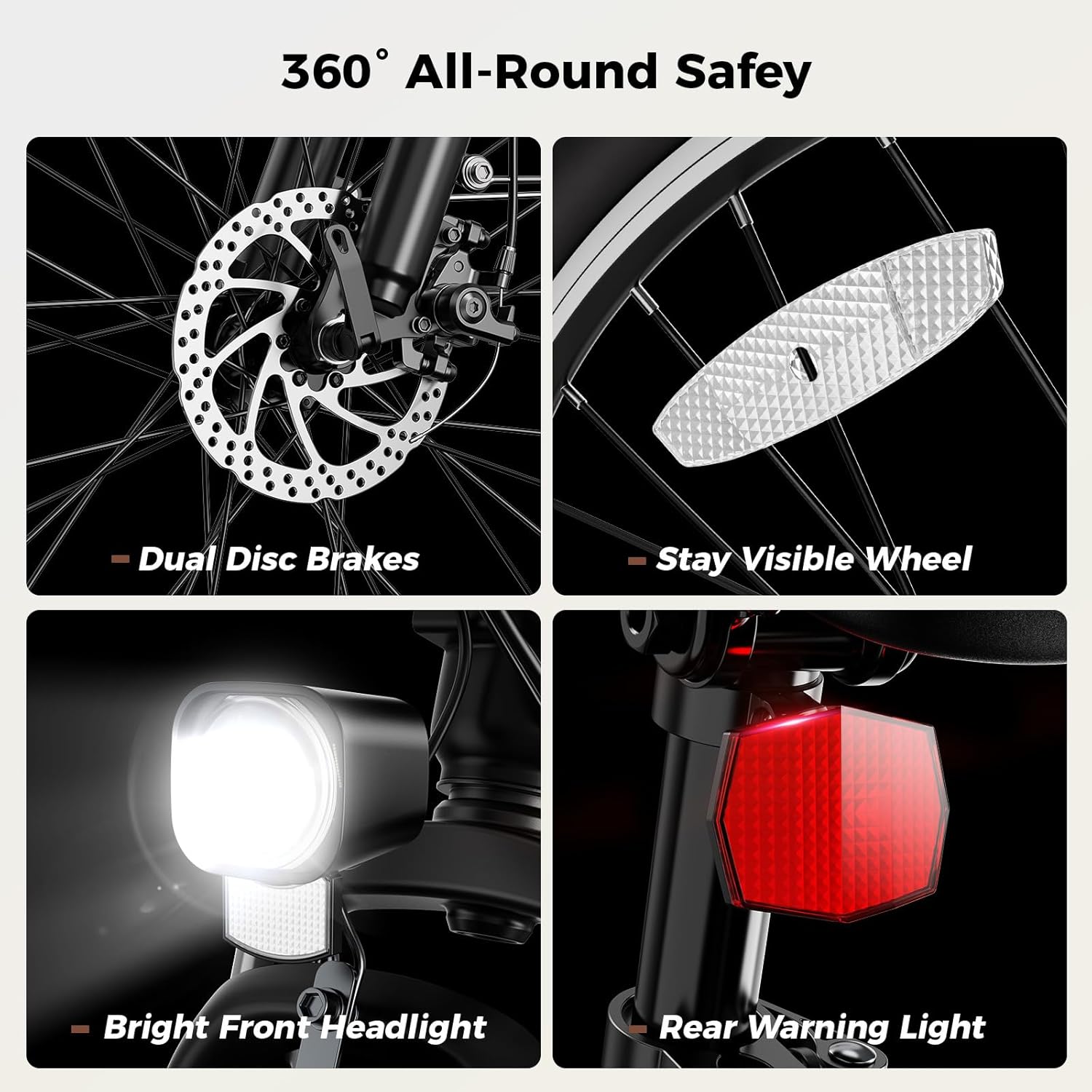
Image: Composite image showing the Jasion YC1 ST's safety features: dual disc brakes, visible wheel reflectors, bright front headlight, and rear warning light.

Image: Close-up of the dual disc brakes on the Jasion YC1 ST electric bike, emphasizing their fast and reliable stopping performance.
3. Tires and Wheels
- Maintain proper tire pressure as indicated on the tire sidewall.
- Inspect tires for cuts, punctures, or excessive wear before each ride.
- Ensure wheel spokes are tight and wheels run true.
4. Suspension
- The bike features a lockable front suspension fork.
- Regularly clean the stanchions of the fork to prevent dirt buildup.
- Ensure the lockout mechanism functions correctly.

Image: A rider on the Jasion YC1 ST electric bike, highlighting the lockable front fork suspension and its benefits for smooth riding on various terrains.

Image: Graphic detailing the benefits of the Jasion YC1 ST's suspension, including reduced vibration, improved control, reduced strain, and increased comfort.
5. General Cleaning
- Clean the bike regularly with a damp cloth and mild soap. Avoid high-pressure washing directly on electrical components.
- Lubricate the chain periodically to ensure smooth operation and prevent rust.
Troubleshooting
If you encounter issues with your Jasion YC1 ST electric bike, refer to the following common problems and solutions:
| Problem | Possible Cause | Solution |
|---|---|---|
| Bike does not power on | Battery not installed correctly or not charged; loose electrical connection. | Ensure battery is fully charged and securely locked in place. Check all visible electrical connections. |
| Motor not assisting | Low battery; incorrect pedal assist level; sensor issue. | Charge battery. Increase pedal assist level on the display. Check for any error codes on the LCD. |
| Brakes feel weak or noisy | Worn brake pads; loose brake cable; contaminated rotors. | Inspect and replace brake pads if worn. Adjust brake cable tension. Clean rotors with disc brake cleaner. |
| Tires losing air quickly | Puncture; valve stem issue; improper seating. | Inspect tires for punctures and repair/replace tube. Ensure valve stem is tight. Re-seat tire bead if necessary. |
If you cannot resolve an issue using these steps, please contact Jasion customer support.
Specifications
| Feature | Detail |
|---|---|
| Model Name | YC1 ST |
| Bike Type | Electric City Bike, Step-Through |
| Motor | 750W Peak Brushless Motor |
| Max Speed | Up to 23 MPH |
| Battery | 360 Wh Removable Lithium-ion (BMS system) |
| Charging Time | 5-6 hours |
| Range (PAS Mode) | Up to 40 miles |
| Wheel Size | 26 Inches (26"x2.0" tires) |
| Frame Material | High Carbon Steel |
| Suspension Type | Front (Lockable) |
| Number of Speeds | 7-Speed Transmission |
| Brake Style | Dual Disc Brakes |
| Weight | 58 lbs |
| Load Capacity | 330 lbs |
| Recommended Height | 5'1" - 6'6" |
| Included Components | Charger, Headlight, Seat, Tool Kit |

Image: Detailed diagram showing the dimensions, weight, load capacity, and recommended rider height for the Jasion YC1 ST electric bike.

Image: Comprehensive sizing chart for the Jasion YC1 ST electric bike, indicating various measurements for optimal fit.
Warranty and Support
The Jasion YC1 ST electric bike comes with a 1-Year Limited Warranty. For warranty claims, technical support, or any questions regarding your product, please contact Jasion customer service.
You can find contact information and further support resources on the official Jasion website or through your purchase platform.
Related documentsYC1 ST


Ask a question about this manual
Ask about setup, troubleshooting, compatibility, parts, safety, or missing instructions. Manuals+ will review the question and use this page’s manual context to help answer it.