
1. Product Overview
The KUXISA CZK-5630 is a versatile and portable tire inflator designed for quick and efficient inflation of various items, including car, motorcycle, and bicycle tires, as well as sports balls. Featuring a powerful 150 PSI maximum pressure and a digital display, it offers precise control and automatic shut-off for optimal inflation. Beyond its primary function, this device also serves as a power bank and includes an integrated LED light for emergency situations.

Figure 1: KUXISA CZK-5630 Portable Tire Inflator and its accessories, demonstrating its versatility for inflating car, motorcycle, bicycle tires, and balls.
2. Package Contents
Please verify that all items are included in your package:
- Tire Inflator Unit (1)
- Air Hose (1)
- Atmospheric Nozzle (1)
- Small Nozzle (1)
- French Adapter (1)
- Ball Needle (1)
- USB Charging Cable (1)
- Storage Bag (1)
- User Manual (1)
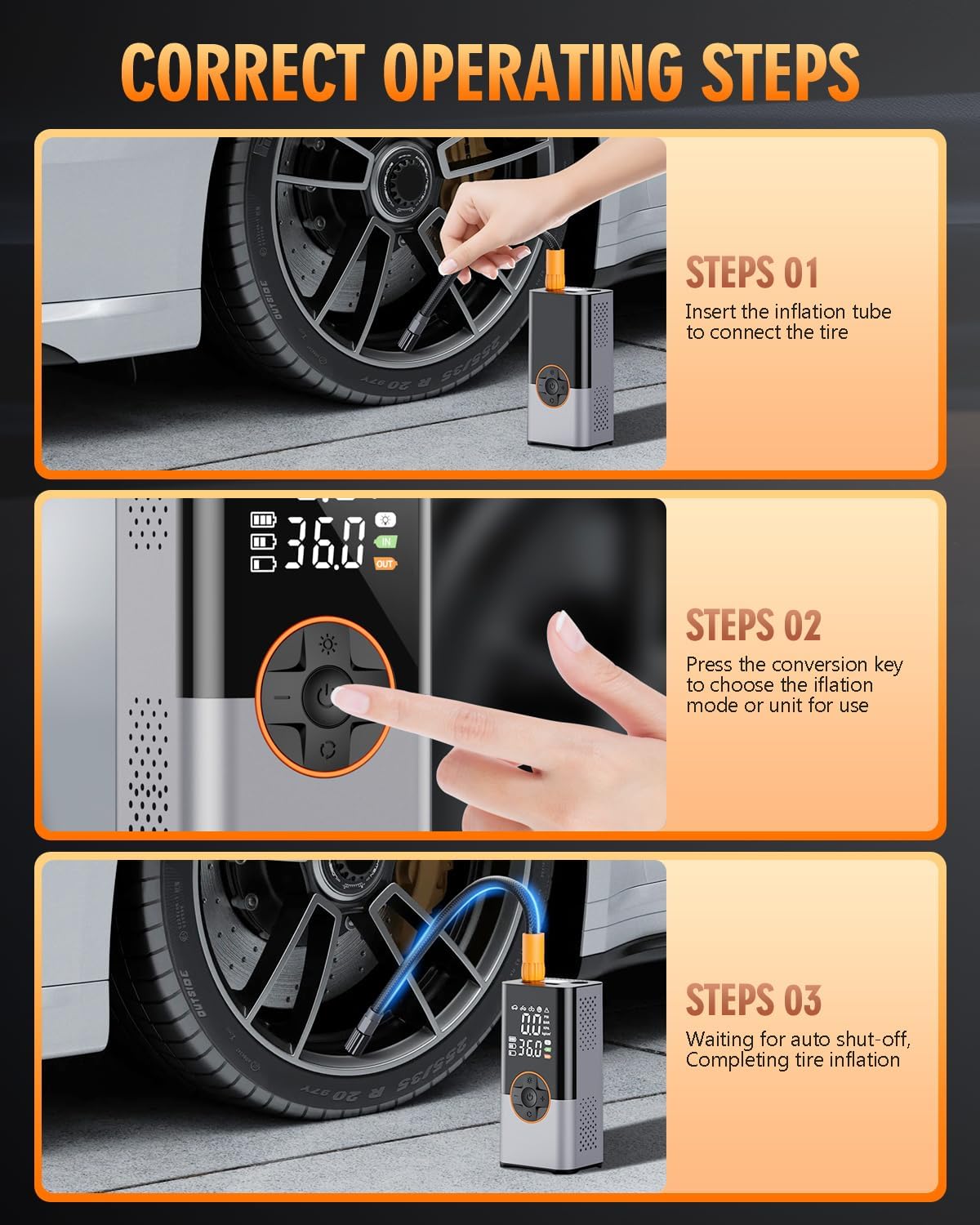
Figure 2: Contents of the KUXISA CZK-5630 package, including the inflator, various nozzles, charging cable, and storage bag.
3. Setup
3.1 Charging the Device
Before first use, fully charge the tire inflator. Connect the provided USB charging cable to the device's charging port and a compatible USB power source (e.g., wall adapter, car charger, computer USB port). The digital display will indicate charging status.

Figure 3: The KUXISA CZK-5630 inflator connected to a USB-C cable for charging, indicating its power input capability.
3.2 Attaching the Air Hose and Nozzle
Screw the air hose securely into the inflation port at the top of the device. Select the appropriate nozzle for your item (e.g., ball needle for sports balls, French adapter for specific bicycle valves) and attach it to the other end of the air hose.
4. Operating Instructions
4.1 Power On/Off
Press and hold the power button (located in the center of the control panel) for a few seconds to turn the device on or off.
4.2 Selecting Inflation Mode
The device offers 4+N smart modes. Press the 'Mode' button (bottom button on the control panel) to cycle through preset modes: bicycle, motorcycle, car, and ball. A fifth manual mode allows for custom pressure settings. The selected mode icon will appear on the digital display.

Figure 4: The KUXISA CZK-5630's digital display illustrating the various preset inflation modes, including car, motorcycle, bicycle, and ball, along with a manual mode.
4.3 Adjusting Target Pressure
Once a mode is selected, use the '+' and '-' buttons to adjust the target pressure (PSI, KPA, BAR, or kg/cm²). The real-time pressure and preset value are displayed on the screen.

Figure 5: A close-up of the KUXISA CZK-5630's intelligent inflation display, showing both the real-time pressure and the user-set present value for precise inflation control.
4.4 Starting Inflation
Connect the nozzle to the item you wish to inflate. Press the power button again to start the inflation process. The device will automatically stop when the preset pressure is reached.

Figure 6: A user demonstrating the KUXISA CZK-5630's auto shutoff feature while inflating a car tire, indicating its efficiency and safety.
4.5 Using the LED Light
Press the 'Light' button (top button on the control panel) to activate the LED light. Press again to cycle through different lighting modes, including a steady light and an SOS flashing signal for emergencies.
4.6 Using as a Power Bank
The device is equipped with a 5V/2A bidirectional USB port. Connect your mobile phone or other electronic devices to this port using your charging cable to use the inflator as an emergency power bank.

Figure 7: The KUXISA CZK-5630 demonstrating its multifunctional capabilities, including serving as a power supply for a smartphone, a ball pump, and providing emergency lighting with an SOS red flashlight mode.
5. Maintenance
- Cleaning: Wipe the device with a soft, dry cloth. Do not use harsh chemicals or abrasive cleaners.
- Storage: Store the inflator in its provided storage bag in a cool, dry place, away from direct sunlight and extreme temperatures.
- Battery Care: To prolong battery life, charge the device regularly, even if not in frequent use. Avoid fully discharging the battery for extended periods.
6. Troubleshooting
- Device not turning on: Ensure the battery is charged. If not, connect to a power source and charge fully.
- Inflator not starting: Check if the air hose is securely connected. Ensure a mode and target pressure are set.
- Inaccurate pressure reading: Ensure the nozzle is properly sealed to the item being inflated.
- Overheating: If the device becomes excessively hot during prolonged use, allow it to cool down before continuing operation.
7. Specifications
| Feature | Specification |
|---|---|
| Brand | KUXISA |
| Model Name | CZK-5630 |
| Maximum Operating Pressure | 150 PSI |
| Air Flow Capacity | 36 LPM |
| Voltage | 12 Volts |
| Power Source | Battery Powered |
| Item Weight | 1.28 pounds (0.58 Kilograms) |
| Product Dimensions | 2.8 x 2.6 x 6.7 inches |
| Special Features | Cordless, LED Light, Portable, Quick Inflation |
8. Warranty and Support
For warranty information and customer support, please refer to the documentation included with your purchase or visit the official KUXISA website. Keep your proof of purchase for any warranty claims.
