

1. Important Safety Information
Please read and understand all instructions before attempting to assemble, operate, or install the product. Failure to follow these instructions may result in electric shock, fire, or serious personal injury.
- Ensure the power supply is disconnected before installation or maintenance.
- Installation must be performed by a qualified electrician or a person with similar technical skills.
- Mount the fan securely to a structural support capable of holding the fan's weight.
- Do not operate the fan with damaged wiring or if the fan is visibly damaged.
- This fan is designed for covered outdoor spaces. While waterproof, avoid prolonged exposure to direct heavy rain or submersion.
- Keep hands, clothing, and other objects clear of the fan blades during operation.
2. Package Contents
Verify that all components are present and undamaged before beginning installation.
- Ceiling Fan Unit with Rattan Lampshade and ABS Blades
- LED Light Kit
- Remote Control
- 16.4ft Power Cord (Plug-in)
- Downrods (4-inch and 7.8-inch options)
- Mounting Hardware (for outlet box, solid wood structure, and ceiling hook installation)
- Instruction Manual

Image: Overview of fan dimensions and included components.
3. Product Specifications
| Feature | Detail |
|---|---|
| Brand | SPACORA |
| Model Number | FS8913-01 |
| Size | 20 Inch |
| Product Dimensions | 20.4"D x 21.8"W x 19.6"H |
| Material | Acrylic, Iron |
| Number of Blades | 3 (ABS) |
| Motor Type | DC (Reversible) |
| Fan Speeds | 6 |
| Light Type | LED (Dimmable, 3 CCT) |
| Timer Function | 1H, 4H, 8H |
| Control Method | Remote Control, App Control |
| Power Source | AC/DC (Plug-in with 16.4ft cord) |
| Voltage | 120 Volts (AC) |
| Wattage | 15 watts |
| Indoor/Outdoor Usage | Covered Outdoor Spaces (e.g., gazebo, patios, porches, canopies) |
| Special Features | Waterproof, Reversible Motor, Bohemian Style |
4. Setup and Installation
This ceiling fan offers flexible installation options. Choose the method best suited for your covered outdoor space.
4.1 Choose Your Mounting Option
The fan can be mounted using an outlet box, a solid wood structure, or a ceiling hook. Ensure the chosen mounting point is structurally sound and can support the fan's weight.

Image: Three available installation methods for the ceiling fan.
4.2 General Installation Steps
- Prepare the Mounting Location: Ensure the power is off at the circuit breaker. Secure the chosen mounting bracket (for outlet box, solid wood, or hook) to the ceiling structure.
- Assemble Downrod: Attach the desired downrod (4-inch or 7.8-inch) to the fan motor housing. Secure it firmly with the provided screws and pins.
- Hang the Fan: Carefully lift the fan and attach it to the installed mounting bracket. Ensure it is securely seated.
- Connect Power: Route the 16.4ft power cord to a suitable outdoor-rated electrical outlet. This is a plug-in fan, so no complex wiring is required at the ceiling.
- Final Checks: Double-check all connections and ensure the fan is stable before restoring power.
Video: This official SPACORA video demonstrates the assembly and installation process for the outdoor ceiling fan, including attaching the downrod and mounting the unit.
5. Operating Instructions
Control your SPACORA outdoor ceiling fan using the included remote control or a compatible smart app.
5.1 Fan Speed Control
The fan features 6 adjustable speeds to customize airflow. Use the remote control or app to select your desired speed:
- Levels 1-2: Low wind for gentle circulation.
- Levels 3-4: Medium wind for moderate cooling.
- Levels 5-6: High wind for maximum airflow.

Image: Fan speed settings and timer functions.
5.2 Reversible DC Motor
The fan is equipped with a reversible DC motor for year-round comfort. Use the remote or app to switch between modes:
- Summer Mode (Downward Airflow): Creates a cooling breeze.
- Winter Mode (Upward Airflow): Circulates warm air trapped near the ceiling.
5.3 Dimmable LED Light with 3 Color Temperatures
The integrated LED light offers customizable illumination:
- Brightness Adjustment: Dimmable from 10% to 100%.
- Color Temperature (CCT): Choose between Warm, Neutral, and White light settings.

Image: Dimmable LED light with 3 color temperature options.
5.4 Timer Function
Set the fan to automatically turn off after a specified period:
- Available settings: 1 hour, 4 hours, or 8 hours.
6. Maintenance
Regular maintenance ensures optimal performance and longevity of your ceiling fan.
- Cleaning: Wipe the fan blades, motor housing, and lampshade with a soft, damp cloth. Do not use abrasive cleaners or solvents.
- Waterproof Design: The fan is waterproof for covered outdoor use. However, avoid direct high-pressure water spray and prolonged soaking in rainwater to extend its lifespan.
- Blade Inspection: Periodically check the fan blades for any signs of damage or imbalance.
- Tighten Fasteners: Ensure all screws and fasteners are tight.
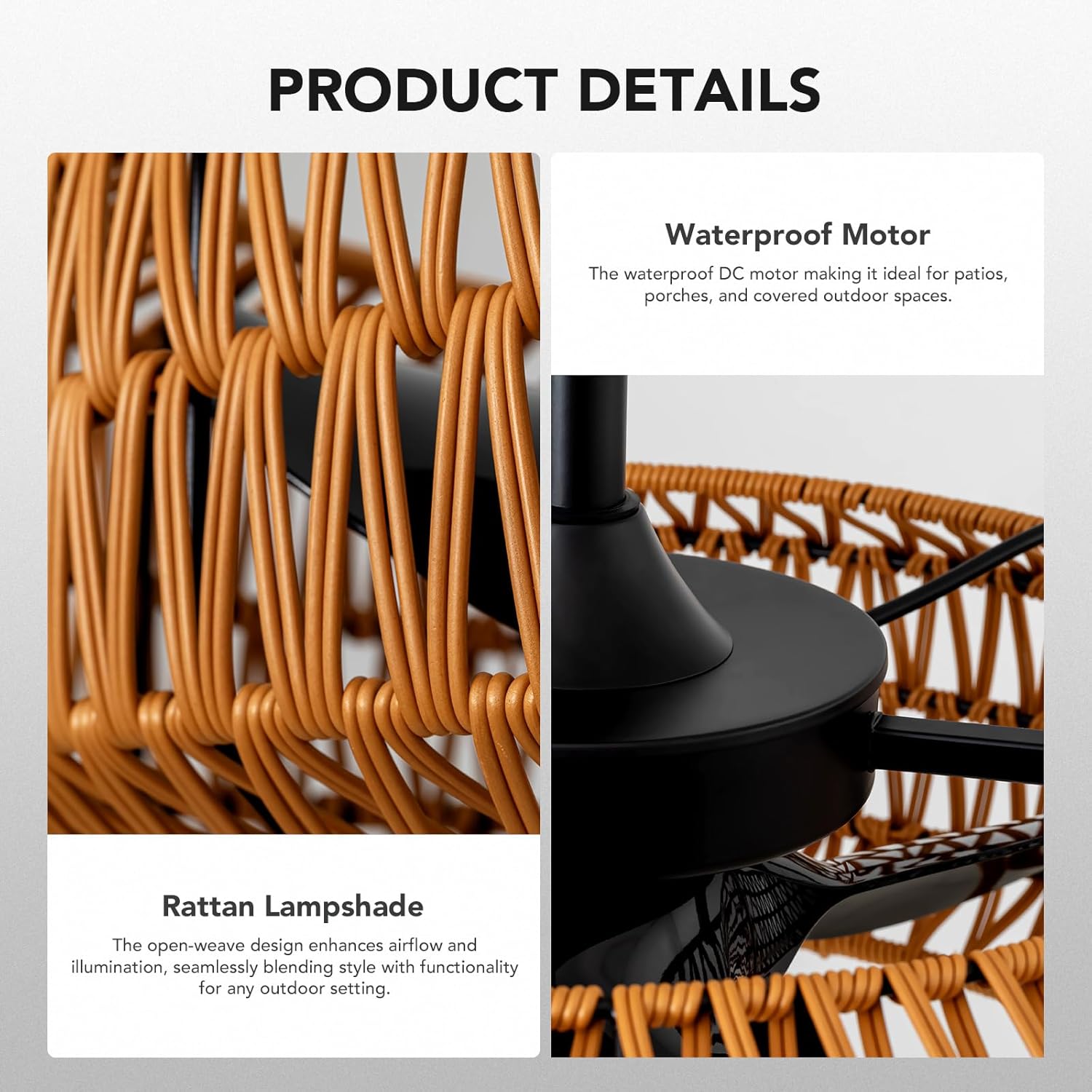
Image: Details of the rattan lampshade and waterproof motor, indicating durability and design.
7. Troubleshooting
If you encounter issues with your fan, refer to the following common problems and solutions:
| Problem | Possible Cause | Solution |
|---|---|---|
| Fan does not start | No power, loose connection, remote battery dead. | Check power outlet, ensure plug is fully inserted. Replace remote batteries. |
| Light does not work | Light setting off, power issue. | Ensure light is turned on via remote/app. Check power supply. |
| Fan wobbles | Loose mounting, unbalanced blades. | Ensure mounting hardware is secure. Check if blades are properly attached and balanced. |
| Remote control not working | Dead batteries, remote out of range, interference. | Replace batteries. Ensure remote is within range and pointed at the fan. Reduce interference. |
| Fan makes unusual noise | Loose screws, motor issue. | Check and tighten all screws. If noise persists, contact customer support. |
8. Warranty and Support
SPACORA stands by the quality of its products.
- 2-Year Promise: This product is built to last and comes with a 2-year guarantee.
- 24/7 Support: For any questions or assistance, please contact SPACORA customer support. We are here to ensure a good customer experience.
Friendly reminder: SPACORA suggests that you do not hang the patio fan outdoors for a long time without obstruction, and try to avoid soaking it in rainwater for a long time, so that your hanging ceiling fan will have a longer service life.