

1. Introduction
This manual provides essential instructions for the safe and efficient use of your DCHK Haribo HBT-03 Wireless Earbuds. Please read this manual thoroughly before using the product and retain it for future reference.
Package Contents:
- Haribo HBT-03 Wireless Earbuds (Left and Right)
- Charging Case with LCD Touchscreen
- USB-C to USB-A Charging Cable
- Three (3) Pairs of Eartips (Small, Medium, Large)
- User Manual (This document)

Image 1.1: Haribo HBT-03 Wireless Earbuds and Charging Case. The image displays the white earbuds seated in their open charging case, which features an LCD screen displaying 'HARIBO' and 'Swipe to Unlock'. A red gummy bear charm is attached to the case.
2. Product Overview
The DCHK Haribo HBT-03 Wireless Earbuds are designed for a high-quality audio experience with convenient features.
Key Features:
- Bluetooth 5.4: Provides stable and efficient wireless connectivity.
- LCD Touchscreen Case: Offers intuitive control over various functions directly from the charging case.
- Active Noise Cancelling (ANC): Reduces ambient noise for an immersive listening experience.
- Transparency Mode: Allows you to hear your surroundings while listening to audio.
- 13mm Dynamic Drivers: Delivers powerful bass and clear audio.
- IPX4 Water Resistance: Protects against splashes and sweat.
- Extended Playback: Up to 12 hours of total playback time with the charging case.

Image 2.1: Key features of the Haribo HBT-03 Earbuds. Icons illustrate wireless earbuds, pocket size, LCD display, Bluetooth 5.4, 12-hour play time, and 13mm driver.
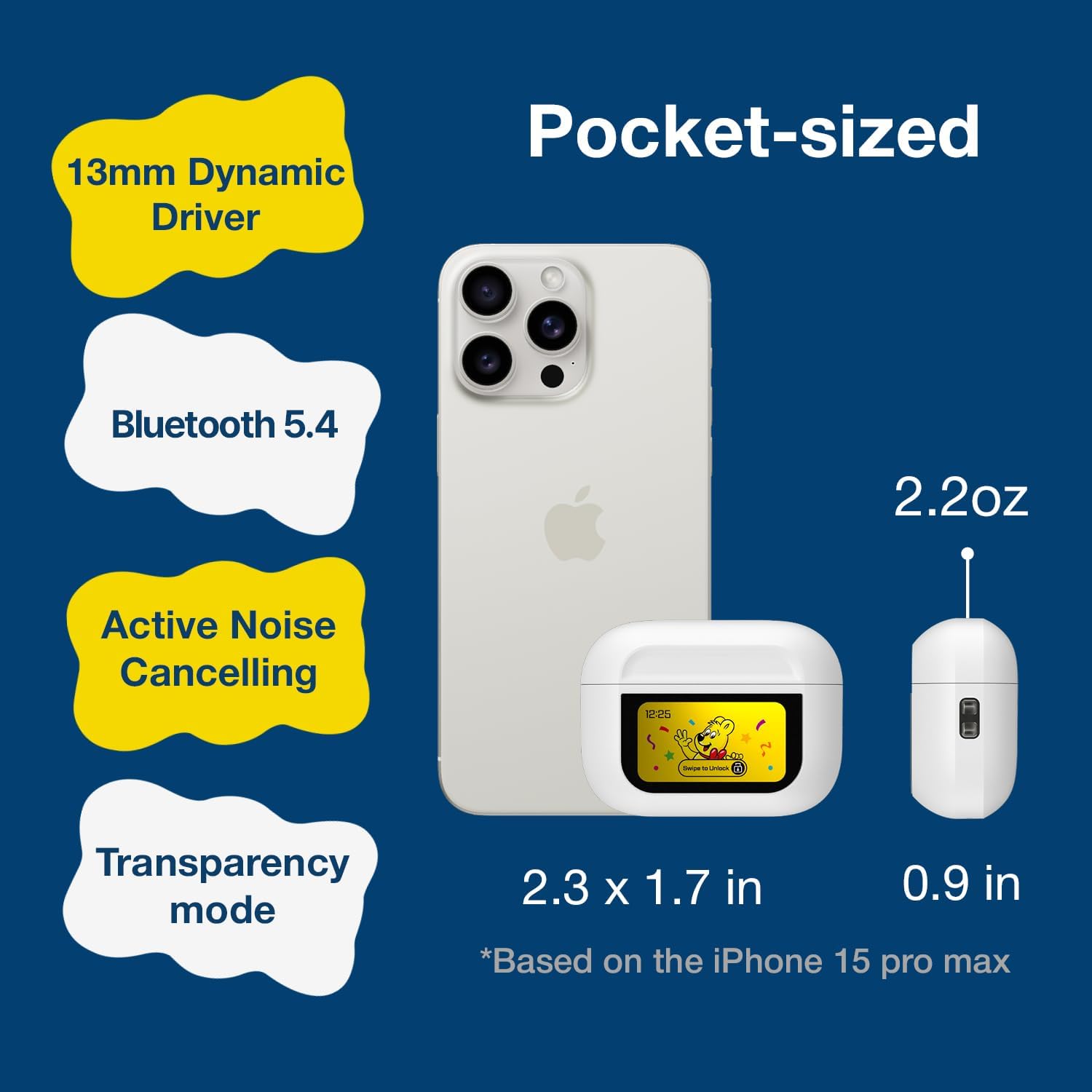
Image 2.2: The compact size of the Haribo HBT-03 Earbuds and case, shown next to a smartphone for scale. The case dimensions are approximately 2.3 x 1.7 inches, and the earbuds weigh 2.2 ounces.
3. Setup
3.1 Charging the Earbuds and Case
- Place the earbuds into the charging case. Ensure they are correctly seated.
- Connect the USB-C end of the charging cable to the port on the charging case.
- Connect the USB-A end of the charging cable to a compatible USB power source (e.g., wall adapter, computer USB port).
- The LCD screen on the case will display the charging status and battery levels.
A full charge for the case takes approximately 1.5 hours. The earbuds charge while inside the case.

Image 3.1: Charging information for the Haribo HBT-03 Earbuds. The image indicates a 1.5-hour charging time, 5 hours of single play time, and up to 12 hours of total play time with the charging case.
3.2 Pairing with a Device
- Ensure the earbuds are charged and placed inside the charging case.
- Open the charging case lid. The earbuds will automatically enter pairing mode.
- On your device (smartphone, tablet, laptop), enable Bluetooth.
- Search for available Bluetooth devices and select "HBT-03" from the list.
- Once connected, the earbuds will indicate successful pairing, and the device will show them as connected.
The Bluetooth 5.4 technology provides an improved transmission range of up to 32 feet (10 meters).

Image 3.2: Bluetooth 5.4 connectivity features of the Haribo HBT-03 Earbuds, highlighting a 32ft improved transmission range, high-quality audio, optimized energy consumption, and extraordinary connection stability.
3.3 Fitting the Earbuds
- Select the eartips that provide the most comfortable and secure fit for your ears. A proper seal is crucial for optimal sound quality and noise cancellation.
- Gently insert each earbud into your ear canal and twist slightly to ensure a snug fit.

Image 3.3: Available eartip sizes (Small: 0.45in, Medium: 0.47in, Large: 0.51in) for the Haribo HBT-03 Earbuds, designed for a perfectly fitting and secure experience.
4. Operation
4.1 Earbud Touch Controls
The earbuds feature touch-sensitive areas for controlling various functions:
- Play/Pause: Single tap on either earbud.
- Next Track: Triple tap on the right earbud.
- Previous Track: Triple tap on the left earbud.
- Volume Up: Swipe up on either earbud.
- Volume Down: Swipe down on either earbud.
- Answer/End Call: Single tap on either earbud.
- Reject Call: Long press on either earbud.
- Activate Voice Assistant (Siri, Bixby, Google Assistant): Long press on the left earbud.
- Toggle ANC/Transparency/Normal Mode: Long press on the right earbud.
- Game Mode/Music Mode: Quadruple tap on either earbud.
4.2 LCD Touchscreen Case Functions
The charging case features a full-color LCD touchscreen for advanced controls and settings. Swipe to unlock the screen and navigate through the options.

Image 4.1: Overview of the various functions available on the Haribo HBT-03 Earbuds' LCD touchscreen case. These include Battery Level Display, Change Song, Volume Control, Screen Brightness Adjustment, Equalizing (EQ modes), Like Button (for TikTok), Find My Earbuds, Remote Photo Capture, Set Current Time, Noise Reduction (ANC/Transparency), Flashlight, Screen Lock, Language Switch, Settings Menu (Power Off, Factory Reset), and Set Alarm.
Available functions on the LCD screen include:
- Battery Level Display: Shows battery status of both earbuds and the case.
- Music Playback Controls: Play, pause, skip tracks.
- Volume Adjustment: Control audio output level.
- Call Handling: Answer, end, or reject calls.
- Noise Cancelling & Transparency: Switch between ANC, Transparency, and Normal modes.
- EQ Modes: Select from 5 adjustable EQ modes (Standard, Classic, Jazz, Rock, Popular).
- Camera Control: Remotely trigger your smartphone camera.
- Language Switching: Change the display language.
- Wallpaper Customization: Personalize the screen background.
- Screen Brightness Adjustment: Modify display intensity.
- Find My Earbuds: Helps locate misplaced earbuds.
- Flashlight: Activates a small light on the case.
- Timer: Set a countdown timer.
- Settings Menu: Access options like Power Off and Factory Reset.
4.3 Power On/Off
- Power On: Open the charging case lid, and the earbuds will automatically power on.
- Power Off: Place the earbuds back into the charging case and close the lid. They will automatically power off and begin charging. You can also power off via the LCD screen settings.
5. Maintenance
5.1 Cleaning
- Regularly clean the earbuds and charging case with a soft, dry, lint-free cloth.
- Remove eartips and clean them with mild soap and water if necessary. Ensure they are completely dry before reattaching.
- Use a cotton swab to gently clean the charging contacts on both the earbuds and inside the case.
- Avoid using abrasive materials, alcohol, or chemical cleaners.
5.2 Storage
- When not in use, store the earbuds in their charging case to protect them and keep them charged.
- Store the product in a cool, dry place, away from extreme temperatures and direct sunlight.
5.3 Water Resistance (IPX4)
The earbuds are rated IPX4, meaning they are resistant to splashing water from any direction. This makes them suitable for workouts and light rain. They are not designed for submersion in water or exposure to pressurized water jets.
6. Troubleshooting
If you encounter issues with your earbuds, refer to the following common problems and solutions:
| Problem | Possible Solution |
|---|---|
| Earbuds not pairing with device |
|
| No sound from one or both earbuds |
|
| Charging case not charging |
|
| Touch controls unresponsive |
|
| LCD screen not responding |
|
7. Specifications
| Feature | Detail |
|---|---|
| Model Name | HBT-03 |
| Bluetooth Version | 5.4 |
| Bluetooth Range | Up to 32.8 feet (10 meters) |
| Audio Driver Size | 13mm Dynamic Driver |
| Frequency Response | 20 Hz - 20 KHz |
| Impedance | 32 Ohm |
| Noise Control | Active Noise Cancellation (ANC) |
| Water Resistance | IPX4 |
| Earbud Battery Life | Approx. 4.5 - 8 hours (depending on usage) |
| Total Playback Time (with case) | Up to 12 hours |
| Charging Case Battery Capacity | 300 mAh |
| Charging Time (Case) | Approx. 1.5 hours |
| Charging Port | USB-C |
| Control Type | Touch Control (Earbuds), Touch Screen (Case) |
| Material | ABS Plastic |
| Item Weight | 2.2 ounces (total) |
| Case Dimensions | 2.4 x 0.95 x 1.8 inches (approx.) |
8. Safety Information
- Do not disassemble or modify the product.
- Avoid exposing the product to extreme temperatures, direct sunlight, or open flames.
- Keep the product away from water and liquids, except for the IPX4-rated resistance to splashes.
- Do not use the earbuds at excessively high volumes for prolonged periods to prevent hearing damage.
- Keep out of reach of children and pets.
- Dispose of batteries and electronic components responsibly according to local regulations.
9. Warranty and Support
DCHK provides a limited warranty for this product. For specific warranty terms and conditions, please refer to the warranty card included in your package or contact DCHK customer support.
Customer Support:
If you have any questions, require technical assistance, or need to report an issue, please contact our customer support team through the retailer's platform or the official DCHK website.