
1. Introduction
This manual provides detailed instructions for the installation, operation, and maintenance of your Eonon E46X7 Android 14 Car Stereo. Please read this manual thoroughly before using the product to ensure proper functionality and to maximize your user experience. Keep this manual for future reference.

Image 1.1: Eonon E46X7 Car Stereo with accessories.
2. Applicable Models
The Eonon E46X7 Android 14 car stereo is designed for compatibility with the following BMW 3 Series (E46) models:
- BMW E46 M3 / 328i / 330Ci / 325i / 325xi / 328i / 328xi / 330i / 330xi 3 Series (1998-2006)
- BMW M3 (2000-2006)
No additional frame or cable changes are typically needed for these models, offering a plug-and-play installation. For specific model compatibility, refer to the detailed images provided.

Image 2.1: Visual guide for applicable BMW E46 models and AC control panel considerations.
3. What's in the Box
Verify that all components are present before beginning installation:
- E46X7 Car Stereo (x1)
- Power cord (x1)
- GPS antenna (x1)
- USB adapter cable (x2)
- Audio/video adapter cable (x2)
- Reverse video input cable (x1)
- 15A fuse (x1)
- External Microphone (x1)
- CANBUS (x1)
- Manual (x1)
- Double-sided adhesive sticker (x1)
- Radio antenna adapter (x2)

Image 3.1: Contents of the Eonon E46X7 package.
4. Setup & Installation
4.1 Power Cable Connector Verification
Before installation, confirm the type of your original car radio power connector:
- If your 17-pin connector has 4 empty pins, it is NOT suitable for direct installation.
- If your 17-pin connector does not have empty pins, or if you have a 40-pin connector, the E46X7 can be installed directly.
- If the connector in the trunk is 17-pin or 40-pin, an additional Eonon A0590 extension harness may be required (not included).

Image 4.1: Power connector compatibility guide.
4.2 AC Control Panel Relocation
If your car's air conditioning control panel is located in the center console, it must be removed and reinstalled below the E46X7 car stereo. Refer to Image 2.1 for a visual guide on this process.
4.3 Wiring Diagram
Follow the wiring diagram carefully for correct connections. Ensure all cables are securely connected to their respective ports.
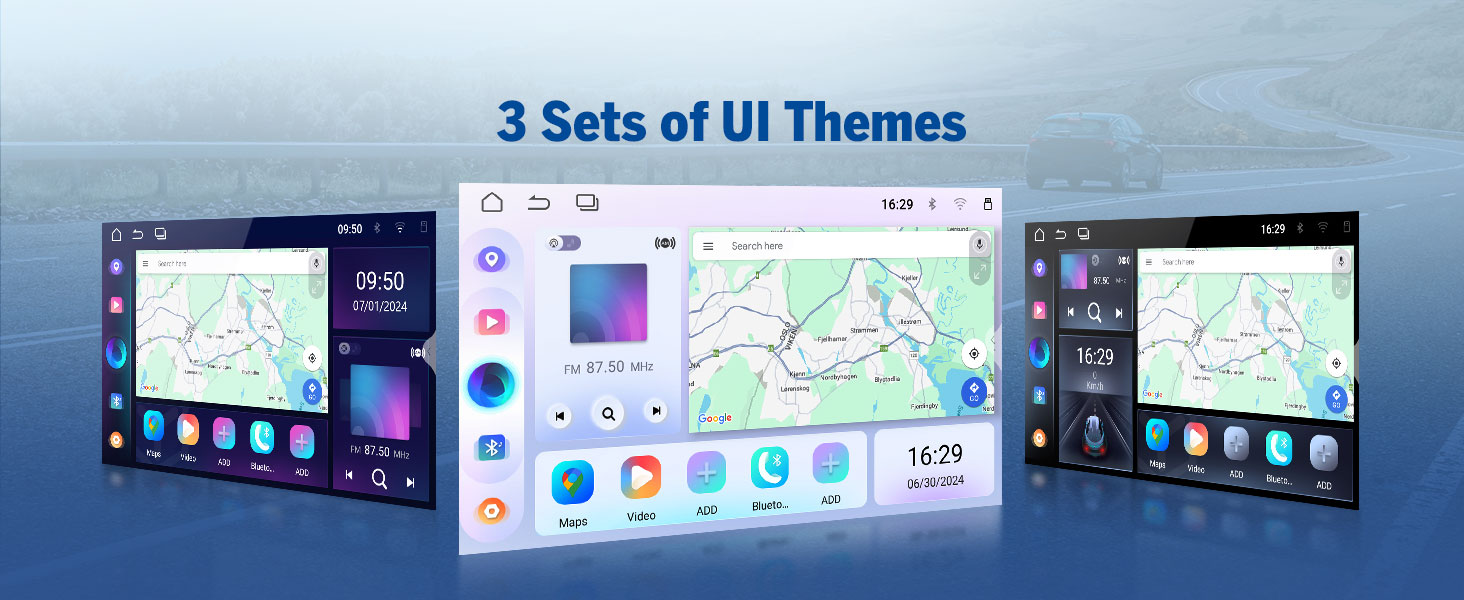
Image 4.2: Comprehensive wiring diagram for the E46X7 unit.
5. Operating Instructions
5.1 Wireless CarPlay & Android Auto
The E46X7 supports both wireless Apple CarPlay and Android Auto for seamless smartphone integration. This allows for hands-free control of music, navigation, calls, and messages via voice commands like 'Hey Siri' or 'Hey Google'.
5.1.1 Wireless Apple CarPlay Connection
- Click the Zlink5 app on the car stereo.
- Turn on Wi-Fi and Bluetooth on your iPhone.
- Find 'EONON' in your phone's Bluetooth device list and enter '0000' to pair. Once connected, tap 'Use CarPlay'.
- Wait a few seconds for the connection to complete.
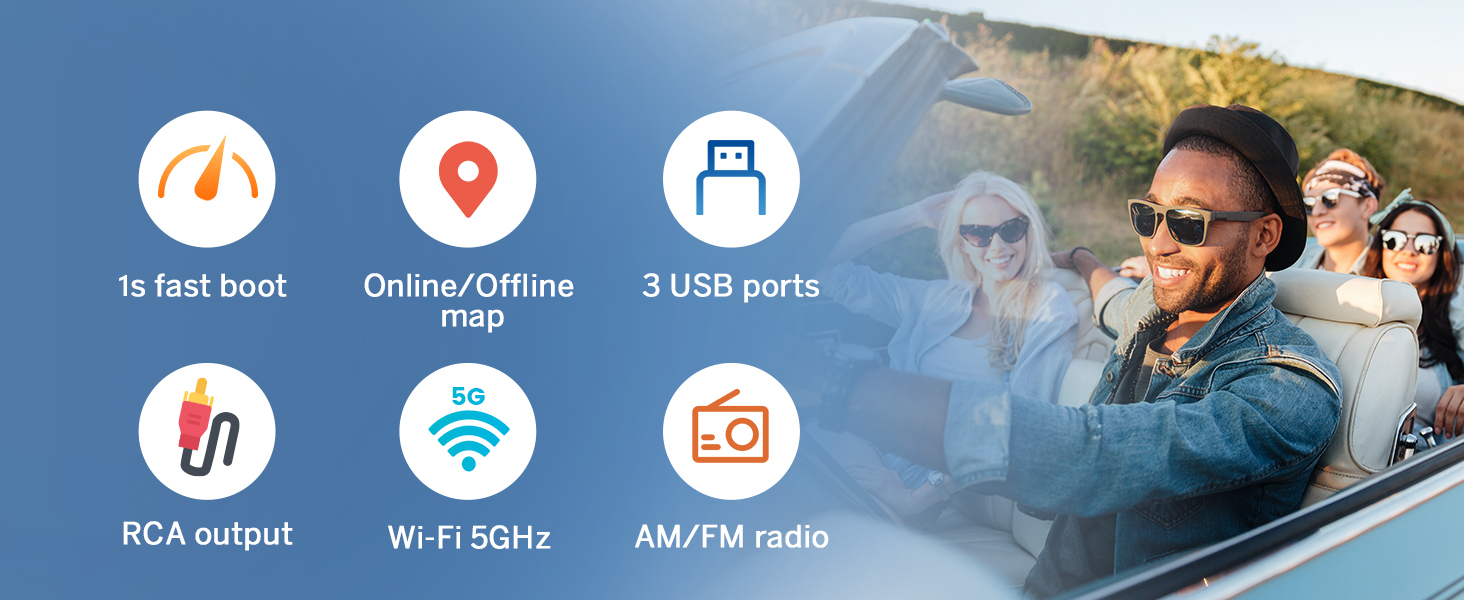
Image 5.1: Wireless Apple CarPlay connection steps.
5.1.2 Wireless Android Auto Connection
- Click the Zlink5 app on the car stereo.
- Turn on Wi-Fi and Bluetooth on your Android phone.
- Find 'EONON' in your phone's Bluetooth device list, enter '0000' to pair, and click 'OK'.
- Wait a few seconds for the connection to complete.

Image 5.2: Wireless Android Auto connection steps.
5.2 Screen Mirroring
Mirror your smartphone's display onto the car stereo screen.
5.2.1 Screen Mirroring for iOS
- Click the Zlink5 app on the car stereo. Set the car stereo to iPhone wireless screen mirroring mode.
- Turn on the iPhone hotspot and connect to the car stereo.
- Turn on the iPhone screen mirroring function and select 'zj-airplay'.

Image 5.3: iOS Screen Mirroring connection steps.
5.2.2 Screen Mirroring for Android
- Click the Zlink5 app on the car stereo. Set the car stereo to Android wireless screen mirroring mode.
- Turn on your phone's Bluetooth. Find 'EONON' in your phone's Bluetooth device list, enter '0000' to pair.
- Turn on the phone's hotspot and connect to the car stereo.
- Install the Zplus app on your phone. Turn on the app and select 'wireless connection'.
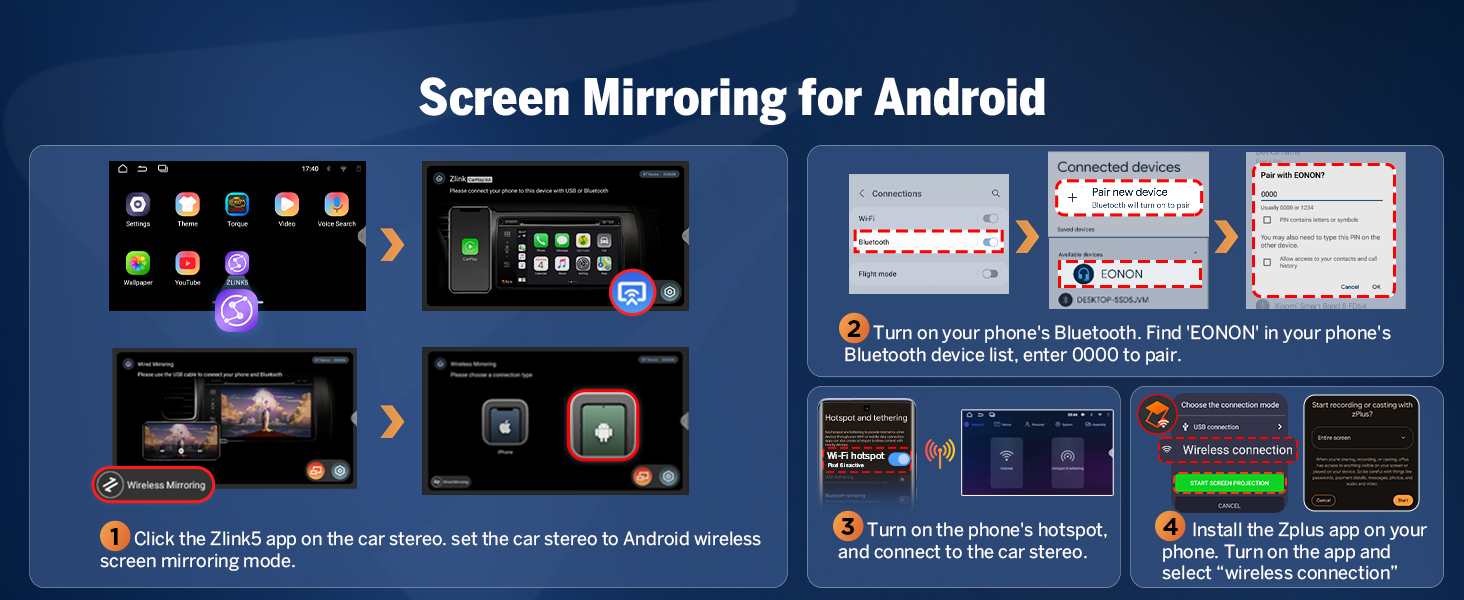
Image 5.4: Android Screen Mirroring connection steps.
5.3 Built-in DSP (Digital Signal Processing)
The integrated DSP chip allows for precise audio tuning. It features a 4x45W output, a 36-band equalizer, and 6 EQ modes to customize your sound experience. DSP enables time alignment, ensuring sound waves from different speakers reach the listener simultaneously for improved sound quality and precision.
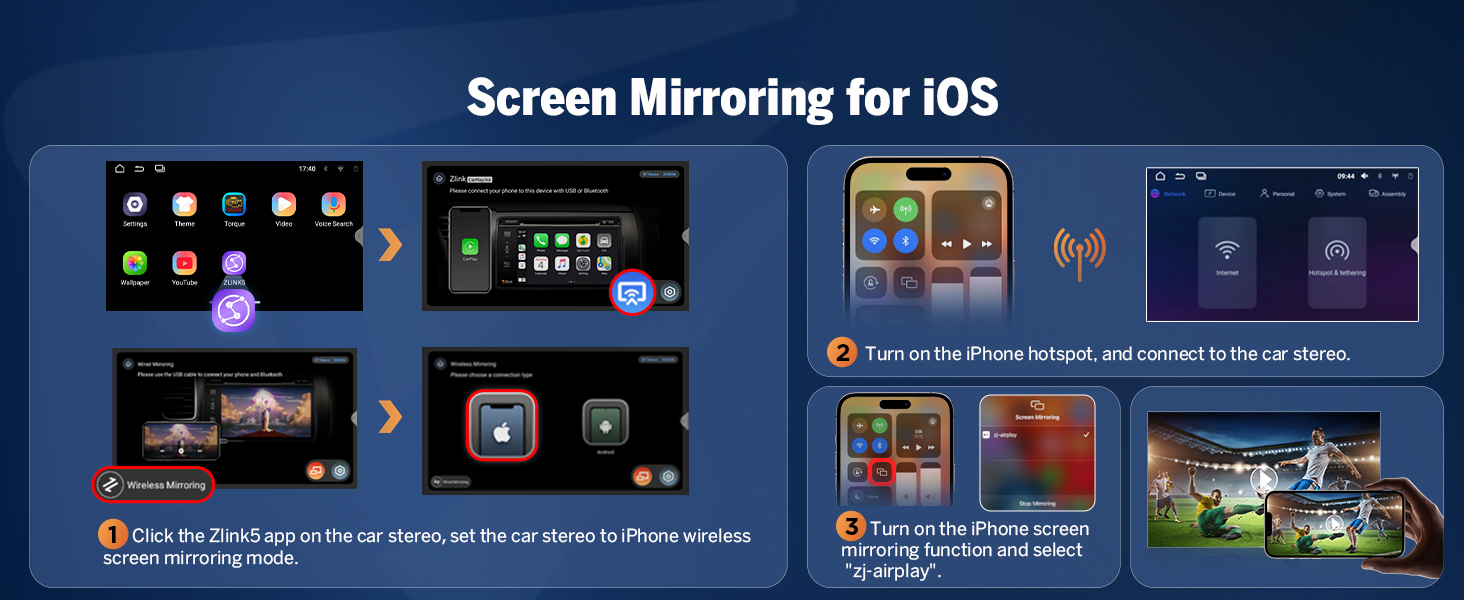
Image 5.5: Built-in DSP features and interface.
5.4 Bluetooth Connectivity
The E46X7 includes an independent Bluetooth module and an extra Bluetooth antenna for quick, stable connections, noise reduction, crystal-clear call quality, and high-quality Bluetooth music streaming.

Image 5.6: Bluetooth module and features.
5.5 User Interface Customization
Personalize your car stereo's appearance with various customization options:
- Boot Logo: Set a custom boot logo.
- Button Color: Adjust the color of the physical buttons.
- Wallpaper: Choose from various wallpapers or upload your own.
- UI Themes: Select from 3 distinct user interface themes.

Image 5.7: User interface customization options.
6. Features & Specifications
6.1 Key Features
- Operating System: Newest Android 14 System (API level 34)
- Processor: Rockchip processor (outperforms conventional 8-core processors)
- Memory: 3GB RAM + 32GB ROM
- Display: 9-inch IPS 1280x720 resolution HD screen with 178° viewing angle, multi-touch capacitive touchscreen.
- Audio: Built-in DSP chips, 4x45W output, 36-band equalizer adjustment.
- Connectivity: Wireless/Wired CarPlay & Android Auto, Bluetooth, Wi-Fi (5GHz), USB (3 ports), AUX audio input.
- Radio: 18 FM/AM channels.
- Updates: Online firmware updates (OTA) for software enhancements and security. Note: These updates are for software, not Android system upgrades.
- Compatibility: Supports Eonon dashcam (A100) and DAB+ box (502) (not included). Eonon rearview camera (A0125) is included and supported.
- Fast Boot: 1-second fast boot.
- Navigation: Online/Offline map support.
- Output: RCA output.

Image 6.1: Android 14 system overview.

Image 6.2: Performance benchmark (AnTuTu scores).
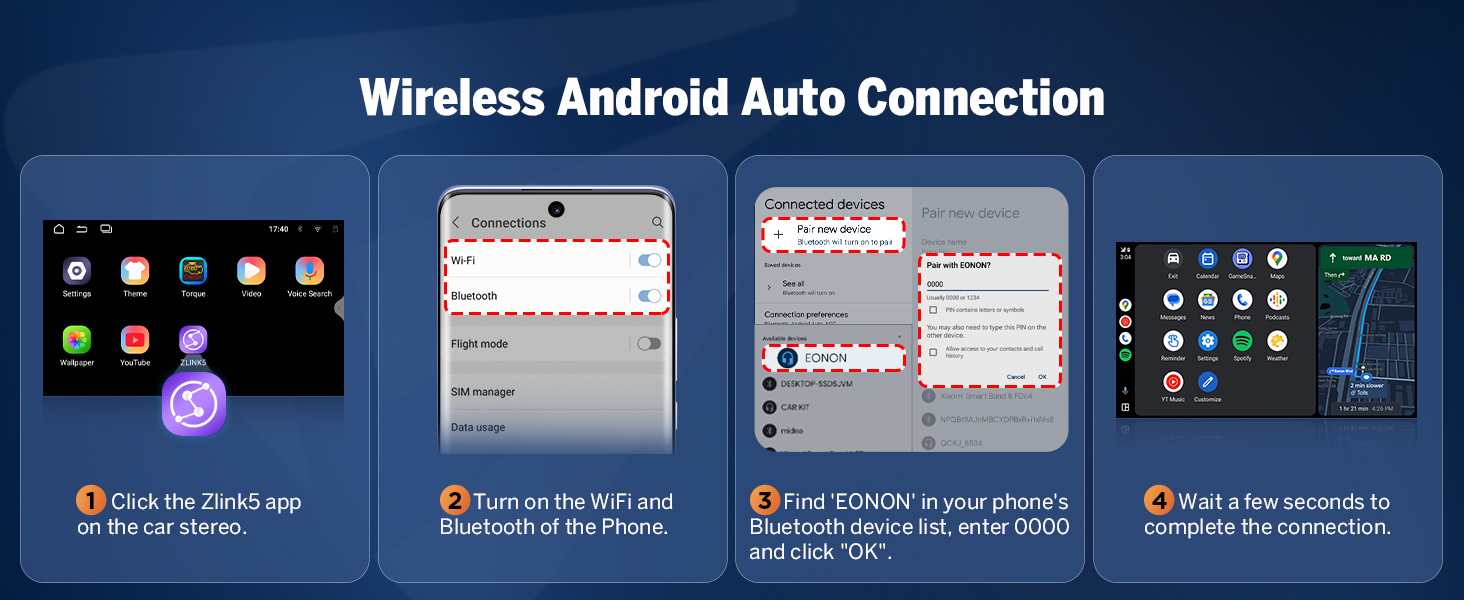
Image 6.3: 9-inch IPS display features.
6.2 General Specifications
- Product Dimensions: 8.98 x 3.94 x 5.32 inches
- Item Weight: 3.59 pounds
- Model Name: E46X7
- Screen Size: 9 Inches
- Mounting Type: Dashboard Mount
- Audio Output Mode: Stereo
7. Maintenance
To ensure the longevity and optimal performance of your Eonon E46X7 car stereo, follow these general maintenance guidelines:
- Cleaning: Use a soft, dry cloth to clean the screen and exterior. Avoid abrasive cleaners or solvents that could damage the surface.
- Software Updates: Regularly check for and install available firmware updates via OTA (Over-The-Air) to benefit from performance improvements and security enhancements.
- Environmental Conditions: Avoid exposing the unit to extreme temperatures, direct sunlight for prolonged periods, or excessive moisture.
- Cable Connections: Periodically check all cable connections to ensure they are secure and free from damage.
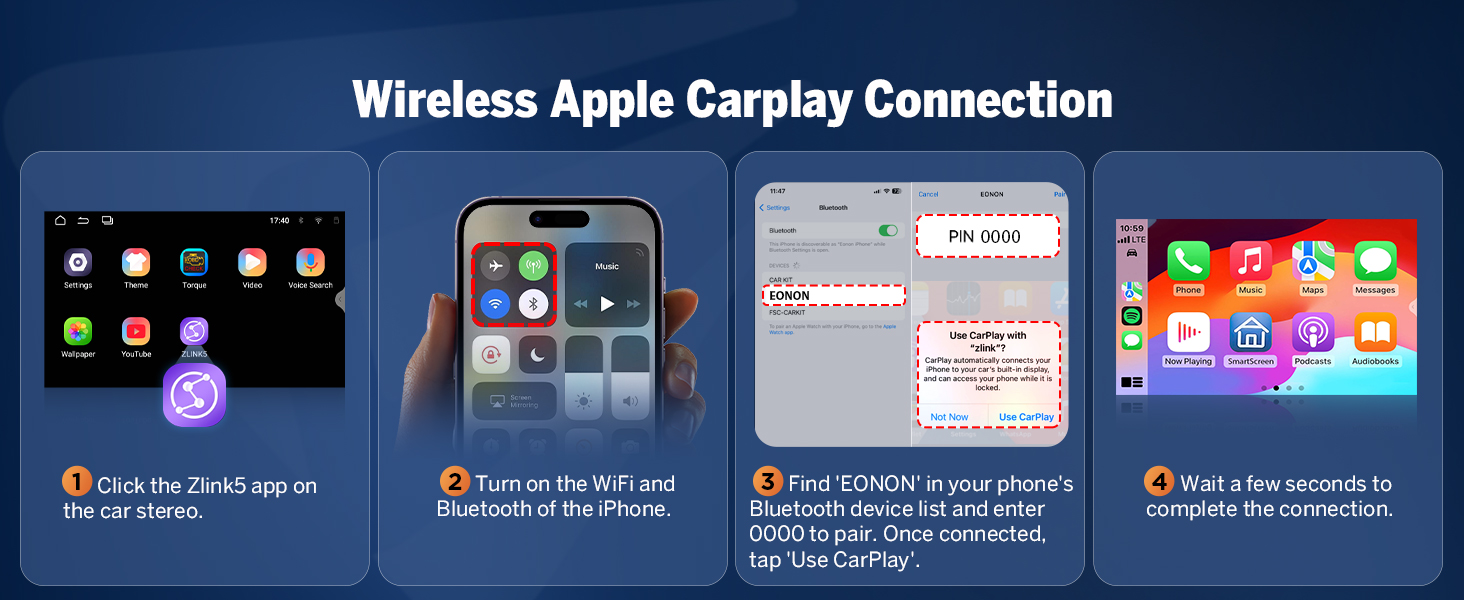
Image 7.1: Over-the-air firmware update screen.
8. Troubleshooting
If you encounter issues with your Eonon E46X7, refer to the following common troubleshooting tips:
- No Power: Check all power connections and the 15A fuse. Ensure the car's ignition is on.
- No Sound: Verify speaker connections, check volume levels, and ensure the DSP settings are correctly configured. Confirm that the audio output mode is set to Stereo.
- CarPlay/Android Auto Not Connecting: Ensure Wi-Fi and Bluetooth are enabled on both the stereo and your phone. Re-pair the devices. Check the Zlink5 app settings.
- Steering Wheel Controls Not Working: Some vehicles may require specific programming or an additional adapter for full steering wheel control functionality. Consult your vehicle's manual or Eonon support.
- Backup Camera Issues: Ensure the camera is correctly wired to the reverse video input. Verify the camera's resolution is supported (minimum 720p).
- Settings Not Saving: Ensure the unit is receiving constant power (B+ wire) to retain settings when the car is off.
- System Lag/Unresponsiveness: Close unnecessary background applications. Perform a system restart. Ensure the firmware is up to date.
For persistent issues, contact Eonon customer support for further assistance.
9. Warranty & Support
Eonon products typically come with a manufacturer's warranty. Please refer to the warranty card included with your product or visit the official Eonon website for detailed warranty terms and conditions.
For technical support, product inquiries, or warranty claims, please contact Eonon customer service through their official channels. You can often find support information on the Eonon brand store page on Amazon or their dedicated support website.
Visit the official EONON Store: EONON Store


