
Sofucor KBS-52K096
Sofucor 132cm Ceiling Fan with Light and Remote Control User Manual
Model: KBS-52K096
1. Introduction
Thank you for choosing the Sofucor 132cm Ceiling Fan with Light and Remote Control. This manual provides important information for the safe installation, operation, and maintenance of your new ceiling fan. Please read it thoroughly before installation and keep it for future reference.
2. Safety Information
WARNING: To reduce the risk of fire, electric shock, or personal injury, always follow these instructions:
- Ensure the installation location is structurally sound and can support the fan's weight.
- All wiring must be in accordance with national and local electrical codes.
- Disconnect power at the main circuit breaker before installation or servicing.
- Do not operate the fan with damaged blades or housing.
- Keep hands, clothing, and other objects clear of rotating fan blades.
- This fan is suitable for indoor use and covered outdoor areas. Do not expose to direct water.
- Consult a qualified electrician if you are unsure about wiring or installation procedures.
3. Product Overview
The Sofucor 132cm Ceiling Fan is designed for efficient air circulation and integrated lighting. It features a silent DC motor, adjustable LED lighting, and convenient remote control operation.
Key Features:
- Silent DC Motor: Operates quietly (below 25 dB) and offers up to 75% energy savings compared to traditional AC motors.
- Integrated LED Light: 18W LED with continuous dimming (10% to 100%) and 3 color temperatures (3000K Warm, 4000K Natural, 6000K Cool White). Includes a light memory function.
- 6 Adjustable Fan Speeds: Provides customizable airflow for various comfort levels.
- Reversible Airflow: Forward rotation for cooling in summer, reverse rotation for circulating warm air in winter.
- Timer Function: Set the fan to turn off automatically after 1, 4, or 8 hours.
- Durable Construction: Features 5 ABS blades, a high-transmittance lampshade, and a reinforced metal canopy.
- Remote Control: Full control over fan speeds, light settings, and timer functions.
- Versatile Installation: Compatible with flat ceilings and sloped ceilings up to 15°. Includes three extension rods (12.5 cm, 25 cm, 60 cm).
Components:
The fan includes a pure copper winding DC motor, an upgraded super bright LED module, a high transmittance lampshade, a reinforced metal canopy, and unique curved blades.

Image: Detailed view of the fan's internal and external components.

Image: Sofucor 132cm ceiling fan installed in a modern kitchen.
4. Setup and Installation
Before You Begin: Ensure power is disconnected at the circuit breaker. Unpack all components and verify against the packing list. A detailed installation video is available from the manufacturer for visual guidance.
4.1 Choosing an Installation Location
- The fan is suitable for indoor use and covered outdoor areas.
- Recommended room size: 12ft x 12ft to 20ft x 20ft.
- Ensure the ceiling can support the fan's weight (7.16 kg).
- Maintain a minimum clearance of 2.3 meters (7.5 feet) from the floor to the fan blades.
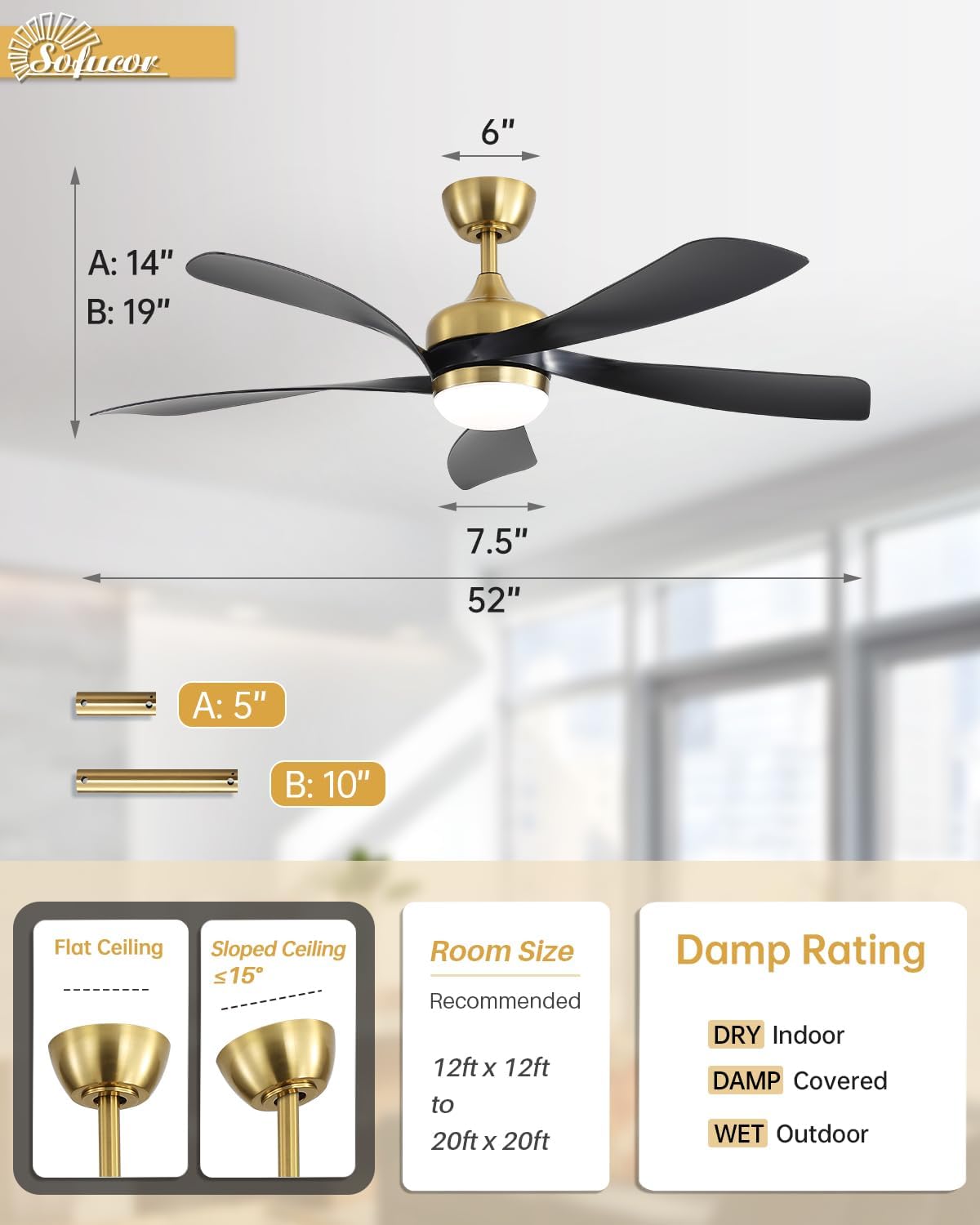
Image: Fan dimensions and installation considerations.
4.2 Mounting the Fan
- Securely attach the mounting bracket to the ceiling joist or a suitable support structure.
- Assemble the downrod (choose from 12.5 cm, 25 cm, or 60 cm) and canopy.
- Hang the fan motor assembly onto the mounting bracket.
- Connect the electrical wiring according to the provided wiring diagram. Ensure all connections are secure.
- Attach the fan blades to the motor housing.
- Install the LED light kit and lampshade.
Note: The fan undergoes factory balancing and noise level checks to ensure stability.
5. Operating Instructions
Your Sofucor ceiling fan is operated via the included remote control.
5.1 Remote Control Functions

Image: Remote control and its functions.
- Power ON/OFF: Turns the fan and light on or off.
- Fan Speed (1-6): Adjusts the fan speed from a gentle breeze (Level 1-2) to a strong wind (Level 5-6).
- Light ON/OFF: Controls the integrated LED light.
- Light Color Temperature: Cycles through 3000K (Warm), 4000K (Natural), and 6000K (Cool White). The light has a memory function to recall the last setting.
- Light Dimming: Adjusts the brightness of the LED light from 10% to 100%.
- Timer (1H/4H/8H): Sets the fan to automatically turn off after the selected duration.
- Forward/Reverse (F/R): Changes the direction of the fan blades for summer or winter mode.
5.2 Fan Modes (Summer/Winter)

Image: Summer and Winter fan modes with speed recommendations.
- Summer Mode (Forward Rotation): Blades rotate counter-clockwise, pushing air downwards to create a cooling breeze. Use speeds 1-2 for comfortable breeze, 3-4 for natural wind, and 5-6 for strong wind.
- Winter Mode (Reverse Rotation): Blades rotate clockwise, drawing air upwards to circulate warm air trapped near the ceiling, helping to warm the room.
5.3 Lighting Control

Image: LED light color temperatures and dimming capabilities.
- The integrated LED light offers three distinct color temperatures: 3000K (warm white), 4000K (natural white), and 6000K (cool white).
- Brightness can be adjusted continuously from 10% to 100%.
- The light memory function ensures the light turns on at the last used color temperature and brightness setting.
6. Maintenance
Regular maintenance ensures optimal performance and extends the life of your ceiling fan.
- Cleaning: Periodically clean the fan blades and motor housing with a soft, damp cloth. Do not use abrasive cleaners or solvents.
- Blade Balance: The fan is factory-balanced. If wobbling occurs, check that all blade screws are tight and blades are free from damage.
- Light Source: The LED light module is designed for long life. If replacement is needed, contact customer support.
- Power Off: Always disconnect power at the circuit breaker before performing any cleaning or maintenance.
7. Troubleshooting
If you experience issues with your fan, refer to the following common problems and solutions:
| Problem | Possible Cause | Solution |
|---|---|---|
| Fan does not start | No power; loose wiring; remote control battery dead. | Check circuit breaker; verify wiring connections; replace remote control battery. |
| Fan wobbles | Loose blade screws; unbalanced blades; improper mounting. | Tighten all blade screws; ensure blades are not bent or damaged; re-check mounting bracket security. |
| Light does not work | Loose wiring; LED module failure; remote control issue. | Check light wiring connections; ensure remote battery is good; contact customer support if LED module is faulty. |
| Remote control not working | Dead battery; obstruction; remote not paired. | Replace battery; ensure clear line of sight to receiver; refer to pairing instructions (if applicable, not detailed in provided data). |
If the problem persists after trying these solutions, please contact Sofucor customer support.
8. Specifications
| Feature | Detail |
|---|---|
| Brand | Sofucor |
| Model Number | KBS-52K096 |
| Size | 132 cm (52 inches) |
| Color | Gold + Black |
| Material | Acrylonitrile Butadiene Styrene (ABS) blades, Metal canopy |
| Motor Type | Silent DC Motor (Pure Copper Winding) |
| Noise Level | < 25 dB |
| Airflow | Max 5000 CFM |
| Fan Speeds | 6 adjustable speeds |
| Light Type | Integrated LED |
| Light Wattage | 18 Watts |
| Light Color Temperatures | 3000K (Warm), 4000K (Natural), 6000K (Cool White) |
| Light Dimming | Continuous (10% - 100%) |
| Timer Settings | 1 hour, 4 hours, 8 hours |
| Control Method | Remote Control |
| Voltage | 220 Volts |
| Item Weight | 7.16 Kilograms |
| Dimensions (L x W x H) | 132L x 132W x 36H centimeters |
| Ceiling Compatibility | Flat ceilings, Sloped ceilings up to 15° |
| Included Components | Remote Control, 3 Extension Rods (12.5cm, 25cm, 60cm) |
| Energy Label | D |
| EPREL Product Page | View EPREL Data |
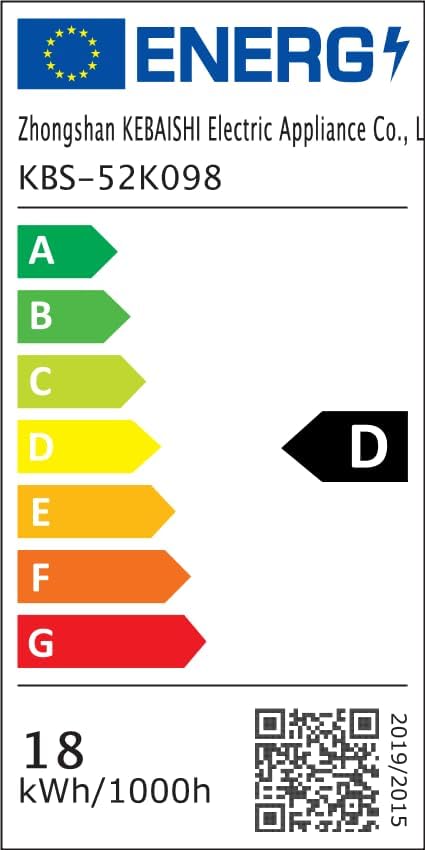
Image: Energy Label D.
9. Warranty and Support
Sofucor is committed to providing high-quality products and customer satisfaction. While specific warranty details are not provided in this manual, our customer service team is available to assist you with any questions or concerns regarding your product.
For support, please contact Sofucor customer service through the platform where you purchased the product or refer to the manufacturer's website for contact information.
Related documentsKBS-52K096


Ask a question about this manual
Ask about setup, troubleshooting, compatibility, parts, safety, or missing instructions. Manuals+ will review the question and use this page’s manual context to help answer it.