
Rolosar Q76
Rolosar Q76 Bluetooth 5.3 Headphones User Manual
Model: Q76
Introduction
This manual provides detailed instructions for the proper use, setup, and maintenance of your Rolosar Q76 Bluetooth 5.3 Headphones. Please read this manual thoroughly before using the product to ensure optimal performance and longevity. Keep this manual for future reference.
Product Overview
The Rolosar Q76 headphones are designed for wireless audio playback and communication, featuring Bluetooth 5.3 connectivity, an LED display on the charging case, and IPX7 waterproofing. The ergonomic ear-hook design ensures a secure fit.
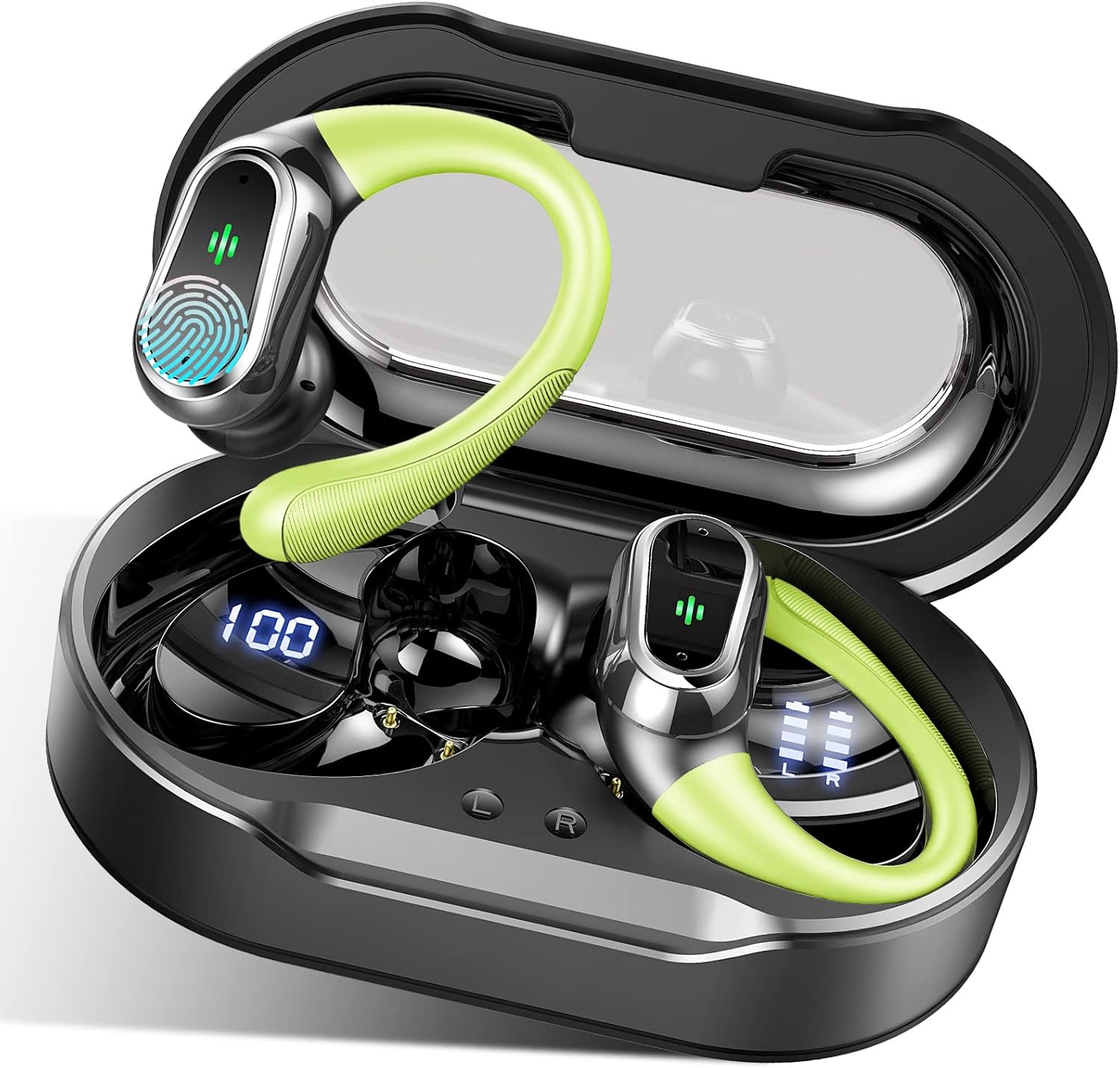
Image: The Rolosar Q76 Bluetooth 5.3 Headphones, green in color, are shown resting within their open black charging case. The earbuds feature a sleek design with a prominent green ear-hook for secure placement. The charging case displays a '100' indicating full charge, and individual earbud battery levels are visible on the case's LED screen. The earbuds themselves have touch-sensitive areas with a fingerprint icon and small LED indicators.
Package Contents:
- Rolosar Q76 Bluetooth Headphones (Left and Right)
- Charging Case
- USB-C Charging Cable
- User Manual
- Multiple sizes of ear tips
Setup
1. Charging the Headphones and Case:
- Initial Charge: Before first use, place both earbuds into the charging case and connect the USB-C cable to the charging port on the case. Connect the other end to a standard USB power adapter (not included).
- Charging Indicators: The LED display on the charging case will show the battery percentage of the case. Individual earbud battery levels will also be displayed. The earbuds' indicator lights will show charging status.
- Full Charge: A full charge typically takes approximately 1-2 hours for the earbuds and 2-3 hours for the charging case. The case display will show '100' when fully charged.
2. Pairing with a Device:
- Power On: Open the charging case. The earbuds will automatically power on and enter pairing mode. The indicator lights on the earbuds will flash, indicating they are ready to pair.
- Activate Bluetooth: On your smartphone or other Bluetooth-enabled device, go to the Bluetooth settings and enable Bluetooth.
- Select Device: Look for "Q76" in the list of available devices and select it to connect.
- Confirmation: Once successfully paired, you will hear an audio prompt, and the earbud indicator lights will stop flashing. The headphones are now ready for use.
- Automatic Reconnection: After initial pairing, the headphones will automatically connect to the last paired device when removed from the case, provided Bluetooth is enabled on the device.
Operating Instructions
Power On/Off:
- Power On: Open the charging case, or press and hold the touch control area on both earbuds for 3 seconds.
- Power Off: Place the earbuds back into the charging case and close the lid, or press and hold the touch control area on both earbuds for 5 seconds.
Music Playback:
- Play/Pause: Tap the touch control area on either earbud once.
- Next Track: Double-tap the touch control area on the right earbud.
- Previous Track: Double-tap the touch control area on the left earbud.
- Volume Up: Triple-tap the touch control area on the right earbud.
- Volume Down: Triple-tap the touch control area on the left earbud.
Call Management:
- Answer/End Call: Tap the touch control area on either earbud once.
- Reject Call: Press and hold the touch control area on either earbud for 2 seconds.
Voice Assistant:
- Activate Voice Assistant: Press and hold the touch control area on either earbud for 2 seconds (when not on a call).
Maintenance
Cleaning:
- Use a soft, dry, lint-free cloth to clean the earbuds and charging case.
- Do not use abrasive cleaners, solvents, or aerosol sprays.
- Regularly clean the charging contacts on both the earbuds and the case to ensure proper charging.
Storage:
- When not in use, store the headphones in their charging case to protect them and keep them charged.
- Store in a cool, dry place, away from extreme temperatures and direct sunlight.
Water Resistance (IPX7):
- The earbuds are IPX7 waterproof, meaning they can withstand immersion in water up to 1 meter for 30 minutes.
- This rating applies to the earbuds only, not the charging case.
- Avoid exposing the charging case to water or moisture.
- Ensure earbuds are completely dry before placing them back into the charging case to prevent damage.
Troubleshooting
- No Sound:
- Ensure the headphones are paired and connected to your device.
- Check the volume level on both the headphones and your device.
- Ensure the earbuds are properly seated in your ears.
- Earbuds Not Pairing:
- Make sure both earbuds are charged.
- Turn off Bluetooth on your device and turn it back on.
- Forget "Q76" from your device's Bluetooth list and attempt to pair again.
- Reset the earbuds (refer to specific reset instructions if available, or place them in the case, close, then reopen).
- Charging Issues:
- Ensure the USB-C cable is securely connected to both the case and the power source.
- Check if the charging contacts on the earbuds and inside the case are clean and free of debris.
- Try a different USB-C cable or power adapter.
- Intermittent Connection:
- Ensure your device is within the Bluetooth range (typically 10 meters/33 feet) without significant obstacles.
- Avoid strong electromagnetic interference.
Specifications
| Model | Q76 |
| Brand | Rolosar |
| Connectivity Technology | Bluetooth 5.3 |
| Waterproof Rating | IPX7 (Earbuds only) |
| Special Features | LED Display, Noise Cancellation |
| Battery Type | Lithium Polymer |
| Charging Interface | USB-C |
| Product Dimensions | 4 x 2 x 5 cm |
| Item Weight | 140 g |
Warranty and Support
Rolosar products are designed for reliability and performance. For warranty information or technical support, please refer to the contact details provided with your purchase or visit the official Rolosar website. Please retain your proof of purchase for warranty claims.
Ask a question about this manual
Ask about setup, troubleshooting, compatibility, parts, safety, or missing instructions. Manuals+ will review the question and use this page’s manual context to help answer it.