
iPormis B0DT6Q4VVD
iPormis King Bed Frame with Storage and Charging Station User Manual
Model: B0DT6Q4VVD
Brand: iPormis
Introduction
Thank you for choosing the iPormis King Bed Frame. This manual provides detailed instructions for the assembly, operation, and maintenance of your new bed frame. Please read this manual thoroughly before beginning assembly and retain it for future reference.
Important Safety Information
- Charging Station Caution: Keep the charging station dry. Do not insert any metal objects into the ports. Unplug the charging station when not in use to prevent electrical hazards.
- Ensure all bolts and screws are securely tightened before use. Periodically check and re-tighten fasteners.
- Do not exceed the maximum weight capacity of the bed frame (over 1,000 lbs).
- Keep small parts away from children during assembly to prevent choking hazards.
- Assemble the bed frame on a soft, clean surface to prevent damage to the product or your floor.
Package Contents
Before assembly, verify that all components are present. Refer to the included installation instructions for a complete list of parts and hardware. Typically, your package will include:
- Headboard with integrated charging station
- Bed frame side rails and support beams
- Metal slats
- Storage drawers (2 units)
- Assembly hardware (screws, bolts, Allen wrench)
- Installation instructions

Image: Exploded view showing the headboard, frame, slats, and storage drawers with dimensions.
Setup and Assembly
Assembly of the iPormis King Bed Frame is designed to be straightforward. It is recommended to have two people for assembly, though it can be completed by one person. Estimated assembly time is approximately 30-45 minutes.
- Prepare the Area: Clear a spacious area for assembly. Place all components on a soft, clean surface to prevent scratches.
- Identify Parts: Unpack all components and identify them using the parts list in your instruction manual.
- Assemble the Headboard: Attach the headboard legs to the upholstered headboard section. Ensure the charging station is correctly oriented.
- Construct the Frame: Connect the side rails and footboard to the headboard. Loosely tighten screws initially.
- Install Support Beams and Slats: Place the central support beam and then lay out the metal slats across the frame. Secure them according to the manual. The frame features noise-free rubber strips for quiet operation.
- Assemble Storage Drawers: Construct the two storage drawers. These are designed with smooth wheels for easy access and sliding prevent Velcro to keep them in place.
- Final Tightening: Once all parts are in place and aligned, fully tighten all screws and bolts.
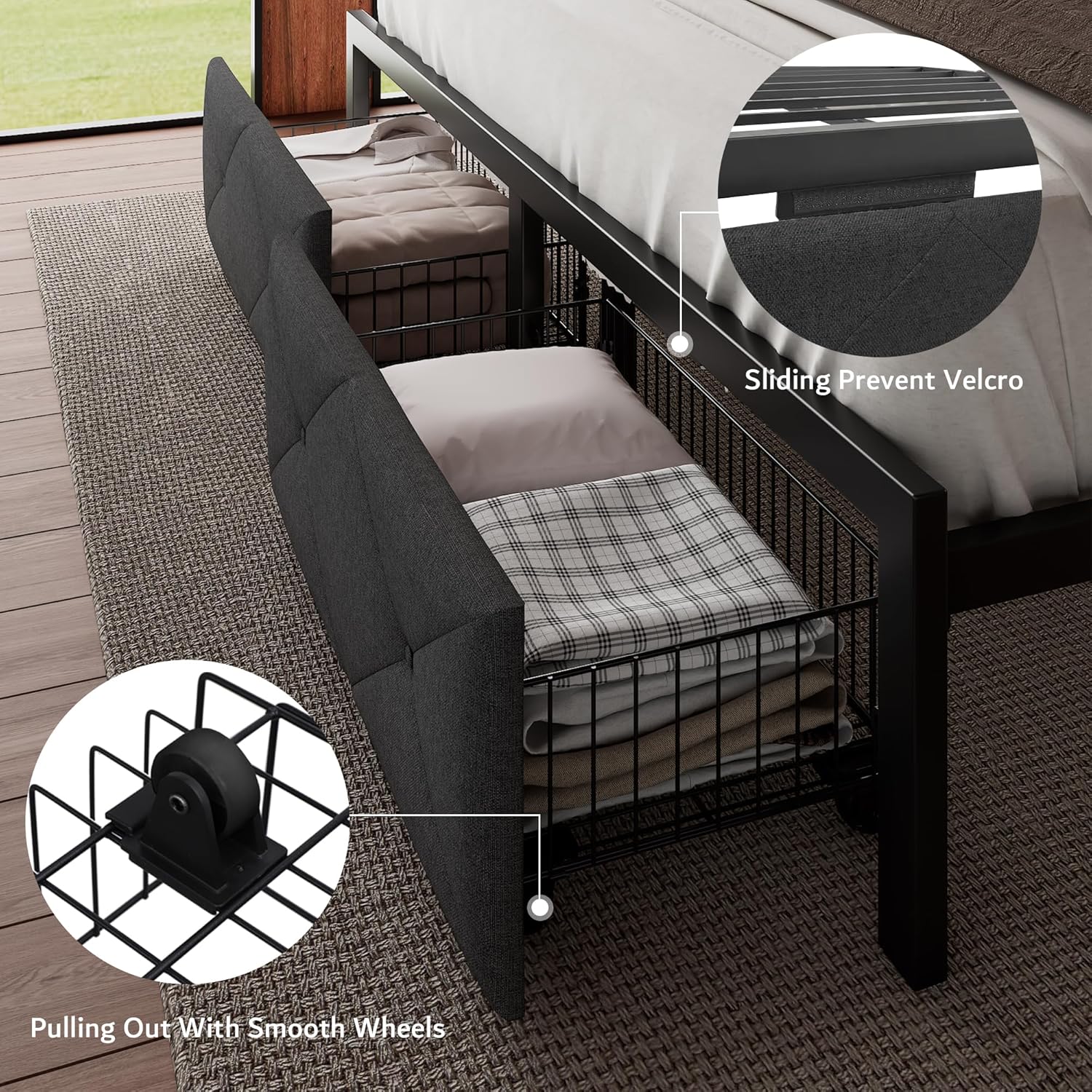
Image: Close-up of the headboard's integrated charging station with 2 AC outlets, 1 USB port, and 1 Type-C port.
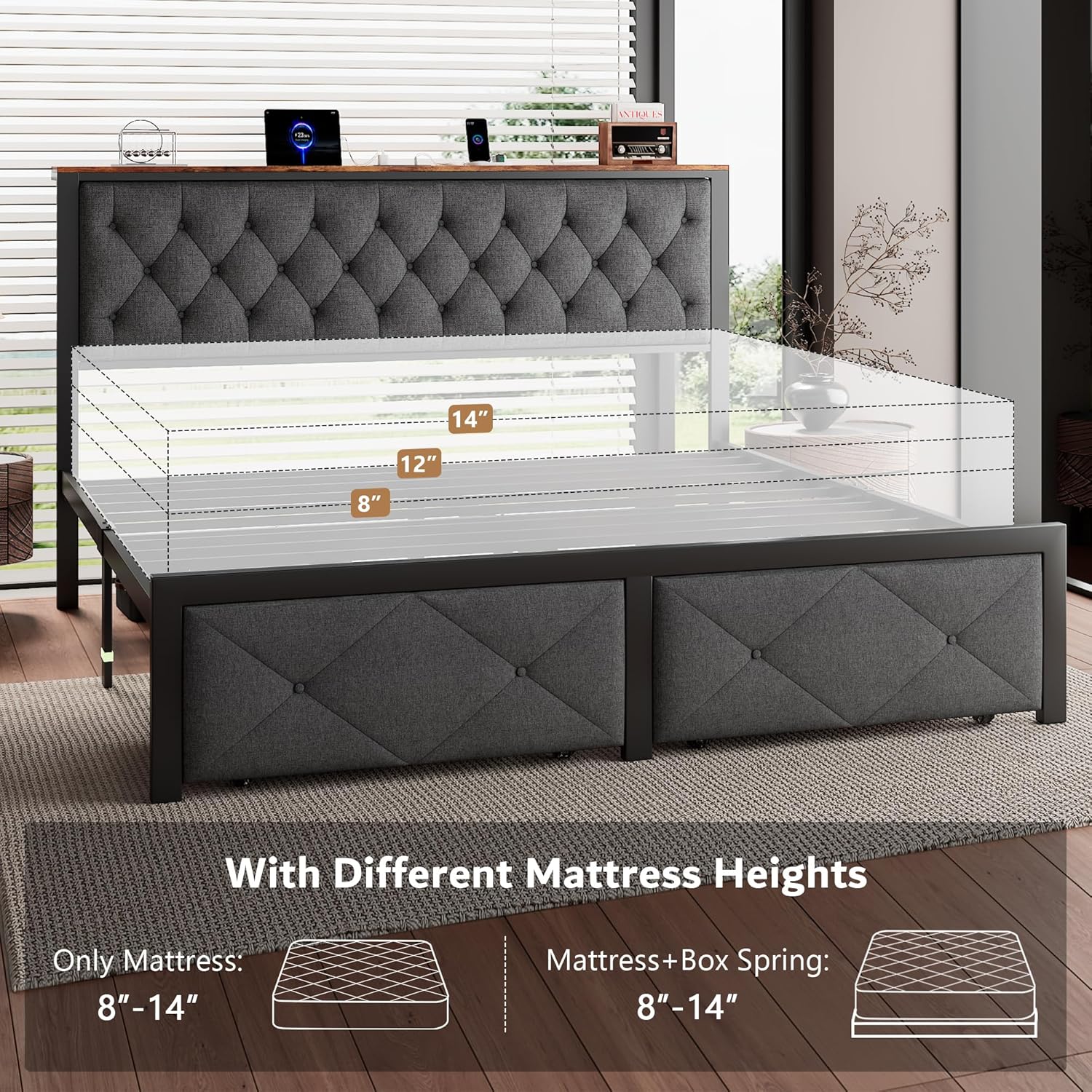
Image: Detail of the storage drawers, highlighting the smooth wheels and sliding prevent Velcro mechanism.

Image: Diagram showing the strong frame foundation with thick metal legs, indicating bearing over 1200 lbs.
Operating Instructions
Using the Charging Station
The integrated charging station provides convenient power access for your devices. It includes:
- 2 AC Outlets (110V/12A)
- 1 USB Port (5V/2A)
- 1 Type-C Port (5V/2A)
To use, simply plug the bed frame's power cord (6.6 feet) into a wall outlet. Then, connect your devices to the appropriate ports on the headboard. Always ensure the charging station is dry before use.
Utilizing Storage Drawers
The two under-bed storage drawers offer ample space for organizing items. They are equipped with smooth-rolling wheels for easy access and can be pulled out or pushed in as needed. Velcro strips help secure the drawers in place when not in use, preventing unwanted movement.

Image: The iPormis King Bed Frame in a bedroom, showcasing the headboard with charging station and the two storage drawers.
Maintenance
- Cleaning the Frame: Wipe metal parts with a soft, damp cloth. Avoid abrasive cleaners.
- Cleaning Upholstery: For the linen upholstered headboard, spot clean with a mild fabric cleaner as needed. Test on an inconspicuous area first.
- Fastener Check: Periodically (e.g., every 3-6 months) check all bolts and screws and re-tighten them to ensure the bed frame remains stable and noise-free.
- Charging Station: Keep the charging station free of dust and debris. Ensure no liquids come into contact with the ports.
Troubleshooting
| Problem | Possible Cause | Solution |
|---|---|---|
| Bed frame is wobbly or noisy. | Loose fasteners. Uneven floor. | Ensure all bolts and screws are fully tightened. If on an uneven floor, place shims under bed legs. |
| Charging station not working. | Power cord unplugged. Outlet issue. Device compatibility. | Check if the bed frame's power cord is securely plugged into a working wall outlet. Test the outlet with another device. Ensure your device is compatible with the charging station's output. |
| Storage drawers do not slide smoothly. | Obstruction under the bed. Damaged wheels. | Check for any objects obstructing the drawer path. Inspect wheels for damage or debris. |
| Mattress slides on the frame. | Incorrect mattress size. Lack of anti-slip measures. | Ensure your mattress is the correct King size (80"x76"). The frame has an embedded design to help prevent sliding; ensure it's properly installed. Consider using a non-slip mattress pad. |

Image: Diagram illustrating the embedded design of the bed frame, which helps to keep the mattress in place and prevent sliding.
Specifications
- Model: B0DT6Q4VVD
- Size: King
- Color: Grey
- Product Dimensions (Overall): 85"L x 78"W x 38"H (approximate, based on image)
- Mattress Area: 80"L x 76"W
- Under-bed Clearance: 10.5 inches
- Weight Capacity: Over 1,000 lbs
- Material: Metal frame, Linen upholstered headboard, MDF board, Rebound Sponge
- Charging Station: 2 AC Outlets (110V/12A), 1 USB Port (5V/2A), 1 Type-C Port (5V/2A), 6.6-foot power cord
- Assembly Required: Yes
- Special Features: Integrated charging station, 2 storage drawers, noise-free design, no box spring needed.

Image: Close-up view detailing the materials used in the headboard construction, including rebound sponge, thick MDF board, and frosted surface metal.
Warranty and Support
For warranty information or technical support, please contact iPormis customer service. Details can typically be found on the product packaging or the official iPormis website. Please have your model number (B0DT6Q4VVD) and purchase date ready when contacting support.
Return Policy: This product typically comes with a 30-day return/replacement policy. Please refer to your retailer's specific return policy for details.
Protection Plans: Extended protection plans may be available for purchase separately from your retailer. These plans offer additional coverage beyond the manufacturer's warranty.
Ask a question about this manual
Ask about setup, troubleshooting, compatibility, parts, safety, or missing instructions. Manuals+ will review the question and use this page’s manual context to help answer it.