
Introduction
This manual provides instructions for the setup, operation, and maintenance of your 1Mii E3Pro Wireless Earbuds and Transmitter. Please read this manual thoroughly before use to ensure proper functionality and to maximize your listening experience.
Important Safety Information:
- The earbuds do not support Bluetooth and should only be used with the provided transmitter.
- The E3Pro device cannot be used alone; it requires connection to an audio source.
- Always ensure all cables are fully inserted to prevent connection issues.
Package Contents
Verify that all items are present in your package:
- 1Mii E3Pro Wireless Earbuds Transmitter Set (includes earbuds and charging dock/transmitter)
- Power Adapter
- Power Cable (USB)
- 3.5mm AUX Cable
- 3.5mm-RCA Cable
- Optical Cable
- S/M/L Ear Caps (three pairs)
- User Manual (this document)
Video: E3Pro Unboxing. This video demonstrates the contents of the 1Mii E3Pro package and provides a visual overview of the components.
Setup and Connection
The 1Mii E3Pro is designed for plug-and-play operation. The earbuds and transmitter come pre-paired from the factory. Follow these steps to connect the system to your TV or audio device.
1. Powering the Transmitter
- Connect the provided power cable to the DC 5V IN port on the back of the E3Pro transmitter.
- Plug the power adapter into a wall outlet. The transmitter will automatically turn on.

Image: Connecting the power adapter to the E3Pro transmitter and a power outlet. Ensure the plug is fully inserted.
2. Connecting to TV/Audio Source (Optical Cable)
Use the optical cable for digital audio output from your TV. This method provides high-quality audio.
- Plug one end of the optical cable into the Optical In port on the E3Pro transmitter.
- Plug the other end of the optical cable into your TV's optical audio output port (often labeled "Digital Audio Out" or "Optical Out").
- On your TV, navigate to the Sound settings. Set the Audio Output to "Optical" and the Digital Output Audio Format to PCM/Stereo. (Note: Dolby/DTS input is not supported. Settings may vary by TV model.)
Video: E3Pro connected to TV via optical cable using bypass mode. This video demonstrates the optical connection process and how to enable bypass mode.
Video: E3Pro connected to TV via optical cable. This video illustrates the steps for connecting the E3Pro to a TV using an optical cable.

Image: Example of TV sound settings, highlighting the PCM audio format selection for optical output.
3. Connecting to TV/Audio Source (3.5mm AUX or RCA Cable)
Use the 3.5mm AUX or RCA cables for analog audio output from your TV or other audio devices.
- Plug one end of the 3.5mm AUX cable into the Aux In port on the E3Pro transmitter. If using RCA, connect the 3.5mm end of the 3.5mm-RCA cable to the Aux In port.
- Plug the other end of the 3.5mm AUX cable into your TV's 3.5mm audio output port (headphone jack). If using RCA, connect the red and white RCA plugs to your TV's corresponding RCA audio output ports.
Video: E3Pro connected to TV via AUX/RCA using bypass mode. This video demonstrates the AUX/RCA connection process and how to enable bypass mode.

Image: The E3Pro transmitter connected to a TV, illustrating various audio input options including optical, 3.5mm AUX, and RCA.

Image: A diagram illustrating the wide compatibility of the E3Pro with different TV audio outputs, including Optical, RCA, and 3.5mm AUX.
4. Soundbar Passthrough (Bypass Function)
The E3Pro supports a bypass function, allowing audio to play through both the earbuds and an external soundbar simultaneously.
- Connect your TV's audio output to the E3Pro's input (Optical In or Aux In) as described above.
- Connect the E3Pro's corresponding output (Optical Out or Aux Out) to your soundbar's audio input.
- Ensure the input and output cable types match (e.g., Optical In to Optical Out, Aux In to Aux Out).
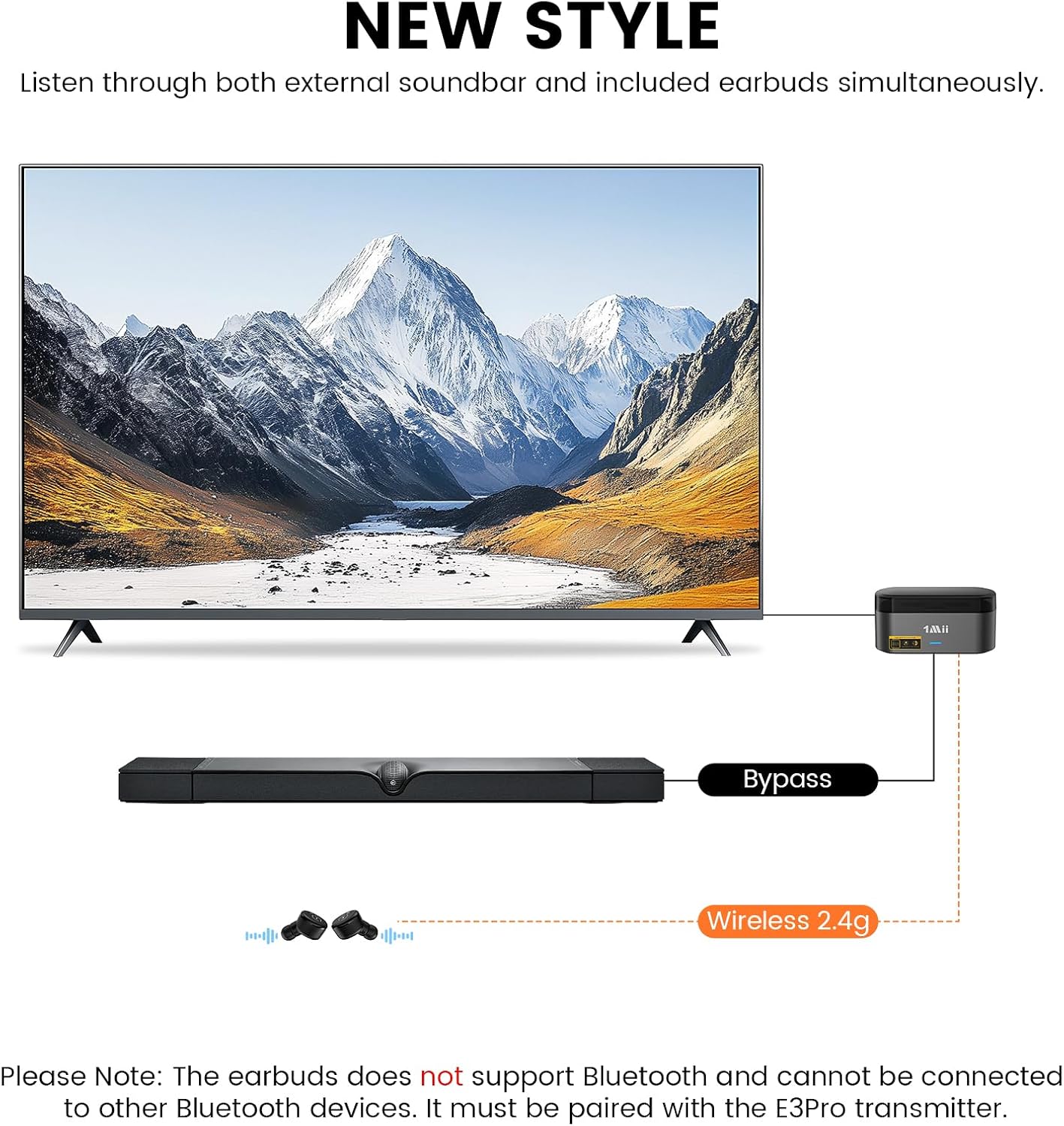
Image: A diagram illustrating the soundbar passthrough setup, where the E3Pro connects between the TV and a soundbar, allowing simultaneous audio output to both the earbuds and the soundbar.
Operating Instructions
1. Earbud Pairing and Charging
- The earbuds are pre-paired with the transmitter. Simply remove them from the charging dock to activate.
- When placed in the charging dock, the earbud LED indicator stays red while charging and turns off when fully charged.
- Upon removal, the earbud LED indicator flashes blue quickly and automatically pairs. A successful connection is indicated by the earbud light flashing blue every 10 seconds.
- The earbuds provide up to 5 hours of continuous audio enjoyment on a single charge.

Image: The 1Mii E3Pro wireless earbuds resting in their charging dock, illustrating the charging status.
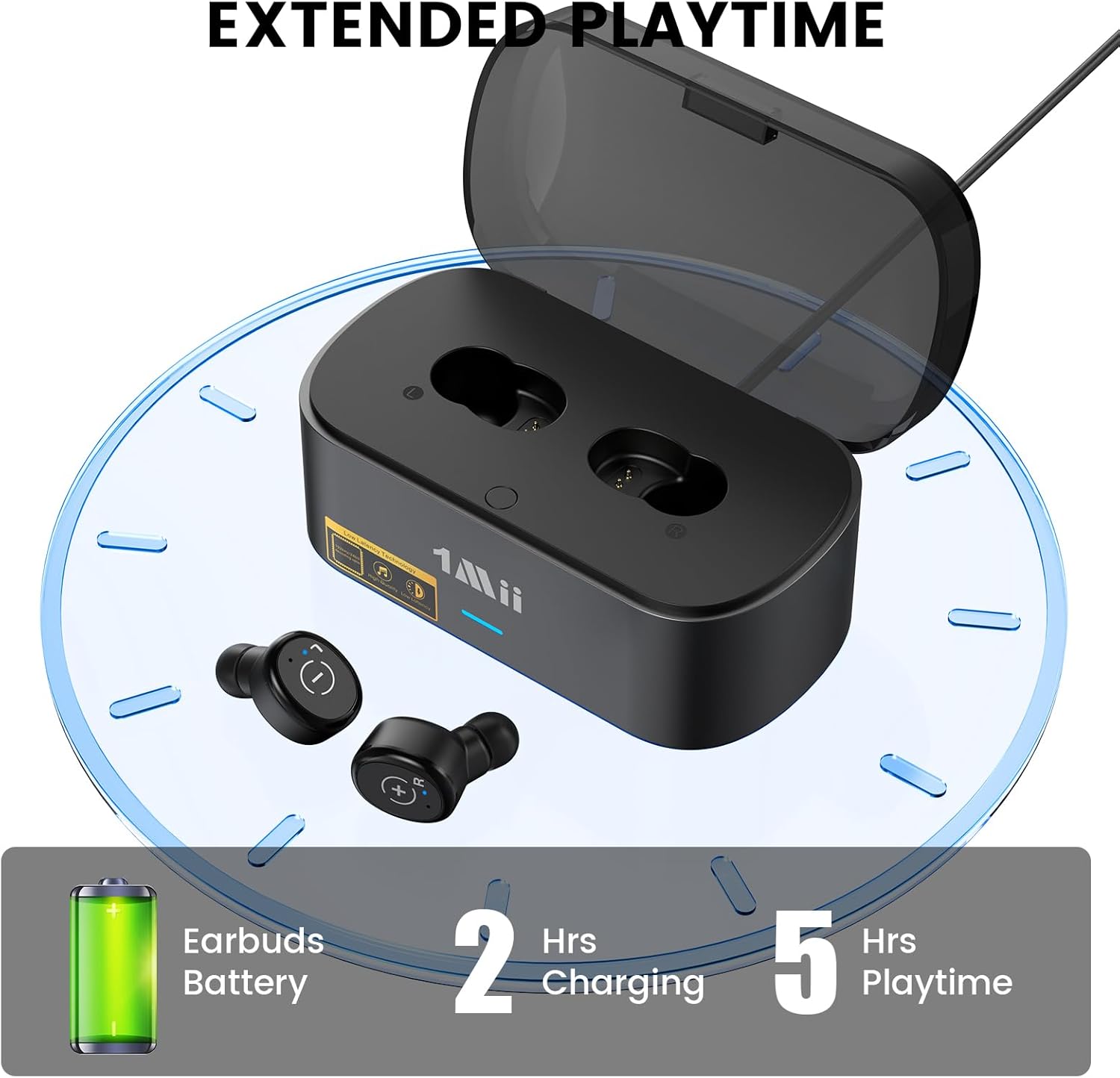
Image: A graphic indicating that 2 hours of charging provides 5 hours of playtime for the earbuds.
2. Earbud Controls
Each earbud features a physical button for control:
- Volume Up: Click the right earbud button once.
- Volume Down: Click the left earbud button once.
- Switch Modes (Music/Gaming): Press the left or right earbud button twice.
- Two beeps indicate Music Mode.
- One beep indicates Game Mode (low latency).

Image: A visual guide demonstrating how to use the earbud buttons for volume control and switching between music and gaming modes.
3. Wearing the Earbuds
The E3Pro earbuds are designed for comfortable, long-term wear. Choose the ear tips that best fit your ears for optimal sound and comfort.

Image: Display of three different sizes (Small, Medium, Large) of ear tips provided with the E3Pro earbuds to ensure a comfortable and secure fit.
Maintenance
- Keep the earbuds and transmitter clean and dry. Avoid exposure to liquids.
- Use a soft, dry cloth to clean the surfaces of the device.
- Regularly check the ear tips for debris and clean or replace them as needed to maintain hygiene and sound quality.
- Store the earbuds in their charging dock when not in use to protect them and ensure they are charged for next use.
Troubleshooting
If you encounter issues with your 1Mii E3Pro, please refer to the following common solutions:
| Problem | Possible Cause | Solution |
|---|---|---|
| No sound or noise when connected via optical cable. | TV audio output format is not set to PCM/Stereo. | Navigate to your TV's Sound settings. Set the Audio Output to "Optical" and the Digital Output Audio Format to PCM/Stereo. (Dolby/DTS is not supported). Video: Troubleshooting noise or no sound with optical cable connection. This video guides you through adjusting TV settings to PCM for optical audio output. |
| Earbuds not pairing or connecting. | Earbuds not properly seated in the charging dock, or low battery. | Ensure earbuds are fully seated in the charging dock. Allow them to charge completely. Remove and re-insert to initiate pairing. |
| No sound from earbuds. | Incorrect cable connection, TV audio output not selected, or earbud volume too low. |
|
Specifications
| Feature | Detail |
|---|---|
| Model Number | E3Pro |
| Connectivity Technology | Wireless (2.4G, not Bluetooth) |
| Audio Inputs (Transmitter) | Optical In, 3.5mm AUX In, RCA In |
| Audio Outputs (Transmitter) | Optical Out, 3.5mm AUX Out (Bypass Function) |
| Power Source | Battery Powered (Earbuds), DC 5V (Transmitter) |
| Battery Type (Earbuds) | Lithium Polymer (included) |
| Earbud Playtime | Up to 5 hours |
| Special Features | Fast Charging, Low Latency (Gaming Mode), Soundbar Passthrough |
| Material | Plastic |
| Item Weight | 10.8 ounces |
| Package Dimensions | 4.84 x 4.45 x 2.52 inches |
Warranty and Support
For warranty information and technical support, please refer to the official 1Mii website or contact their customer service directly. Keep your purchase receipt for warranty claims.
For further assistance, you may visit the 1Mii Store on Amazon.


