
HiOazo HSC-400W-Blue
HiOazo HSC-400W-Blue WiFi Irrigation Controller User Manual
Model: HSC-400W-Blue | Brand: HiOazo
Introduction
The HiOazo HSC-400W-Blue WiFi Irrigation Controller is an advanced system designed to automate and optimize your garden and lawn watering. With its smart features, including WiFi remote control, multi-zone management, and intelligent weather skips, it provides a convenient and efficient solution for maintaining healthy plant growth while conserving water. This manual provides detailed instructions for installation, operation, and maintenance of your irrigation controller.
Key Features
- WiFi Remote Control: Manage your irrigation system from anywhere using the updated HiOazo app on your smartphone. Create and modify watering schedules with ease.
- 4-Zone Control: Independently manage up to four irrigation zones, allowing for customized watering based on specific plant needs or area requirements.
- 16 Watering Programs: Set up to 16 distinct watering programs with flexible frequencies, including daily, odd/even days, specific days of the week, and hourly/daily intervals.
- Two Irrigation Methods: Choose between "Cycle and Soak" to allow water absorption and prevent runoff, or "No Cycle and Soak" for continuous water supply.
- Smart Weather Skips: Automatically skip scheduled watering based on real-time weather conditions such as rain, frost, or strong winds, preventing overwatering and conserving water.
- Manual Watering Function: Initiate watering instantly for any zone as needed, providing flexibility outside of programmed schedules.
- Seasonal Adjustment: Easily adjust watering schedules seasonally to adapt to changing weather patterns and plant requirements.
- Water Usage Calculation: Monitor water consumption within the app to track usage and promote water conservation.
Setup and Installation
1. Unboxing and Component Check
Carefully unpack all components. Ensure you have the HiOazo HSC-400W-Blue controller, power adapter, and any included accessories. Inspect for any visible damage.
2. Mounting the Controller
Choose a suitable indoor location for mounting the controller, away from direct sunlight and extreme temperatures. Ensure it is close to a power outlet and within WiFi range. Use appropriate screws and anchors to secure the controller to the wall.

Figure 1: HiOazo HSC-400W-Blue WiFi Irrigation Controller and its accompanying smartphone app interface.
3. Wiring the Controller
Connect your irrigation system's common wire, zone wires, and optional master valve/pump start relay wire to the corresponding terminals on the controller. Refer to the wiring diagram below for correct connections. Ensure all connections are secure.

Figure 2: Detailed wiring diagram for the HiOazo HSC-400W-Blue controller, illustrating connections for common (C), master valve (M), zones (1-4), and sensor (S) terminals, along with the 24VAC power input.
- Connect the common wire from your valves to the 'C' terminal.
- Connect each zone wire to its respective numbered terminal (1, 2, 3, 4).
- If using a master valve or pump start relay, connect its wire to the 'M' terminal.
- For a rain sensor, connect its wires to the 'S' terminals.
- Connect the 24VAC power adapter to the 'PWR IN' terminals.
4. Powering On and App Connection
Plug in the power adapter. The controller will power on. Download the "HiOazo" app from your smartphone's app store (available for iOS and Android). Follow the in-app instructions to connect your controller to your home WiFi network. This typically involves creating an account, adding a new device, and entering your WiFi credentials.
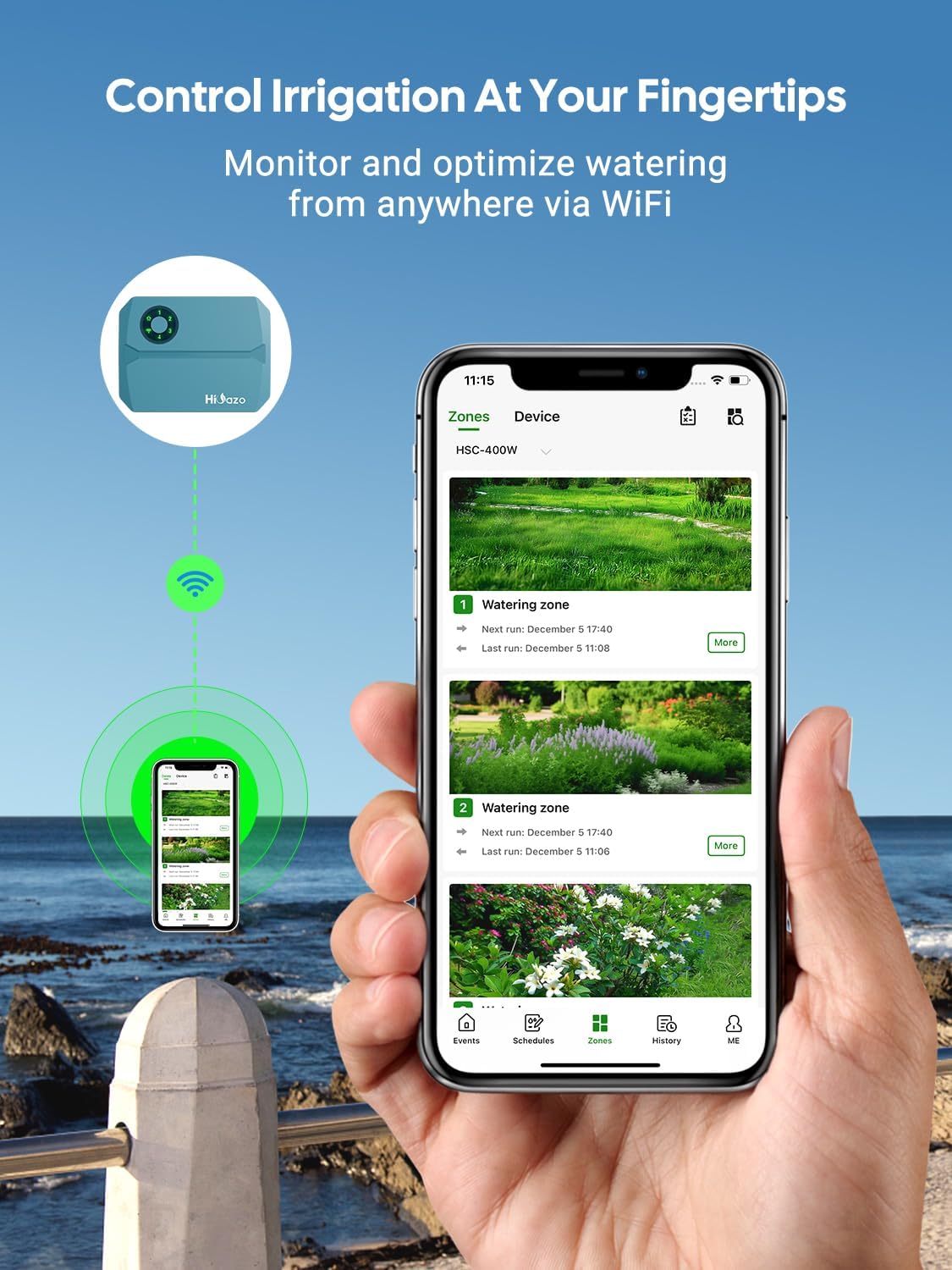
Figure 3: The HiOazo controller seamlessly connected to a smartphone via WiFi, demonstrating the ability to control irrigation remotely.
Operating the Controller
1. Navigating the HiOazo App
The HiOazo app provides a user-friendly interface for managing your irrigation. Explore the different sections: Events, Schedules, Zones, History, and Me (for account settings). The main screen provides an overview of current weather and quick run options.

Figure 4: Overview of the newly upgraded HiOazo app, showcasing its intuitive interfaces and comprehensive features for irrigation management.
2. Creating Watering Schedules
To create a new watering schedule:
- Go to the "Schedules" section in the app.
- Tap to add a new schedule.
- Choose your preferred irrigation method: "Cycle and Soak" or "No Cycle and Soak".
- Select the zones you wish to include in this schedule and set the watering duration for each zone.
- Define the watering frequency (e.g., every day, odd days, specific days of the week, daily/hourly interval).
- Set the start and end times for the schedule.
- Enable "Weather Intelligence" (Smart Weather Skips) for automatic adjustments based on rain, frost, or wind.
- Name your schedule and save it.

Figure 5: The six-step process within the HiOazo app for setting up a customized watering schedule.
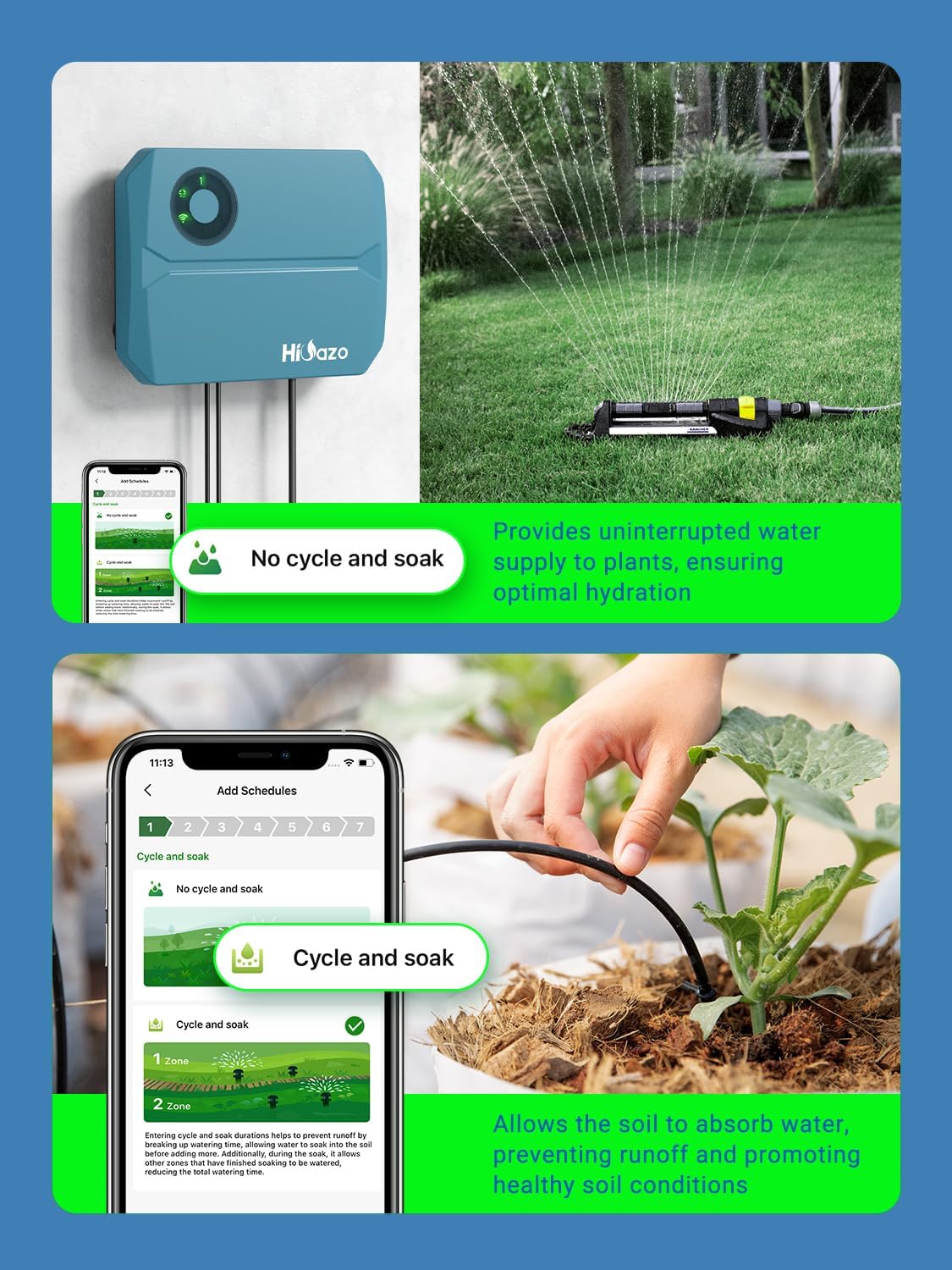
Figure 6: Illustration of the two available irrigation methods: "No cycle and soak" for continuous watering and "Cycle and soak" for improved water absorption.
3. Manual Watering
To manually water a zone or all zones:
- From the main "Watering" screen, tap "Quick run".
- Select the zone(s) you wish to water manually.
- Set the desired duration for the manual run.
- Confirm to start watering.
4. Smart Weather Skips
The controller automatically integrates with local weather forecasts to optimize watering. Ensure "Weather Intelligence" is enabled in your schedules. The system will automatically skip watering if rain, frost, or high winds are detected, preventing water waste and protecting your plants.

Figure 7: The Smart Weather Skips feature, allowing the system to automatically adjust watering based on real-time weather conditions like rain, frost, and wind.
5. Monitoring Water Usage
The app provides insights into your water consumption. Navigate to the "History" or "Usage" section to view detailed reports on water used, helping you manage and conserve water effectively.

Figure 8: The app's water usage monitoring feature, displaying total water amount and usage per cycle, aiding in water conservation.
Maintenance
- Cleaning: Periodically wipe the controller's exterior with a soft, dry cloth. Do not use abrasive cleaners or solvents.
- Firmware Updates: Ensure your app and controller firmware are always up-to-date for optimal performance and new features. The app will notify you of available updates.
- Winterization: In regions with freezing temperatures, disconnect the controller from power and drain all water from the irrigation system to prevent damage from freezing. Store the controller in a dry, protected area if necessary.
- Sensor Check: If using a rain sensor, periodically check it for debris or obstructions that might affect its operation.
Troubleshooting
| Problem | Possible Cause | Solution |
|---|---|---|
| Controller not powering on | No power, faulty adapter, loose connection. | Check power outlet, ensure adapter is securely plugged in, test adapter if possible. |
| Cannot connect to WiFi | Incorrect WiFi password, controller too far from router, router issues, 5GHz network. | Verify password, move controller closer to router, restart router, ensure you are connecting to a 2.4GHz network. |
| Zones not watering | Valves not receiving power, wiring issues, water supply off, rain sensor active, schedule not set correctly. | Check wiring connections, ensure main water supply is on, check rain sensor status in app, verify schedule settings. |
| Watering skips unexpectedly | Smart Weather Skips enabled, rain sensor activated. | Check app for active weather skips (rain, frost, wind). Verify rain sensor is not falsely triggered. |
| App not responding | App glitch, internet connectivity issue. | Close and reopen the app, check your phone's internet connection, restart your phone. |
Specifications
| Attribute | Detail |
|---|---|
| Brand | HiOazo |
| Model | HSC-400W-Blue (Manufacturer Model: IB-1099-XXEU) |
| Dimensions | 18.9 x 14.5 x 12.8 cm |
| Item Weight | 910 grams |
| Color | Blue |
| Material | Plastic |
| Voltage | 24 Volts (AC) |
| Display Type | LCD or LED |
| Zones Supported | 4 |
| Connectivity | WiFi (2.4GHz) |
Warranty and Support
For warranty information and technical support, please refer to the documentation included with your product packaging or visit the official HiOazo website. You can also contact HiOazo customer service through the contact information provided on their website or within the HiOazo app.
Related documentsHSC-400W-Blue


Ask a question about this manual
Ask about setup, troubleshooting, compatibility, parts, safety, or missing instructions. Manuals+ will review the question and use this page’s manual context to help answer it.