
1. Introduction
Thank you for choosing the JINLICTE P50 Portable Misting Fan. This device is designed to provide efficient cooling and air circulation, featuring both fan and misting functions. It can be used as a pedestal fan or a tabletop fan, making it suitable for various indoor and outdoor environments. With its 20000mAh rechargeable battery, remote control, and multiple speed settings, the P50 fan offers versatile and convenient cooling.
2. Safety Instructions
- Read all instructions before using the fan.
- Do not immerse the fan unit in water or other liquids.
- Ensure the power source voltage matches the fan's requirements.
- Keep the fan away from open flames, heat sources, and flammable materials.
- Do not insert fingers or other objects into the fan grille when operating.
- Supervise children when the fan is in use.
- Disconnect the power cable before cleaning or performing maintenance.
- Only use the provided Type-C charging cable for charging.
- The misting function requires connection to a water tap; do not operate without a water source.
3. Package Contents
- 12-Inch Cordless Misting Fan Unit
- Tripod Stand
- Type-C Charging Cable
- User Manual (this document)
- Water Pipe Misting System (5M hose)
- Remote Control
4. Product Overview
Familiarize yourself with the main components of your JINLICTE P50 Misting Fan.

Figure 4.1: The JINLICTE P50 fan shown in both pedestal and tabletop modes, with mist being emitted from the fan head. The remote control is also visible.
Key Components:
- Fan Head: Contains blades, motor, and misting nozzles.
- Control Panel: Located on the fan's body, features buttons and an LED display for settings.
- Tripod Stand: Provides stability for pedestal use.
- Misting Hose Connection: Port for attaching the water pipe.
- Type-C Charging Port: For battery recharging.
- Remote Control: For convenient operation from a distance.
5. Setup
5.1 Assembly (Pedestal & Tabletop Use)
- For Pedestal Use: Securely attach the fan unit to the top of the tripod stand. Ensure it is stable before operation.
- For Tabletop Use: Detach the fan unit from the tripod. The fan head can be folded 180° to stand independently on a flat surface.

Figure 5.1: The JINLICTE P50 fan configured for tabletop use, demonstrating its versatility.
5.2 Misting System Connection
- Locate the misting hose connection port on the fan unit.
- Connect one end of the provided 5-meter water pipe to this port.
- Connect the other end of the water pipe to a standard outdoor water faucet.
- Ensure all connections are secure to prevent leaks.
- Turn on the water faucet and use the built-in valve on the hose to control the water flow and mist intensity.
Important: The misting function requires a direct connection to a water tap for continuous operation.
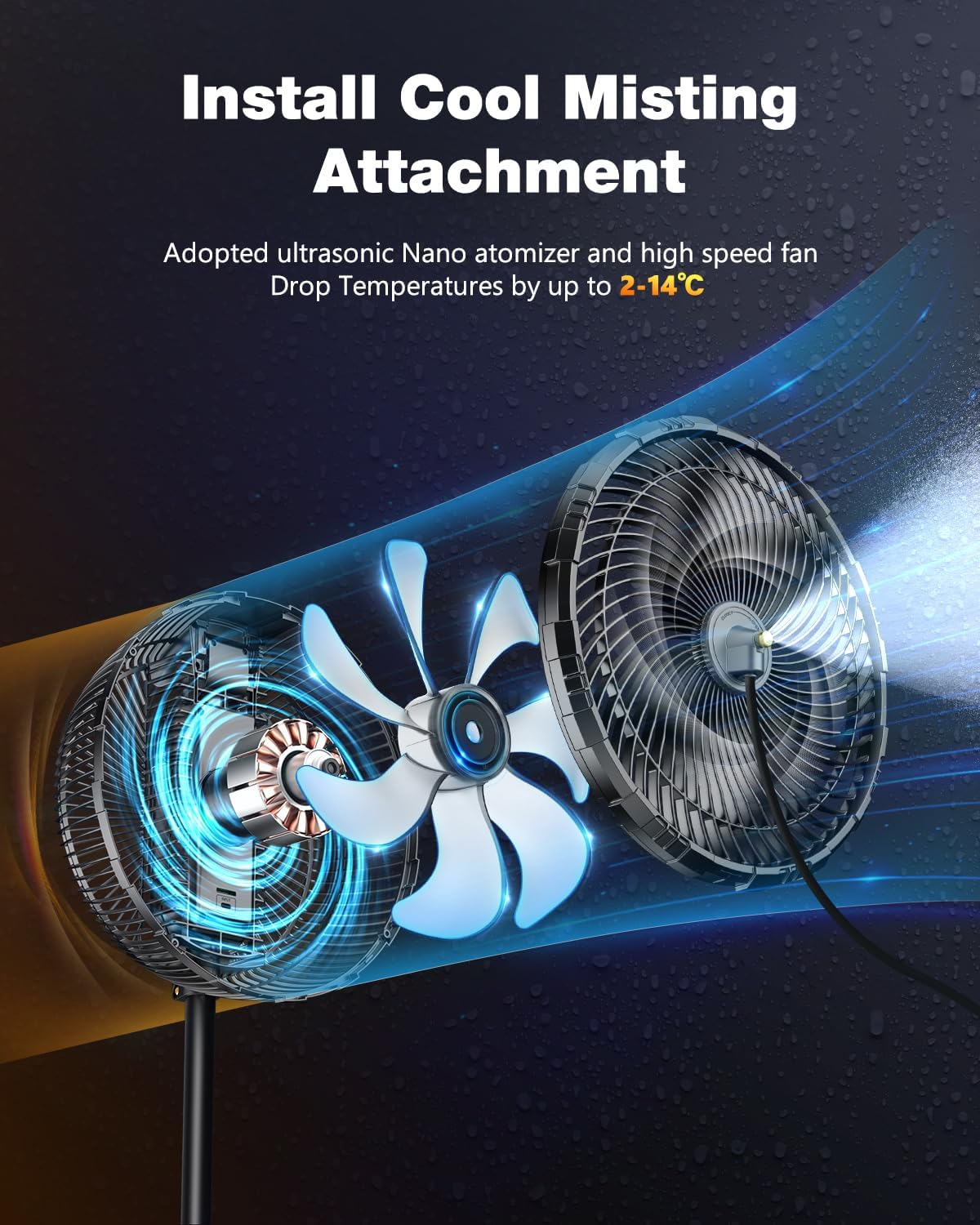
Figure 5.2: Internal view of the fan's misting mechanism.
5.3 Charging the Battery
- Connect the provided Type-C charging cable to the charging port on the fan.
- Connect the other end of the cable to a compatible USB power adapter (not included).
- The LED display will indicate the charging status. A full charge provides 6-30 hours of operation, depending on speed and mist usage.

Figure 5.3: The fan operating wirelessly, highlighting its 20000mAh battery capacity.
6. Operation
The JINLICTE P50 fan can be operated using the control panel on the unit or the included remote control.

Figure 6.1: Fan in operation, showing the LED display and remote control.
6.1 Power On/Off
- Press the power button on the control panel or remote control to turn the fan on or off.
6.2 Fan Speed Adjustment
- Press the speed button on the control panel or remote to cycle through 7 available fan speeds. The current speed will be displayed on the LED screen.
6.3 Oscillation
- Press the oscillation button on the control panel or remote to activate or deactivate the oscillation feature. The fan supports 45° and 90° oscillation angles.
6.4 Misting Function
- Ensure the misting system is properly connected to a water tap and the water supply is on (refer to Section 5.2).
- Press the mist button on the control panel or remote to turn the misting function on or off.
- Adjust the water flow using the valve on the water pipe to control mist intensity.
6.5 Timer Function
- Press the timer button on the control panel or remote to set an automatic shut-off time. Available options are 1H, 2H, 4H, and 8H.
6.6 Remote Control Usage
- Point the remote control directly at the fan's control panel.
- The effective range for the remote control is less than 20 feet (approximately 6 meters).

Figure 6.2: The fan's quiet operation, suitable for nighttime use.
7. Maintenance
7.1 Cleaning
- Always unplug the fan and disconnect the water supply before cleaning.
- Wipe the exterior of the fan with a soft, damp cloth. Do not use abrasive cleaners or solvents.
- To clean the fan blades, carefully remove the front grille (if detachable) and wipe the blades with a soft cloth. Ensure the blades are dry before reassembling.
- If misting nozzles become clogged, gently clean them with a small brush or pin.
7.2 Storage
- When not in use for extended periods, ensure the fan is clean and dry.
- Store the fan in a cool, dry place, away from direct sunlight and extreme temperatures.
- It is recommended to store the fan in its original packaging to protect it from dust and damage.
8. Troubleshooting
- Fan does not turn on: Check if the battery is charged. Ensure the power button is pressed firmly.
- No mist is produced: Verify that the water pipe is securely connected to both the fan and a water tap. Ensure the water tap is open and the valve on the hose is adjusted to allow water flow. Check for any clogs in the misting nozzles.
- Remote control not working: Ensure the remote is pointed directly at the fan's control panel and is within the 20-foot range. Check if the remote's batteries need replacement.
- Fan is unstable: Ensure the tripod stand is fully extended and locked into position on a flat, stable surface.
9. Specifications
| Feature | Specification |
|---|---|
| Brand | JINLICTE |
| Model Name | P50 |
| Fan Size | 12 inches |
| Power Source | Battery Powered |
| Battery Capacity | 20000mAh |
| Running Time | 6-30 hours (depending on settings) |
| Fan Speeds | 7 Levels |
| Oscillation | 45° + 90° |
| Control Method | Remote, Touch |
| Timer Function | 1H, 2H, 4H, 8H |
| Voltage | 5 Volts (DC) |
| Wattage | 10 watts |
| Item Weight | 2.35 Kilograms (5.17 pounds) |
| Indoor/Outdoor Usage | Indoor, Outdoor |
10. Warranty and Support
For warranty information and customer support, please refer to the manufacturer's official website or contact JINLICTE customer service directly. Keep your purchase receipt for any warranty claims.