
Introduction
Thank you for purchasing the Surtime 52-inch Ceiling Fan with RGB Lights. This manual provides essential information for the safe installation, operation, and maintenance of your new ceiling fan. Please read these instructions thoroughly before installation and retain them for future reference.
Safety Information
- Ensure the power supply is disconnected at the circuit breaker before installation or maintenance.
- All electrical connections must be performed by a qualified electrician and comply with local codes and ordinances.
- The mounting structure must be capable of supporting the weight of the fan (approximately 13.48 lbs).
- Do not operate the fan if any part is damaged. Contact customer support for assistance.
- Keep hands, clothing, and other objects away from the fan blades when the fan is operating.
- This fan is designed for both indoor and outdoor patio use. Ensure proper installation for the intended environment.
Package Contents
Verify that all components are present before beginning installation:
- 52-inch Ceiling Fan Unit
- Light Kit (Integrated LED)
- Remote Control (with 2 x 12V Alkaline batteries included)
- Instruction Manual
- Mounting Hardware
Setup and Installation
This ceiling fan features a pre-assembled, flush mount design for direct installation to ceilings without the need for downrods. The integrated LED light kit simplifies setup. Refer to the detailed diagrams and instructions provided in the included manual for specific wiring and mounting procedures.

Image: The diagram illustrates the fan's dimensions (52 inches wide, 14 inches high) and confirms its flush mount installation type. It also highlights key components like the metal body, LED light, and fan blades.
Blade Installation: The fan includes reversible blades with a white side and a wood-grain side. Choose the desired finish before attaching the blades to the motor housing.

Image: This image demonstrates the "Double Blade" feature, showing one side of the blade in white and the other in a wood finish, allowing for customizable aesthetics.
Operating Instructions
Your Surtime ceiling fan can be controlled via the included remote control or a compatible smartphone application.
Remote Control Operation
- Power On/Off: Press the power button to turn the fan and light on or off.
- Fan Speed: Use the fan speed buttons (1-6) to adjust the airflow. The DC motor offers 6 distinct speeds.
- Light Control:
- White Light Modes: Cycle through 3 color temperatures (Cool White, Natural White, Warm White) by pressing the dedicated light button.
- RGB Light Modes: To activate RGB color effects, first ensure the light is on (white light mode). Then, press the RGB button to cycle through various color options.
- Dimming: The LED light is dimmable. Use the dimming buttons on the remote to adjust brightness.
- Reversible Function: Press the reverse button to change the direction of the fan blades. This function is useful for seasonal air circulation.
- Timer: Activate the 2-hour timer function to automatically turn off the fan after the set duration.

Image: This visual illustrates the fan's lighting capabilities, including stepless dimming, three white light color temperatures (cool, natural, warm), and vibrant RGB side lighting for ambient effects.

Image: This diagram explains the reversible motor function, showing how forward airflow creates a cooling breeze in summer and reverse airflow circulates warm air in winter.
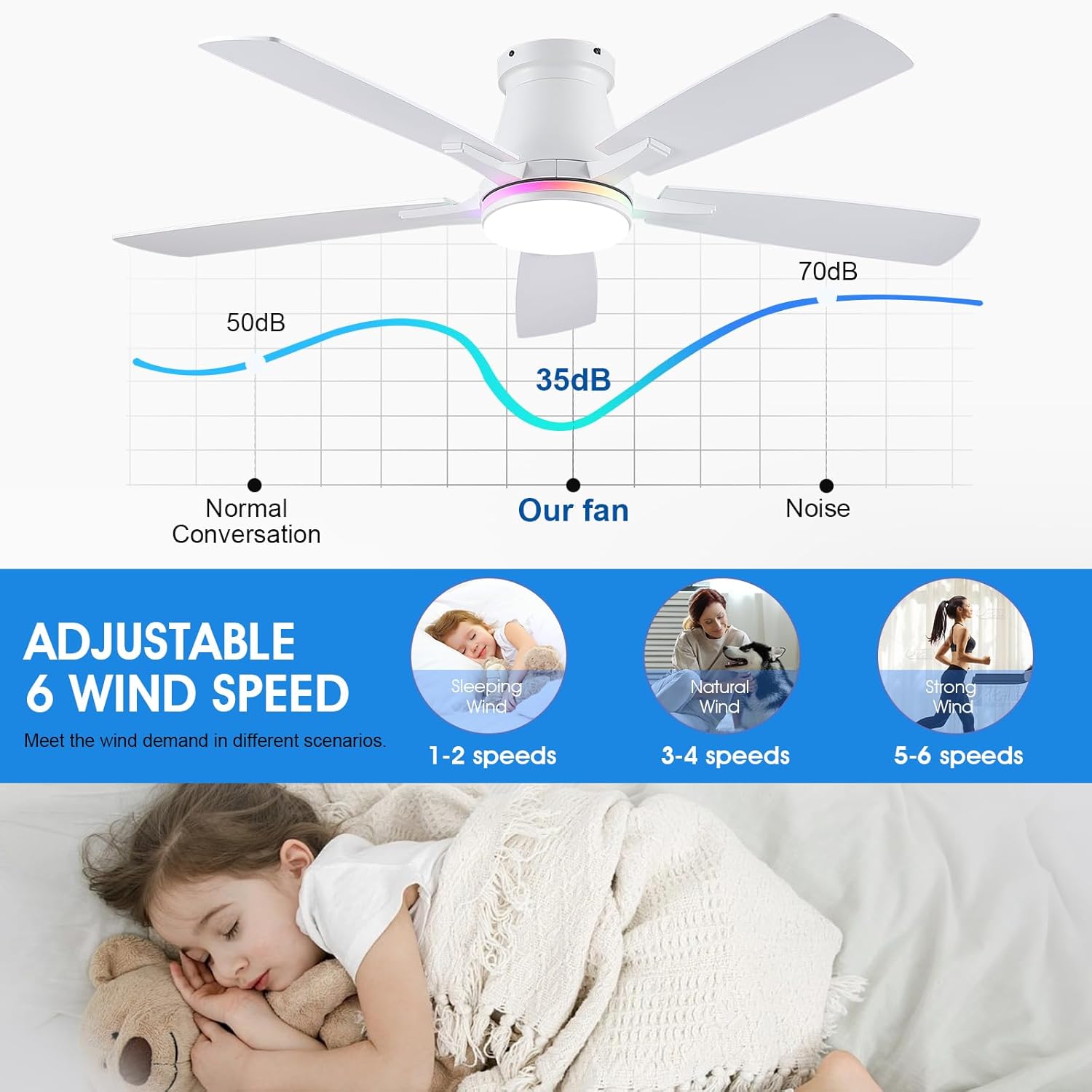
Image: This graphic highlights the fan's quiet operation, showing noise levels (e.g., 35dB for the fan) compared to normal conversation, and suggests appropriate speed settings for different scenarios like sleeping (1-2 speeds) or strong wind (5-6 speeds).
App Control
Download the compatible smartphone application (refer to the included manual for QR code or app store details) to control all fan and light functions from your mobile device. The app provides additional customization options for RGB lighting and scheduling.
Maintenance
- Cleaning: To clean the fan, wipe with a soft, damp cloth. Do not use abrasive cleaners or solvents. Ensure power is off before cleaning.
- Blade Care: Periodically check fan blades for dust accumulation. Clean gently to maintain balance and efficiency.
- Light Source: The integrated LED light source is designed for long-term use and is not user-replaceable.
Troubleshooting
| Problem | Possible Cause | Solution |
|---|---|---|
| Fan does not operate. | No power supply; remote control batteries depleted; remote not paired. | Check circuit breaker; replace remote batteries; refer to manual for remote pairing instructions. |
| Light does not turn on. | No power supply; light function off; remote control batteries depleted. | Check circuit breaker; ensure light is activated via remote/app; replace remote batteries. |
| Fan makes excessive noise. | Loose screws; unbalanced blades; motor issue. | Ensure all mounting screws are tight; check blade balance; contact customer support if noise persists. |
| Remote control not responding. | Batteries depleted; remote not paired; obstruction between remote and receiver. | Replace batteries; re-pair remote (see manual); ensure clear line of sight. |
Specifications
| Model Name | 8310-White-RGB |
| Product Dimensions | 52"L x 52"W x 14"H |
| Item Weight | 13.48 pounds |
| Material | Iron (Body), Acrylic (Shade) |
| Power Source | DC |
| Voltage | 110 Volts |
| Installation Type | Flush Mount |
| Light Source Type | LED (Dimmable, RGB, 3-Color Temperature) |
| Control Method | App, Remote Control |
| Fan Speeds | 6 |
| Reversible Motor | Yes |
| Timer Function | 2-hour |
| Indoor/Outdoor Usage | Indoor, Outdoor (Patio) |
| Batteries Required | 2 x 12V (Included) |
| Battery Cell Type | Alkaline |
Warranty and Support
The Surtime 52-inch Ceiling Fan comes with a 2-year warranty. Additionally, a 30-day replacement guarantee is provided for defects or damages upon receipt.
For any questions, troubleshooting assistance, or warranty claims, please contact Surtime customer support. Our support team offers lifetime troubleshooting for this product.
Contact information can typically be found on the product packaging or the official Surtime website.