
Surtime 8310
Surtime 52" Ceiling Fan with RGB Lights User Manual
Model: 8310 | Brand: Surtime
Important Safety Information
Please read and understand all instructions before attempting to assemble, operate, or install the product. Failure to follow these instructions may result in electric shock, fire, or serious personal injury.
- Ensure the power is disconnected at the circuit breaker before installation or maintenance.
- All electrical connections must be in accordance with local codes, ordinances, and the National Electric Code. If you are unfamiliar with proper electrical wiring, consult a qualified electrician.
- Mounting structure must be capable of supporting a minimum of 35 lbs (15.9 kg).
- Do not bend fan blades when installing, balancing blades, or cleaning the fan.
- Never insert foreign objects between rotating fan blades.
- This appliance is not intended for use by persons (including children) with reduced physical, sensory or mental capabilities, or lack of experience and knowledge, unless they have been given supervision or instruction concerning use of the appliance by a person responsible for their safety.
Included Components
Verify that all components are present before beginning installation:
- 52-inch Ceiling Fan Unit
- Instruction Manual
- Integrated LED Light Kit
- Remote Control (with 2 x 12V batteries included)
- Mounting Hardware

Figure 1: Overview of the Surtime 52-inch Ceiling Fan with RGB Lights.
Specifications
| Feature | Detail |
|---|---|
| Brand | Surtime |
| Model Name | 8310-White-RGB |
| Color | 52IN-White-RGB |
| Material | Iron (Body), Acrylic (Shade) |
| Product Dimensions | 52"L x 52"W x 14"H |
| Item Weight | 13.48 pounds |
| Voltage | 110 Volts |
| Power Source | DC |
| Installation Type | Flush Mount |
| Control Method | App, Remote |
| Light Source Type | LED (Dimmable, RGB, 3 Color Temperatures) |
| Fan Speeds | 6 Adjustable Speeds |
| Motor Type | DC Reversible Motor |
| Timer Function | 2-hour Timer |
| Indoor/Outdoor Usage | Indoor, Outdoor Patio Use |

Figure 2: Detailed dimensions and key components of the ceiling fan.
Setup and Installation
The Surtime 52" Ceiling Fan features a pre-assembled design for straightforward installation. It is designed for flush mounting directly to ceilings without the need for downrods. For detailed step-by-step instructions, please refer to the comprehensive instruction manual included in your package.
Key Installation Points:
- Ensure the electrical box is securely mounted and capable of supporting the fan's weight.
- Connect wiring according to the provided diagrams in the manual.
- Attach the fan blades securely. The blades are double-sided, offering a white finish on one side and a wood-grain finish on the other, allowing you to choose your preferred style.
- Install the integrated LED light kit.

Figure 3: Fan blade options and key features for installation and operation.
Operating Instructions
Your Surtime ceiling fan can be controlled via the included remote control or a dedicated mobile application. Both methods offer comprehensive control over fan and lighting functions.
Fan Operation
- Fan Speeds: The fan offers 6 adjustable speeds.
- Levels 1-2: Low Comfortable Wind (e.g., for sleeping)
- Levels 3-4: Medium Natural Wind
- Levels 5-6: High Cooling Wind
- Reversible DC Motor: The fan features a reversible motor for year-round comfort.
- Summer Mode (Forward Rotation): Creates a downward airflow, providing a cooling breeze.
- Winter Mode (Reverse Rotation): Creates an upward airflow, circulating warm air trapped near the ceiling.
- Timer Function: Set the fan to turn off automatically after 2 hours using the timer function.

Figure 4: Visual representation of summer and winter airflow modes.
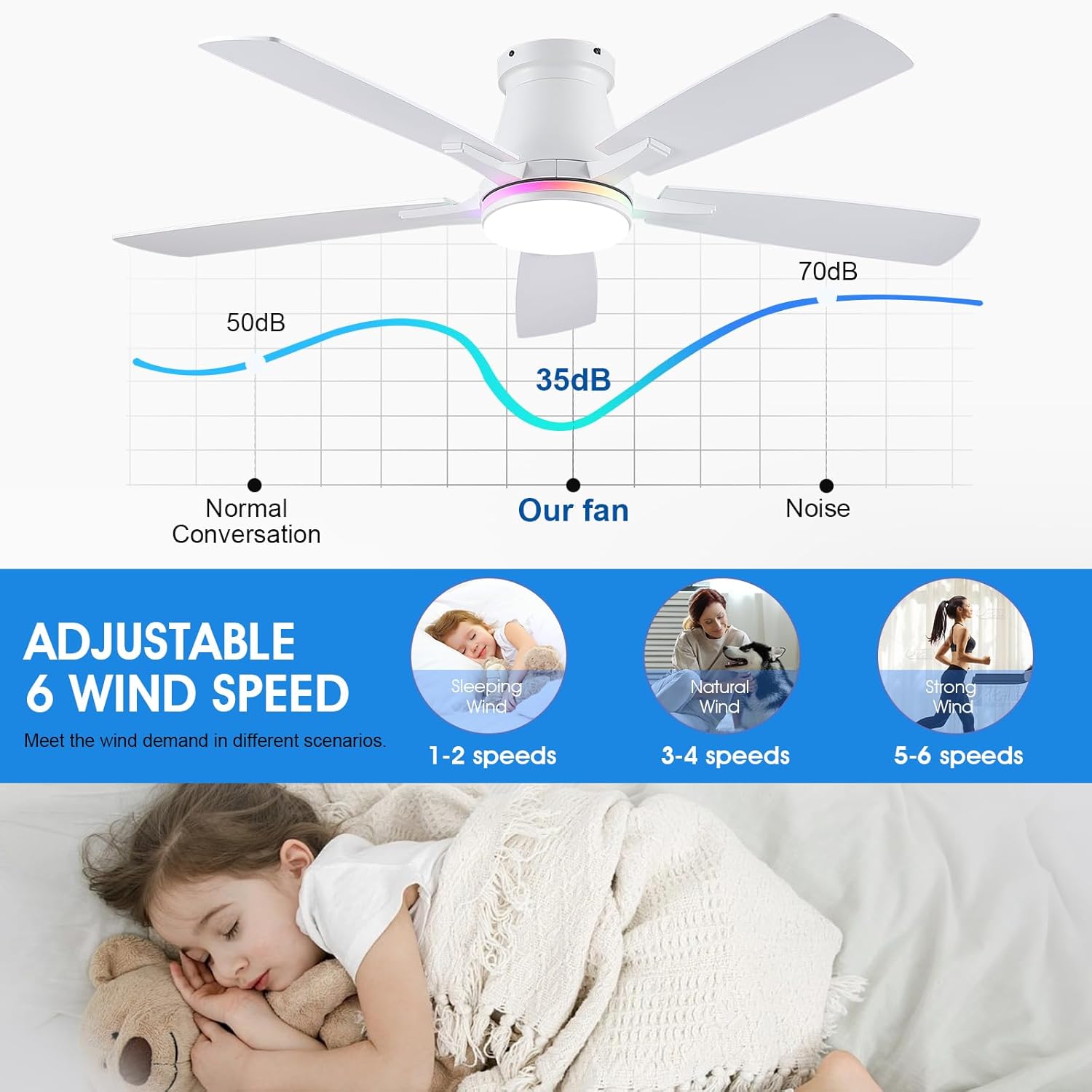
Figure 5: Fan speed levels and associated noise output.
Lighting Operation
- LED Dimmable Light: The integrated LED light is dimmable, allowing you to adjust brightness from 20% to 100%.
- 3 Color Temperatures: Choose from three white light color temperatures: 6000K (Cool White), 4000K (Natural White), and 3000K (Warm White).
- RGB Lighting: The fan features vibrant RGB lighting for ambient effects. To activate RGB modes, first press the On/Off button to turn on the main light, then press the RGB button to cycle through color effects. This prevents accidental mode conflicts.
- Light Memory Function: The fan remembers your last light setting when turned off and on again.

Figure 6: Light features including dimming and color temperature options.
Video Demonstration
Watch the official product video for a visual guide on the fan's features, including RGB lighting, fan speed control, and reversible function.
Video 1: Demonstration of the 8310 RGB Ceiling Fan's features in a real-scene display.
Maintenance
Regular maintenance ensures optimal performance and longevity of your ceiling fan.
- Cleaning: To avoid damage to the finish, clean the fan with a soft, damp cloth. Do not use abrasive cleaners or solvents.
- Blade Cleaning: Periodically wipe the fan blades to remove dust buildup, which can affect airflow and balance.
- Tightness Check: Check all screws and connections on the fan and mounting hardware periodically to ensure they are secure.
- Light Source: The integrated LED light source is designed for long life and typically does not require replacement.
Troubleshooting
If you encounter issues with your Surtime ceiling fan, refer to the following common troubleshooting tips:
| Problem | Possible Cause(s) | Solution |
|---|---|---|
| Fan does not start | No power to the fan; Loose wire connections; Remote control battery low or not paired. | Check circuit breaker. Ensure all wiring connections are secure. Replace remote battery or re-pair the remote/app with the fan (refer to manual for pairing instructions). |
| Fan makes excessive noise | Loose fan blades or mounting screws; Fan not properly balanced. | Tighten all screws on the fan blades and mounting bracket. Ensure blades are clean and free of debris. Refer to the manual for blade balancing instructions if necessary. |
| Light does not work | Loose wire connection to light kit; LED driver issue; Remote control issue. | Check connections to the light kit. Ensure the remote control is functioning and paired. If the issue persists, contact customer support. |
| Difficulty syncing remote/app | Interference; Incorrect pairing procedure. | Ensure no other devices are interfering. Follow the pairing instructions in the manual precisely. It is recommended to sync after all fans are installed if you have multiple units. |
| Fan base rotates when turning on/off | Possible installation anomaly. | While unusual, if the fan functions correctly otherwise, this may not indicate a fault. Re-check mounting security. If concerned, contact customer support. |
| Fan speed control is inconsistent | Remote/app signal issue; Specific control logic. | Ensure clear line of sight for remote. Some models may require turning the fan off and then directly to the desired speed. Refer to the manual for specific control logic. |
Warranty and Support
Surtime provides a 2-year warranty for this ceiling fan. Additionally, a 30-day replacement guarantee is offered for any defects or damages upon arrival.
Our dedicated support team is available to provide lifetime troubleshooting assistance for your RGB ceiling fan with lights. For any inquiries, technical support, or warranty claims, please contact Surtime customer service through the retailer's platform or the contact information provided in your product packaging.
Related documents8310


Ask a question about this manual
Ask about setup, troubleshooting, compatibility, parts, safety, or missing instructions. Manuals+ will review the question and use this page’s manual context to help answer it.