
1. Introduction and Overview
The Beats Powerbeats Pro 2 are advanced wireless Bluetooth earbuds designed for active lifestyles. They feature secure-fit ear hooks, active noise cancelling, transparency mode, and heart-rate monitoring. With an IPX4 rating, they are sweat and water resistant, making them suitable for various training conditions. Powered by the Apple H2 chip, these earbuds offer up to 45 hours of battery life with the included wireless charging case and are compatible with both Apple and Android devices.
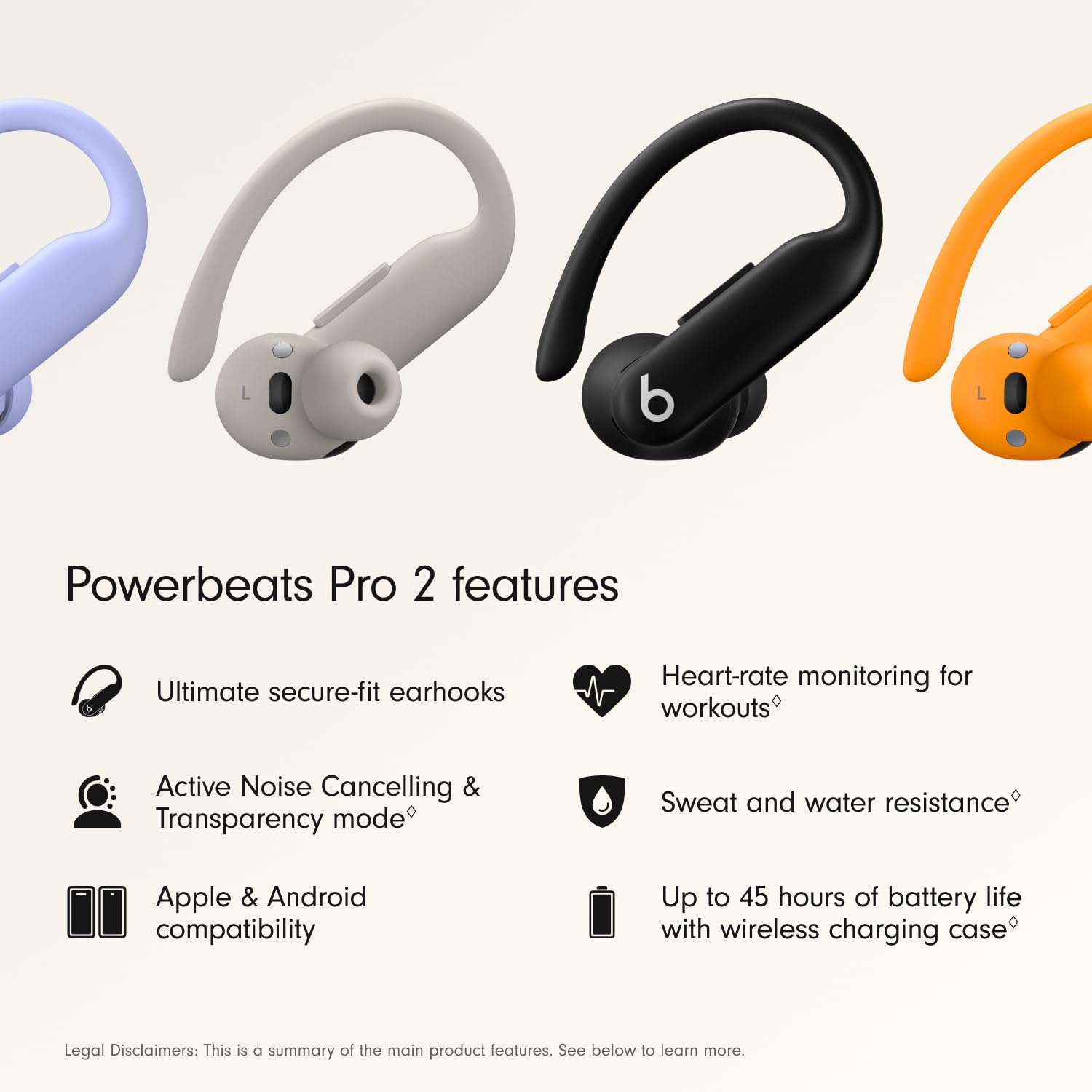
Image: Overview of Powerbeats Pro 2 key features including secure-fit earhooks, heart-rate monitoring, ANC, Transparency mode, IPX4 rating, Apple & Android compatibility, and 45 hours battery life.
2. What's in the Box
Verify that all items are present in your Powerbeats Pro 2 package:
- Powerbeats Pro 2 earbuds
- Charging case with wireless charging capability
- Ear tips with five size options (XS, S, M, L, XL)
- Warranty card
- (Power adapter and USB-C to USB-C charging cable are sold separately)
3. Setup
3.1 Charging the Earbuds and Case
Before first use, fully charge your Powerbeats Pro 2 earbuds and charging case. Place the earbuds into the charging case. Connect the charging case to a power source using a compatible USB-C cable (not included) and power adapter. The case also supports wireless Qi charging.
3.2 Finding the Right Fit
A proper fit is crucial for optimal sound quality, noise cancellation, and heart-rate monitoring accuracy. Experiment with the five included ear tip sizes to find the best seal for your ears.
- Step 1: Find your ear tip size. Try one size up for a better seal if needed.
- Step 2: Secure the ear hook and rotate it toward the back of your ear until it feels comfortable and stable.
- Step 3: Take the Fit Test on iOS or through the Beats app for Android to ensure an optimal seal.

Image: Visual guide demonstrating how to find the correct ear tip size and secure the ear hook for an optimal fit.
3.3 Pairing with Your Device
For Apple Devices:
With the earbuds in the charging case, open the case lid and hold it near your unlocked iOS device. Follow the on-screen prompts for one-touch pairing.
For Android Devices:
Download the Beats app from the Google Play Store. With the earbuds in the charging case, open the case lid and place it near your Android device. Follow the instructions in the Beats app for one-touch pairing and to unlock features like heart-rate monitoring and customizable controls.
4. Operating Instructions
4.1 Power On/Off
The Powerbeats Pro 2 earbuds automatically power on when removed from the charging case and power off when returned to the case.
4.2 Controls
Each earbud features on-ear buttons and tactile volume rockers for easy control:
- Play/Pause/Skip: Use the 'b' button on either earbud.
- Volume Control: Use the volume rockers on the top edge of each earbud.
- Call Management: Use the 'b' button to answer or end calls.
- Voice Assistant (Siri): Activate Siri hands-free on Apple devices or use voice-activated controls on Android.
4.3 Active Noise Cancelling (ANC) and Transparency Mode
The Powerbeats Pro 2 offer both Active Noise Cancelling (ANC) for immersive listening and Transparency mode to stay aware of your surroundings. Switch between modes using the controls on the earbuds or through your device's settings/Beats app.

Image: Close-up of a Powerbeats Pro 2 earbud illustrating the active noise cancelling and transparency mode features.
4.4 Heart-Rate Monitoring
Integrated heart-rate monitoring sensors pulse over 100 times per second to measure your pulse in real-time during workouts. This data can be integrated with compatible fitness apps on your device.

Image: Close-up of a Powerbeats Pro 2 earbud showing the green light of the heart-rate monitoring sensor.
4.5 Spatial Audio
Experience immersive sound with personalized spatial audio and dynamic head tracking, delivering clear highs, rich mid-range tones, and powerful bass.
5. Features
- Ultimate Secure-Fit Ear Hooks: Designed for stability during intense workouts, tested over 1,500 hours for a secure and comfortable fit.
- Active Noise Cancelling (ANC) & Transparency Mode: Provides focused listening or awareness of surroundings.
- Heart-Rate Monitoring: Real-time pulse measurement for fitness tracking.
- IPX4 Sweat and Water Resistance: Durable enough for training in various weather conditions.
- Up to 45 Hours Battery Life: Combined battery life with the wireless charging case.
- Apple H2 Chip: Ensures extraordinary efficiency and performance.
- Adaptive EQ & Personalized Spatial Audio: Delivers immersive sound with dynamic head tracking.
- Class 1 Bluetooth Connectivity: For reliable wireless connection and enhanced call quality.
- On-Ear Controls: Tactile buttons and volume rockers for easy management of audio and calls.
- Nickel-Titanium Alloy Ear Hook: Provides flexibility, grip, and comfort, making them 20% lighter than the previous generation.

Image: A person exercising while wearing Powerbeats Pro 2 earbuds, highlighting their sweat and water resistant IPX4 rating.

Image: Powerbeats Pro 2 earbuds in their open wireless charging case, emphasizing the up to 45 hours of battery life.
6. Maintenance
6.1 Cleaning
Regularly clean your Powerbeats Pro 2 earbuds and charging case to maintain performance and hygiene. Use a soft, dry, lint-free cloth. Do not use abrasive materials or harsh chemicals. Remove ear tips and clean them separately with water and mild soap if necessary, ensuring they are completely dry before reattaching.
6.2 Storage
Always store the earbuds in their charging case when not in use to protect them and keep them charged. Store the case in a cool, dry place away from extreme temperatures.
6.3 Water Resistance
The Powerbeats Pro 2 are IPX4 rated, meaning they are resistant to sweat and splashes of water. They are not waterproof and should not be submerged in water or used for swimming. Avoid exposing them to pressurized water or high-velocity water, such as showering or water sports.
7. Troubleshooting
7.1 Pairing Issues
- Ensure Bluetooth is enabled on your device.
- Make sure the earbuds are charged and in the charging case with the lid open when attempting to pair.
- Try resetting the earbuds by holding down the system button on the charging case for 15 seconds until the LED indicator light flashes red and white.
- Forget the device in your phone's Bluetooth settings and attempt to pair again.
7.2 Sound Quality Issues
- Check the ear tip fit. An improper seal can significantly affect sound quality and noise cancellation.
- Ensure the earbuds are clean and free of debris that might block the speaker grilles.
- Verify that the audio source is playing at a sufficient quality.
7.3 Battery Life Concerns
- Ensure both earbuds and the charging case are fully charged.
- Battery life can vary based on volume levels, ANC usage, and environmental factors.
- If battery drain is unusually fast, contact support.
7.4 Fit and Comfort Issues
- Re-evaluate your ear tip size using the provided options.
- Adjust the ear hooks carefully to find a comfortable and secure position behind your ear.
8. Specifications
| Brand | Beats |
| Model Name | Powerbeats Pro 2 |
| Model Number | MX723ZM/A |
| Color | Jet Black |
| Ear Placement | In Ear |
| Form Factor | In Ear, True Wireless |
| Noise Control | Active Noise Cancellation, Sound Isolation |
| Battery Life | Up to 45 Hours (with charging case) |
| Water Resistance Level | IPX4 (Sweat and Water Resistant) |
| Connectivity Technology | Wireless (Bluetooth Class 1) |
| Compatible Devices | Cellphones, Desktops, Laptops, Smart Watch, Tablets (Apple & Android) |
| Control Type | Volume Control, App Control, Button Control, Siri, Touch Control, Voice Control |
| Material | Plastic, Silicone, Nickel-Titanium Alloy |
| Item Weight | 69 Grams |
| Country of Origin | China |
9. Warranty and Support
9.1 Warranty Information
The Beats Powerbeats Pro 2 earbuds come with a 1-Year Limited Warranty from the date of original retail purchase. This warranty covers manufacturing defects. Please refer to the warranty card included in your package for full terms and conditions.
9.2 Customer Support
For further assistance, technical support, or warranty claims, please visit the official Beats support website or contact their customer service. Keep your proof of purchase handy when seeking support.
Online Support: www.beatsbydre.com/support


