1. Product Overview
The Pyle 4K USB Video Conference Room Camera System is an integrated solution designed for high-quality video conferencing. It features a 4K camera with a 120° field of view, 5X digital zoom, and AI-powered auto-framing. The system includes an 8-meter microphone pickup range with echo cancellation and noise reduction for clear audio. It is compatible with various platforms such as Zoom, Skype, and Microsoft Teams, and supports PC, Mac, phone, and tablet devices.

Image 1: Front view of the Pyle 4K USB Video Conference Room Camera System.
2. What's in the Box
Verify that all components are present in the package:
- Pyle 4K USB Video Conference Room Camera System (Main Unit)
- USB Cable
- Peeping Cover (Privacy Cover)
- Wall-mounted Components (Bracket and Screws)
- Power Adapter (12VDC 3.0A)
- Remote Control
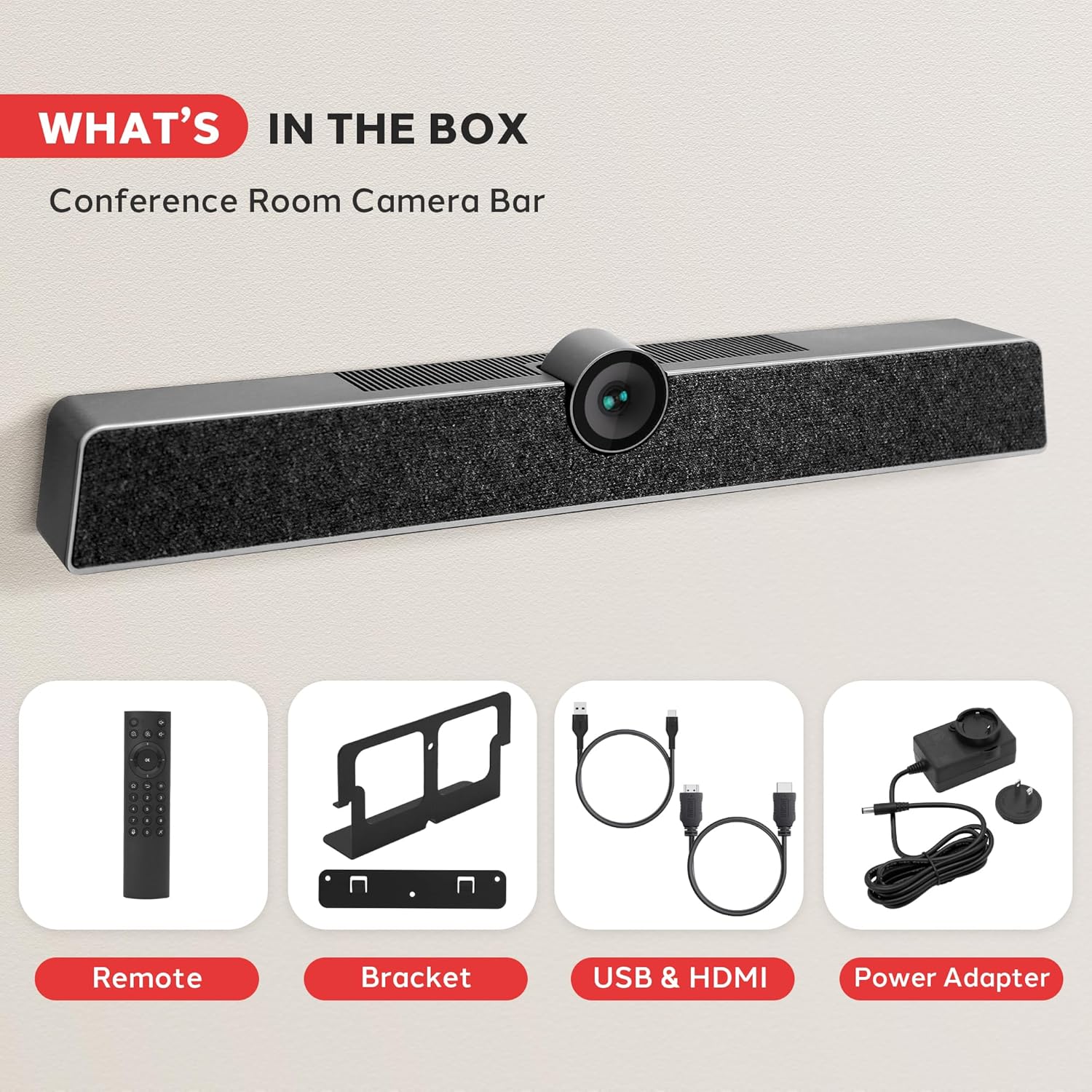
Image 2: All components included in the product package. This includes the main camera unit, remote control, mounting bracket, USB and HDMI cables, and power adapter.
3. Setup and Installation
The Pyle 4K USB Video Conference Room Camera System offers flexible installation options for various meeting environments.
3.1 Desktop Placement
For desktop use, simply place the camera system on a flat, stable surface in front of your display. Ensure the camera lens is unobstructed and positioned to capture the desired area.
3.2 Wall Mounting
To wall-mount the system, use the provided wall-mounted components. Secure the bracket to the wall using appropriate screws, then attach the camera system to the bracket. Ensure the mounting location provides a clear line of sight for the camera and is at an optimal height for participants.

Image 3: Illustration of multiple installation methods, including wall mounting above a display and desktop placement.
3.3 Connectivity
Connect the camera system to your computer or display using the appropriate cables:
- USB Connection: Use the provided USB cable to connect the camera system to your computer. This enables video, audio, and control functions.
- Power Connection: Connect the power adapter to the camera system and a power outlet.
- HDMI Output (Optional): If desired, connect an HDMI cable from the camera system's HDMI OUT port to a display for direct video output.
- Aux In/Out (Optional): For external audio devices, use the Aux In/Out ports.
- LAN Port (Optional): Connect an Ethernet cable for network connectivity if required by your setup.

Image 4: Detailed view of the multi-port connectivity options on the rear of the device.
4. Operating Instructions
Once connected, the system is generally plug-and-play. Your operating system should automatically recognize the device.
4.1 Starting a Conference
Open your preferred video conferencing application (e.g., Zoom, Microsoft Teams, Skype). In the application's settings, select the Pyle camera system as your primary video and audio input device.
4.2 Camera Features
- 4K Video Quality: The camera captures video in 4K resolution, providing clear and detailed visuals.
- 120° Field of View: The wide-angle lens ensures that all participants in a room are visible.
- 5X Digital Zoom: Use the remote control to zoom in or out, focusing on specific individuals or areas.
- AI Auto-Framing: The system automatically adjusts the camera's view to keep all participants centered and optimally framed within the video feed.
- Face Detection: Advanced AI identifies and tracks faces for improved framing and focus.
- Voice Localization: The system can detect the direction of speech, enhancing audio clarity for the active speaker.

Image 5: Visual representation of key features including wide viewing angle, face detection, voice localization, and clear audio output.
4.3 Audio Features
- 8-Meter Voice Pickup: The integrated MEMS microphone array can capture voices clearly from up to 8 meters away.
- Echo Cancellation: Reduces echo effects for clearer communication.
- Noise Reduction: Filters out background distractions, ensuring the speaker's voice is prominent.
4.4 Remote Control Functions
The included remote control allows for convenient adjustment of camera settings, including zoom, volume, and other functions. Refer to the remote control's button layout for specific operations.
5. Maintenance
To ensure optimal performance and longevity of your Pyle 4K USB Video Conference Room Camera System, follow these maintenance guidelines:
- Cleaning: Use a soft, dry cloth to clean the exterior of the device. For the camera lens, use a lens cleaning cloth and solution specifically designed for optical surfaces. Avoid abrasive cleaners or solvents.
- Storage: When not in use for extended periods, store the device in a cool, dry place away from direct sunlight and extreme temperatures.
- Cable Management: Ensure all cables are neatly organized and not under strain to prevent damage.
- Firmware Updates: Periodically check the Pyle official website for any available firmware updates to improve performance and add new features.
6. Troubleshooting
If you encounter issues with your camera system, refer to the following common problems and solutions:
- No Video Output:
- Ensure the USB cable is securely connected to both the camera system and your computer.
- Verify the power adapter is connected and the device is powered on.
- Check your video conferencing application settings to confirm the Pyle camera is selected as the video source.
- Try connecting to a different USB port on your computer.
- No Audio Input/Output:
- Confirm the Pyle camera system is selected as both the microphone and speaker in your computer's sound settings and your conferencing application.
- Check the volume levels on the device, your computer, and the application.
- Ensure the microphone is not muted (check the remote control or application settings).
- Poor Video Quality:
- Ensure sufficient lighting in the room.
- Clean the camera lens with a soft, dry cloth.
- Verify your internet connection speed is adequate for 4K video streaming.
- Close other applications that might be consuming system resources.
- Remote Control Not Responding:
- Check and replace the batteries in the remote control.
- Ensure there are no obstructions between the remote control and the camera system.
7. Specifications
| Feature | Specification |
|---|---|
| Brand | Pyle |
| Model Number | SQOCULICAMERA.6 |
| Video Capture Resolution | 4K |
| Field of View (FOV) | 120 Degrees |
| Digital Zoom | 5X |
| Microphone Pickup Range | 8 Meters |
| Connectivity Technology | USB |
| Special Features | AI Auto-Framing, Face Detection, Remote Control, Speakers, Wind Noise Reduction, Echo Cancellation |
| Item Weight | 2.27 pounds |
| Package Dimensions | 21.3 x 7.8 x 6.61 inches |
8. Warranty and Support
For warranty information and technical support, please refer to the official Pyle website or contact their customer service department. Keep your purchase receipt for warranty claims.
Pyle Customer Support:
Visit www.pyleusa.com for product registration, support, and contact information.


