
Vaczon VCZ008BK
Vaczon 52-inch Black Ceiling Fan with Light and Remote/App
Model: VCZ008BK
User Manual
Introduction
Thank you for choosing the Vaczon 52-inch Black Ceiling Fan with Light and Remote/App. This manual provides essential information for the safe installation, operation, and maintenance of your new ceiling fan. Please read these instructions thoroughly before beginning installation or use, and retain them for future reference.
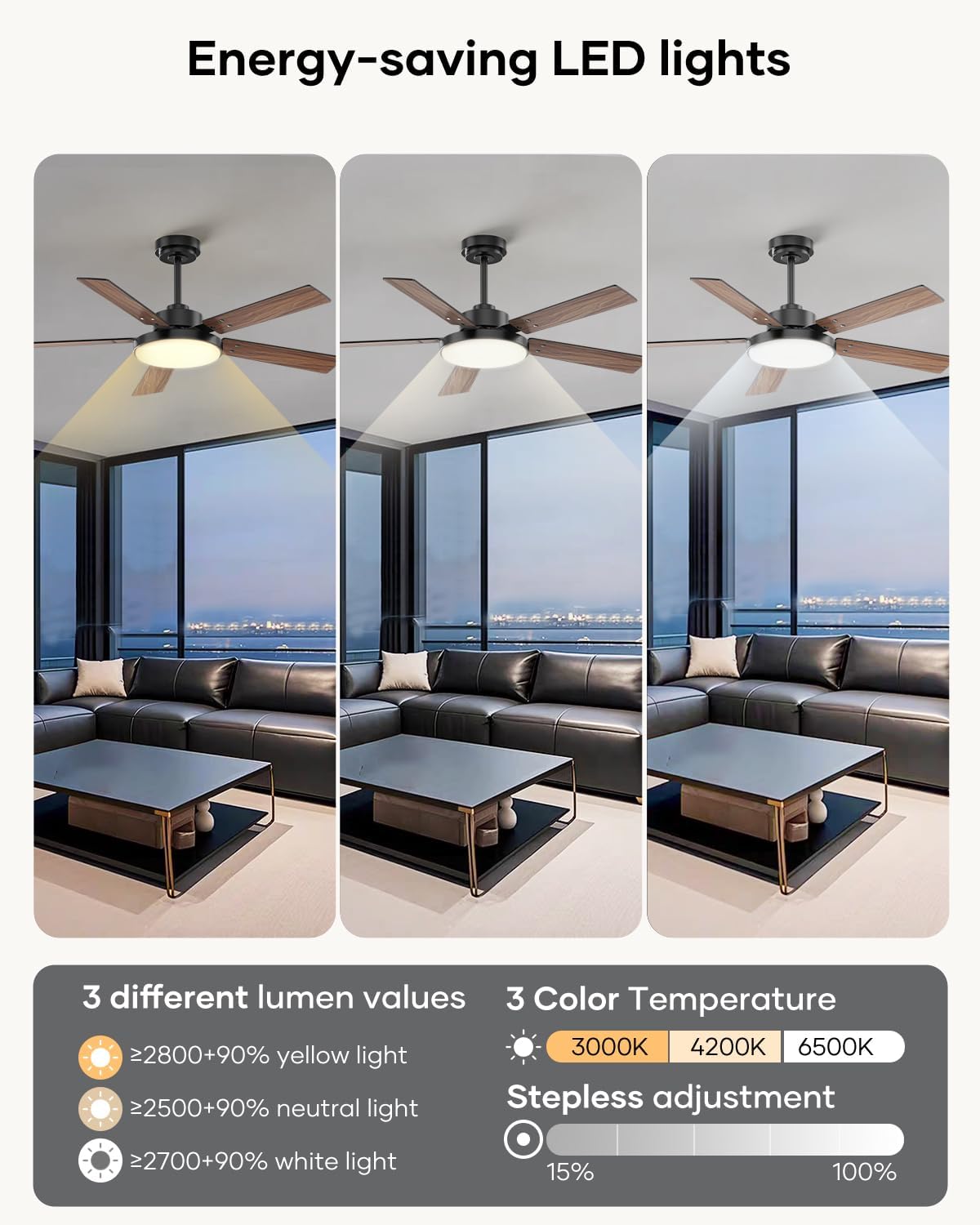
This ceiling fan features advanced LED lighting with adjustable color temperatures and stepless dimming, a quiet and efficient DC motor with 6 reversible speeds, and convenient control via remote or a mobile application. It is designed for both indoor and covered outdoor use, enhancing comfort and ambiance in various living spaces.
Important Safety Information
WARNING: To reduce the risk of fire, electric shock, or personal injury, always turn off the main power supply at the circuit breaker before installation, removal, or maintenance.
CAUTION: All wiring must be in accordance with national and local electrical codes. If you are unfamiliar with wiring, consult a qualified electrician.
- Ensure the installation site can support the fan's weight.
- Do not connect the fan to a dimmer switch.
- Maintain a minimum clearance of 7 feet from the floor to the fan blades.
- Do not operate the fan if any part is damaged.
Setup and Installation
The Vaczon 52-inch ceiling fan is designed for straightforward installation. Please follow the steps below carefully. For visual guidance, refer to the included video tutorial.
1. Unpacking and Parts Identification
Carefully remove all components from the packaging. Verify that all parts listed in the packing list are present and undamaged.

2. Assembling the Ceiling Bracket
Secure the ceiling bracket to your ceiling junction box. Ensure it is firmly attached to a structural support capable of holding the fan's weight.

3. Assembling the Downrod
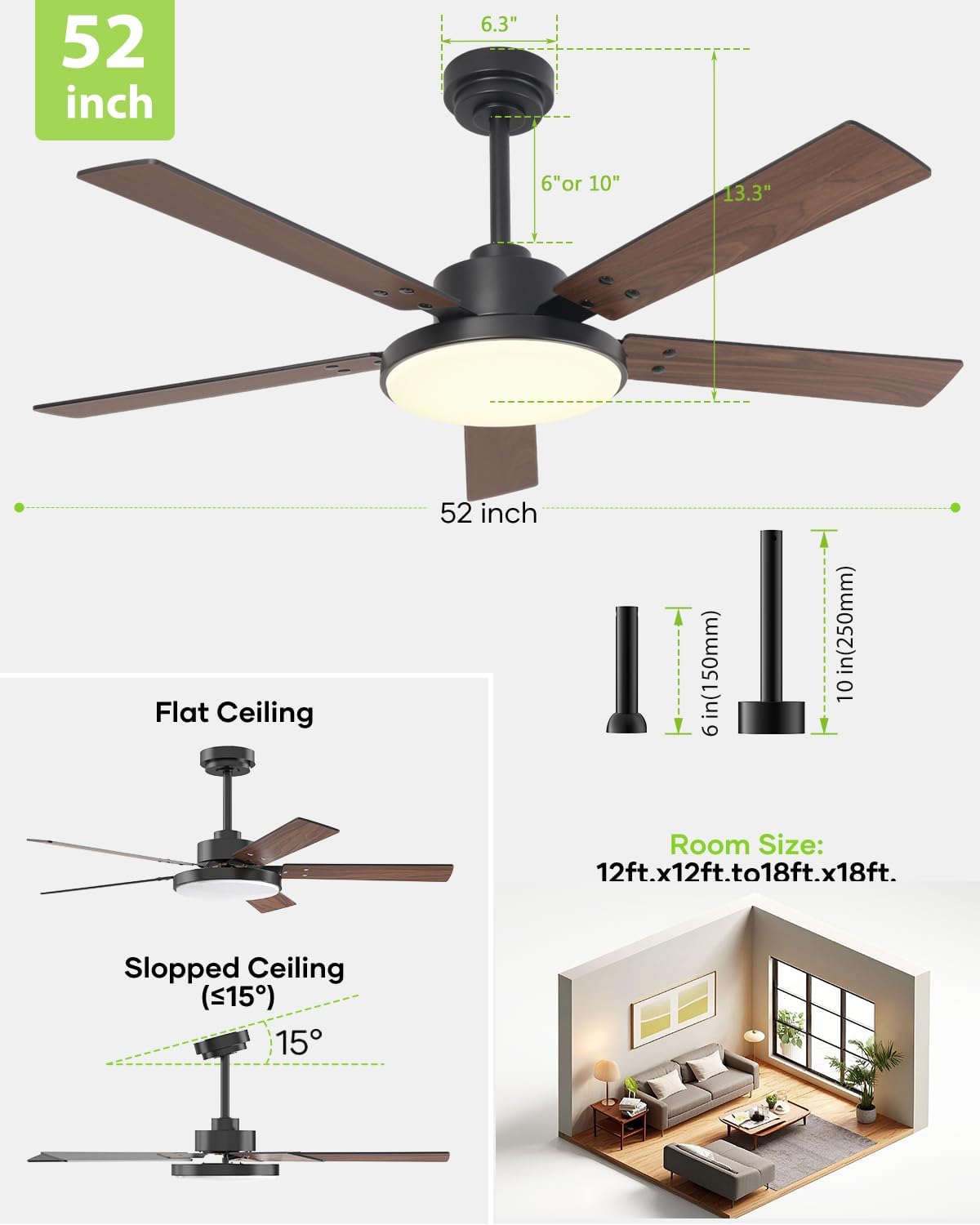
Choose between the 6-inch or 10-inch downrod based on your ceiling height. Feed the motor wires through the downrod and secure the downrod to the motor assembly using the provided pin and screws.
4. Hanging the Ceiling Fan Body
Carefully lift the fan assembly and place the downrod ball into the ceiling bracket. Connect the electrical wires as per the wiring diagram in the full instruction manual (not provided here). Secure the canopy to cover the wiring connections.

5. Assembling the Blades
Attach each fan blade to its respective blade bracket. Then, secure the blade assemblies to the fan motor using the provided screws. Ensure all screws are tightened firmly.

6. Assembling the Light Kit
Connect the light kit wires to the corresponding wires from the fan motor. Secure the light kit to the bottom of the fan motor.

7. Installing the Light Shade
Gently insert and twist the light shade into the light kit until it is securely fastened. Ensure it is properly seated to prevent it from falling.

8. Installation Video Tutorial
For a comprehensive visual guide on the installation process, please watch the official Vaczon installation video:
Operating Instructions
Your Vaczon ceiling fan offers versatile control options and features to optimize your comfort.
1. Remote and App Control
Control your fan effortlessly using the included remote control or the dedicated mobile application. Both allow you to adjust fan speed, light brightness, and set timers.

2. Fan Speed and Airflow
The fan features 6 adjustable speeds, providing a powerful airflow of up to 3884 CFM. Select your desired speed for optimal comfort.

3. Reversible Motor for Seasonal Use
Utilize the reversible motor function to optimize air circulation throughout the year. In summer, the downward airflow creates a cooling effect. In winter, the upward airflow helps distribute warm air evenly.

4. Advanced LED Lighting
The integrated 24W LED light offers 3 adjustable color temperatures (3000K warm white, 4200K neutral white, 6500K cool white) and stepless dimming from 15% to 100%. This eye-care LED is designed to protect your eyes from blue light and flickering.

5. Operational Features Video
Explore the various operational features of your Vaczon ceiling fan, including speed adjustments, lighting modes, and more, in this informative video:
Maintenance
Regular maintenance ensures optimal performance and longevity of your ceiling fan.
- Cleaning: Periodically clean the fan blades and motor housing with a soft, damp cloth. Do not use abrasive cleaners or solvents.
- Tightening: Check all screws and connections annually to ensure they are secure. Loose connections can cause noise or wobble.
- Blade Balance: If the fan wobbles, ensure all blades are securely attached and balanced. A balancing kit (not included) can be used if necessary.
Troubleshooting
If you encounter issues with your fan, refer to the following common troubleshooting tips:
- Fan does not start: Check circuit breakers and wall switch. Ensure all wire connections are secure. Verify remote control batteries.
- Fan is noisy: Ensure all motor housing screws are tight. Check that blade attachment screws are tight. Verify the canopy is properly secured.
- Light does not work: Check wire connections to the light kit. Ensure the light function is activated on the remote or app.
- Remote not working: Replace remote batteries. Ensure the remote is paired correctly with the fan (refer to the full manual for pairing instructions).
For more detailed troubleshooting, please consult the complete instruction manual or contact customer support.
Specifications
| Brand | Vaczon |
| Model Name | VCZ008BK |
| Size | 52 inch |
| Color | Matte Black/Maple Wood Grain |
| Product Dimensions | 52"D x 52"W x 15.5"H |
| Item Weight | 6.73 Kilograms (14.81 pounds) |
| Number of Blades | 5 |
| Power Source | DC |
| Wattage | 54 watts |
| Voltage | 120 Volts |
| Air Flow Capacity | 3884 Cubic Feet Per Minute |
| Number of Power Levels | 6 |
| Light Type | 24W LED (3000K, 4200K, 6500K, 15%-100% dimmable) |
| Control Method | App, Remote |
| Downrod Lengths | 6 inches, 10 inches |
| Indoor/Outdoor Usage | Indoor, Covered Outdoor (not directly exposed to rain) |
| Certifications | DOE, ETL, FCC |
| UPC | 646414815870 |
Warranty Information
Vaczon products are manufactured to the highest quality standards. This product is covered by a limited warranty against defects in materials and workmanship. Please refer to the warranty card included in your product packaging for specific terms, conditions, and duration of coverage. Keep your proof of purchase for warranty claims.
Customer Support
If you have any questions, require assistance with installation, or need to report a problem, please contact Vaczon customer support. Our team is available to help you.
- Online Support: Visit the official Vaczon website for FAQs and support resources.
- Email: Refer to your product packaging or the official website for customer service email contact.
- Phone: Refer to your product packaging or the official website for customer service phone number.
Related documentsVCZ008BK


Ask a question about this manual
Ask about setup, troubleshooting, compatibility, parts, safety, or missing instructions. Manuals+ will review the question and use this page’s manual context to help answer it.