
EONON E46X6S
Eonon E46X6S QCM6225 9-inch Double-Din Car Stereo Instruction Manual
Comprehensive guide for installation, operation, and maintenance.
1. Introduction
Welcome to the Eonon E46X6S QCM6225 9-inch Double-Din Car Stereo. This advanced unit is designed to enhance your driving experience with cutting-edge technology and seamless integration. Featuring a powerful Qualcomm QCM6225 Octa-core processor, 6GB RAM, and 64GB ROM, it delivers responsive performance for all your in-car entertainment and navigation needs. This manual will guide you through the setup, operation, and features of your new car stereo.

Figure 1: Eonon E46X6S QCM6225 Car Stereo with accessories.
2. Applicable Models
The Eonon E46X6S QCM6225 car stereo is compatible with the following BMW 3 Series E46 models:
- BMW 3 Series E46 (1998-2006)
- BMW M3 (2000-2006)
Important Installation Notes:
- If your car's power cable connector is a 17-pin connector with 4 empty pins, it is NOT suitable.
- A 17-pin connector without empty pins or a 40-pin connector is suitable for direct installation.
- If the connector in the trunk is 17-pin or 40-pin, an additional Eonon A0590 extension harness is required (not included).
- If the air conditioning control panel of your car is located in the console center, it needs to be removed and installed below the E46X6S car stereo.

Figure 2: Compatibility details for BMW E46 models and power connector types.
3. Key Features
Your Eonon E46X6S QCM6225 car stereo comes equipped with a range of advanced features:
- High Performance: Powered by Qualcomm QCM6225 Octa-core processor (6nm LPP technology) with 6GB RAM, 64GB ROM, and Adreno 610 GPU for smooth operation.
- Superior Audio: Integrated Digital Signal Processing (DSP) and a 48-band graphic equalizer with six preset EQ modes. Features 4*48W max output power and Optical & Coaxial HD audio output.
- Vibrant Display: 9-inch QLED touch screen with 1280*720 HD resolution for true-to-life colors and high contrast.
- Seamless Connectivity: Supports Wireless/Wired Apple CarPlay and Android Auto, Bluetooth 5.1 for hands-free calls and music, Built-in Wi-Fi 6, and a Built-in 4G Module (SIM card not included).
- Intuitive User Interface: Runs on Android 13, offering split-screen multitasking, 3 brightness modes (Light, Dark, Auto), and customizable UI themes.
- OEM Integration: Designed for plug-and-play installation, retaining factory features such as steering wheel controls, door information, and driving data display.
- Expandability: Compatible with Eonon dashcam (A100) and OBDII (V0056) (sold separately). Includes an A0127 rearview camera.

Figure 3: High-performance Qualcomm QCM6225 Octa-core processor details.

Figure 4: Built-in DSP and HD audio output capabilities.
4. Setup & Installation
The Eonon E46X6S is designed for a straightforward, plug-and-play installation in compatible BMW E46 models. Basic tools are required for removal of the original unit and trim pieces.
Installation Steps Overview:
- Carefully remove the existing car stereo and surrounding trim.
- Disconnect all wiring harnesses from the original unit.
- If necessary, relocate the AC control panel as per the compatibility notes.
- Connect the provided wiring harnesses (power, audio, USB, GPS, 4G, rearview camera) to the Eonon unit. Ensure all connections are secure.
- Test the unit's functionality before fully reassembling the dashboard.
- Secure the Eonon E46X6S unit into the dashboard and reattach all trim pieces.
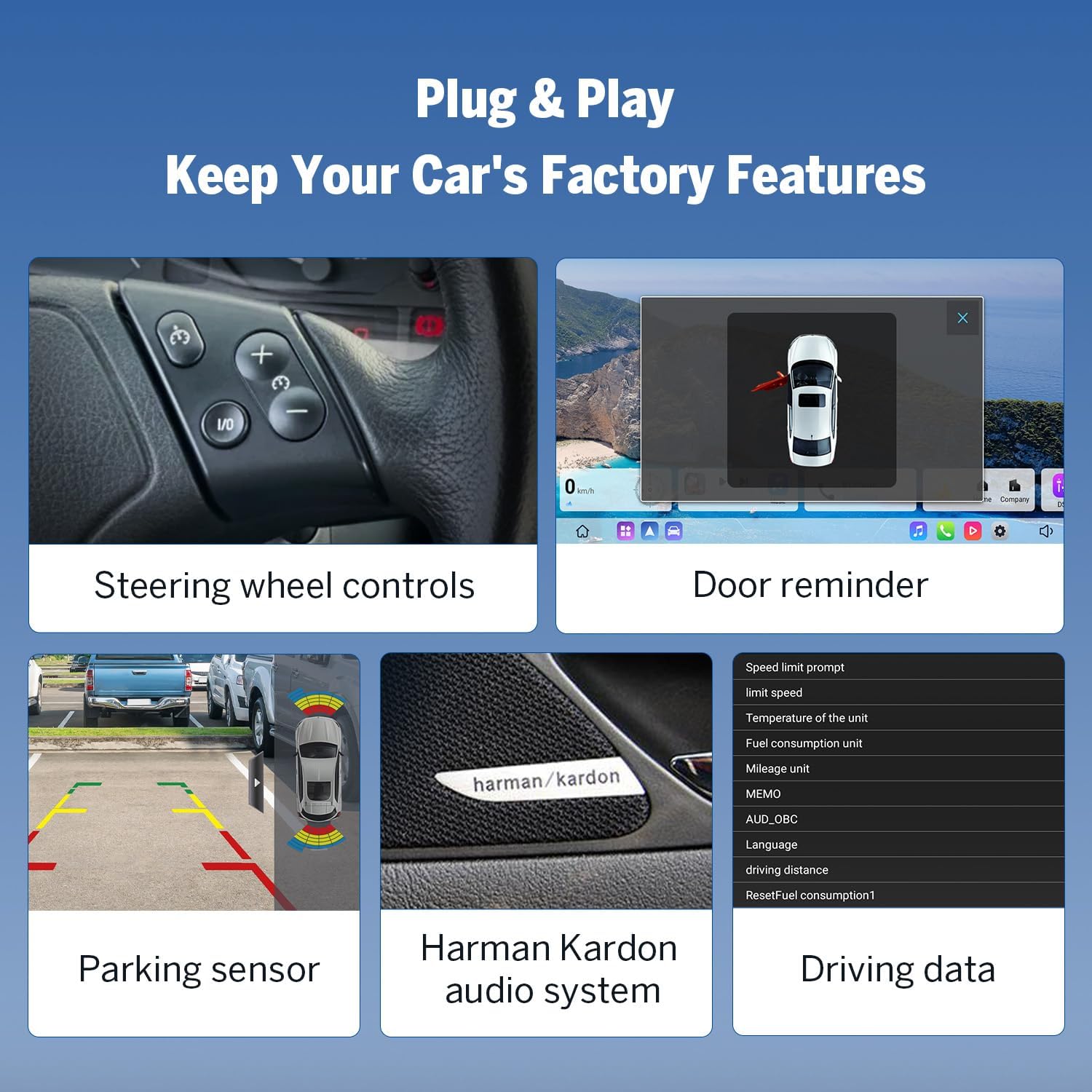
Figure 5: Retained OEM features after installation.
Detailed Installation Video:
Video 1: A comprehensive guide to installing the Eonon E46X6S car stereo in a BMW E46.
5. Operating Instructions
The Eonon E46X6S features an intuitive Android 13 interface for easy navigation and control.
Basic Operations:
- Power On/Off: Press and hold the power button on the unit.
- Volume Control: Use the physical buttons on the unit or the vertical volume control on the screen.
- Home Screen: Access various applications and widgets from the customizable home screen.
- Split-Screen Multitasking: Run two applications side-by-side, such as navigation and media playback.
- Settings: Access system settings for display, sound, connectivity, and more.

Figure 6: Overview of the new Eonon UI for X6S.
UI Demonstration Video:
Video 2: Demonstration of the Eonon 2025 New UI features, including split-screen and settings.
6. Connectivity
The Eonon E46X6S offers multiple connectivity options for a fully integrated experience:
- Apple CarPlay & Android Auto: Connect your iPhone or Android device wirelessly via Bluetooth or wired via USB for seamless access to navigation, music, calls, and messages.
- Bluetooth 5.1: Enjoy stable and fast connections for hands-free calls, contact synchronization, and audio streaming. An external microphone is included for clear call quality.
- Wi-Fi 6 & 4G Module: Built-in Wi-Fi (2.4/5 GHz ready) and a 4G module (requires a separate SIM card) provide internet access for online navigation, streaming, and app downloads.
- GPS Navigation: Supports both offline and online GPS navigation, ensuring you always find your way.
- USB Ports: Multiple USB adapter cables are included for connecting various devices and charging.
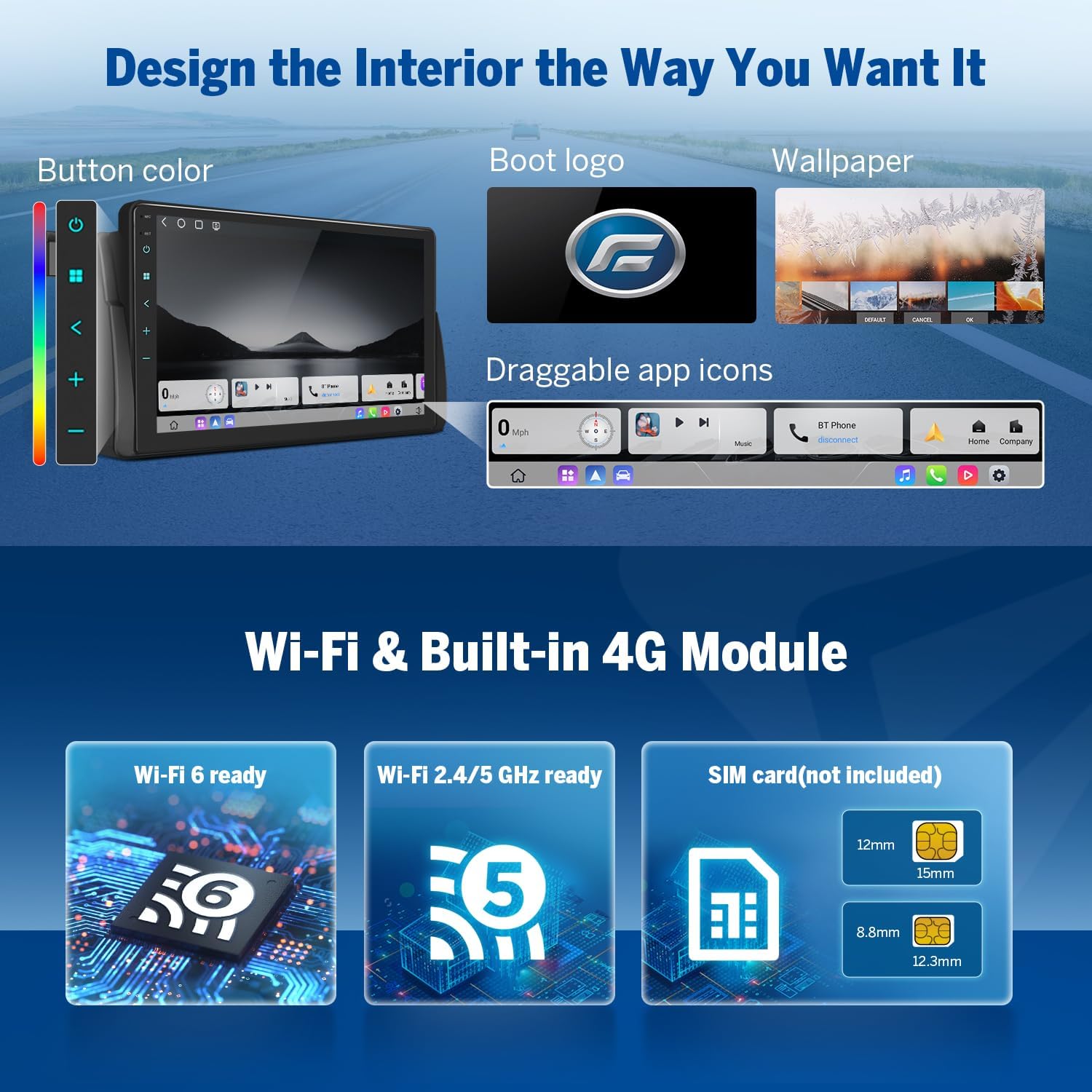
Figure 7: Wi-Fi and 4G connectivity features.
7. Audio Features
Experience superior sound quality with the Eonon E46X6S:
- Built-in DSP: Digital Signal Processing ensures time alignment in car audio systems, delivering improved sound quality and precision.
- 48-Band Graphic Equalizer: Customize your audio experience with a detailed 48-band graphic equalizer and six preset EQ modes.
- High Power Output: Enjoy powerful audio with 4*48W maximum output.
- Optical & Coaxial HD Audio Output: For connecting to external amplifiers and achieving high-fidelity sound.
8. Safety Features
Enhance your driving safety with integrated features:
- Backup Camera (A0127): A rearview camera is included to assist with parking and reversing, providing clear visibility of the area behind your vehicle.
- OBDII Support: The unit supports an optional OBDII diagnostic tool (V0056, not included) for real-time vehicle status monitoring and fault diagnosis.
9. Software Updates
Keep your Eonon E46X6S up-to-date with Over-the-Air (OTA) firmware updates. These updates provide software fixes and enhance security. Please note that OTA updates are for software improvements and do not upgrade the Android operating system version.
10. Specifications
| Feature | Detail |
|---|---|
| Model Number | E46X6S |
| Processor | Qualcomm QCM6225 Octa-core (6nm LPP) |
| RAM | 6GB |
| ROM | 64GB |
| Operating System | Android 13 |
| Display Size | 9 inches |
| Display Type | QLED Touch Screen |
| Resolution | 1280*720 HD |
| Bluetooth Version | 5.1 |
| Wi-Fi | Built-in Wi-Fi 6 (2.4/5 GHz) |
| 4G Connectivity | Built-in 4G Module (SIM card not included) |
| Audio Output Power | 4*48W Max |
| Audio Features | Built-in DSP, 48-band EQ, Optical & Coaxial HD Output |
| Tuner Technology | DAB, FM/AM Radio with RDS |
| Product Dimensions | 8.98 x 9.69 x 5.32 inches |
| Item Weight | 4.6 pounds (2.09 Kilograms) |
| Color | Black |
11. What's in the Box
The following items are included with your Eonon E46X6S QCM6225 car stereo:
- A0127 Reversing Camera (x1)
- Power Cord (x1)
- GPS Antenna (x1)
- 4G Antenna (x1)
- USB Adapter Cable (x2)
- Audio/Video Adapter Cable (x2)
- Reverse Video Input Cable (x1)
- 15A Fuse (x1)
- SIM Card Holder (x1)
- External Microphone (x1)
- CANBUS (x1)
- Manual (x1)
- Double-sided Adhesive Sticker (x1)
- Radio Antenna Adaptor (x2)
12. Troubleshooting
If you encounter any issues with your Eonon E46X6S, please refer to the following general troubleshooting steps:
- No Power: Check all power connections and the 15A fuse. Ensure the car's ignition is on.
- No Sound: Verify speaker connections, check volume levels, and ensure the correct audio source is selected. If using external amplifiers, check their power and connections.
- Touchscreen Unresponsive: Try restarting the unit. Ensure the screen is clean and free from obstructions.
- GPS Not Working: Ensure the GPS antenna is properly connected and placed in an area with clear sky view.
- Bluetooth/Wi-Fi Issues: Check device pairing, ensure Bluetooth/Wi-Fi is enabled on both devices, and try restarting the unit.
- Software Glitches: Perform an OTA software update if available.
For more detailed troubleshooting or persistent issues, please consult the full user manual included with your product or contact Eonon customer support.
13. Warranty and Support
For information regarding the warranty coverage and duration for your Eonon E46X6S QCM6225 car stereo, please refer to the official warranty documentation provided with your purchase. This document outlines the terms and conditions of your warranty.
For technical support, product inquiries, or service requests, please visit the official Eonon website or contact their customer support team directly. Contact information can typically be found on the Eonon website or in your product packaging.
Related documentsE46X6S


Ask a question about this manual
Ask about setup, troubleshooting, compatibility, parts, safety, or missing instructions. Manuals+ will review the question and use this page’s manual context to help answer it.