
1. Introduction
The AIMIBO 2025 Wireless Display Adapter 4K provides a versatile solution for screen mirroring and extending displays from your mobile devices and computers to larger screens like HDTVs, monitors, and projectors. This adapter supports 4K resolution at 60Hz and offers multiple connection modes including Direct Connect, DLNA Connect, and USB-C Wired Connect, ensuring broad compatibility across iOS, Android, Windows, and macOS operating systems.
2. Package Contents
- 1 x AIMIBO Wireless Display Adapter
- 1 x Micro USB Charging Cable
- 1 x User Manual (this document)
3. Product Overview
Familiarize yourself with the components of your AIMIBO Wireless Display Adapter:
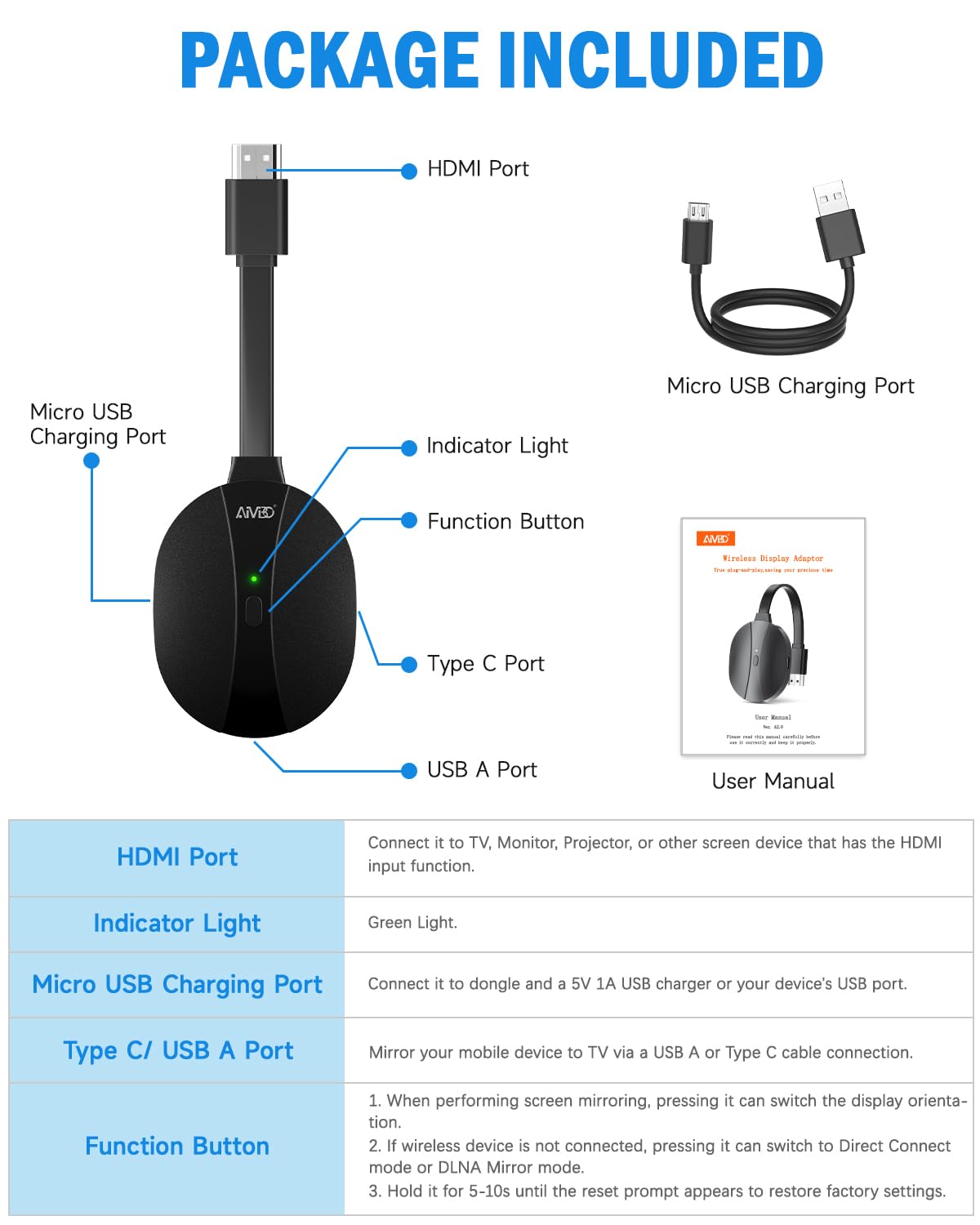
Image: AIMIBO Wireless Display Adapter components.
| Component | Function |
|---|---|
| HDMI Port | Connects to TV, Monitor, Projector, or other display devices with HDMI input. |
| Micro USB Charging Port | Connects to a 5V/1A USB charger or your TV's USB port for power. |
| Indicator Light | Indicates device status (e.g., green for powered on). |
| Function Button | Switches display orientation, changes mirroring modes, or performs factory reset. |
| Type C/USB A Port | Mirrors your mobile device screen via a USB-A or USB-C cable connection. |
4. Setup Instructions
Step 1: Power Connection
Connect the Micro USB charging cable to the dongle's Micro USB Charging Port and then to a 5V/1A USB charger or your TV's USB port for power. The indicator light on the dongle should turn green.
Video: Connecting the Micro USB power cable to the AIMIBO adapter.
Step 2: HDMI Connection
Plug the HDMI connector of the dongle into an available HDMI input on your TV, monitor, or projector.
Video: Connecting the HDMI end of the AIMIBO adapter to a display.
Step 3: Select Input Source
On your display device (TV/monitor/projector), use its remote control to select the corresponding HDMI input source. The setup screen will appear, displaying connection instructions and a password for wireless mirroring.
5. Operating Instructions
5.1 Direct Connect Mode (Wireless Mirroring)
This mode allows direct screen mirroring without requiring a Wi-Fi network, ideal for quick presentations or home use.
For iOS/macOS Devices (AirPlay)
- 1. On your iOS device, swipe down from the top-right corner (or up from the bottom for older models) to open Control Center. On macOS, click the Control Center icon in the menu bar.
- 2. Tap 'Screen Mirroring' and select the device name (e.g., 'AMB-XXX-P2P') displayed on your TV screen.
- 3. If prompted, enter the 4-digit password shown on your TV screen.
- 4. Wait for approximately 5 seconds for the connection to establish.

Image: Steps for iOS screen mirroring to TV.
Video: Detailed steps for connecting an iPhone to the display adapter via AirPlay.
For Android Devices (Miracast/Cast)
- 1. On your Android device, navigate to the screen mirroring function. This is often found in Quick Settings or Display settings and may be labeled 'Smart View', 'Cast', 'Wireless Display', 'Screen Mirroring', etc.
- 2. Select the device name (e.g., 'AMB-XXX-P2P') displayed on your TV screen.
- 3. Confirm the connection on your device if prompted.
- 4. Wait for approximately 5 seconds for the connection to establish.

Image: Steps for Android screen mirroring to TV.
For Windows Devices (Cast)
- 1. On your Windows 8/10/11 device, press the Windows key + K to open the Connect panel.
- 2. Select the device name (e.g., 'AMB-XXX-P2P').
- 3. Choose 'Duplicate' or 'Extend' display mode as needed.

Image: Steps for Windows screen mirroring to TV.
5.2 DLNA Connect Mode (Extended Display)
DLNA mode allows you to stream media content to the display while using your device for other tasks (Extended Mode). This mode requires a Wi-Fi connection.
- 1. Ensure your device is connected to the same Wi-Fi network as the AIMIBO adapter (if the adapter is connected to a home Wi-Fi network).
- 2. Open a media application that supports DLNA (e.g., a video player or gallery app).
- 3. Look for the 'Cast' or 'DLNA' icon within the app and select the AIMIBO adapter.
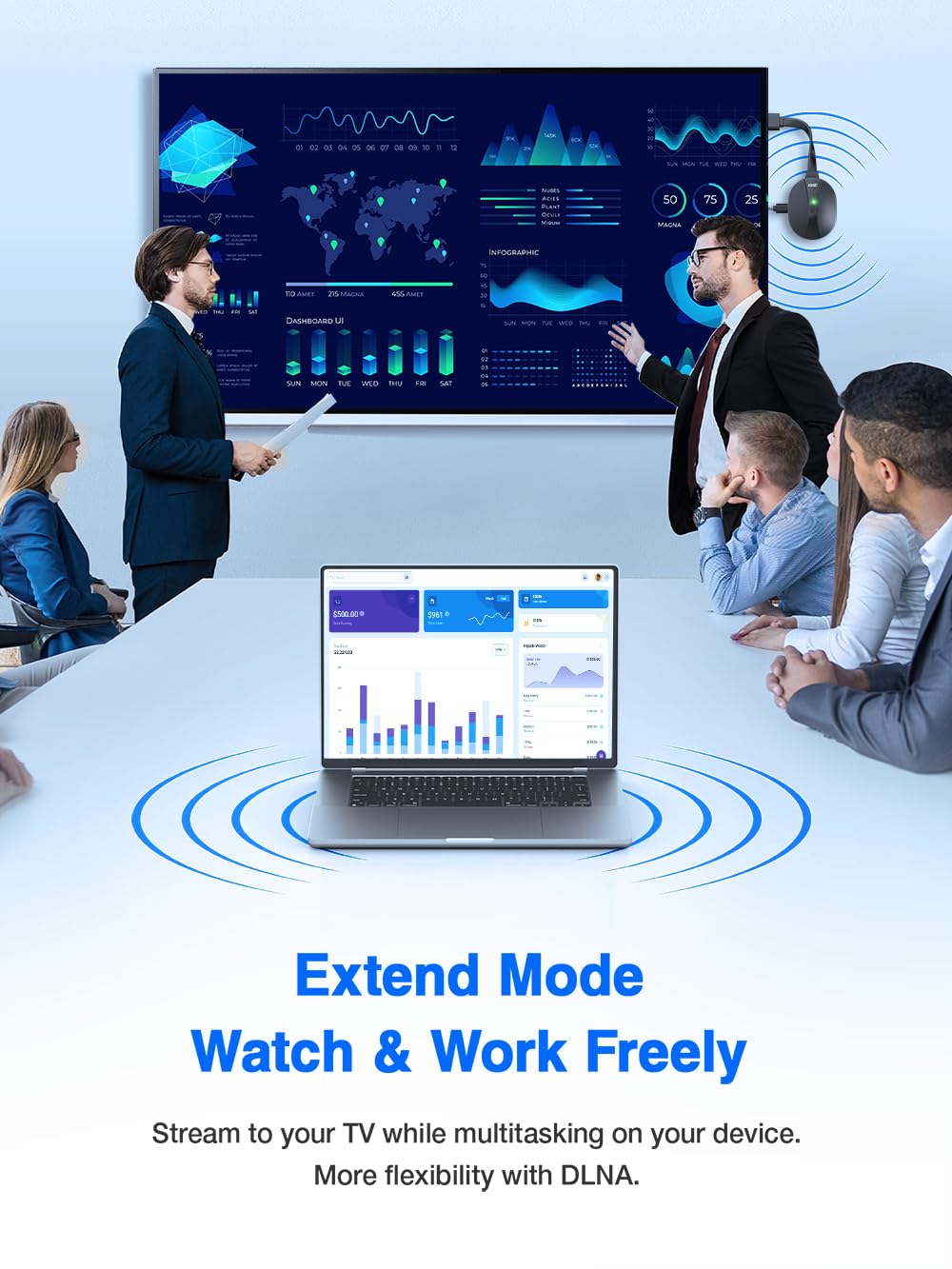
Image: Laptop using extended mode to display content on a TV via the adapter.
5.3 USB-C Wired Connect Mode
For devices with a USB-C port, you can use a USB-C cable for a direct wired connection, which is ideal for lag-free mirroring without relying on Wi-Fi, especially in complex or offline environments.
- 1. Connect your device to the Type C/USB A Port on the dongle using a compatible USB-C cable.
- 2. The display will automatically mirror your device's screen.

Image: Smartphone connected to the adapter via USB-C for wired screen mirroring.
5.4 Function Button Usage
The function button on the dongle serves multiple purposes:
- 1. When performing screen mirroring, press the button to switch the display orientation (portrait/landscape).
- 2. If a wireless device is not connected, pressing it can switch between Direct Connect mode and DLNA Mirror mode.
- 3. Hold the button for 5-10 seconds to restore factory settings.
6. Compatibility Notes
The AIMIBO Wireless Display Adapter supports AirPlay, DLNA, and Miracast protocols.
- Windows & Android: These devices support most casting applications, including HDCP-protected content from platforms like Netflix and Prime Video.
- iOS & macOS: These devices support screen mirroring for Safari, Office, and non-HDCP applications. Note: iOS/macOS devices do not support HDCP-protected content mirroring due to content provider restrictions.
- Important: Not compatible with all Google protocol devices, such as Google Pixel series and Google Mobile Services.

Image: Application compatibility for different operating systems.
7. Troubleshooting
No Signal / Black Screen
- Ensure the dongle is properly powered via the Micro USB port (5V/1A minimum).
- Verify the HDMI connection to your TV/monitor.
- Check that your TV/monitor is set to the correct HDMI input source.
- Try connecting the dongle to a different HDMI port or display device.
Unstable Connection / Lag
- Ensure your device is within the recommended operating range (up to 65ft/20m).
- Minimize interference from other wireless devices or networks.
- If using DLNA, ensure both the dongle and your device are on a stable 2.4GHz or 5.8GHz Wi-Fi network.
- Consider using the USB-C wired connection for maximum stability and minimal latency.
Cannot Connect / Find Device
- Ensure the dongle is powered on and the indicator light is green.
- Restart both your source device and the AIMIBO adapter.
- Perform a factory reset on the dongle by holding the function button for 5-10 seconds.
- Verify that your device's screen mirroring feature is enabled and correctly configured.
No Audio
- Check the volume settings on both your source device and the display device.
- Ensure the HDMI cable is securely connected.
- Some devices may require manual audio output selection in their display settings.
HDCP Content Not Displaying (iOS/macOS)
- Due to HDCP restrictions, certain streaming services (e.g., Netflix, Prime Video) cannot be mirrored from iOS/macOS devices. This is a limitation of the content providers, not the adapter.
8. Specifications
| Feature | Detail |
|---|---|
| Product Dimensions | 6.4 x 1.77 x 0.47 inches |
| Item Weight | 2.89 ounces |
| Manufacturer | AIMIBO |
| Item Model Number | Aimibo-4k-wda |
| Connectivity Technology | HDMI, Wi-Fi 2.4GHz, Wi-Fi 5GHz |
| Connector Type | HDMI |
| Resolution | 4K (3840 x 2160) |
| Supported Internet Services | Disney+, Hulu, Hulu Plus, Netflix, Prime Video, Vudu, YouTube (Compatibility varies by OS and HDCP restrictions) |
| Form Factor | Dongle |
| Color | Black |
9. Safety Information
- Read all instructions before using the device.
- Do not expose the device to water, excessive moisture, or extreme temperatures.
- Avoid dropping or subjecting the device to strong impacts.
- Do not attempt to disassemble, modify, or repair the device yourself. Unauthorized repairs may void the warranty and pose safety risks.
- Use only the provided or recommended power adapter (5V/1A) to prevent damage.
- Keep the device away from children.
10. Warranty and Support
For warranty information, technical assistance, or customer service, please refer to the official AIMIBO website or contact support directly.
- Official Website: www.aimibo.tv
- Email Support: support@aimibo.tv