
Introduction
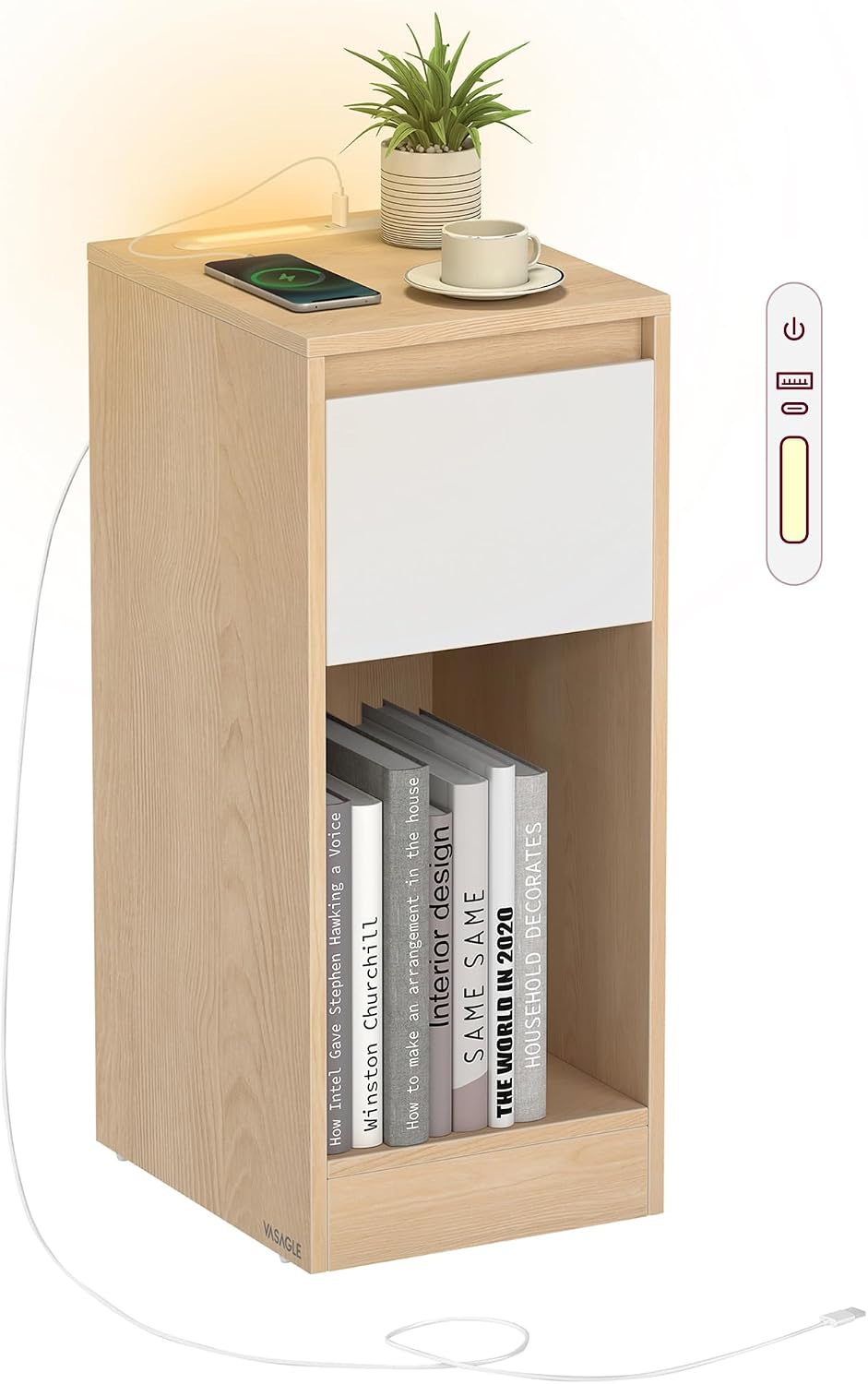
This manual provides detailed instructions for the assembly, operation, and maintenance of your VASAGLE KAILYN LET610Y01 Slim Bedside Table. This product features a compact design, integrated LED lighting, and a convenient charging station with USB-A and USB-C ports. Please read these instructions carefully before assembly and use to ensure proper function and safety.
Safety Information
- Ensure all parts are present and undamaged before assembly. Do not use if any parts are missing or broken.
- Assemble the unit on a soft, clean surface to prevent scratches.
- Do not overtighten screws during assembly to avoid damaging the material.
- Keep small parts away from children during assembly to prevent choking hazards.
- Place the bedside table on a level surface to prevent tipping.
- Do not exceed the maximum weight capacities: 45.4 kg (100 lb) for the tabletop and 4.5 kg (10 lb) for the drawer.
- For the charging station, use a USB-A adapter with an output of 5V 2A or higher (not included).
- Use USB-C or USB-A cables rated for 2A or above (not included) for charging devices.
- Avoid exposing the electrical components to moisture.
Package Contents
Verify that all components listed below are included in your package:
- Accessory Kit (includes screws, fasteners, and tools)
- Instruction Manual
- All furniture panels and parts for the bedside table
Note: A screwdriver and Allen key are typically included in the accessory kit for assembly.
Assembly Instructions
Follow these steps to assemble your bedside table. Refer to the numbered parts in the accessory kit and the diagrams provided in the physical instruction manual for visual guidance.
- Prepare Components: Unpack all components and lay them out on a clean, soft surface. Identify each part using the labels.
- Attach Legs: Attach the legs to the designated panels using the provided screws. Tighten them securely with the included tool (screwdriver or Allen key).
- Insert Tabletop Support Brackets: Insert the tabletop support brackets into the pre-drilled holes on the side panels.
- Secure Legs to Brackets: Secure the legs to the support brackets using the included hex bolts.
- Assemble Frame: Connect the remaining panels to form the main frame of the bedside table, ensuring all connections are firm.
- Install Drawer: Assemble the drawer according to the specific instructions for the drawer slides and front panel. Insert the assembled drawer into its compartment.
- Install Charging Station and LED Light: Carefully place the charging station and LED light unit into its designated slot on the tabletop. Ensure the power cable is routed correctly.
- Final Check: Once all connections are secure, carefully flip the table upright.

Operating Instructions
LED Light Operation
The integrated LED light provides ambient illumination. It is controlled via a touch-sensitive button on the charging station.
- Turn On/Off: Tap the touch control button to switch the LED light on or off.
- Adjust Brightness: Touch and hold the control button to adjust the brightness level of the LED light. Release when the desired brightness is reached.

Charging Station Usage
The bedside table is equipped with a charging station featuring one USB-A port and one USB-C port.
- Power Connection: Connect the power cable from the charging station to a compatible USB-A power adapter (5V 2A or higher, not included) plugged into a wall outlet.
- Charging Devices: Use a USB-A or USB-C cable (rated for 2A or above, not included) to connect your electronic devices to the corresponding ports on the charging station.
- Cable Management: The charging station includes a 5.9 ft (1.8 m) extension cord for flexible placement.

Storage Features
The bedside table offers various storage options to keep your essentials organized.
- Handy Tabletop: The top surface provides space for items like a lamp, alarm clock, or beverages.
- Roomy Drawer: A pull-out drawer offers concealed storage for personal items.
- Open Compartment: An open shelf below the drawer is suitable for books, magazines, or decorative items.

Maintenance
- Cleaning: Wipe the surfaces with a soft, damp cloth. Avoid using harsh chemicals or abrasive cleaners, which can damage the finish.
- Spills: Immediately wipe up any liquid spills to prevent water damage to the engineered wood.
- Inspection: Periodically check all screws and fasteners to ensure they remain tight. Retighten if necessary.

Troubleshooting
| Problem | Possible Cause | Solution |
|---|---|---|
| LED light does not turn on. |
|
|
| Devices are not charging. |
|
|
| Table is wobbly. |
|
|
Specifications
- Model Number: LET610Y01
- Brand: VASAGLE
- Dimensions (L x W x H): 30 x 25 x 59.5 cm (11.8 x 9.8 x 23.4 inches)
- Item Weight: 6 kg (13.2 lbs)
- Tabletop Max. Load Capacity: 45.4 kg (100 lbs)
- Drawer Max. Load Capacity: 4.5 kg (10 lbs)
- Material: Engineered Wood (Particleboard and MDF panels)
- Color: Oak Beige + Cloud White
- Charging Ports: 1 x USB-A, 1 x USB-C
- Power Cable Length: 1.8 m (5.9 ft)
- Assembly Required: Yes
- Tools Recommended For Assembly: Screwdriver
Warranty and Support
For warranty information or technical support, please refer to the documentation included with your purchase or contact VASAGLE customer service through their official website or the retailer where the product was purchased. Please have your model number (LET610Y01) and purchase date ready when contacting support.


